Managing financial transactions with the right balance of functionality, flexibility, security, and efficiency is the ultimate goal of today's competitive economy. An infrastructure that facilitates straight-through processing (STP) can best support these goals and provide the transparency that Sarbanes-Oxley compliance demands. SAP provides that infrastructure with Transaction Manager, a component of Treasury and Risk Management.
Key Concept
Straight-through processing (STP) integrates all aspects of financial transactions. It makes these processes efficient because data progresses automatically from one step to another without being manually re-entered at each step. SAP Transaction Manager facilitates STP by eliminating parallel structures to create transparency and streamline the financial process.
Increasing numbers of companies are investing and hedging their free cash. Transaction Manager, a component of SAP R/3's Treasury and Risk Management module that is also available in mySAP ERP, is designed to manage those investment processes. With Transaction Manager, companies do not have to use spreadsheet or treasury software to record the investments and do not have to resort to manual processes or interfaces to post to FI. Such manual tracking can create regulatory compliance problems, including Sarbanes-Oxley. New functions in SAP Transaction Manager support Sarbanes-Oxley and German regulations and improve compliance with the International Financial Reporting Standards (IFRS) and Financial Accounting Standards (FAS).
Transaction Manager has been available as part of SAP R/3 since Release 4.0B. New developments in R/3 Enterprise have been available since 2002. See the sidebar, "Transaction Manager Release Strategy." I'll describe the functionality of Transaction Manager SAP Enterprise 4.7 Extension Set 1.10 and show how it helps meet regulatory requirements such as the Sarbanes-Oxley Act. Then I'll show how you can use it for making a fixed-term deposit.
The objectives of Transaction Manager are to:
- Capture financial transactions, process them, and update accounting
- Fulfill the legal requirements concerning segregation of duties
- Provide reporting and evaluation facilities for analyzing financial transactions, positions, and portfolios
Compliance Functionality
Transaction Manager enables companies to update the Treasury functions directly to FI without having parallel accounting in the Treasury workstation. Implementing better operational and process controls as well as increased automation and workflow means that companies have much greater ability to assess what is going on in their business. Transaction Manager also solves the legal requirement of segregation of duties and supports Sarbanes- Oxley compliance.
Transaction Manager helps businesses comply with Sarbanes-Oxley guidelines by improving control processes and financial reporting. This functionality supports the trading activities involved in preparing and entering transactions in addition to the back-office activities such as monitoring, accounting, payment control, and transaction analysis. Many steps in this process chain are automated, and the status of a transaction can be evaluated and monitored at any time.
Tip!
mySAP ERP 2004 extends the online access for external auditors by defining a specific role with the required authorizations. This online access allows for Sarbanes-Oxley compliance and will become available to older releases via support packages or SAP notes.
You can view your company's financial transaction results with predefined, flexible reports. The link to the SAP drill-down reporting tools allows you to define your own reports in addition to those provided by SAP. You can transfer data to BW via the standard extractors for reporting.
Note
Other SAP products that support the Sarbanes-Oxley Act include Management of Internal Controls (MIC), Audit Information System (AIS), Strategic Enterprise Management (SEM), and Corporate Governance.
Transaction Manager controls financial transactions and identifies the control points for supporting Sarbanes-Oxley: authorization control, execution control, segregation of duties, transaction limits, accounting interface, confirmation, and documentation. For example, you can authorize different users for different activities in the transaction and position management process. This allows you to separate trading, back office, and accounting functions by responsibilities. You can define the roles by following the IMG menu path CFM>Transaction Manager>General Settings>Authorization Management>Define authorization by roles. Figure 1 shows the predefined roles for Transaction Manager.

Figure 1
Roles available in Transaction Manager
You can execute control by giving the necessary authorization to the trader, the last role shown in Figure 1. Follow application menu path CFM>General Functions>Trader Authorizations (transaction TBT1). (See Figure 2.)
Note
Transaction Manager is just one part of the Treasury and Risk Management module. After capturing financial transactions, the module offers many methods of calculation of your company's financial risks. Transaction Manager has been implemented both in Europe and the US, mostly in the headquarters of global companies.

Figure 2
Trader authorization for financial instruments
You can configure the system to require transactions to be released for posting by one or more users. Therefore, you can keep security control of the financial transactions and increase the transparency of your financial position. The limit management function enables you to assign a range of different limit amounts to different transactions and users.
Why Not Just Use AR/AP?
Unlike Transaction Manager, the R/3 Accounts Receivable (AR) and Accounts Payable (AP) modules do not support STP. They are not flexible enough to facilitate Treasury functions and to provide flexible reporting capabilities. For example, you cannot calculate the interest on fixed-term deposits or automatically update cash management for the future return of the investment.
You may lose transparency and efficiency if you follow your financial transactions in AR and AP. Measuring financial risk involves integrating your operational cash flows, financial transactions, and market data for comprehensive analyses. It is difficult to do this analysis by only using AR and AP. You would need to rely on text fields as a basis of your financial transaction reports.
In addition, you would need to create memo records in your cash management module to post the expected cash flow from the financial transactions. You cannot perform risk analysis in AP/AR, and you would need to pull your financial transaction data to an external risk management system. Using so many adapted programs and workarounds could cause integration, STP, and Sarbanes-Oxley compliance problems.
Transaction Manager Functionality
Transaction Manager supports a range of financial processes, including money market transactions, securities, and debt management. They are referred to as product types. Table 1 shows the available options.
Financial instruments
|
Product categories
|
Money market
|
Fixed-term deposits
Deposits at notice
Commercial paper
Repurchase agreements (Repo)
Floating rate
|
Foreign exchange (FX)
|
FX spot transactions
Forward exchange transactions
FX swaps
FX options
FX futures
|
Securities
|
Bonds
Dual currency bonds
Index-linked bonds
Drawable bonds
Warrant bonds
Stocks
Shareholdings
Subscriptions rights
Investment certificates
Repurchase agreements (Repo) Reverse repurchase agreement
Security lending
|
Derivatives
|
CAP/floor
FRA
Swaps
OTC options
Futures
Exchange traded options
|
Debt management
|
Issued bonds
Fixed-rate loans
Floating-rate loans
Annuity loans
Commercial paper
Facilities
|
Table 1Note
To understand Transaction Manager, you do not need to be an expert in all the financial categories listed in Table 1. Once you understand how one of the categories functions, you can easily understand how to process the others. The basic structure of the transaction and position process are the same for all the financial processes.
Transactions for each product type progress through different stages, which are called activities. Activities depend on the nature of the product and the company's policy and procedures. The sequence of activities is called the transaction and position management process, which is divided into the following areas (Figure 3):
- Trading area, which includes functions for maintaining financial transactions
- Back-office area, where transactions are settled
- Accounting area, where the general ledger and subledgers are updated automatically

Figure 3
Transaction and position management process
Before going into the transaction management process example, I'll take you through the master data and customizing steps. Each financial transaction is created with a product type, transaction type, and business partner.
Product Type
The basic financial borrowing and investment transactions, which are predefined in the system, are called product categories. Product categories are defined at the system level and are applicable to all company codes. Product type is a refinement of the product category, which is defined by user. To create a money market product type, follow the IMG menu path CFM>Transaction Manager>Money Market>Transaction Management>Product Types>Define Product Types or use transaction SM30 table view V_Prodart5.
Figure 4 shows the money market product types predefined by SAP. Select one of the product types and click on the details icon (a magnifying glass) to see the detail of the selected product type.
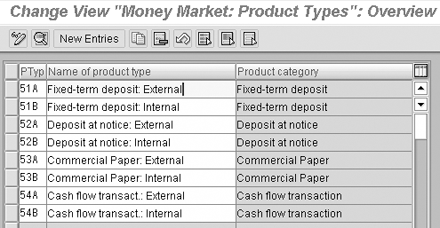
Figure 4
Product type definitions
Figure 5 shows the details of Product Type 51A (fixed-term deposit).
Note
The screenprints in this article are taken from SAP R/3 Enterprise IDES System (4.7x110).

Figure 5
Product type details
Transaction Types
A financial transaction type determines the type of transaction executed with a specific product type. The R/3 system predefines basic transaction categories. You can refine the transaction types according to business requirements on the basis of financial transaction categories. To create a transaction type, follow the IMG menu path CFM>Transaction Manager>Money Market>Transaction Management>Transaction Types>Define Transaction Type (SM30 table view V_GART5). You can see the screen in Figure 6.
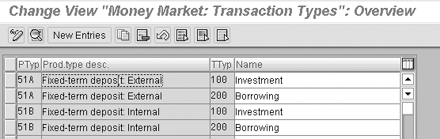
Figure 6
Define transaction type
Note
There is no standard menu path to maintain product and transaction categories. You can only add or delete new product categories by changing associated tables. You should not delete the SAP standard product and transaction categories because you could damage the system functionalities and have upgrade problems.
Business Partner
The business partner is an organization or person executing trading orders on the behalf of the company. Business partners should be created, released, and authorized before they enter financial transactions.
To simplify my example, I used the house bank as a business partner. If the business partner is a house bank, there is no need for active payment. The house bank makes the corresponding posting to the company's bank account via a bank statement.
If the business partner is not the company's house bank, the FI payment program should make the active payment. In this case, you should create the business partner either as a customer in FI-AR or vendor in FI-AP and link it to the business partner. You can make the link between the business partner and customer vendor via transaction codes FLBPD2/FLBPC2.
To create and release the business partner, go to the application menu and follow the menu path Accounting>Corporate Finance Management>Business Partner>Maintain Business Partner (transaction BP).
Tip!
You should give the role TR0151 Counterparty to your business partner to process financial transactions (Figure 7). A role is a set of properties that a business partner must possess to carry out certain business transactions. For example, a business partner can act as a borrower or as a treasury partner. Assigning the role TRO151 allows you to enter a financial transaction to that business partner in the system.
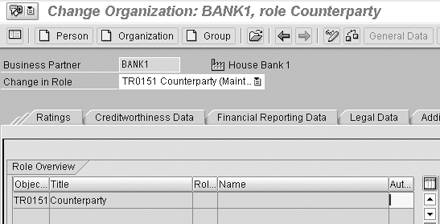
Figure 7
Business partner master data
The next step is to authorize the business partner to perform fixed-term deposit transactions. To assign the authorization, use transaction code TBI6 or menu path Accounting>Corporate Finance Management>Business Partner>Special Functions>Standing instructions>Transaction Authorization. See the screen in Figure 8.

Figure 8
Authorizations of the business partner
An Example of a Money Market Investment
Now that you understand the important customizing steps and necessary master data for Transaction Manager, you can follow the transaction and position management process in my example of a money market investment (Figure 9). Company code 1000 has a liquidity surplus, and invests this surplus amount with the business partner BANK1 in a fixed-term deposit. BANK1 is the house bank of the company code 1000. I'll take you through the trading, back office, and accounting processes.

Figure 9
Create a fixed-term deposit
Trading
The first step of the transaction and position management process is trading. The trader maintains direct contact with the business partners, negotiates and executes transactions or orders, exercises options and other rights, and enters transactions and positions. You can create the money market financial transaction by following menu path Accounting>Corporate Finance Management>Transaction Manager>Money Market>Trading>Fixed Term Deposit (transaction TM01).
Note
SAP allows you to implement the back-office area without implementing the trading area with the help of its open architecture. You can replace the trading area with a third-party trading program, such as a Web-based trading product that makes it easier for corporate treasuries to provide trade confirmation with banks. XML or IDocs such as IDoc type FTRCON01 integrate these programs to the back-office area.
Figure 9 shows a fixed-term deposit transaction. 1,000,000 EUR has been invested in a fixed-term deposit with a 5% interest rate and 2 Act/360 interest calculation methods. There are predefined methods of interest rate calculations. In my example, I assume that the year has 360 days and 2 Act means the number of the actual days between the start date and the finish date. You can see the expected cash flow of the contract in Figure 10.
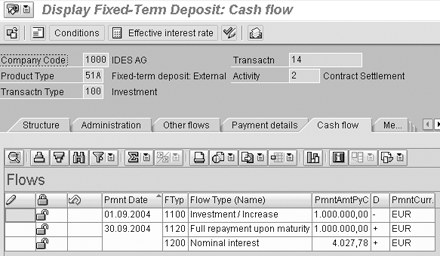
Figure 10
Cash flow of the fixed-term deposit
The R/3 system determines the cash flow in chronological order via the flow types. Payment flows for the cash flow and postings are controlled by (+) and (-) indicators in the D (direction) column. You define flow types in the configuration and assign them to the product type and transaction type. In this example, 1,000,000 EUR was invested in a fixed-term deposit September 1. Full repayment upon maturity and nominal interest will be made on September 30.
The positive flow of the nominal interest is shown on a separate line. Nominal interest and repayment will be posted to different accounts based on the flow types. Flow types also allow you to clearly identify the cash flows. You can also define additional flow types for bank charges or commissions. These flow types are then recorded with each transaction. This way, you can increase the transparency of your cash flow.
Back Office
The back-office tasks are split into two parts. The first one is related to the immediate processing of deals entered in the trading area. The back-office processor confirms and checks transaction activities carried out by the trader. This role includes managing business partners and master agreements as well as entering and transferring payment flows. The back-office area includes correspondence functions, such as the function for automatically generating confirmations.
You can output the correspondence data via print, fax, email, and IDocs. The second part of back-office tasks is related to periodic activities such as interest rate adjustments and foreign exchange fixing.
To settle financial transactions, go to transaction TM06 or follow application menu path Accounting>Corporate Finance Management>Transaction Manager>Money Market>Back Office>Fixed Term Deposit>Settle. A financial transaction goes through various activities during its processing. For example, when the contract is first created in the trading area, the activity status is set to Contract. Settling alters the status of the activity from Contract to Contract Settlement. Figure 11 shows the confirmation letter and the activity status of the contract.
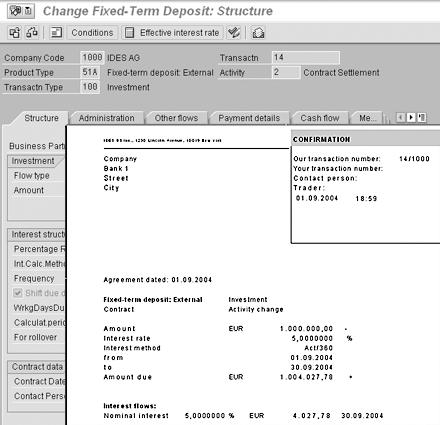
Figure 11
Settlement and correspondence for the fixed-term deposit
Accounting
The staff accountant takes on the transactions that have been processed by the back-office staff and carries out the postings, accruals, deferrals, and valuations. This role comprises transferring the flows and posting information to FI. The accounting area includes posting activities that do not result directly from trading and back- office processes. Examples of these are incoming payments postings (such as interest earned or dividends) or depreciation postings that result from a position valuation.
The accounting area features automatic posting functions for transferring data to FI and can update the G/L on a real-time basis. It also contains flexible functions for processing payment transactions and facilities for valuation and accrual/deferral. Reporting functions, such as the posting journal and the posting overview, support these features.
To post the financial transactions, go to transaction code TBB1 or follow the menu path Accounting>Corporate Finance Management>Transaction Manager>Money Market>Accounting>Posting>Execute. Figure 12 shows the posting journal and FI postings related to the example.
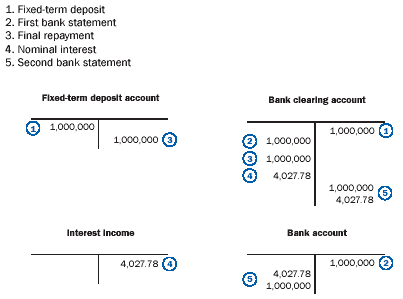
Figure 12
Financial accounting postings
Transaction Manager Release Strategy
Transaction Manager, a component of the Treasury and Risk Management module, provides financial instruments for processing the related financial transactions from deal capture through to transferring the relevant data to FI. It offers functions to analyze and optimize the treasury processes.
Transaction Manager, introduced in Release 4.0B, was enhanced in a new product called SAP Corporate Finance Manager-Transaction Manager (SAP CFM-TM) in SAP R/3 Enterprise. CFM is a package for managing financial resources and analyzing and optimizing financial business processes. SAP CFM version 1.0 and 2.0 are add-ons to Release 4.6C. (For release restrictions, check SAP notes 351620 and 424096).
New developments in SAP R/3 Enterprise are available in extensions and application packages. SAP CFM was placed in the application package EA-FINSERV. When you activate the extension EA-FINSERV, the related application and IMG menus for CFM are generated. As of mySAP ERP 2004, SAP CFM is no longer used as a name for SAP's Treasury functions. Transaction Manager is now in the Treasury and Risk Management component of Financial Supply Chain Management (FSCM). Figure 1 shows the evolution of SAP ERP and Transaction Manager, as well as the enhancements that were made in each version. For more information, go to www.sap.com/fscm.
Highlights of the new functions introduced with R/3 4.6:
- Enhancement of BAPIs
- New correspondence types
- Redesign of the User Interface
- New interest methods, etc.
- Significant changes to Business Partner Management
- New business content (sample customizing)
Highlights of the new functions introduced with SAP Enterprise:
- TM is not part of Treasury
- TM is delivered with SAP R/3 Enterprise Financial Services 1.10 (EA-FINSERV 110)
- Enhancements in handling of Interest rate derivatives
- Revenue classification
- Compliance functions for FAS 133 and IAS 39
Highlights of the new functions introduced with mySAP ERP:
- New financial instruments for the foreign exchange market
- New legal requirement functions (development in Data Retention Tool, DART) to support German tax requirement, online tax for tax auditor, Sarbanes-Oxley compliance)
- Enhancements in Accounting (new valuation functionality to support IAS and other GAAP rules)
- New BW extractors
Figure 1
Roles available in Transaction Manager
Aylin Korkmaz
Aylin Korkmaz is a manager in Accenture’s Global Energy practice specializing in finance streamlining and management reporting. She has seven years of experience working in global multi-stream projects containing challenging business process designs and change management issues. Aylin has deep process architecture and design skills, and is one of Accenture’s leading practitioners in the area of Financial and Strategic Enterprise Management modules. She has led design and configuration teams within complex SAP solution environments and delivered cutting-edge finance and business intelligence solutions.
You may contact the author at aylin.korkmaz@accenture.com.
If you have comments about this article or publication, or would like to submit an article idea, please contact the editor.


 Premium