Automatically prorate your split infotype wage types using the PRATE operation. With a few configuration steps see how easy it is to set up this functionality in your payroll rules.
Key Concept
Wage type splits are a common occurrence during payroll runs; however, they do not always behave the way you would like by default. Custom rules and configuration can be created in order to prorate each split according to specifications. PRATE is an operation that can be called within personal calculation rules in your payroll schema. The operation modifies wage types originating from infotypes to prorate their amounts based on their infotype record dates. Since the operation depends on infotype record validity it should only be used in rules that process infotypes with wage types such as infotypes 0014 and 0015.
Occasionally, it may be necessary to prorate an employee’s wage type. To avoid the tedious manual changes that this could bring about, an automated solution needs to be devised. For instance, if an employee receives a car allowance every pay period (e.g., biweekly) through the recurring payments infotype (0014), and goes on a leave of absence half way through the pay period, then the amount that the employee receives as a car allowance for this particular pay period should be halved (depending on company policy). In this case, the car allowance wage type should be prorated in order for the employee to receive the appropriate allowance.
There are a few different ways to set up automatic wage type proration in the SAP system to reduce the need for manual intervention and error (e.g., using partial period factoring). In this article, however, I focus on using the payroll operation PRATE.
The PRATE operation can be used if the wage type you want to prorate originates from an infotype that is processed through payroll (e.g., infotype 0014 or 0057). The proration is carried out based on the infotype record’s validity during the current pay period. It uses a ratio based on the number of calendar days the record is valid in the pay period, divided by the total number of days in the pay period.
In my first example scenario (in which the employee leaves in the middle of the pay period), the car allowance wage type would normally be delimited through a long-term absence action. If the leave of absence starts on the eighth day of a 14-day pay period, the wage type record in infotype 0014 would be valid only for the first seven days and the PRATE operation would prorate the amount using a ratio of 7/14 (i.e., 50%).
The PRATE operation is also able to properly prorate a wage type for which the amount changes during a pay period. In this case, two infotype records would be valid for the same wage type – one for the first part of the pay period with the original amount and another for the second part with the new amount. Given that the PRATE operation bases its proration on a valid number of days, each record would be prorated individually, giving an appropriate averaged amount.
Another advantage of the PRATE operation is its flexibility. This is due to its dependence on infotype records, which allows you to handle certain exceptions more readily. If in the example scenario the employee had reached an agreement to receive the full amount of the car allowance for the pay period for which he’s on leave, you can accommodate this by making sure the record is valid for the entire pay period. Thus, these exceptions are handled without requiring any extra configuration, which might be needed with other proration techniques that are not based on infotype records (such as employee status).
PRATE Function Configuration
Here is a walk-through of the configuration needed to prorate wage types that originate from the recurring payments infotype using the PRATE function. There are several different ways to achieve this and they all involve modifying the personal calculation rule (PCR) that processes infotype 0014, namely PCR XAP0. The XAP0 rule is called from within PCR X011, which can be found in the XAP0 schema. (The names of these rules and schemas differ depending on your country.) To ensure that you do not modify default SAP system rules, make a custom copy of these rules if it does not already exist.
To minimize PCR modifications with each new wage type that needs to be prorated, you create a new processing class specification under processing class 47 and add it to the rule. The first step is to create the new processing class specification in table V_T52D2. This new specification can then be used by any wage type that needs to be prorated using the PRATE function. In Figure 1 you can see the newly created specification “&” sign that was created under the processing class 47 entry.
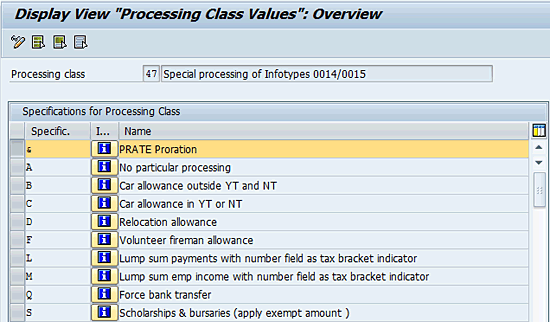
Figure 1
New processing class 47 specification created in table V_T52D2
Next, using table V_512W_D, you assign the newly created processing class 47 specification to the wage types that need to be prorated. In this example, I assign the specification & to wage type 9201 and a copy of the default car allowance wage type (M201) provided by the SAP system (Figure 2). Make sure that the new processing class is only valid starting at a certain date to avoid retroactive changes to previous payroll results.

Figure 2
Assign the new processing class 47 specification to the copied car allowance wage type as of January 26, 2013, in table V_512W_D
Now you need to modify the PCR that reads infotype 0014 so that you can alter its behavior if processing class 47 has been assigned a specification of & for the current wage type. In Figure 3 I have added a single line to the existing rule that calls the PRATE operation under the desired conditions. In this example, rule ZAP0 is a copy of the SAP-provided default rule XAP0.

Figure 3
Custom rule ZAP0 based on default rule XAP0
PRATE Function Limitations
While the PRATE operation is extremely simple to set up, it does have a few limitations that must be taken into account when evaluating whether it meets your needs. The first limitation is that proration is always done based on the number of calendar days, not the number of days worked. Therefore, even if an employee only works 10 out of 14 days, the proration is still based on the 14 calendar days in a biweekly model. The second limitation is that the proration formula cannot be modified and is always a simple ratio of days. This might not be the ideal ratio in all situations – for instance, if you require a formula that is based on actual worked hours or is more complex than a simple ratio.
Other Options
For a more customizable, but also a more complex proration solution that can use various variables in the proration formula, I suggest looking into proration using partial period factoring. A good introduction to this is found in the SAPexperts article, “
A Simpler Method of Checking Part Period Factoring,” by Tita Rijpma.
Nadime Salamé
Nadime Salamé has a bachelor’s degree in both Biology and Information Systems. He has been working in the SAP HR field since 2006. He is currently working as an SAP HCM Consultant at SAPERGY based in Montreal, Quebec.
You may contact the author at nadime.salame@sapergy.com.
If you have comments about this article or publication, or would like to submit an article idea, please contact the editor.




 Premium