One result of the Sarbanes-Oxley Act of 2002 is that companies will need to close their books faster. BW and SEM offer functionalities and applications that help you achieve the fast close, including process chains, Business Consolidations System, and the Corporate Performance Monitor. Learn how you can use each of these to speed your closing.
By now, you are aware that the Sarbanes-Oxley Act (SOA) of 2002 will affect the methods you use for your core business processes. The closing process is a case in point. The Act requires companies to close their books faster and simultaneously increase the level of detail and in-depth analysis. This is where SAP BW comes into play. BW has many touch points not only during your closing processes, but also during two other processes that have a direct effect on the fast close: data consolidation and risk-management analysis.
To help you with your fast-close, data-consolidation, and risk-management processes, SAP provides a number of tools and functionalities either in BW or that work with BW. Let me show you how you might use these tools and functionalities.
The Fast Close
Where SAP R/3 has the Schedule Manager to help with the closing process, BW's process chains offer a similar functionality and more. BW's process chains allow you to manage and monitor a wide variety of ongoing activities in BW throughout the entire uploading process. This helps identify areas that have problems processing the data and provides information on the items (down to possible line items) that are at issue. A process chain might show how to solve an issue as well. Once these BW processes have occurred, you use an auditing tool or, in the consolidations area, the Consolidations Monitor to track subsequent activities. These tools offer numerous methods such as error-log creation to help identify problems so you can solve them.
Take, for example, pulling sales order data from different sources. Before this activity can be completed, the required data must be made available. The process chain in Figure 1 gathers the sales order data from three separate sources, places it in an ODS called Sales Order Details, and then updates a basic InfoCube using the data in the ODS.
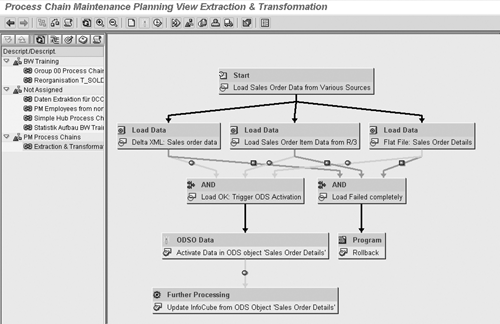
Figure 1
Process chain view of BW for pulling sales order data from multiple sources
A process chain allows the uploading of R/3 data and all the numerous processes within your BW system to verify the data integrity. Some of the verification processes are standard, such as noting the number of records in error, if the master data (both characteristic values and attributes) is correctly loaded (numerical/ alphanumeric), or if the upload is created with referential integrity.
Process chains can run automatically as a background job, reducing the load on your BW system during peak usage times. Since balancing activities between peak and off-peak times improves performance, staging your processes via process chains allows you to run your queries more efficiently. This offers faster access to financial and managerial results you need to meet the SOA's fast-close requirement.
Data Consolidation
Not every company is a full SAP shop. For those that use both legacy and SAP systems, consolidating data using the SAP R/3 Enterprise Controlling – Consolidations Systems (EC-CS) is not the best option. The tool of choice for heterogenous environments is SAP's Strategic Enterprise Management – Business Consolidations System (SEM-BCS) application. SEM-BCS relies heavily on data processing in BW. Since SEM-BCS relies on transactional ODSs, transactional InfoCubes, and virtual/remote InfoCubes with services, you need to understand how they work and how they are integrated with SEM-BCS.
The transactional InfoCube is a subset of the basic InfoCube used for “writing to” rather than “reading from.” You can execute a query from it, but it's most efficient at being “written to.” You post to transactional InfoCubes via an Excel spreadsheet or a function module. The information in this InfoCube is then used as a basis for consolidation.
The virtual/remote InfoCube with services is used in the processing and display of data from your consolidation (transactional) InfoCube to your queries. This remote InfoCube is the new type on the block, and you can attach it to a transactional InfoCube and read its data via a function module. It then presents your consolidated data based on your consolidation object (company, company code, business area, functional area, division, or plant to name a few). The unique part of this remote InfoCube is the connection via the function module, which is standard Business Content. If you need to make any adjustments in the function module's ABAP programming, you must document what you change for SOA compliance.
The final, integral part of BW within SEM-BCS is the transactional ODS. It holds the detailed data used in the consolidation process, and it differs from a standard ODS in one major area: It has only one table — the active table. A standard ODS has three items: an active table, a change log, and an activation queue. To load a transactional ODS, use an Excel spreadsheet or function module, similar to how you would load a transactional InfoCube.
A scenario in which you might use these BW items in a consolidation process is data entry from a legacy system. You first download the data from the legacy system to an Excel spreadsheet. Then, you use the Flexible Uploading Process in SEM-BCS to move it into a transactional InfoCube or ODS. SEM-BCS can then consolidate this data from the transactional InfoCube or ODS based on the consolidation objects. This consolidation process has numerous steps, but once you've configured the underlying rules, it is carried out automatically via the Consolidation Monitor (Figure 2). Once the process completes, you can use the remote InfoCube with services to access the consolidated data and view the results in a query.
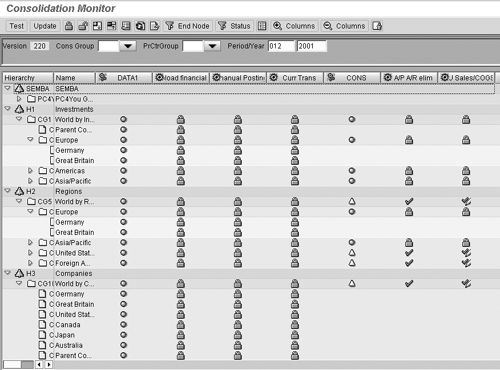
Figure 2
BW-based SEM-BCS Consolidation Monitor
This process has several areas to address in terms of SOA controls. Creating the Excel flat file is a manual interface rather than an automated process and, as such, is subject to manipulation or error. Consequently, the authorization and control over who creates the Excel spreadsheet and how becomes very important. Another area of concern once the data is in BW is the configuration of the consolidation activity itself. This may include analysis and review of items such as the interunit elimination of profits, which controls the removal of “funny money” from the corporate view of sales and profits. Finally, the configuration of the queries to read this data may need to be analyzed for verification in terms of the consolidated objects to be reported upon.
Risk-Management Analysis
A company develops risk ranges that are used to analyze the variances of key metrics that drive the company. These key performance indicators (KPIs) and the risk ranges are built on information supplied by BW. Part of the SEM – Corporate Performance Monitor/Strategy Management (SEM-CPM-SM) application are SAP's risk management tools. Figures 3 and 4 show different views of these tools. They are incorporated into the Balanced Scorecard (BSC) and the Management Cockpit, and they rely heavily on information developed and stored in BW's InfoCubes and possibly ODSs. The analysis of the metrics in SEM-CPM-SM is accessible via queries developed in BW. Therefore, it is important to understand and analyze the configuration and basis for these KPIs and queries from BW.
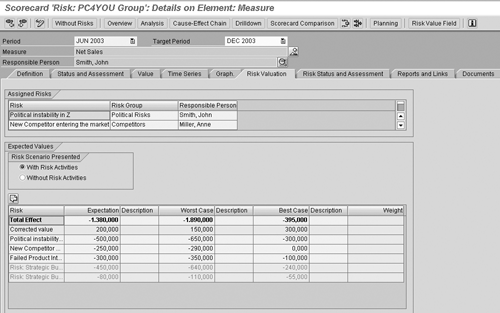
Figure 3
Risk management tool within SEM’s Balanced Scorecard
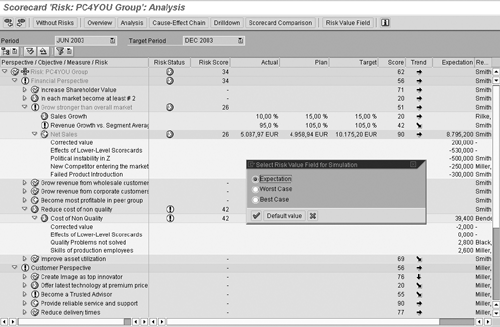
Figure 4
Detailed risk value fields of risk management analysis in SEM-CPM-SM
rely on data read from BW via queries. Therefore, not only is the data within the BW InfoCubes available, but everything in the query structure is also available as calculated key figures or metrics. The process of verifying different metrics deals with which set of key figures — total sales, contribution margin I, or some other calculated key figure — you use to observe and account for risk areas in your corporation. Once you choose these metrics, you must verify the activities behind the numbers. That means looking at the data within the InfoCube you are using and then confirming the query that supplies the metric with data. Anything in a query is fair game to use as a metric.
The question is: Is it a calculated key figure based on a formula within the query, or is it precalculated, and is the query presenting a single number? Are you using a basic key figure, calculated key figure, something in a Business Content structure within a query, or customized items within a structure? You can, of course, also use restricted key figures in this process.
Let's look at an SOA-relevant example. Say you've decided that, based on extensive analysis, one KPI shows your company's value is the variance between sales orders taken and billing. If the variance is low, meaning fewer adjustments in your order process, then the greater your profits. If the data received from R/3 into BW is precalculated, there is little interaction with that data, other than presenting it in a query. You likely do not need a control for this process. If you need to calculate the variance via a formula in a BW query, however, you need to verify the integrity of the calculation and filters used with internal controls to comply with the requirements of the SOA.
For example, a customer has shown a tendency to either alter its order significantly or cancel it outright. You might apply a filter to the formula for this specific customer, therefore improving (reducing) your sales order/billing variance. If you use a precalculated key figure that was uploaded into the InfoCube, the risk that this information can be manipulated via an additional touch point within the query is lower than if you use a query formula to achieve the metric. Therefore, using precalculated key figures, fewer controls and analyses are necessary to comply with the SOA.
Once the creation of the queries is completed, review the methods (variable or fixed values) used to filter the data within the query. This allows you to analyze the controls within the metric (e.g., does the end user have the ability to enter a variable value, or does the system do it automatically?). Next, you need to define the risk range around each of your identified metrics. This process varies from corporation to corporation, depending on whether the range is a percentage of earnings per share (EPS) or a percentage based on a fixed number (5 percent variance on either side of a metric). You might also define a risk range more dynamically — for example, by currency variation or ongoing fluctuations in seasonality. You either have this data delivered via BW as a final amount or have the system do the calculation based on data used from BW InfoCubes. The final calculation completes within SEM.
I have listed only select examples of touch points between BW and the SOA, as there are too many to cover here. I recommend that you assign someone on your BW team to keep abreast of SOA changes, review your current BW system, and communicate the corporate SOA strategy with the rest of your team.

Peter Jones
Peter Jones is a business intelligence solution architect in the areas of CO, EC, SAP BW, BI, BusinessObjects, Planning and Consolidation (BPC), and SEM for MI6 Solutions. He is certified in all these areas and is a subject-material expert for SEM, CO, BI, and BPC, with over 14 years of experience in these areas working for SAP and MI6 Solutions. Currently, he is involved in projects incorporating SAP BW 7.4, HANA, BPC 10.0, and EPM 10.0. He has consulted in all those areas for the last nine years. Peter was an SAP instructor for seven years and has written several books about SAP NetWeaver BW, FI/CO, and has recently revised his book about BPC Implementation to version 10.1. He is a contributor to Best Practices for Financial Reporting in SAP, an exclusive anthology of articles that delivers unparalleled guidance on how to optimize financial reporting processes with SAP applications.
You may contact the author at peter.jones@mi6solutions.com.
If you have comments about this article or publication, or would like to submit an article idea, please contact the editor.