Find out about enhancements in SAP SCM 7.0 in the areas of demand planning, supply network planning, and Capable-to-Match. Learn about characteristics-based planning, Customer Forecast Management (CFM), and other functionalities and process improvements in SAP Advanced Planning & Optimization.
Key Concept
A new SAP SCM release, SAP SCM 7.0, has been recently shipped. Supported by the most recent SAP technology, it contains planning processes that allow you to manage more complex supply chains and products. This new release is based on the SAP NetWeaver 7.01 platform. The end of maintenance is the end of 2015.
SAP SCM 7.0 became generally available in May 2009 after a six-month period of a Ramp-Up phase in which several companies tested and verified the robustness and new processes included in this new release.
Note
The name of this release, SAP SCM 7.0, could be confusing because the previous release was named SAP SCM 2007. This new release has been included in the SAP Business Suite 7.0 and follows the same naming convention.
Table 1
|
Customer Forecast Management (CFM)
|
DP
|
|
|
X
|
A new Web-based scenario for analyzing and manipulating external demand coming from your customers before incorporating it in the company demand process. It improves the vendor-managed inventory (VMI) process.
|
|
Release and consumption of forecast with configuration
|
DP
|
|
|
X
|
It enhances the planning functionality for complex products handled with characteristics (variant configuration)
|
|
New multi-linear regression (MLR) forecast method for point of sale (POS)
|
DP
|
|
|
X
|
New statistical algorithm based on MLR and taking the aggregated information coming from the POS
|
|
Reinitialization and trend dampening
|
DP
|
|
|
X
|
New method of dampening the trend, especially useful with structural changes such as new plants
|
|
Low-level code (LLC)
|
SNP
|
X
|
X
|
|
New selection of master data when executing the LLC process in SNP. A new Business Add-In (BAdI) /SAPAPO/SNP_LLC allows custom LLC determinations.
|
|
VMI with consignment inventory
|
SNP
|
|
|
X
|
SAP APO can combine VMI and consignment inventory
|
|
Characteristic- based planning
|
CTM
|
|
|
X
|
A new option in the CTM profile allows you to plan based on characteristics. It considers the objects’ dependencies (select conditions and procedures with reference characteristics) during the CTM process.
|
|
Shelf life
|
CTM
|
|
|
X
|
A new option in the CTM profile allows consideration of a product’s shelf life during planning
|
|
Block planning
|
CTM
|
X
|
|
X
|
Block planning allows you to plan or schedule based on a piece of time in which you can locate an operation with some characteristic
|
|
Cross-location planning
|
PP/DS
|
|
|
X
|
It groups important enhancements that increase capabilities for cross location planning such as:
- New demand propagation heuristic
- New descriptive characteristics propagation heuristic
- Interactive sourcing
- Production planning table (PPT) enhancements
|
|
Interactive sourcing
|
Production planning/detailed scheduling (PP/DS)
|
|
|
X
|
The planner can choose the better source of supply (SoS) by checking the situation (components and resource capacity availability). It’s enabled with a check box available in several planning heuristics.
|
|
PPT improvements
|
PP/DS
|
|
|
X
|
A new chart for cross-location planning and other new features for characteristic-based planning
|
|
Block rescheduling
|
PP/DS
|
X
|
|
X
|
Rescheduling of the operations inside a block when the block is changed (increased, moved, shortened, deleted)
|
|
Replenishment planning: Deployment functionality
|
PP/DS
|
|
|
X
|
PP/DS provides a new deployment heuristic for replenishment planning, similar to the SNP deployment heuristic
|
|
Master data:
Resource networks
|
PP/DS
|
|
|
X
|
Especially interesting for the process industry, this new master data allows modeling of the flow of the product though the plant. The PP/DS optimizer can work with this new master data object.
|
|
Finite task planning
|
PP/DS
|
|
|
X
|
Together with the enhancement in the previous row, it improves the planning execution in process-oriented manufacturing companies. The PP/DS optimizer considers the maximum level (finiteness) constraint of storage resources.
|
|
Shelf Life Propagation
|
PP/DS
|
|
|
|
Shelf life is spread across locations and components
|
|
Backorder processing (BOP), Product Allocation
|
Global Available-to-Promise (GATP)
|
|
X
|
|
Those GATP processes incorporate new performance improvements
|
|
Subcontracting in multilevel ATP (MATP)
|
GATP
|
|
|
X
|
Enhancements in subcontracting with MATP
|
|
Alert Monitor
|
Cross area
|
X
|
X
|
|
The Alert Monitor screen, redesigned in this release, provides an easier and faster interface
|
|
Transfer of master data objects
|
Core Interface (CIF)
|
X
|
X
|
|
Erroneous master data objects are collected in the integration model while correct objects are transferred. Production data structure (PDS) transfer to SAP APO has been improved.
|
|
| Table 1 |
Summary of the most important SAP APO enhancements in SAP SCM 7.0 |
Note
For more information about MATP, refer to my articles “Make Promises You Can Keep with GATP” which was posted to the knowledgebase March 2005 and “Enhanced Global ATP Functionality in SCM 5.0 and SCM 2007” which was posted to the knowledgebase January 2008.
Table 1
- Usability, through improvements around user productivity and simplicity
- Better performance of the transactions or the end-to-end process
- New business processes or new variations of previous processes
Focusing on the business process, you can find the most significant enhancements in SAP APO in four areas:
- Collaboration with customers, especially through the VMI process
- Characteristic-based planning from the demand calculation to the replenishment tasks leveraged by new features in all SAP APO areas
- Improved cross-location planning capabilities in PP/DS
- Process manufacturing planning considering tanks’ capacities or complex production networks
Technology Overview
As Figure 1 shows, SAP APO delivers the first scenarios supported by Web Dynpro for ABAP, a user interface extensively used in SAP TM. You reach Figure 1 via transaction /SAPAPO/CFM_POWL or menu path Demand Planning > Planning > Customer Forecast Management > Customer Forecast Management. Web Dynpro for ABAP provides SAP standard technology for programming screens that can be seen through a Web browser or with the new SAP user interface, SAP NetWeaver Business Client.
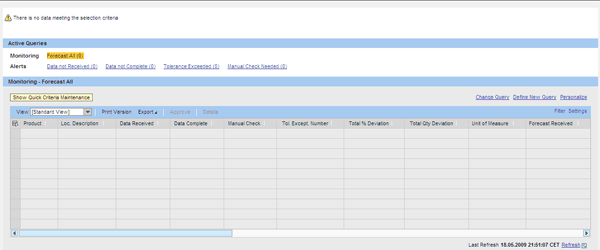
Figure 1
New CFM transaction programmed with Web Dynpro for ABAP
This SCM release comes with one of the most important enhancement in SAP technology: supporting Enhancements Packages. The Enhancement Packages contain a package of new functionalities and innovations that users can switch on or not. It means that you could choose which feature to be installed and which not, providing flexibility to your processes. Therefore, it avoids system upgrades providing long term system stability and a reduction of the Total Cost of Ownership (TCO), but you still can innovate with new delivered functionality.
Note
You can find additional sources of information about SAP SCM 7.0 in SAP Help at
https://help.sap.com > SAP Supply Chain Management > SAP SCM 7.0 > Application Help. Also, consult the Release Notes at
https://service.sap.com/releasenotes > SAP Solutions > SAP SCM (SAP Service Marketplace user required) and SAP Note 1284461 (Release Restrictions for SAP SCM 7.0).
Enhancements in DP
DP receives three main enhancements in SAP SCM 7.0 These enhancements relate to:
- Forecast and product configuration
- CFM
- Aggregated POS data in the forecast
Forecast and Product Configuration
Planning of variant configuration or configurable products was possible in previous releases of SAP APO. The planning process of these complex products goes across most of the SAP APO modules. In particular, it begins with characteristic-based forecasting (CBF) functionality available in DP. In this release, the integration of forecasting and planning, release, and forecast consumption has been improved.
Configurable products allow you to model products with many variants. If you use a simple traditional numbering (product1, product2, …) for these products, it leads to a very large, and probably unmanageable, product master data. Due to customer pressure, more and more industries changed from standardized products to customization based on customer specifications. For instance, you now can design your own sport shoes on some Web pages. This is a good example of a configurable product that you cannot handle in product master data with only numbering. You also need to manage the properties such as size, color, and extras. Some industries, such as steel producers, have hundreds of properties to describe a product.
DP allows you to calculate demand at a characteristics level with the CBF technique, answering questions such as: How much is the demand for shoes in red, size 8, model X? With this release, the planning process of these complex products has been improved in several SAP APO areas.
The first of these enhancements is in the forecast release and consumption by sales order. Demands with specific properties, that is characteristic values (model A, color = red) that are released from DP, are consumed by the sales order with the same properties. For example, in Figure 2 a sales order on 17.10.2008 asking for 25 model A, red sport shoes reduces from the demand released on 10.11.2008 (300 each) with the same characteristics value: model A, red. To check this consumption, use menu path Production Planning > Interactive production Planning Product View or transaction /SAPAPO/RRP3 and click the Forecast tab.

Figure 2
Example of forecast consumption in the product view
To configure this new consumption, SAP APO delivers a new requirement strategy, 35 PLANNING W/O FINAL ASSEMBLY FOR CONFIG. (Figure 3). You can check the configuration by following menu path APO > Demand Planning > Environment > Current Settings > Specify Requirements Strategy.

Figure 3
New requirement strategy 35 for planning configurable products
CFM
As part of its improvements in SAP APO, SAP has delivered the new CFM, which is part of VMI. (Do not confuse this with the existing collaboration scenario in collaborative demand planning.) VMI relies on functionality coming from SAP APO components DP, SNP, and Transport Load Builder (TLB) to allow collaboration with customers, especially in industries such as consumer products or electronic device manufacturers.
CFM is a new part of VMI, improving this process. CFM enables you to manage the collaboration with customers in the initial steps of the VMI process where the demand planner or VMI analyst can control and check external demands. Before this release, in the VMI process, the data was passed to the planning process directly. With CFM, customer demand is stored independently and you can verify it automatically or manually.
Figure 1The second transaction, the waterfall analysis (transaction /SAPAPO/CFM_WFALL), exports the information about customer demands to a Microsoft Excel sheet where the planner can go deeper into customer forecast data.
You can configure CFM functionality (Figure 4) in IMG menu path APO > Supply Chain Planning > DP > Customer Forecast Management. At this point, you define the horizons where you check the customer demands and the tolerances that are acceptable. For instance, you can get alerts when the customer changes the demand in the next two weeks by more than 5%. Those profiles are assigned to the product in the product master data or at the location level.
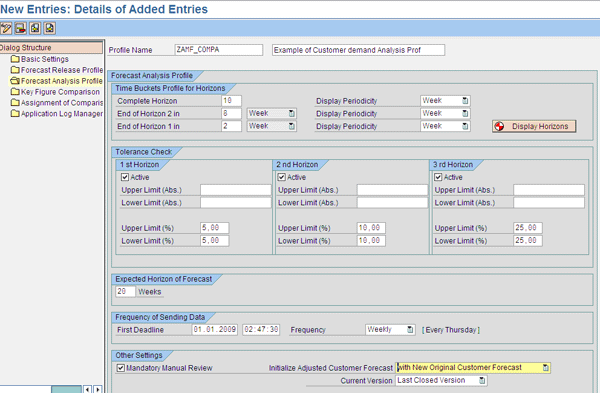
Figure 4
CFM settings in APO customizing
Also, a new inbound process has been developed to support the reception and storage of original documents with the demands coming from the customers. CFM provides two ways to receive the customer forecast: from an IDoc or from a comma-separated values (CSV) file. In addition, you can manually enter the customer data. This information is stored in predefined SAP NetWeaver Business Warehouse (SAP NetWeaver BW) objects, InfoCubes, and so on where the customer forecast analysis take place.
Additionally, new alerts such as tolerance exceeded, data not complete, data not received, or manual check needed are available in the Alert Monitor where you can configure new alerts to warn about those deviations.
Aggregated POS Data in the Forecast
A new forecast algorithm added to this release allows you to consider aggregated data at the POS level, combining statistical forecasting and MLR. New configurations and key figures available in the interactive planning screen provide a way to improve the forecast quality considering the information reported at the store level. For instance, a new key figure, POS data, has been added to the MLR profile.
Enhancements in SNP
SNP introduces some enhancements in this release. Those enhancements focus on increasing the performance of the planning execution with an improved LLC calculation process and provide new capabilities in the VMI scenario and characteristic-based planning.
LLC
Through the LLC process, the system determines the lowest level at which a product can be located in a bill of materials (BOM). This process is required to execute the planning process in the correct sequence. For instance, in the example shown in Table 2, product B has the LLC=2 because it is at the lowest level in the BOMs of product X (level 1) and Product Y (level 2).

Figure 1
Example of level code calculation for products X and Y
The LLC is determined in advance via menu path SNP > SNP in background > Determine low level code or transaction /SAPAPO/SNPLLC (Figure 5), increasing the performance of the planning process. That is important when you manage thousands of products in complex supply chains. In previous releases, it was not possible to select the master data affected by the LLC process. Therefore, you might have executed unnecessary master data, which would have a negative impact on performance. Now if you don’t need to plan a product, you do not include it in the LLC process.
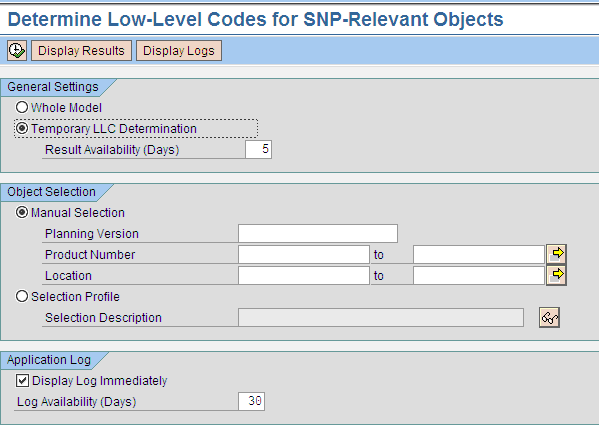
Figure 5
Determine LLC
You can add LLC determination to planning process chains to improve the performance of background planning processes. Planning process chains are used for complex background processes. You can execute a process manually but usually it takes a long time so you must schedule it at night. Planning process chains allow the definition of all the steps required. One of the first steps in a planning process is the LLC so you can determine the right sequence of the product.
For more information about process chain refers to the article “Step-by-Step Guide to Create and Use Process Chains in APO” by Manoj Ambardekar, which was posted in May 2007.
Enhancements in VMI Process
SAP SCM 7.0 allows you to combine VMI and consignment inventory. With VMI, the customer agrees to delegate the replenishment activities to the supplier, providing advantages for both customer and supplier. This scenario requires close collaboration and shared information (stock levels, sales/consumptions or demands). With the consignment stock scenario, the customer stores the stock and the customer carries out the replenishment process through traditional purchase orders.
Now the supplier can implement two different VMI scenarios: Standard VMI (supplier-planned inventory) and consignment VMI (supplier-owned and -planned inventory). To support this enhancement, some changes have been introduced in the TLB user interface and the integration of master data from SAP ERP.
Additionally, a new key figure, Consignment Stock in Transit, has been added to the VMI planning book (transaction /SAPAPO/SNPVMI) as shown in Figure 6. SAP ERP and SAP APO provide an additional step in the delivery process, stock in transit, when delivering to customers. Previous to this release, the consignment stock was updated in the customer location when the good issue was executed for the sales order, which could lead to errors with long-term distribution processes.
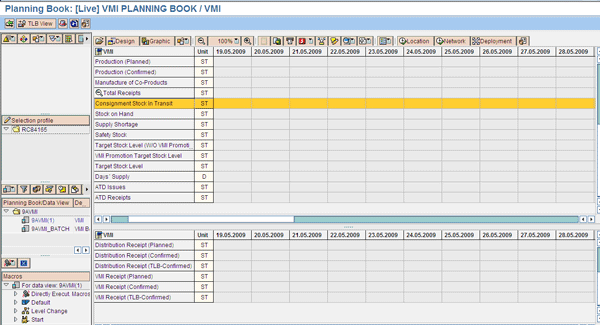
Figure 6
New key figure in the VMI planning book for the consignment scenario
This VMI scenario is integrated with SAP ERP and requires the installation of enhancement package 4 on the SAP ERP side and the activation of the Business Function APO_VMI_CONS, provided with this enhancement package.
Enhancements in CTM
Following with one of the cross area enhancements of this release, characteristic-based planning, CTM takes into account the characteristics of the products when planning with the CTM engine. As part of the characteristic-based planning scenario, CTM incorporates capabilities to work with the master data required for managing configurable products such as the object dependencies. The object dependencies drive the BOM explosion taking into account the characteristics values.
For example, if color is one of the properties of my product, when it takes the value green, the system selects the component green paint instead of another color. One constraint of this scenario is that it works only with continuous planning (PP/DS orders).
Another enhancement is the consideration of shelf life during the planning process, which is important for consumer products or pharmaceutical companies in which remaining product life plays an important role during planning activities.
Figure 7 shows the new check boxes added to the CTM profile that drive the new planning scenarios. The CTM profile contains all the configuration required to run the engine execution for planning. CTM is based on a program that executes the algorithm, which is called an engine. You can access it via menu path APO > MultiLevel Supply & Demand Matching > Planning > Capable-To-Match (CTM) Planning or with transaction /SAPAPO/CTM.

Figure 7
New check boxes in the CTM profile creation

Adolfo Menéndez Fernández
Adolfo Menéndez Fernández is the application architecture manager at Repsol in Madrid. Previously, he worked at SAP Consulting Spain as the logistics consulting manager. He studied at the University of Oviedo, where he earned an electronic engineering degree. He is a certified SAP consultant in supply and demand planning (SNP and DP), order fulfillment (Global Available-to-Promise), production planning and detailed scheduling (PP/DS), as well as procurement and materials management (MM). Adolfo has more than 10 years of SAP implementation experience in the consumer product goods, pharmaceutical, automotive, furniture, textile, chemical, oil & gas, and steel industries using SAP ERP logistic modules (including PP, MM, and sales and distribution [SD]) as well as SAP SCM (DP, SNP, and PP/DS). He is APICS certified in Production and Inventory Management (CPIM).
You may contact the author at asturiasadolfo@yahoo.com.
If you have comments about this article or publication, or would like to submit an article idea, please contact the editor.