See how SAP BusinessObjects Global Trade Services handles letters of credit and understand the enhancements in the letter of credit functionality for faster and more efficient processing. Learn how this functionality is integrated with the logistics system. Find out how to configure letters of credit in SAP BusinessObjects Global Trade Services through a step-by-step configuration checklist.
Key Concept
The letter of credit processing service uses the data from the SAP feeder system (SAP ERP Central Component). It is integrated with the order-to-cash (in sales and distribution) and procure-to-pay scenarios (in materials management). This is applicable for both importing and exporting scenarios. Letter of credit functionality is a part of the Risk Management module in SAP BusinessObjects Global Trade Services.
The large physical distance between business partners and the underlying legal and political conditions in foreign trade pose a credit risk. Payment conditions between exporters and importers in the form of letters of credit can mitigate those financial risks and expedite transactions in international trade.
You can create letters of credit, which act as a guarantee, using SAP BusinessObjects Global Trade Services. It fetches data from SAP ERP Central Component (SAP ECC) documents and carries out electronic communication efficiently. Before SAP BusinessObjects Global Trade Services, businesses would encounter the following issues in the letter of credit process:
- No automatic method of creation of letters of credit existed and there was no integration among different departments such as finance, sales, purchasing, and compliance
- Third-party systems were used for the letter of credit process, raising the cost
- Complex custom programming was required on the SAP R/3 side, consuming a lot of time and effort for maintenance
- Much time was wasted in the communication process between banks and importers/exporters as there was no electronic mode of communication
SAP BusinessObjects Global Trade Services offers an improved way to process letters of credit. The letter of credit process involves integration of SAP ECC (mainly materials management and sales and distribution) with SAP BusinessObjects Global Trade Services. You can monitor the delivery dates and the receipt of documents for legal control more effectively. The letter of credit master data in SAP BusinessObjects Global Trade Services allows you to manage letters of credit that you receive from banks.
In the letter of credit, you can manage all data relating to shipping and document dates in the header data. The item data contains business partner data, values, and relevant bank data. The system recognizes that your particular export or import business partner requires a letter of credit. You can assign the letter of credit to export or import transactions through logistics integration. In SAP BusinessObjects Global Trade Services you can create, edit, and display letters of credit for exporting and importing purposes. You need to maintain letters of credit in the system when you notify your bank that your business partner requires one. Once a letter of credit is created, you can assign it to an export or import transaction.
SAP BusinessObjects Global Trade Services has also enhanced the communication process. It is possible to communicate electronically with other parties involved in a letter of credit process. The data exchanged electronically is stored in a letter of credit. It is also integrated with the logistics processes in the feeder (SAP ECC) system. The number of the letters of credit created in SAP BusinessObjects Global Trade Services is entered manually in the sales order. The letter of credit number is copied to both the delivery and billing documents. As a result, it is easy to track document flows through logistics processes. Let’s see the basic steps for letter of credit processing.
Exports Processing
First, create a sales order for exports or a purchase order for imports in the feeder system. After entering all the necessary data, save the order.
To process a letter of credit for an export scenario, leave the feeder system and go to the Exports scenario in the SAP BusinessObjects Global Trade Services cockpit using transaction /SAPSLL/MENU_LEGAL. Under the SAP Risk Management section, click the Letter of Credit Processing button (Figure 1) to go to Figure 2. Then click the execute icon next to Display Assigned Letter of Credit Documents.
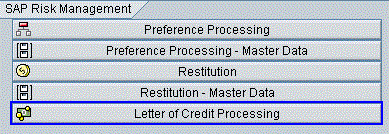
Figure 1
Click the Letter of Credit Processing button

Figure 2
Click the execute icon
The system displays a list of all documents assigned to the letter of credit defined in the system (Figure 3). It gives you information about the products and documents assigned to letters of credit. You can use this list to validate whether the correct letters of credit are assigned to your SAP ECC documents.

Figure 3
A list of documents assigned to the letter of credit
Then create a delivery and a billing document in the feeder system. Go back to the SAP BusinessObjects Global Trade Services cockpit and click Letter of Credit Processing again. Click the Mast. Data tab to display the existing letter of credit (Figure 4). Click the display icon to display the corresponding letter of credit (Figure 5).
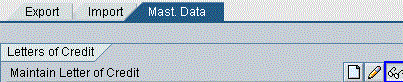
Figure 4
Click the Mast. Data tab

Figure 5
Display the letter of credit
Click the Documents link in Figure 5 to display the relevant document for this letter of credit. The document shown here is the Shipper’s Export Declaration (US) (Figure 6).

Figure 6
View the export document
Click the display icon in Figure 4 to see the status of the letter of credit, banks involved, dates, foreign trade organizations responsible, values, business partner involved, terms of payment, and assigned documents.
Now go back to view the corresponding customs document assigned to the document from the feeder system. You can see all the related documents created in the feeder system here. All details relevant to the letter of credit process are in the Lett.Cred. tab (Figure 7).

Figure 7
Letter of credit details
Click the Communication node in Figure 8 to see the status of the letter of credit data. For example, the successfully sent data is shown with a green light (Figure 8). This also allows you to monitor the messages that have been electronically sent to you.

Figure 8
Successfully sent data
Imports Processing
Now I’ll describe how letter of credit processing happens for an import scenario. Follow the same steps as you did in Figures 1 and 2. The system shows a list of relevant documents assigned to the letter of credit (Figure 9).

Figure 9
View your SAP ECC documents assigned to letter of credit
You can see the application log for the selected data by clicking the log icon circled in Figure 9. The system then shows the detailed step-by-step activity involved in the letter of credit process (Figure 10).
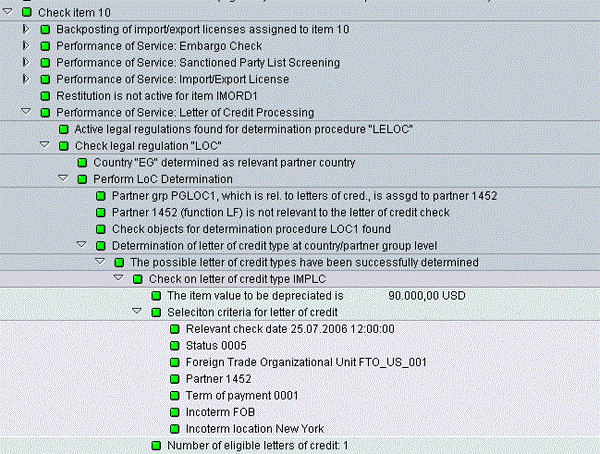
Figure 10
Step-by-step letter of credit activities
You can view the letter of credit assigned to the SAP ECC document for the import process in Figure 4. Once the activities in Figure 4 are executed you get to a screen where you enter mandatory details such as Legal Regulation, LetterofCredit Type, and the letter of credit number (Lett.Cred.) (Figure 11).
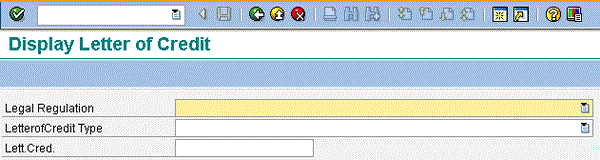
Figure 11
Enter mandatory values for displaying the letter of credit
After you enter the mandatory fields, click the check mark icon to display the letter of credit (Figure 12).
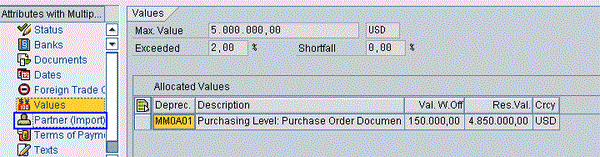
Figure 12
Display the letter of credit
Click the Assigned Documents node in the Attributes section on the left side of the letter of credit to check the purchase order reference number created in SAP ERP Central Component (Figure 13).
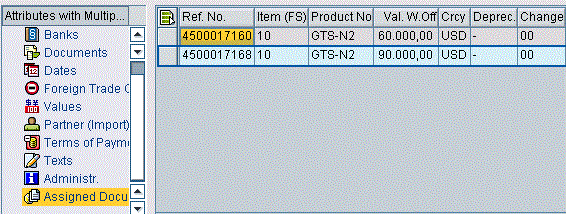
Figure 13
Check the reference number
Now let’s check the communication enhancements in the letter of credit functionality in SAP BusinessObjects Global Trade Services. Click the Communication link on the left and then click the print preview icon (Figure 14).
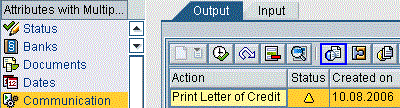
Figure 14
Click the print preview icon
The system displays the relevant document for this process — for example, the form shown in Figure 15.
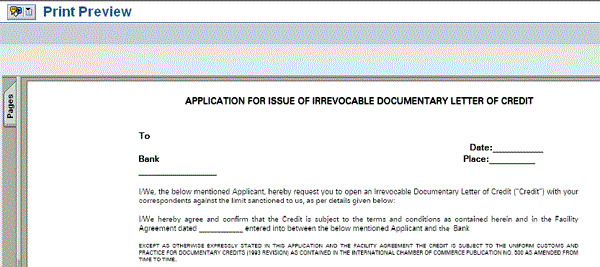
Figure 15
Sample form
Apart from the messages you send, you can also receive messages from your business partners. You can view those messages via the Communication node shown in Figure 16.

Figure 16
View the messages
Configuration Checklist
Let’s now look at the configuration checklist required for letter of credit processing in SAP BusinessObjects Global Trade Services. The SAP Risk Management nodes are part of the SAP BusinessObjects Global Trade Services IMG.
Step 1. Connect the feeder system to SAP BusinessObjects Global Trade Services. To transfer data, set up the system communication between the feeder system and SAP BusinessObjects Global Trade Services. Specify the logical systems, Remote Function Call (RFC) destination, and Application Link Enabling (ALE) distribution model. You need the logistics master data record (e.g., vendors, customers, and materials) and document data (e.g., sales orders, purchase orders, and billing documents) to use the services in SAP BusinessObjects Global Trade Services.
Step 2. Define the legal regulation. Follow IMG menu path General settings > Legal regulations > Define Legal regulations. Here you define a legal regulation for the letter of credit processing service in SAP BusinessObjects Global Trade Services and activate it for your respective country. You can use the standard settings available in the system (which is LOC for letter of credit). Once you add the entry, activate this step by clicking the save icon.
Step 3. Define and activate document types. Follow IMG menu path Global Trade Services > SAP Risk Management > General settings for SAP Risk Management > Activate Document Types. When you use SAP Risk Management and you want to transfer documents from the feeder system to SAP BusinessObjects Global Trade Services, SAP BusinessObjects Global Trade Services creates a corresponding document for each feeder system document type. Define the document types to recognize the feeder system documents and create a replication of them. You can activate the document types by entering your document types for activation and clicking the Save button in the IMG.
Step 4. Define and activate item categories. Follow IMG menu path Global Trade Services > SAP Risk Management > General settings for SAP Risk Management > Activate Item Categories. Here you activate the item categories that are relevant to letter of credit service based on your business requirements. This allows SAP BusinessObjects Global Trade Services to determine an item category if a document is transferred from the feeder system to SAP BusinessObjects Global Trade Services. Add the item categories you want to activate and click the Save button to activate them.
Step 5. Define letter of credit partner groups so that the system can determine the appropriate letters of credit for import or export purposes, depending on the determination rules for countries and partner groups. Follow IMG menu path Global Trade Services > SAP Risk Management > Letter of Credit Processing service > Define Partner Groups Relevant to Letters of Credit.
Step 6. Assign a determination procedure for active legal regulations. Specify which determination procedure the system should use to determine the relevant legal regulations for which you have activated the letter of credit processing service. Follow IMG menu path Global Trade Services > SAP Risk Management > Letter of Credit Processing Service > Assign Determination Procedure for Active Legal Regulation.
Step 7. Activate legal regulations for the letter of credit service. You can decide on which main level you would like to activate the legal regulation. Two main levels are available for activation: country and country group. Then you activate on a process level. The different process levels available are country/country, country/country group, country group/country, and country group/country group. Follow IMG menu path Global Trade Services > SAP Risk Management > Letter of Credit Processing Service > Activate Legal Regulation.
Step 8. Define determination procedures for letter of credit types to enable the system to determine automatically the letter of credit types that are appropriate to specific business transactions. Such letter of credit types include revocable or irrevocable, for example. The determination procedure you define here controls how the system determines the letter of credit types that are relevant to a specific legal regulation. Follow IMG menu path Global Trade Services > SAP Risk Management > Letter of Credit Processing Service > Define Procedure for Automatic Determination of Letter of Credit Types.
Step 9. Configure controls for the letter of credit processing service. In the control settings, define the basic conditions for the letter of credit processing service. You configure these settings for each legal regulation. Follow IMG menu path Global Trade Services > SAP Risk Management > Letter of Credit Processing Service > Control Settings for Letter of Credit Processing Service.
Step 10. Define letter of credit types. Follow IMG menu path Global Trade Services > SAP Risk Management > Letter of Credit Processing > Define Letter of Credit Types. Define which letter of credit types you want to use in the letter of credit processing service based on your business requirements.
Ravi Kalluri
Ravi Kalluri is an SAP BusinessObjects Global Trade Services consultant at Accenture Services Pvt Ltd. His focus is on the entire global trade area, including Compliance Management, Customs Management, Risk Management, and Electronic Compliance Reporting. He has an excellent understanding of SAP ERP logistics processes and their integration to global trade in a supply chain environment. His interests are networking, participating in conferences, and writing articles.
You may contact the author at ravi.kalluri@accenture.com.
If you have comments about this article or publication, or would like to submit an article idea, please contact the editor.