SAP R/3 can help your business manage the COBRA law, which requires companies to offer health insurance to employees who have lost coverage. In the first of a two-part series, the author discusses the rules, terms, and notification process of the COBRA law.
In 1985, the United States Congress passed the Consolidated Omnibus Budget Reconciliation Act. This law, known as COBRA, requires companies that offer group health coverage to allow certain participants who lose coverage to purchase continuation coverage. R/3 Enterprise contains features designed to enable your company to easily comply with the requirements of this law. Despite this built-in functionality, many companies have either outsourced their COBRA processing or implemented custom-built solutions in R/3. This article shows how easy it is to configure R/3 Enterprise for the production of COBRA enrollment packages.
COBRA Basics
The COBRA law requires employers to notify persons who are eligible for continuation coverage of their COBRA rights. The notification must be delivered in a timely manner and it must contain instructions on how continuation coverage can be obtained. Eligible persons who wish to elect continuation of coverage must be allowed to continue their participation in the health plan for a fixed length of time. The duration of continuation coverage is different depending on the reason that the coverage was lost. This article will focus on the notification process, which involves two primary steps. The first step is to recognize that an event has occurred. The second step is to provide an accurate notice of COBRA rights to the qualified beneficiaries. The next article in the series will show how R/3 Enterprise supports the ongoing administration of COBRA participation.
COBRA Qualified Events and Beneficiaries
A COBRA-qualified event is defined as some change that causes a current health plan participant to lose eligibility for the coverage enjoyed just prior to the event. A COBRA-qualified beneficiary is a person who was covered by the qualified plan just prior to the event and will no longer be eligible for regular coverage as a result of the event. The law recognizes eight types of qualified events. The R/3 COBRA event collection process identifies qualified events by searching for specific changes in master data. Let’s discuss each type of event separately, because the relevant master data is different for each of them.
- The termination of employment event is always accomplished in the personnel administration module by performing an action. Actions are stored in infotype 0000. The COBRA module allows you to specify which actions represent a termination of employment at your company. Employees who are allowed to keep their health coverage when they retire do not need to be offered COBRA coverage. Remember that a COBRA-qualified event requires the beneficiary to lose eligibility for existing coverage. You should keep the COBRA process in mind when creating the list of actions and reasons used in the personnel administration module.
- The death of employee event is also entered via a personnel action because an action is the only way to change the employment status from active to withdrawn. This is really just a special type of termination of employment. For regular terminations, all family members, including the employee, are considered qualified beneficiaries; but when the employee dies, the remaining family members are the only eligible beneficiaries.
- The reduction in working hours event can be recognized in one of two ways. You can tie this event to a personnel action if you have one defined for a reduction in hours that results in loss of eligibility. R/3 also searches for changes in the employee’s scheduled working hours in infotype 0007. The event collection program determines if the change in working hours caused a loss of eligibility for existing coverage. This collection process requires that you have benefit eligibility rules configured on the basis of scheduled working hours. All family members are potential beneficiaries for this event.
- An employee’s entitlement to Medicare can cause a loss of eligibility for existing coverage. This event is recognized by the creation of a new infotype 0077 record with the Medicare indicator set to true. All family members are potential beneficiaries for this event.
- The divorce event is recognized by the creation of a divorced spouse record. This is infotype 0021 sub-type 10. For this event, the former spouse and any other covered family members except the employee are potential beneficiaries.
- Legal separation is similar to divorce. This event is recognized by the creation of a new spouse record (infotype 0021 subtype 1) with the separation date populated. All family members other than the employee are potential beneficiaries for this event.
- A child’s loss of dependent status is determined by searching infotype 0021 subtype 2 for changes. The data in infotype 0021 indicates a child’s age, marital status, disability status, and student status. This information is compared to the configured eligibility rules to see if a loss of coverage has occurred. The child who loses coverage is the only qualified beneficiary for this event.
- Bankruptcy of employer is a special qualified event. When activated, this event searches infotype 0000 for employment status of the retired beginning on the bankruptcy date. (For bankruptcy processing, the collection program requires that all active employees be converted to the status of retirees.) All family members are potential beneficiaries for this event.
COBRA Configuration Steps
Configuration for COBRA is found in the IMG via menu path Personnel Management > Benefits > COBRA. The steps are shown in Figure 1. The first step displays a list of all health plans defined in your system. Simply put a check mark adjacent to each plan that should be considered eligible for COBRA continuation coverage. Be careful not to change the dates on this screen. You can delimit records to indicate that a plan’s COBRA status has changed, but changing the date fields can cause data from other IMG steps to disappear.
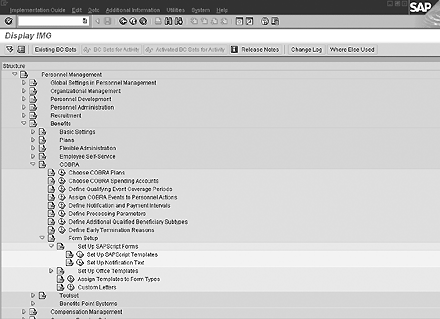
Figure 1
COBRA configuration steps
In the second step, you select with check marks the FSA plans that are eligible for COBRA continuation coverage. You also assign a dependent eligibility rule to each plan so the COBRA process can determine which family members can participate in the FSA plan.
The step for defining qualifying event coverage periods comes preconfigured with the minimum coverage periods specified by U.S. law. You only need to update this step if your company wishes to offer COBRA coverage for a longer time period.
As I noted, R/3 searches the personnel actions to identify some COBRA events. When you assign COBRA events to personnel actions, you are telling R/3 which action/reason values represent these COBRA events. The COBRA events that are captured through master data changes other than personnel actions do not require configuration. Figure 2 shows an example of this configuration.

Figure 2
Assign COBRA events to personnel actions
The step to define notification and payment intervals is preconfigured by SAP. You should review this step to confirm that the settings are consistent with your company policy and local laws. You can create entries in this table for each state. The District of Columbia (DC) is used as the default and is the only entry that is required. If a state where your company does business has laws that vary from the national standard, you can copy the DC entry to one for your state and adjust the values. Table 1 explains the meaning of each value configured in this step.
| Election period |
The number of days employees have to complete election of COBRA coverage. The election period starts on the later of two dates: the date on which normal coverage ends or the date on which the beneficiaries are notified of their rights. |
| Employer period |
The number of days the company has to provide notice of qualified events to the provider |
| Administration period |
The number of days the company has to provide notice to qualified beneficiaries of their COBRA rights. This period begins on the day the company becomes aware of the event. |
| Beneficiary period |
The number of days an employee has to notify the company that a covered beneficiary has experienced a qualified event such as divorce |
| Disability period |
The number of days COBRA beneficiaries have to notify the company that they are certified as disabled |
| End of disability |
The number of days COBRA beneficiaries have to notify the company they are no longer certified as disabled |
| Initial payment |
The number of days within which beneficiaries must make their first payment |
| Monthly payments |
The number of days within which beneficiaries must make subsequent payments |
| Payment due date |
The day of each month by which COBRA payments are due |
| Regular period fees |
The percentage of the health plan premium that will be charged for regular COBRA coverage. The law allows up to 102 percent for this fee. |
| Disability extension fees |
The percentage of the health plan premium that is charged during the disability extension period. The law allows up to150 percent for this fee. |
| |
| Table 1 |
Notification and payment intervals |
|
The step for defining processing parameters must be configured to activate COBRA processing. In this step, you indicate which of the eight possible qualifying events should be collected by the event collection tool. You can also indicate whether COBRA coverage starts on the event date or on the loss-of-regular-coverage date. You can set a flag to exclude non-citizens from receiving COBRA coverage. You can restrict the COBRA offering so that the beneficiary is offered continuation coverage only for health plans in which they were already covered just prior to the event. You can also indicate that FSA plans should be offered only if they have a positive balance.
The COBRA process automatically collects events for employees, their spouses, and children. If your company wishes to collect COBRA events for other family members such as a domestic partner, use the step Define Additional Qualified Beneficiary Subtypes to connect the other dependent types to the appropriate COBRA events.
The law allows companies to cancel continuation coverage for certain reasons. The step Define Early Termination Reasons allows you to configure those reasons. The reasons include the beneficiary’s failure to pay premiums, the company’s discontinuation of all health plans, coverage under another health plan for the beneficiary, and discontinuation of disability when coverage was extended.
If you want to use the standard delivered COBRA forms, there is only one step in the forms setup section to configure. This is the Assign Templates to Form Types step. Table 2 shows the delivered SAPscript template names that should be assigned to each form type.
| COBRA letter |
HR_BEN_COB_LET01 |
| COBRA enrollment form |
HR_BEN_COB_ENRO |
| COBRA confirmation form |
HR_BEN_COB_CONF |
| COBRA invoice |
HR_BEN_COB_INVO |
|
|
| |
| Table 2 |
Standard COBRA template names |
|
Entering COBRA Events
The configuration for COBRA allows R/3 to recognize COBRA qualified events by monitoring routine master data activity. Let’s look at how it works for two different events. Joe works for the company and has medical coverage for himself and his family, which includes a spouse and two children. Joe is being laid off on April 12 because the facility he works in is closing. Someone in HR performs the personnel action for termination with the reason code for a plant closing. It is not necessary for this staff person to evaluate this action for COBRA eligibility. He or she simply needs to complete the action using transaction PA40.
Natalie is an employee who has medical coverage for herself and her spouse. On March 20, she obtained a final decree of divorce. She delivers this document to the HR department on April 14. An HR staff person creates a family/related person record on infotype 0021 with subtype 10 for a divorced spouse. This record has a begin date of March 20. The person entering this information does not need to evaluate the time that has passed since the divorce occurred and does not need to determine whether or not the former spouse had medical coverage. The R/3 COBRA process does all of this based on the configuration.
Collecting COBRA Events
The top half of Figure 3 is a diagram of how the COBRA event collection process works. Someone in the benefits department runs the COBRA event collection program at the end of each week. The program uses the COBRA configuration as a guide when searching the master data for qualified events. It is good practice to use an event selection period that covers the most recently passed two or three months. The large selection window allows for the possibility of back-dated changes such as the divorce that was effective on March 20 but not entered until mid-April. The event collection program checks the COBRA buffer and the list of COBRA beneficiaries to ensure that each event is collected only once. Figure 4 shows the output of the COBRA event collection process for two events.
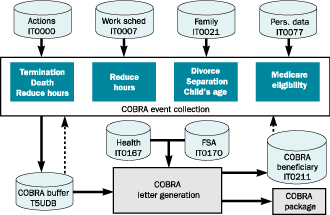
Figure 3
The COBRA event collection process
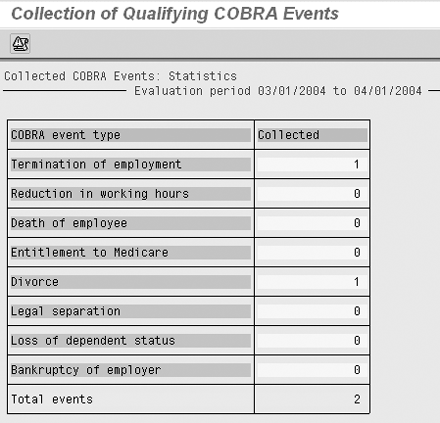
Figure 4
Results of COBRA event collection process
Generating COBRA Letters
The bottom half of Figure 3 shows how to create COBRA letters. The event collection program puts a record in the COBRA buffer table, T5UDB, for each employee who has experienced a new COBRA event. The letter generation program processes the records from the buffer table. It searches infotype 0167 for current health plan participation and infotype 0170 for FSA participation. The participation is compared to the configuration settings to determine which persons in the family should be offered each type of coverage. Each person who is eligible for continuation coverage is added to infotype 0211 as a qualified COBRA beneficiary. Their participation in the regular benefits plan is terminated using the plan’s termination rules. Finally, the program produces a COBRA notification package (Figure 5).

Figure 5
Event selected for COBRA letter generation
The COBRA notification package has three main parts. The first part is the notification letter. This letter is addressed to the employee if the employee is one of the beneficiaries. It is addressed to the spouse if the spouse is a beneficiary, or it is addressed to the first child if neither the employee nor the spouse is a beneficiary. Separate letters are created if any family members have their own address recorded on infotype 0021. The notification letter explains the COBRA process in great detail. It advises the beneficiary regarding the dates by which the forms must be returned, the maximum length of time for continuation coverage, and how and when payments are to be made. All of the details are calculated in R/3 by using the person’s master data and configuration.
The second part of the package is a COBRA election letter. Each beneficiary receives an election letter. The letter allows the beneficiaries to indicate whether or not they desire to accept the continuation coverage. The final piece of the COBRA package is an enrollment form. Each beneficiary receives an enrollment form. The form lists the plan or plans available for selection. It also shows the coverage options and related costs. If the beneficiary is the employee or spouse, the form lists the qualified children as possible dependents for the benefit plan.
The COBRA Process
The R/3 system supports COBRA as an integrated process. The configuration of the COBRA section allows the event collection program to recognize COBRA-qualified events as they happen in routine data maintenance. A little forethought is required to ensure that events are being captured through master data maintenance, but it is not necessary for everyone in HR to understand COBRA rules. The termination rules automatically stop regular coverage at the time the COBRA letters are created. This ensures that COBRA beneficiaries will not have both regular coverage and COBRA coverage at the same time. The standard COBRA letter contains all information your company is legally required to provide. It also contains the enrollment forms necessary for qualified beneficiaries to select their continuation coverage. (For more information on the COBRA law, go to the United States Code title 29 sections 1161-1169 at https://uscode. house.gov/usc.htm.) In part two of this series, I explain the process of recording COBRA elections and administering the billing process.
Clay Molinari
Clay Molinari has 20 years of experience in the IT industry and has been working as an SAP HR consultant since 1997. He is currently president of C&C Savant, Inc., an SAP consulting firm that specializes in combining standard SAP configuration and custom ABAP programming to help its clients solve unique or complicated requirements.
You may contact the author at claymolinari@comcast.ne.
If you have comments about this article or publication, or would like to submit an article idea, please contact the editor.




 Premium