Learn the pros and cons of options for budget reallocation – manual and automatic – when you cannot postpone the movement of staff during a compensation planning period.
Key Concept
For many organizations, the compensation planning period is aligned with the end or beginning of their fiscal year. This is a time when many transfers, promotions, and mergers/break-offs occur. Compensation specialists do not necessarily want budgets locked down during this time period – they need budgeted funds to transfer with the reassigned employees. When the funds do not transfer with employees a budget imbalance occurs. This means that one organizational unit has too much funding while another organizational unit has too little.
The most surprising thing to note about SAP Enterprise Compensation Management budgets is that they are static by nature. While there are a few good reasons for this characteristic, it is often viewed as a negative feature by compensation teams because many have a need for organizational flexibility during the compensation planning period.
For example, suppose you handle the budget for two groups in your organization. One group has 10 people while the other group has two. The larger group has the larger budget allocated to it. With no changes, the budgets are static. Now suppose that your company decides to restructure and moves nine people from the larger group into the smaller group. Unfortunately, even though the people moved, the budget did not. Now you have a large budget for a small group and a small budget for a large group. What do you do?
This article explains how you can ameliorate and even prevent budget imbalances. First, I explain the static nature of budgets. Then, I present three mainstream options for overcoming budget imbalances.
Budgeting Overview
Budget structures can be created for merit increases, bonuses, and long-term incentives. They can be based on performance management results (last year’s numbers or predicted numbers for the current year) or determined through integration with Personnel Cost Planning and Simulation (PCP). A complete budget structure mirrors your organizational structure. Just as an organizational structure is made up of individual entities known as organizational units, a budget structure is made up of individual entities known as budget units. Budget units are assigned to organizational units and roll up to the top in a similar fashion. Figure 1 shows how to generate a budget structure from an organizational hierarchy using transaction code PECM_GENERATE_BUDGET.
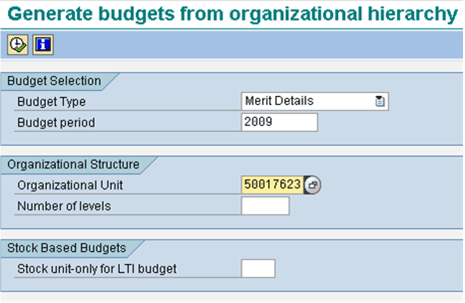
Figure 1
Budget generation
Transaction code PECM_GENERATE_BUDGET gives compensation specialists the ability to create budgets based on a company’s organizational structure. Entering in the top organizational unit in the Organizational Unit field and leaving the Number of levels field blank generates a specified budget for the entire organization for a defined period.
Once a budget has been released (status changed from Planning to Released), it is ready for allocation. A budget can be unreleased (status changed from Released to Planning) only if no money from the budget has been allocated. Compensation money is assigned directly to the budget unit and not to organizational units or to employees. This means that organizational changes do not affect the amount of money a budget unit contains. The static nature of the budget units prevents managers from spending money and then having it be reassigned without any oversight. Not all organizational movements merit a fund transfer – bonus forfeitures and passed payout dates are two reasons why money may not follow employee movement. Many compensation specialists, however, see the need for the movement of funds to keep up with organizational changes. A failure to do so results in an inequitable allotment of budget money known as a budget imbalance.
Budget Imbalances
Typically, prior to and directly after the planning period, budgets cannot be spent. If changes are made, then the budgets can be recalculated as they are typically not released until immediately before the start of the planning period. The length of planning periods varies from company to company based on a number of different factors including the number of employees and number of hierarchical level budgets to roll up for approval. They typically last about a month but can run longer.
A budget imbalance occurs when a budget unit has too much or too little money to fund its organizational unit as a result of a post-budget creation change. The change is usually due to an organizational movement such as a transfer, position change, or restructuring. Budget imbalances occur only during the compensation planning period once a budget unit has been released and partially or completely spent. Prior to that point, budgets can be unreleased and regenerated.
Let me explain my example in more detail. Organizational Unit A has 10 employees and is funded by Budget Unit A with a value of $10,000 USD. Organizational Unit B has two employees and is funded by Budget Unit B with a value of $2,000 USD (Figure 2).
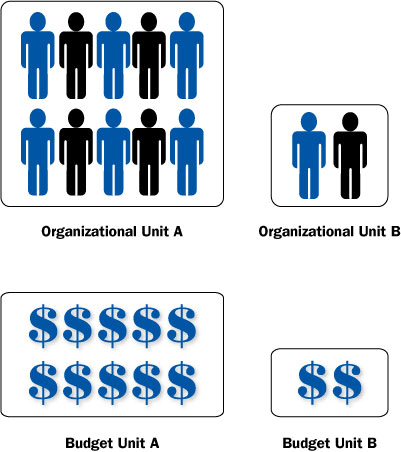
Figure 2
Organizational units and budget units prior to transfer
Due to company restructuring, nine employees from Organizational Unit A are transferred to Organizational Unit B. Budget Unit A still has a value of $10,000 USD to disburse for the one remaining employee in Organizational Unit A while Budget Unit B has only $2,000 USD to disburse for the now 11 employees in Organizational Unit B (Figure 3). This scenario occurs because budget units are not affected by changes to organizational units.
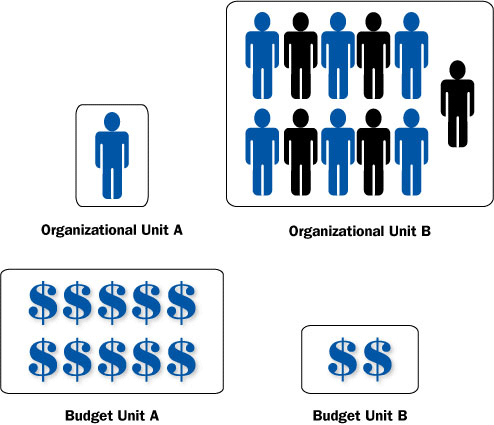
Figure 3
Organizational units and budget units after transfer
Strategies
There are three main strategies for dealing with budget imbalances: prevent them, manually reallocate funds, or have the system automatically reallocate funds. Let me explain the pros and cons of each method.
Prevention
Preventing budget imbalances is, in theory, the easiest and most straightforward solution to the budget imbalance issue. Prevention involves freezing all organizational moves during the compensation planning period, thereby rendering budget reallocation unnecessary. If an organization is unable to freeze organizational movements during compensation planning, then budget movements must occur to offset/equalize budget imbalances. Freezes only need to be conducted during the planning period because this is the only time when budgets are spent.
Freezes are ideal for those companies that can successfully impose a freeze period because it averts budget imbalances and renders budget reallocations unnecessary. However, for many companies, the end-of-year planning period is a critical time for making organizational moves. This solution is not likely to hold in real-world scenarios as it provides no flexibility for organizational changes.
Those companies looking to employ the strategy of prevention should hold an organizational movement period immediately prior to establishing the budgets. This period should be advertised to managers as the critical movement period prior to a mandatory freeze. Once budgeting begins, all organizational movements should be frozen through the completion of the planning period. This is a good reason to keep planning periods relatively short.
Manual Reallocation
Manually reallocating funds involves the movement of funds from one organizational unit to another. Although budget units contain the funds to be distributed, the spent budget values are assigned directly to the organizational units, so transfers occur from one organizational unit to another. This task is usually performed by a compensation specialist using Business Server Page (BSP) application PECM_START_BDG_BSP, as shown in Figure 4.
This method of handling budget imbalances provides greater flexibility because it allows for organizational movements to occur. Compensation specialists have control over the process and over which funds are transferred where. They are also able to contact outgoing managers for input on award amounts, if applicable. The downside to this strategy is that it is a manual process requiring a compensation specialist resource to make time-consuming changes. The process becomes burdensome if a lot of changes or calculations must be made to determine which portion of the funds to move. Complex calculations open the door for human error. Changes must also be made quickly to keep up with the manager planning process. Failure to stay current with the budget changes could mean that managers are able to assign money that a compensation specialist intends to move.
Companies that opt for this strategy should designate resources in advance to handle the reallocations. A notification process should be in place so that these resources know when organizational movements have been made. I recommend keeping a log of fund movements until the compensation planning period is complete and all awards have been approved and activated.
How to Manually Reallocate Funds
The process of manually transferring funds between organizational units is relatively straightforward. You need three pieces of information to complete the transaction – the sending organizational unit, the receiving organizational unit, and the amount to be transferred.
Step 1. Use transaction PECM_START_BDG_BSP. If prompted for a user ID and password, enter in your SAP R/3 login information. Click the Budget Reassignment button (Figure 4). Use the Search Criteria dropdown to select the appropriate object type, organizational unit, or budget unit and search for the applicable object. Select the budget unit by clicking the blue check box to the left of the desired budget unit. Selecting an option at a higher level is acceptable as the rolled-up entities are broken out below.
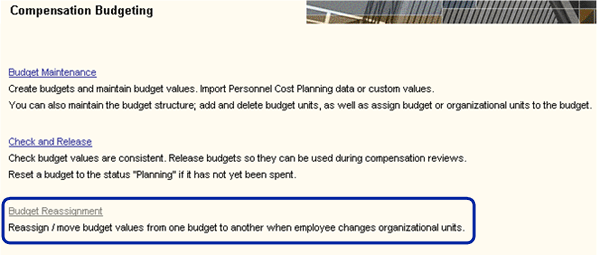
Figure 4
Budget reassignment
This BSP allows compensation specialists to perform most of their tasks related to budgets: creation, deletion, checks, and reassignment. Selecting the Budget Reassignment option allows compensation specialists to manually reallocate funds from one budget unit to another using a step-by-step process.
Step 2. Choose the sending/old organizational unit. Select the Choose Sending Org. Unit button. Select the old organizational unit from the displayed budget structure by clicking the blue check box in its left (Figure 5). Click the Next Step button.
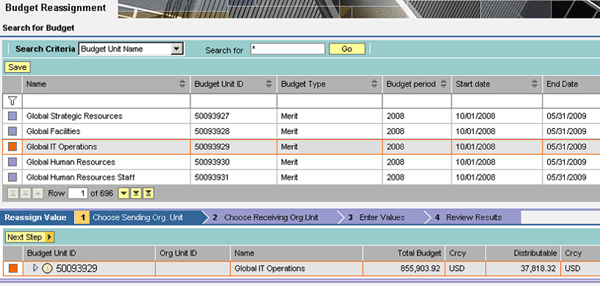
Figure 5
Select the sending organizational unit
Step 3. Select the receiving/new organizational unit from the displayed budget structure by clicking the blue check box to its left. Click the Next Step button.
Step 4. Enter the Amount to be Transferred in the Reassign Budget field. Click the Reassign button to initiate the funds transfer. Click the Next Step button.
Step 5. Click the Next Step button to bring up the Review Results page. This page shows a summary of changes made. Click the Save button in the top left corner of the BSP (directly beneath the Search for Budget – Search Criteria dropdown).
Automatic Reallocation via a Custom Program
The third choice for handling budget imbalances is the use of a custom program to automatically reallocate funds. You can set the program to run as a scheduled job on a periodic basis (such as nightly or weekly) during the compensation planning period. The program should be designed to detect recent organizational changes and transfer a calculated amount from the old organizational unit to the new organizational unit. The amount to be transferred needs to adhere to the calculation rules used to generate the budget. This may be a flat amount, a set percentage, a percentage based on Performance Management results, or an aggregate amount per employee.
An automatic reallocation program is extremely beneficial for companies with a large employee base. The reallocation program is tailored to meet the needs of each client’s compensation program. Types of plans, eligibility, and proration rules need to be accounted for at a unique level, so there is really no standard code for it. The main benefit of this method is that no resources are required to make manual changes and there are no calculations to manually perform. If the program is run nightly, then funds are reallocated in a timely manner and budgets have a greater chance of being current for manager planning. One drawback to this method is the lack of flexibility. The budgeting rules must be strictly adhered to so that the correct amount is withdrawn and transferred to another unit. Flexibility is only possible with manual overrides.
Several factors come into play when determining which of the three methods to implement at a company. Things such as the number of employees, predisposition to organizational movements during the compensation planning period, and available compensation resources will affect your decisions. In most cases some combination of the above solutions will end up working well for your organization. A typical recommendation involves implementing an organizational freeze while running a nightly program to account for any essential movements. This encourages managers to make organizational changes prior to the compensation budgeting period but still allows for flexibility during year-end closeouts.
Rebecca M Bartlett
Rebecca Bartlett is a senior HCM Consultant with Exaserv, Inc., helping companies develop and continuously maintain optimal and high-performing workforces. She specializes in the design and integration of talent management and SAP applications for employee self-services and SAP functionality for manager self-services. In her current role at Exaserv, Rebecca helps clients across the United States and Europe implement sustainable global workforce development strategies. She applies her insight and knowledge to each endeavor and excels in delivering a positive user experience. Rebecca holds a bachelor’s degree in computer engineering and a master’s degree in business administration.
You may contact the author at rebeccabartlett@exaserv.com.
If you have comments about this article or publication, or would like to submit an article idea, please contact the editor.