Starting with R/3 Release 4.0A, you can integrate payment card functionality into your SAP system. Avoid mid-project surprises by reviewing the process and specific system requirements.
Key Concept
The cross-application Payment Card Interface is available in SAP R/3 in releases 4.0A and above, including the latest mySAP ERP release. In addition, other SAP products such as CRM, Internet Sales, and Biller Direct incorporate payment card functionality. The Payment Card Interface provides the technical tools necessary to enable Remote Function Call (RFC) communication to SAP R/3. Additionally, the connection to a network processor or clearinghouse requires either an Internet gateway or frame relay connection.
Increasingly, organizations that use SAP are exploring payment card acceptance as a component of their financial supply chains. In addition to labor savings, accepting payment cards can free up working capital by reducing days of sales outstanding (DSO) and decrease exposure to accounts receivables risk by shifting the liability to the banks issuing the customers' cards.
Companies can realize these benefits when card transactions are integrated with their ERP systems. You can incorporate line-item detail into complex transactions for reduced discount rates and increased purchase information. Data and workflows are integrated with systems and business operations for greater efficiency across the enterprise. The visibility, reliability, and timeliness of financial information also lead to improved Sarbanes-Oxley Act compliance. I'm going to give you an overview of payment card processing and then explain the specific requirements for using the cross-application Payment Card Interface.
The Processing Environment
Payment card transaction processing requires managed access to the financial networks positioned between the merchant and the buyer (
Figure 1). A customer requests goods or services from the merchant. Upon collecting the customer's payment card data, the merchant sends an authorization request to the credit card issuing bank.

Figure 1
Payment processing information flow
The issuing bank responds with acceptance or denial through its designated processing network or clearinghouse. The clearinghouse then provides authorization information to the merchant, which can approve the order and ship the goods to the customer.
The settlement process typically occurs in batch mode after the invoicing of the card payment. The merchant sends the transaction to the network processor or clearinghouse, which communicates with the issuing bank. The issuing bank transfers funds to the merchant's bank. The merchant's bank receives the funds and notifies the merchant of funds deposited. The merchant reconciles the deposits in SAP manually.
Note
Invoicing in SAP refers to the process of creating a Sales and Distribution (SD) billing document and posting that document to accounting.
Payment Authorization and Settlement
In an SAP system, payment card transaction processing is basically a two-step process. The first step, payment authorization, occurs in real time during the sales order save. The second step, payment settlement, can be executed as a scheduled batch job after invoicing, or you can execute it manually at any time.
It's important to note several distinctions in configuring SAP functionality for both the authorization and settlement processes. First, the customer's accounts receivable account is cleared of any liability once the invoice is posted to accounting. Liability is simultaneously posted to a credit card clearing account, essentially transferring the liability to the financial institution that issued the payment card. As these transactions accumulate in the credit card clearing account, they become eligible for subsequent batch processing.
Second, settlement deposits for payment card payments must be reconciled manually in the SAP system. Settlement clears all open items in the credit card clearing account into a single open item in a bank settlement cash clearing account. Items in the bank settlement cash clearing account must then be cleared manually to offset a cash account and as an optional posting to a credit card processing fees account. The SAP-supplied
Credit Card Settlement Simulation function module shown in
Figure 2 is exactly that — a simulation. To settle the transaction, the administrator must perform manual submission or have an additional solution that can automate the process. This is supplied only for testing SAP functionality, not for bank communication, and you must enter it in SAP configuration if you are going to use it in the settlement process.
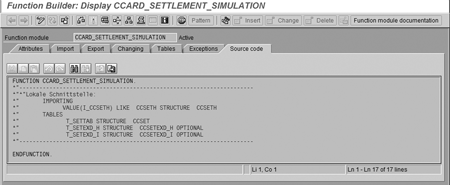
Figure 2
SAP-supplied function module CCARD_SETTLEMENT_SIMULATION for simulating settlement before connection to a middleware/clearinghouse
Common Misconceptions about Payment Card Processing in SAP
SAP can do it all. SAP does not possess native functionality to process payment card transactions. You need to build or purchase middleware to interface with a clearinghouse.
- It's easy to build your own clearinghouse interface. Building your own interface can require weeks or months of effort at considerable cost. Ongoing maintenance and updates are also necessary to remain current with financial institutions.
- Authorization is automatic. You can't perform payment card authorization until the product is confirmed as shippable within X number of days.
- Settlement is automatic. You can't request a settlement deposit until an order has been invoiced and posted to a credit card clearing account.
Filling the Payment Chain Gap
While SAP provides basic payment card processing capabilities, ensuring functional continuity and transaction efficiency between multiple SAP components and financial institutions is a far more complex challenge than meets the eye. As illustrated in Figure 1, SAP provides basic payment card processing functionality. However, a payment chain gap exists.
SAP does not provide an interface or direct connection between various SAP products and the payment card processing networks. Therefore, your challenge is to extend SAP functionality so that it can integrate payment card transaction processing with SAP-enabled data and workflows. You must either develop the necessary interface between your organization and the payment card processing network or clearinghouse in-house or acquire it through a third-party vendor.
Configuring SAP for Payment Card Acceptance
In R/3, payment card functionality is integrated with both the SD and Financial Accounting (FI) modules. While payment card functionality is shared equally between the SD and FI modules, the required configuration work takes place about 80% in the SD module versus about 20% in the FI module. Configuration in the SD and FI modules allows you to choose the card types to be accepted, specify the order and invoice types that allow payment cards, and identify customers that may be restricted from payment card use. Payment card configuration begins in the
Display structure screen, which drills down to the level where IMG steps take place. Use menu path
Sales and Distribution>Billing>Payment Cards.
I'll highlight a handful of the subsequent required configuration activities. The first step (
Figure 3) lists all the types of credit cards that the merchant can accept.
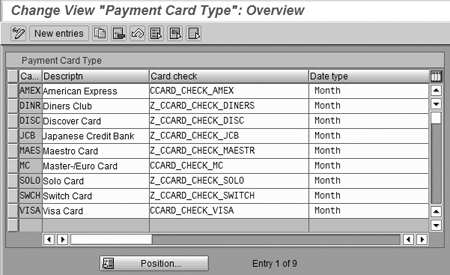
Figure 3
Card type configuration
Figure 4 shows the assignment of the payment card plan type default for each type of sales order document.

Figure 4
Assign Payment Card plan type to documents that can accept and process payment card payments
The setup screen in
Figure 5 establishes the manner in which each billing document type is billed through SD.
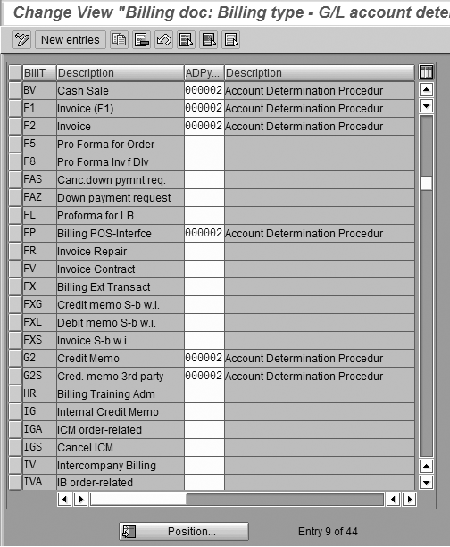
Figure 5
Assign Account Determination Procedure to SD billing document type In the Merchant ID configuration window (Figure 6), you set u
In the
Merchant ID configuration window (
Figure 6), you set up merchant IDs, which the processor or clearinghouse assigns. Merchant IDs are assigned back to G/L accounts in
Figure 7. These assignments are imperative to track transactions and transaction volume successfully, as well as to perform reconciliation of settlement deposits received from the clearinghouse.
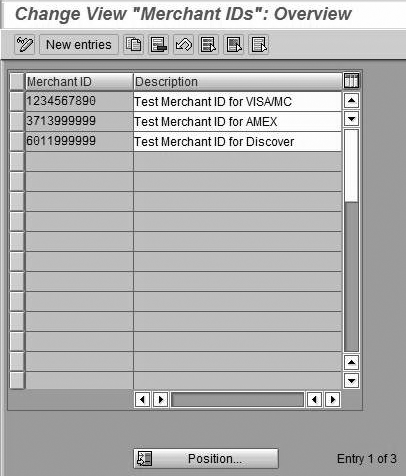
Figure 6
Maintain Merchant IDs
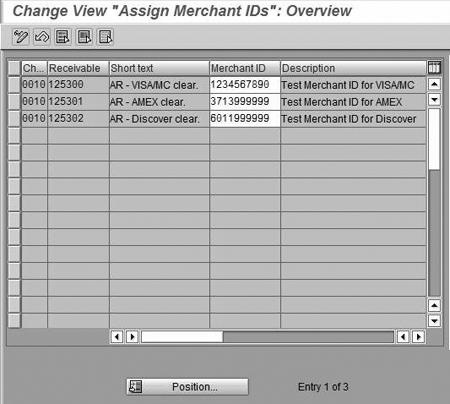
Figure 7
Assign Merchant IDs to G/L accounts
Setting Up the Functionality
Now I'll illustrate some of the key functionalities required for successful payment card integration within the SAP environment. For the system to be able to establish an external RFC, the appropriate entries must be made in transaction
SM59, as shown in
Figure 8. Note the
CCARD_AUTHORIZATION and CCARD_SETTLEMENT entries toward the top of the list.
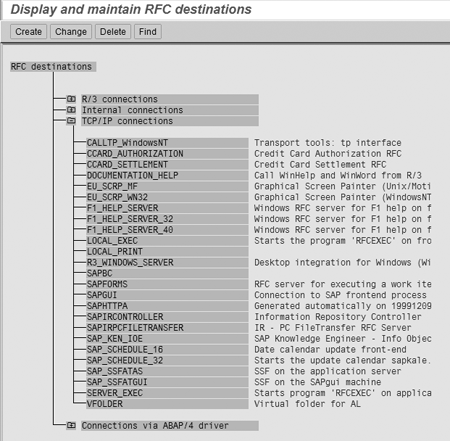
Figure 8
Transaction SM59 showing TCP/IP RFC destinations for authorization and settlement
Once you have established a connection to an integration solution, click on the
Test connection button at the top of the setup page. The
CCARD_SETTLEMENT (
Figure 9) and
Connection Test (
Figure 10) screens show the settlement setup and the resulting connection report.

Figure 9
Details of the settlement RFC destination setup

Figure 10
CCARD_SETTLEMENT RFC is connected to an external payment card solution
It's important to understand the function and benefits of including Level III data with transactions. Level III line-item detail supports business-to-business and business-to-government credit card use. Whereas Level I and Level II offer limited insight into each purchase, Level III includes extensive data, such as quantities, product codes, shipping, discounts, order numbers, and tax details. This information is useful to cardholding organizations, since it helps them streamline accounting and business practices and merge payment data with electronic procurement systems.
Business-to-business transactions in the U.S. generally rely on the availability of Level III data. No standard for transmission of Level III data exists among processors, and specific data requirements vary by processor. The correct mapping of this data is crucial, yet the standard SAP Payment Card Interface does not supply the precise data required for any given clearinghouse.
Figures 11, 12, and
13 list Levels I, II, and III data, supplied by SAP R/3 releases 4.0 and higher. When the settlement is run, these three tables are populated by the system and are submitted in the standard SAP RFC call. The information contained in these screens corresponds roughly with about 80 percent of the data that is generally accepted as Level III; however, it is not entirely accurate and therefore not reliable for generating true Level III-specific transaction reports. An interface developed either in-house or acquired through a vendor is essential for exact compliance with processor requirements.

Figure 11
CCSET table structure used at time of settlement — basic Level I details

Figure 12
CCSETEXD_H table structure used at time of settlement — with some Level II details
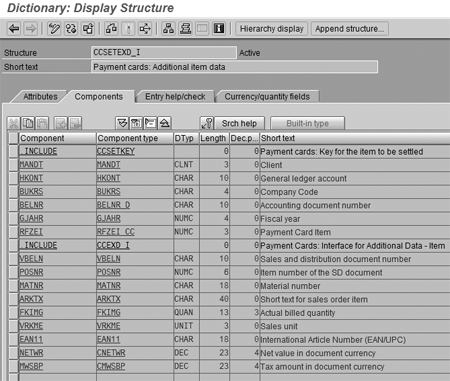
Figure 13
CCSETEXD_I table structure used at time of settlement — with some Level III details
The
Clearing account/external functions screen (
Figure 14) provides the final piece of the puzzle, where authorization and settlement RFCs have clearly been assigned to the various credit card clearing accounts configured for use in the IMG.
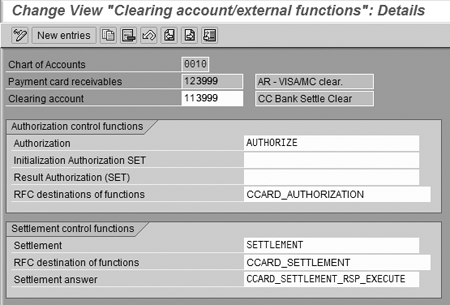
Figure 14
Configuration for authorization and settlement per credit card clearing G/L account
Developing and maintaining a custom, in-house payment card interface typically requires a substantial commitment in staff resources and time. In many cases, the process requires months of effort and a team of development professionals. Additionally, a separate interface must be built to connect with each proprietary processing network required. If you decide to work with a third party to implement credit card clearing, you should confirm that your chosen third-party solution has been certified by SAP for Payment Card Interface integration.
Eric Bushman
Eric Bushman specializes in payment card processing and integration within the SAP Payment Card Interface, including consumer cards, corporate cards, purchase cards, and debit cards. He works closely with Paymetric's Fortune-class customers to integrate payment card workflows with native SAP sales and accounting operations. He served as the integration lead for payment card processing in the first credit card integration with SAP's R/3 (SD and FI) product for Nuskin in 1997, and as the integration lead for payment card processing in the first credit card integration with SAP's Customer Relationship Management (CRM) product for iLogistix in 2000. Prior to becoming an independent SAP integration consultant in 1996, he was a consultant for Price Waterhouse. Eric will be a featured speaker at the ASUG CRM Forum in Phoenix this October.
You may contact the author at
ebushman@paymetric.com.
If you have comments about this article or publication, or would like to submit an article idea, please contact the
editor.


 Premium