Walk through the process of undertaking a comprehensive performance audit of a BW system, from reviewing your queries to training super users. A variety of improvements, both technical and team-focused, can result from this inside-out and front-to-back guide to managing the performance of a BW system. While individually these changes may have a relatively small effect, together they can lead to a substantial and permanent improvement.
Key Concept
System performance could be described as the “speed at which a system responds to a user’s command.” However, a more useful definition might be “the time in which users can get to the information they need to do their job.”
Unlike SAP ERP, SAP NetWeaver BW does not keep goods moving. Instead, it provides information to improve the business’s decision-making processes. This could be vital information, such as knowing which suppliers should be called because they are not meeting their delivery dates or which products should be re-priced because their manufacturing costs have risen sharply over the previous year.
This business benefit is what keeps users returning to the SAP NetWeaver BW system and determines its success. When managing your system, you should ensure that it offers users the best opportunity to work with the data in an optimal time frame. You need to listen to, support, and educate them. After all, without active users, an SAP NetWeaver BW system becomes nothing more than an unnecessary business overhead.
SAP NetWeaver BW system performance is always a balance between cost and responsiveness. You can always improve performance at additional cost by:
- Increasing server capacity, such as CPUs and memory
- Implementing SAP NetWeaver Business Warehouse Accelerator
- Re-designing projects with a revised focus
Plenty of articles have been written about optimum design techniques — but wouldn’t it be great to increase performance without deploying cash-consuming measures? Within a complex IT system, many factors might have an adverse effect on a user’s experience and result in poor performance. Many of these causes can be inexpensive to address and, cumulatively, can have a substantial effect. I discuss the topic of performance in broad terms and look at a variety of techniques, from benchmarking query statistics to training your users, that could improve your system.
What Is System Performance?
When speaking of system performance, you should include the following:
- Query runtime
- Time for the system to respond to a user command (e.g., to open and display a dialog box)
- Effort and time required to navigate to the report layout a user needs
- Consistency: If a one-minute response time is expected, and the response is received in 45 seconds, then the user is likely to be pleased with this. However, if the user is expecting a five-second response time, and the response is received in 30 seconds, then they may be somewhat less pleased.
- Volume of reporting activity. A critical factor in measuring performance is the total number of reports executed over a certain time period. The more you use a system, the slower you can reasonably expect it to be.
The first thing, before embarking on any performance project, is to establish a process to capture and benchmark these statistics. Performance improvements are likely to be gradual and cumulative. Regularly publishing measures communicates achievements and sets realistic expectations.
Technical Content: Your Most Useful Tool
Technical Content is a tool contained in every SAP NetWeaver BW system — you can find it within the Business Content repository. It is originally delivered in a deactivated status, so you must install it. In the later versions of SAP NetWeaver BW (7.0 onward), the Technical Content has been redeveloped and greatly improved (see SAP Notes 965386 and 934848). The new version of the tool offers up-to-the-minute data from Virtual InfoProviders and an Administration Cockpit in the Portal. Also, it is now very simple to activate and install. If you are using SAP NetWeaver BW 7.0, then check that the new Technical Content has been installed.
Technical Content is by far your most useful tool in both understanding what is happening in a system and where to focus your efforts. You can use it to address the main areas of performance statistics, time of day/month, queries, and users.
Performance Statistics
Validate and substantiate any claims that performance is not satisfactory. After agreeing on a definition of what the satisfactory performance is, publish regular benchmarks highlighting successes or failures. Benchmarks can vary, depending on the nature of a report. When delivering projects, good minimum criteria for the initial display of a report are:
Time of Day/Month
As with any other system, SAP NetWeaver BW has a cyclical nature to its activity. Use is increased just after the closing of a financial period and early in the working day.
A server is an expensive and finite resource. Servers are designed to handle a certain volume of processing — in most cases less than the greatest instantaneous load. By ensuring the work is spread out over a greater time period, you use the resource more effectively, which results in greater productivity.
An appropriate analogy here is an airport. An airport is not designed to handle all passengers flying at the exact time they want to. Airport and airline owners go to great lengths to flatten the peak periods (Monday morning, Friday evening, Christmas and Thanksgiving periods) by making these flights more expensive. A flight at 3:00 pm on a Wednesday afternoon, however, is much more affordable.
It is reasonable to think of the similar use of an SAP NetWeaver BW system: It is more expensive, in terms of someone’s time, to run a report during a peak period. Encourage users to think of their time using the system in this way. Perhaps they could be persuaded to catch that 3:00 pm flight on Wednesday without too much inconvenience.
Figure 1 provides an example of the load on a BW production system. You can see the period of peak user activity is short, and for the rest of the day the system has substantially less user activity.

Figure 1
Example of number of query executions per hour. Notice the surge when US users are arriving in the office and the drop-off at lunchtime.
Queries
Are there any problem queries that are taking a disproportionate amount of the system’s capacity or being run the majority of the time? Why are other reports not being run at all? By analyzing the queries that are, or are not, being used, you can focus your training and redevelopment.
For example, understanding why reports that once were critical are no longer actively used is a very valid question. In my personal experience of working with users, I have often discovered reports have fallen into obsolescence because of a small number of long outstanding issues within the data or the need for simple modification to the key figures contained within a report.
Users
Are there particular users that are having a disproportionately poor experience? By working with individuals, it is possible to understand and address the issues they are experiencing. For example, an individual may be exporting the data to Microsoft Excel to be filtered and aggregated. There is a much faster and less involved way of doing exactly the same thing using SAP NetWeaver BW and its filter functionality. Or perhaps the user is navigating through reports, using a series of inefficient navigation steps. By working with this user, these problems can be identified and resolved easily. Once these are understood, likely resolutions could include training, education, issue correction, or development of additional reports.
Figure 2 shows the actual use of an SAP NetWeaver BW production system for all the active users. Six users are responsible for the overwhelming majority of reporting activity on the system. These people can be your initial targets for training and education.

Figure 2
Example of distribution of total query execution time per user. Note that a small number of users is responsible for the majority of the load on the system.
Understand the User’s Experience
Project teams build and tune a system in the development and QA environments. It is normal that a production environment, particularly after months or years of growth, could be experiencing a substantially different performance than that expected by the development team.
It is important that the BW team understands and doesn’t become isolated from the user’s experience. Your BW team should avoid the following:
- Using super user IDs, which do not receive authorization error messages
- Accessing reports via alternative methods. If the users access the SAP NetWeaver BW system through SAP NetWeaver Portal, rather than the BEx Analyzer, then the technical team should, too.
-
Having their own super queries, instead of using and navigating through the standard reports. If the standard reports are difficult to use, then the project team responsible for them needs to be aware of this.
Build Expertise Within the Project Team
The BW technical team needs to understand that system performance is not just a technical issue. To address this ongoing issue:
- Gain a consensus in the wider community that performance is an ongoing consideration and therefore always a work in progress. A culture of continuous improvement, in which requests and recommendations are listened to and acted upon, rather than a blame culture, in which fingers are quickly pointed in the event of problems, is beneficial to everyone.
- Keep the emphasis on long-term improvement and value, rather than the immediate resolution of tickets within Service Level Agreements (SLAs). It is typical in environments with a focus on meeting SLAs that systems can become paralyzed. A support team can become preoccupied with closing issues rather than delivering a useful system. Issues can often be closed without an appropriate resolution and it is important that a support team concentrate on resolving the user’s problem, rather than demonstrating that the issue cannot be repeated. What’s more, system improvements may be avoided because they are not issues and the functionality is not considered broken. In fact, implementing a change could actually trigger the support team to cause other unexpected issues. For example, compressing a large InfoCube substantially reduces both report execution times and the duration of data loads. This would seem like an obvious action for a support team to take. However, the first time the compression is executed, there is a theoretical (and unlikely) risk that reporting could be affected. The compression may fail or the data could become corrupted. Therefore, a support team may be reluctant to undertake this improvement, even though it could be of great benefit.
- Encourage the project and support team to get out and meet the user community face-to-face. Building a positive relationship helps reduce the friction that can commonly form between these groups.
-
Support the team’s continual learning curve. Encourage them to spend time investigating complaints, developing performance management tools, and deploying system improvements. It’s easy for a team to be sidetracked by a single lengthy and time-consuming modification, which offers a 25% improvement, and ignore the series of minor changes, offering a 5% improvement. Used together they are more beneficial.
Build Expertise Within the Business Team
The users are responsible in securing the success of their IT system. They must maintain data, define priorities, and make the most effective use of output. This section identifies the variety of actions the project team can take to increase the business’s acceptance and use of a system.
Super Users
In every substantial user community, an experienced super user is needed. This super user acts as an ambassador for the system and champions its capability. These people can be great allies — if they are confident and happy with a system, then they distribute this message throughout their community. By working with them, you can make improvements to procedures, practices, and the system, all of which result in a tangible difference to the user experience.
Some ways for a super user to contribute:
User Training
The users already know how to use the system, so why would they need training? It is likely that the users were taught how to use SAP NetWeaver BW with a specific project or implementation. It is entirely possible that these original users are now no longer in their roles, and that the current users have received their knowledge second- or third-hand (or worse).
Training should not be considered a one-off activity, delivered when a system is new. You can garner great value in repeating training and tailoring advanced sessions for users. This allows for a much more interactive approach. Supplementary training sessions don’t need to be time consuming to set up or deliver. A half-day, to once again present project functionality and field questions, is not a substantial commitment. Up-front involvement from a super user can ensure that valuable topics are covered and the session keeps to its purpose.
Alternatively, it can be effective to schedule regular, short individual training sessions with key individuals. For example, a common issue is that a user may not realize navigation is a problem. A user may be familiar with running SAP List Viewer reports and think that SAP NetWeaver BW should be tackled in a similar way. However, SAP List Viewer reports are executed in a single step, often taking tens of minutes, whereas in SAP NetWeaver BW, multiple small navigations are usually more effective than a single large data dump. Therefore, the slice and dice nature of running SAP NetWeaver BW reports is the exact opposite of SAP ERP ABAP reports. Coaching your users to unlearn their SAP ERP behavior for SAP NetWeaver BW can dramatically improve their experience.
Front-End Techniques and Quick Wins
Different techniques to improve performance can be effectively employed within the SAP NetWeaver BW front end. These fall into the quick-win category and can usually be deployed without substantial development or testing effort. They include portals, InfoProvider restrictions, BEx variable settings, and default months.
Portals
If you access your reports via a portal, has it been tuned by the Basis team? Navigation though SAP NetWeaver Portal — for example, redrawing screens and opening dialog boxes — should be quick and all take less than one second.
InfoProvider Restrictions
When you execute a query on top of a MultiProvider, the Online Analytic Processing (OLAP) engine executes the same query on each of the underlying InfoCubes. For example, a MultiProvider may contain several InfoCubes containing related data such as budget and sales data. When running a query, SAP NetWeaver BW looks in both InfoCubes for data. When reporting only on sales, the system looks in both InfoCubes, which results in unnecessary processing of budget data during every report execution. By creating a variable against the InfoProvider characteristic within a query, you can restrict execution to read only the InfoCubes that contain valid data.
BEx Variable Settings
When navigating through a report, each variable or filter screen has a drop-down menu dialog. This menu can be filled with data based on one of three algorithms, which is configured in the InfoObject maintenance screen (transaction RSD1) as shown in Figure 3.
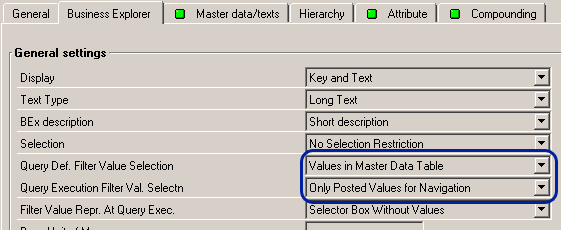
Figure 3
The InfoObject maintenance screen defines the data that appears in BEx filter dialogs
The selected algorithm can have a major effect on the time taken to display the dialog window, particularly for large InfoObjects such as 0MATERIAL. Check that the system is using the appropriate algorithm for the task.
The available settings for the algorithms are:
- Values in master data table: Quickest to run. The dialog contains every value from the master data table, regardless of whether any data is available for reporting.
- Only values posted for navigation: Moderate running time. This can be useful when further restricting your report because the filter dialog only presents data that exists within your report’s current navigational state.
-
Only values in InfoProvider: Slowest to run. Dialog contains all values that are contained within your InfoCube. It can provide the cleanest list, but because it must access data in the entire InfoCube prior to displaying a filter dialog, it can be excruciatingly slow for large InfoObjects, such as 0MATERIAL.
Default Months
Be cautious of developing a query that, by default, retrieves data spanning many years. Users often use the default selection criteria for a report and the increase in unnecessary data causes the report to slow at a linear rate. For example, a 24-month report needs to retrieve and process 24 times the data of a single-month report.
Creating small ranges as the default values ensures that reports have modest data sets. Then users can enlarge the data set and run slower and more demanding reports only when necessary.
Back-End Techniques and Quick Wins
Even though the SAP NetWeaver BW back end is the domain of the developer, many places in this area affect the user community experience. Here are some of the typically overlooked quick wins.
Always Use a MultiProvider
Always build your reports on top of a MultiProvider, rather than directly on an InfoCube. By doing this, you are free to restructure and reorganize the underlying InfoCubes within the MultiProvider without affecting any of the reporting functionality. Furthermore, you can optimize the InfoCube’s dimensions for performance and the MultiProvider’s dimensions for tidiness.
Process Chains
Are these running in parallel, where possible, and are they taking an appropriate time? Process chains need to finish well in advance of the first people arriving in the office. They should always be checked prior to the working day to ensure they have successfully completed.
It is reassuring for users, after logging on, to be presented with a daily system message that confirms that the system has been fully updated and verified. Figure 4 shows a sample of a system message presented to every user when they log on to BEx Analyzer.
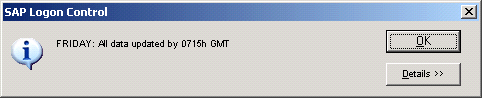
Figure 4
System message to confirm status of data in SAP NetWeaver BW
InfoCube Partitioning
Check that you have partitioned your InfoCubes. This can be configured within the InfoCube maintenance screen in transaction RSDCUBEM, as shown in Figure 5. When compressed, partitioning splits the data in the E fact table across a number of individual tables, according to the nominated time characteristic. This can have a substantial effect on execution times.
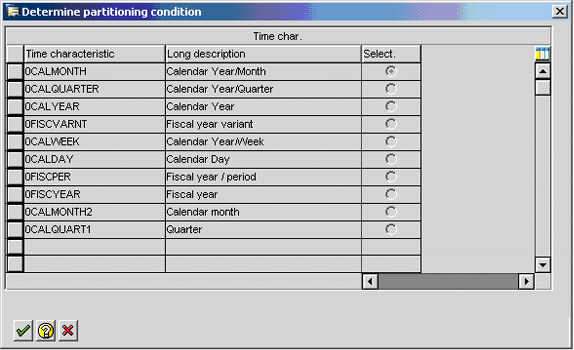
Figure 5
Partitioning by month in transaction RSDCUBEM
For instance, you can run a report for a single month and the BW system can access a small table containing all the data desired. However, without partitioning, the BW system is forced to access a large table that could be over 30 times the size.
Be aware that you can change this configuration only when the InfoCube does not contain any data. When used, the compression setting only has an effect on reports that access compressed data.
Aggregates
A well-designed aggregate can offer a huge improvement on reports, especially when you use navigational attributes. Aggregates are small InfoCubes. They have fewer characteristics, so they require a smaller number of records to store the same information. This means that when a report accesses the data in an aggregate, it has to read far fewer records than it would in an InfoCube. There could be as many as 10,000 times more records in an InfoCube than in an aggregate.
Navigational attributes normally exist outside of the InfoCube’s star schema, so when reporting, a slow join must be made between the star schema and the master data table. However, by placing the navigational attributes into an aggregate, the values are stored in a star schema structure, meaning the inefficient join is no longer necessary.
Avoid the temptation to have a single multi-purpose aggregate, because several smaller, focused ones provide better results. Update times need not be a major concern because SAP NetWeaver BW intelligently builds and updates the data held within the aggregates. They are populated in a sequence to minimize processing — the most summarized and least granular ones are left to last because they can reference the data in the aggregates that have just been built.
It is not uncommon to deploy an aggregate for a single report and then see its runtime fall from 45 minutes to as little as a few seconds. Aggregates do require continual monitoring and revising as the business evolves, and so do their reporting requirements.
George Campbell-Kelly
George Campbell-Kelly is a certified senior BI consultant at Bluefin, the United Kingdom’s largest dedicated SAP consultancy. Since first working with SAP BW in 2000, he has led the delivery of BW systems that operate with SAP R/3, SAP CRM, and Oracle JDE.
You may contact the author at george.campbell-kelly@bluefinsolutions.com.
If you have comments about this article or publication, or would like to submit an article idea, please contact the editor.