Every business is organized into a hierarchy to manage the reporting structure. Organizational units and job codes are two such hierarchies and are essentially the backbones that give needed structure to organizations. Both are used across all the SAP SuccessFactors talent modules, including Learning, Recruiting, and Onboarding, to manage standard business processes. This article provides insights on how to set up Organization and Job structures in the SAP SuccessFactors Learning Management System (LMS) module of SAP SuccessFactors Learning. It includes some of its uses that help administrators manage their learning system effectively and overcome some of the common challenges faced by learning administrators in growing organizations with mass training assignments, reporting on training completions, and training planning.
In this article, I take a deep dive into the organization and job structures setup and uses.
What Are Organizational Units and Job Codes?
An organizational unit (organization ID) is an entity to which employees belong. A job code is an entity associated with an employee, which determines the roles and responsibilities of the employee, and the skills and competencies required for that specific job position/role. Categorizing an organization into organizational units creates a cohesive, clear organizational structure. The same goes with building job structures.
What Are the Benefits of Setting Up These Structures?
Most organizations do not effectively leverage these structures in their learning management system (LMS) and, thus, spend a lot of extra time on manual administration. Setting up organizational units and job codes not only helps increase learning administrator efficiency and productivity, it also helps organizations assign training more effectively, and for less operational and administrative expense. In the SAP SuccessFactors LMS, administrators can associate users and training with organizational IDs and job codes. This association helps manage training assignments and makes reporting more efficient. It overcomes some of the common challenges faced by organizations in the areas of, for example, mass assignment of trainings and reporting.
How to Use Organizational Units and Job Codes in the SAP SuccessFactors LMS Module
In SAP SuccessFactors Learning, organizations and organizational IDs can do the following:
- Connect users to an organization unit, and organization units can be associated with cost centers. With this, every organization unit’s training can be channeled to its respective cost centers, helping maintain accountability for any training costs associated with the courses and external events.
- Use organizational units to selectively enable or restrict classroom training slots based on organization strategy or training needs. If any departments would like to reserve slots for the training, they can reserve them using organizational units.
- Use organizational units to designate appropriate approvers for training requests, streamlining the approval process. This is because a set of approvers belonging to the specific organization unit can approve or reject training requests.
- Assign training and run reports based on specific organization units allowing organizations to manage and report on trainings at a granular level
- For planning training—training can be set up according to each organizational unit’s specific training needs. These organizational units can be used to configure rules for automated assignment of trainings to select a specific user population.
Job codes can be used in the following ways in SAP SuccessFactors Learning:
- To associate training items with a job code. As a result, when employees are hired/onboarded into the LMS, they are automatically assigned with the required courses/trainings based on their job codes/positions.
- To automate assignment of trainings based on job codes. This comes in handy when employees are transferred or get an international assignment.
- To make mass assignments of trainings to a group of users in a specific job position.
- Allows organizations to target and report on trainings for specific job positions. This can be helpful in areas of compliance and auditing.
- To associate competencies with a specific job codes in the LMS, enabling administrators to manage competency-based training assignments and reporting.
How to Set Up Organizational Units and Job Codes in SAP SuccessFactors LMS Module
Now that you understand how to use organizational IDs and job codes/positions in SAP SuccessFactors Learning, let’s look at how to set them up.
The SAP SuccessFactors LMS provides simple and easy-to-use connectors, which are accessible to LMS administrators. Connectors are used to import data into the LMS. There are different types of connectors offered in the SAP SuccessFactors LMS. Each connector has its own specific data structure, so each input data file must match a predefined format.
To set up the organization and job data in SuccessFactors LMS, follow these steps.
Step 1. Download the connector template from the SAP SuccessFactors LMS instance using the Download Connector Template tool. Follow menu path Admin Center > Learning Administration > System Admin tab > Tools, and the screen in Figure 1 opens.
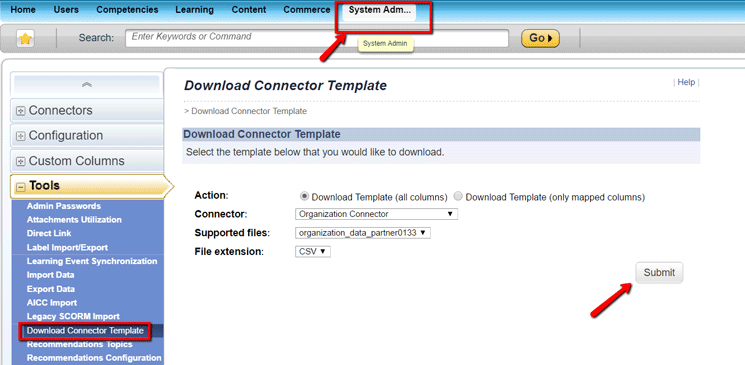
Figure 1
Download the connector template(s)
Here you find separate templates available to download for organizational unit and job code connectors. Choose the Download Connector Template option on the left, under Tools (Figure 1), and the screen expands on the right. Select the Download Template (all columns) radio button. Then select the specific connector template(s) you want to download from the Connector field drop-down options. (The options are shown in Figure 2.). Select the appropriate connector (e.g., job or organization) from the supported drop-down options, and CSV (comma-separated value) as the File extension format to download the import file template. Once you’ve made your entries in Figure 1, click the Submit button to download the template.
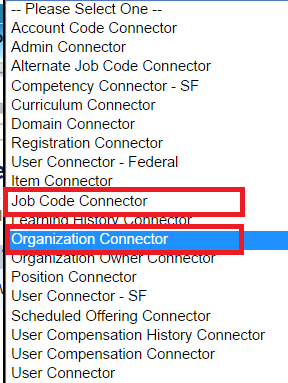
Figure 2
The list of connector templates available for download
Step 2. After the respective templates are downloaded, open the template file using Excel and populate the data file with the organization and job data as shown in Figure 3.
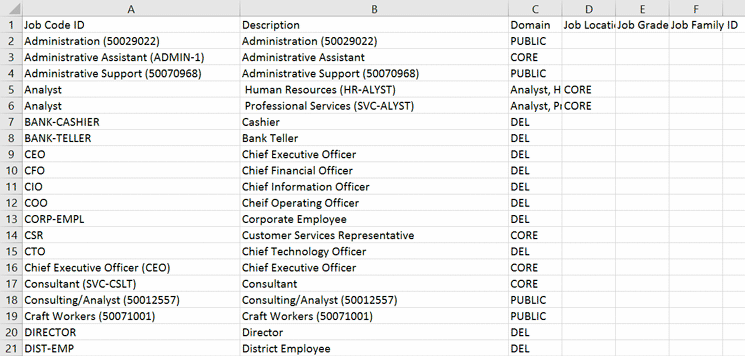
Figure 3
Sample template with job-code data
Step 3. Either a learning administrator or your implementation consultant can configure the mappings in the connector configuration file. This mapping is required to map the import connector file (in Excel or CSV) fields to the fields in the LMS.
Mappings can be configured in the SAP SuccessFactors LMS administrative interface by following menu path System Admin > System Configuration > Connectors (Figure 4). The fields on the right represent the columns or fields in the CSV or Excel import file. The fields on the left correspond to the fields in the SAP SuccessFactors LMS. This helps extract data from the import file and import it into the SAP SuccessFactors LMS organizational structures.
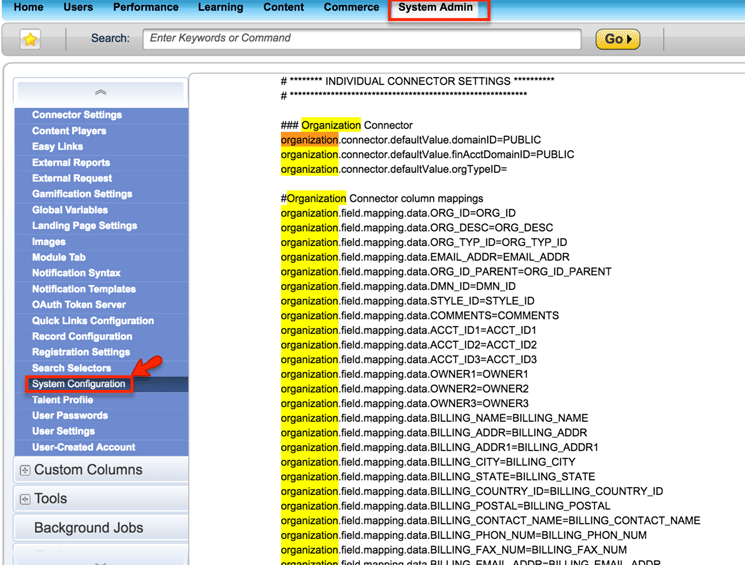
Figure 4
Map the connector settings to the LMS
(Note:
Administrators need to have Edit System Configuration permission in the SAP SuccessFactors Learning system to edit the connector configuration file as shown in Figure 4.)
Step 4. After the data-import files have been created with the data, as shown in Figure 3, and are imported to a Secure File Transfer server, the required connectors can be executed or scheduled to run in the SAP SuccessFactors LMS (Figure 5).

Figure 5
Review the list of available connectors and the connector execution screen
To schedule (or execute) the connectors, click the Schedule This Process checkbox in Figure 5.
Connectors can be scheduled to run once or to run periodically. The connector-execution process imports the Excel or CVS file into the SAP SuccessFactors LMS from the secure file transfer server.
Step 5. Once the connector has been executed, the organizational and job data is set up in the SAP SuccessFactors LMS and is ready to be used for easy administration of your learning system. To view the Organization units in the SAP SuccessFactors LMS, follow menu path Admin Center > Learning Administration > Users tab > Organizations and the screen in Figure 6 opens.
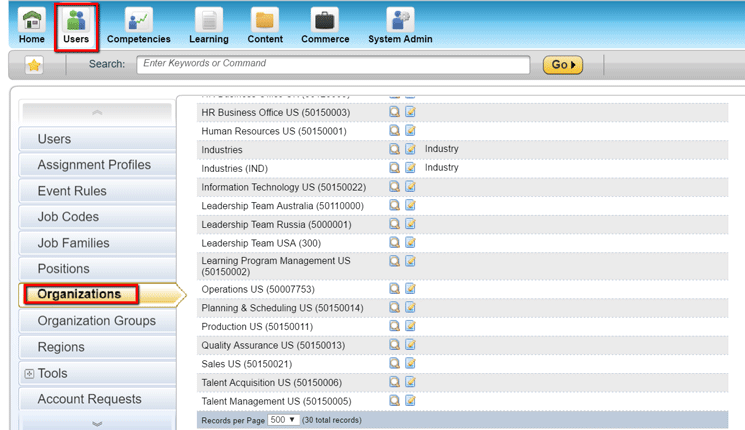
Figure 6
The new list of organizational units that are available in the SAP SuccessFactors LMS module after the connector is executed
Follow menu path Admin Center > Learning Administration > User tab > Job codes and the screen in Figure 7 opens.
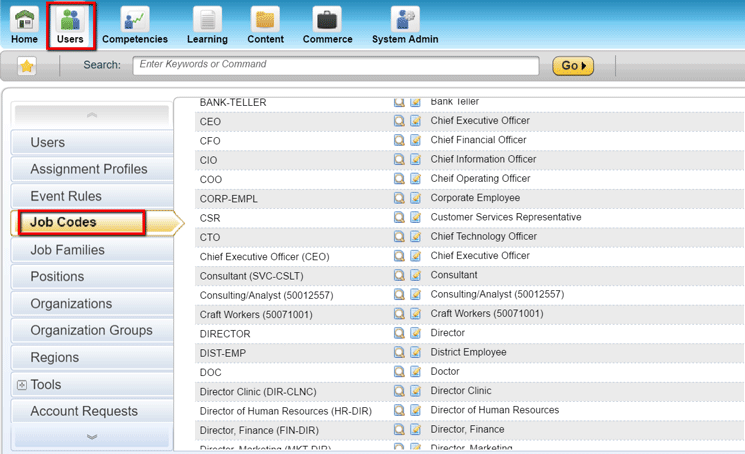
Figure 7
The new list of job codes that are available in the SAP SuccessFactors LMS module after the connector is executed
These job codes and organizational units are now available for administrators to use in the SAP SuccessFactors LMS. Both job codes and organization units can be associated with users, trainings, competencies, and so on.
These same connectors can also be used to refresh the data in the SAP SuccessFactors LMS whenever there are changes in the organizational units or job codes, thus making the administrators more responsive to changes in organizational and job structures or business-process changes within an enterprise.