SAP's standard functions and operations provide functionality to solve most time and payroll calculations. But in some cases they don’t, and that is when you can develop custom functions and operations for both payroll and time management. The author introduces you to the basics, including how to design, code, and use them.
SAP’s standard functions and operations provide functionality to solve most time and payroll calculations. But in some cases they don’t, and that is when you can develop custom functions and operations. Both payroll and time management can use custom functions and operations. The process for creating them is much the same.
I’m going to introduce you to the basics of knowing when to create custom functions and operations, if it is a function or an operation that is needed, and how to design, code, and use them.
Build a Function or an Operation?
Custom functions and operations require a good deal of thought, analysis, and design. My rule of thumb is that 90 percent of the effort should be spent in analysis and only 10 percent on coding. Functions and operations are coded in ABAP, so you have all the flexibility of that programming language, but should you create a custom function or a custom operation?
Table 1 has guidelines on how to know when to create a function versus an operation, but keep in mind there are no hard and fast rules on when to do one or the other. A function performs a specific job. For example, it reads data from custom tables, manipulates multiple wage types at the same time, calculates taxes, and processes wage types. An operation does a small unit of work, such as multiplying a single wage type’s number by a rate to get an amount.
| If the requirement is: |
Then this approach fits best: |
| The calculation requires several wage types. For example — do you use several wage types plus other factors to calculate the value for a new wage type? |
This is best implemented with a function. You could select various wage types from the result table (RT), look up some data in infotypes or custom tables to perform a calculation, and put the results into a new wage type in the RT. |
| The calculation is intended to introduce a custom data value into a wage type or time type. For example, you added a new field to infotype 1 or created a custom infotype and need to bring that data into time evaluation. |
Use a custom operation for this. When processing the wage type or time type in a rule, you can retrieve a data value from a custom field or custom infotype and put it into the calculation (the HRS field in time evaluation or AMT/RTE/NUM in payroll). |
| You want to make a decision — some sort of branching logic — in time evaluation or payroll. |
Use a custom operation to read that data value and put it into the variable key of the rule. |
|
| Table 1 |
When to create a function or operation |
Example 1: Time Evaluation Operation for Sell-Back Hours
I ran into a recent requirement to provide the number of paid time off (PTO) sell-back hours to the time evaluation program RPTIME00. This PTO sell-back number was stored in a custom infotype 9002, and the time evaluation schema needed it for a calculation. This custom operation was called ZSLBK. The ABAP code for this is simple, as shown in Figure 1.
form opzslbk.
  tables: pa9002.
* act-anz is the HRS field in time eval
  act-anz = 0.
* get the field on infotype 9002
  select * from pa9002 where pernr = pernr-pernr and
                             endda >= acdate and
                             begda <= acdate.
    act-anz = pa9002-z_hrsbback.
  endselect.
endform.                    “opzslbk
|
|
| Figure 1 |
ABAP code for operation ZSLBK
|
When operation ZSLBK is called from time evaluation, RPTIME00 actually executes the ABAP form opzslbk. The ABAP code for that form sets the HRS field to zero (act-anz = 0), then reads table pa9002 for the current personnel number (the pernr-pernr field). The acdate field is the accounting date for time evaluation — which is the current day being processed in the time schema. As with most functions, operations, or ABAP code in general, there are other ways to accomplish this. For example, some programmers might use the HR_READ_INFOTYPE function to read infotype 9002 instead of directly accessing table PA9002.
Note
Time evaluation functions and operations are stored in RPTMOZ00. Payroll functions and operations are stored in PCBURZxx0, where xx is the country code (US, MX, DE, etc.). These are not user exits; they are includes to the time and payroll drivers. When you first modify them, you are asked to open a “repair” on them since they are standard SAP include files (work with your Basis team for help on repairs). However, SAP doesn’t deliver any changes to these includes, so your changes will not be overwritten.
Rules and functions must also be defined via transaction PE04, the function/operation editor. A number of attributes are specified here. Table 2 describes the more frequently used ones.
Operation ZSLBK has a simple configuration in PE04, as shown in Figure 2.
|
Functions
|
| The name of the ABAP form that contains the code — for functions this is “fu” followed by the function’s name. |
| Which countries the function is valid for. Time functions are valid for all countries. |
| The parameter list describes what each of the four parameters is used for, and that can vary by country. |
| The input parameters button tells the function which internal tables to print out in the log before the function is executed. For example, you could print out the input table (IT), RT, and Workplace Basic Pay (WPBP) table before the function is processed. These parameters do not have any bearing on what internal tables are available to the function. |
| The “output parameters” describe which tables are printed out after the function has been executed. |
| Operations |
| Similar to functions, the ABAP form and valid countries are specified. The name of the ABAP form for operations is “op” followed by the operation name. |
| Operations can have complex variations in how parameters are specified. The best way to approach this is to find an operation that has similar processing logic and see how its parameters have been defined. |
| Note: More information on transaction PE04 can be found on SAP’s Web site at https://help.sap.com in the HR Tools section |
|
| Table 2 |
Frequently used attributes in the function/operation editor |
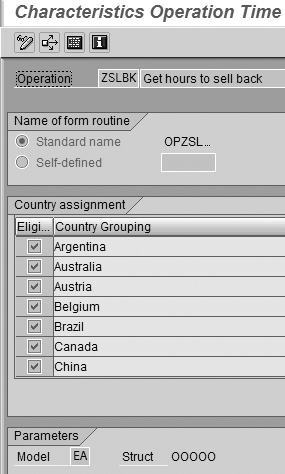
Figure 2
Attributes of operation ZSLBK
A critical attribute of a rule is the parameter model — in the case of operation ZSLBK, the parameter model is EA. The structure of the parameter model EA is OOOOO — five letter Os. The letter “O” is used to tell the payroll driver that whatever takes that space is part of an operation name. Since ZLSBK is a five-character operation, model EA fits well. There are many possibilities for the parameter model, as shown in Figure 3. The letter “F” is a symbol for a field parameter, “V” is for a value parameter, and “S” is for the mathematical sign.
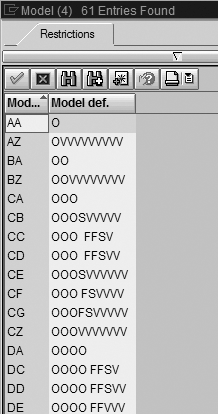
Figure 3
Parameter models for operations
Returning a Value to the Variable Key in a Rule
One of the most important uses of operations is to return a value into the rule’s variable key so that a decision can be made. Operation ZXPTO is an example of that. It reads a custom field from infotype 1 and returns it to the variable key, as shown in Figure 4.
form opzxpto.
* find the infotype 1 valid as of the acdate
loop at p0001 where endda >= acdate and begda <= acdate.
vargt = p0001-zzextrapto.
endloop. * if it’s empty then return **
if vargt = ‘’. vargt = ‘**’. endif.
* fill the variable key
perform fillvargt.
endform.
|
|
| Figure 4 |
ABAP code for operation ZXPTO |
Since infotype 1 has already been read into memory by the time evaluation program RPTIME00, you don’t have to read it again within this operation. You simply loop through infotype 1 (the internal table P0001) where its effective dates span the time evaluation accounting date, field acdate. If the infotype 1 field (zzextrapto) is empty, then you return ** to the variable key (the variable key doesn’t accept spaces, so the default value is **). The standard form fillvargt is used to put the varg value into the rule’s variable key.
The attributes for a decision operation are different than what you saw in example 1. Figure 5 shows how the parameters are configured for this decision operation.
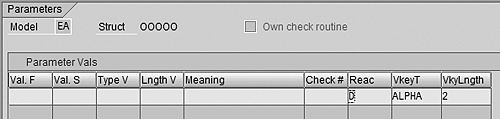
Figure 5
Defining parameter values for a decision operation in PE04
Note
A good way to determine what needs to be set for the parameter values of a decision operation is to look at a similar existing operation. Use the F1 key to get the system help text for each field to determine the possible values and combinations of values. The parameter values correspond to the selected parameter model.
Example 2: A Custom Function for Benefit Accrual
Functions are easier to define than operations, but usually involve more complex ABAP programming. A function can process all the entries in a particular payroll table, the IT or RT for example, but an operation only has to be concerned with one wage type at a time.
Using a custom function for calculating a benefit accrual is a good example to show how the process works. Some companies calculate an accrual for the cost of employee benefits. This accrual is charged to the employee’s cost center as a debit. The credit then goes to a corporate expense for employee benefits. In this example, an accrual rate is multiplied by a wage base to get the accrual amount. Each combination of employee subgroup and personnel subarea (in this case, each labor union is in a separate personnel area) can have its own accrual rate. The number of possible rates is well over 100. For a smaller number of rates, you could set up payroll constants in V_T511K, and use those constants in a rule to calculate the benefit accrual. But given the number of rates in this case, a payroll function makes sense.
Before approaching the ABAP code or even the definition of the function in PE04, it is good to define the high-level calculation logic. This practice helps you determine which internal payroll tables need to be accessed, as shown in Table 3.
| Calculation Step |
Payroll Tables Required |
| Find the correct accrual rate for the employee’s personnel subarea and employee subgroup |
Internal table WPBP contains the employee’s personnel subarea and employee subgroup, but they could have transferred from one to another during the period. If that happens, do you prorate the accrual for each personnel subarea/employee subgroup combination? Or do you only look at the first or last assignments in the payroll period? In this example, you always use the last WPBP assignment of the period. You need a custom table to store the accrual rates. |
| Multiply the benefit accrual wage base by the accrual rate |
You need to know if the accrual wage base wage types will be in the IT or RT when this function is called. In this case, they will be in the IT simply as a matter of design. I ensured that the wage types involved in the calculation have processing class 20 values that keep them in the IT. |
| Create the benefit accrual wage type that charges the employee’s cost center |
Should you put this accrual wage type in the IT or RT? In this case, you will put it in the RT since there is no need to process the wage type further. |
| Create the benefit accrual wage type for the corporate benefit expense |
This wage type also goes in the RT, but you need to attach a specific corporate benefit cost center to it so that when the accounting transfer to FI/CO is run, it will not be charged to the employee’s cost center. The corporate benefit cost center is stored in table C1 in payroll. You have to link the wage type in the RT to the cost center in the C1 table via a wage type split indicator. This is the same technique used in the standard system when assigning override cost centers to wage types on infotypes 14, 15, and 267. |
| |
| Table 3 |
High-level calculation logic for benefit accrual calculation |
Unlike operations, functions do not have parameter models. They simply have four parameters that can be passed from the schema to the function. Each parameter value is stored in the “as”’ structure as as-parm1, as-parm2, as-parm3, and as-parm4. Figure 6 shows the definition of payroll function ZBNAC, which calculates the benefit accrual during the payroll calculation. My example function doesn’t require any input parameters.
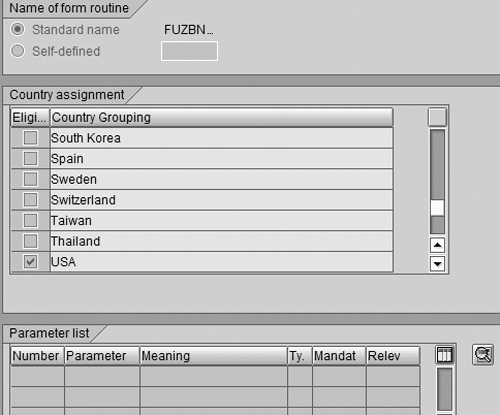
Figure 6
Defining payroll function ZBNAC in transaction PE04
When defining a function, you can specify which internal tables are printed to the log before and after the function. For example, my function reads wage types from the IT and writes new ones to the RT, so it would make sense to print them to the log. It also creates an entry in table C1, so displaying that before and after the function’s processing helps users determine what the function changed in that table. The Input parameter button specifies which tables are printed in the input section of the payroll log, and the Output parameter defines those printed in the output section. Figure 7 shows the definition of input parameters. Earlier releases of SAP R/3 may not have these two buttons on the function/operation editor. In that case, simply maintain view V_T52BW instead.
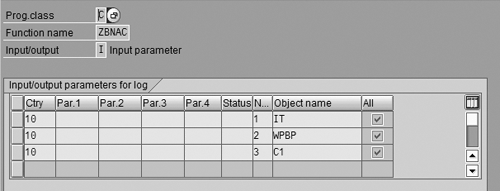
Figure 7
Defining input parameters (tables) for a function
The first part of the actual ABAP development is to use transaction SE11 (Data Dictionary) to create a table to store the benefit accrual rates. In addition to the table definition, the table maintenance generator was used to create a maintenance view that can be used with transaction SM30 to maintain the rates (Figure 8).
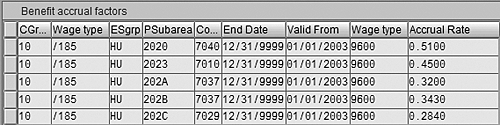
Figure 8
The table maintenance view for ZHR_BEN_ACCRUALS
The BASE_LGART is the wage type that has the wage base for the benefit accrual, while ACCRUAL_LGART holds the wage type that carries the calculated amount to accrue for benefits. You also store the company code and controlling area because they are needed to create the entry in the C1 table. Those values could have been determined dynamically in the ABAP code, but putting them in the table makes the code simpler.
Now that you know which internal tables to access in payroll and you have the custom table to store the benefit accrual rates, you can write the ABAP code for the function. Using the employee’s personnel subarea and employee subgroup and each wage type in the IT, you search the data in ZHR_BEN_ACCRUALS (where the IT wage type equals the BASE_LGART). If you find an entry, then the “found” variable is set to “X.” Figure 9 shows the ABAP code used to calculate the accrual wage types for the ABAP function fuzbnac. As with payroll operations, this code goes into the include PCBURZUS0. (To save space, the ABAP code used to select the correct benefit accrual rate from ZHR_BEN_ ACCRUALS is not shown.) If you do find a rate, then the variable “found” is equal to “X.”
* zhr_ben_accruals was read with the company code, employee
* subgroup, and personnel subarea from the last wpbp split –
* along with the current wage type in the IT and the
* value of variable ‘calc_molga’
* if we found an entry in zhr_ben_accruals then create the accrual
* wage types, one for employee’s current cost center and one for
* cost center coming from zhr_ben_accruals.
    if found = ‘X’.
      it-lgart = zhr_ben_accruals-accrual_lgart.
      it-betrg = zhr_ben_accruals-ben_factor * it-betrg.
      it-betpe = zhr_ben_accruals-ben_factor.
* create wt without new cost center split – this will debit
* the employee’s cost center for the benefit accrual amount
      move-corresponding it to rt.
      collect rt.
* create wage type with cost center link, this will be a credit
* to the cost center coming from zhr_ben_accruals
* next_c1znr has the next split number for the c1 table
      rt-c1znr = next_c1znr.
      rt-betrg = rt-betrg * -1.
      collect rt.
      c1-c1znr = next_c1znr.
      c1-bukrs = wpbp-bukrs.
      c1-kokrs = zhr_ben_accruals-kokrs.
      c1-kostl = zhr_ben_accruals-kostl.
      append c1.
    endif.
|
| |
| Figure 9 |
ABAP code to calculate benefit accrual |
When payroll is run with the log turned on, you obtain the output shown in Figure 10. In the Input section, you see the tables used as inputs to the calculation — the IT, WPBP, and C1 tables. The Output section shows the tables that the function changed — RT and C1.
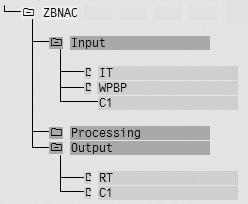
Figure 10
Log display for function ZBNAC
Steve Bogner
Steve Bogner is a managing partner at Insight Consulting Partners and has been working with SAP HR since 1993. He has consulted for various public, private, domestic, and global companies on their SAP HR/Payroll implementations; presented at the SAP user's group ASUG; and been featured on the Sky Radio Network program regarding SAP HR.
Steve will be presenting at the upcoming HR Payroll Seminar November 7-8 in Chicago and November 27-28 in Orlando. For information on the event, click
here.
You may contact the author at sbogner@insightcp.com.
If you have comments about this article or publication, or would like to submit an article idea, please contact the editor.