See how you can assess the abilities of potential successors using the talent review meeting and talent calibration functionalities in SAP ERP HCM succession management.
Key Concept
Talent review meetings and talent calibration are important processes in succession planning. During talent review meetings, talent management specialists work closely with line managers (and other managers if required) to calibrate the employees on their teams. In SAP ERP 6.0 enhancement package 4, you can generate the agenda of the talent review meeting along with details of the talents in SAP ERP HCM succession management.
Managers need to invest time to assess the employees on their teams. In SAP ERP 6.0 enhancement package 4, SAP ERP HCM succession management provides functional components to conduct talent review meetings and talent calibration in a formal and efficient way.
With these components, you can compare and calibrate the employees in your team with those in other teams. Assessing every employee in the organization allows you and the other managers to know and understand the strengths of all employees: what can be accomplished, where deficiencies exist, and the positions you need to fill to remove those deficiencies.
Talent Review Meeting
Organizations conduct talent review meetings to discuss employees’ skills and potential successors that may be suitable for vacant positions. During the meeting, managers also:
- Discuss the development needs of the employees
- Identify high potential in the team
- Nominate to talent groups
- Perform/edit talent assessments
- Perform talent calibration
Note
In SAP ERP HCM succession management, you can use talent groups to plan development and mentoring needs specifically tailored to the employees in that talent group. Employees are assigned to a talent group in a two-step process: a manager nominates the employee, and the nomination is approved.
The talent management specialist (or whoever is responsible for talent management) organizes the talent review meetings using SAP ERP HCM succession management. With this functionality the specialist creates the meeting agenda and includes the participating managers as attendees. The agenda contains the details and assessments of the employees to be discussed in a talent profile (Figure 1).
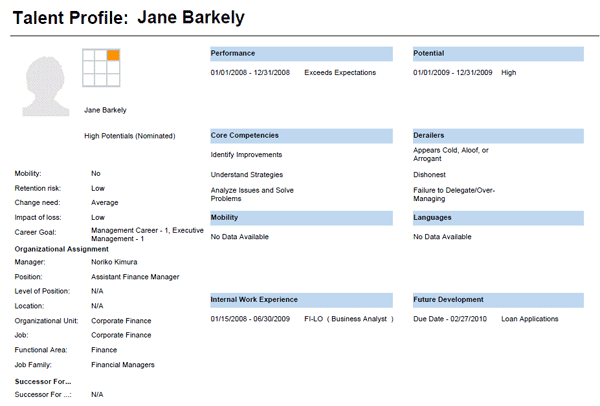
Figure 1
Talent profile of an employee
To create an agenda, you need to do some configuration. Follow IMG menu path SAP IMG > Talent Management and Talent Development > Talent Review Meeting.
Complete the following configuration settings in the IMG:
- Specify the languages for the talent review meeting. If you are part of a global organization, you can customize the languages in which the meetings will be conducted.
- Define categories for the talent review meeting. In this customizing activity, you can define categories such as global, local, or your organization’s location and regions. You choose these settings to suit your business requirements.
- Define levels for the talent review meeting. For example, determine if middle management or top management is participating in the meeting. You can create the agenda based on the level; for example, if top management are the participants, the meeting can be for determining the potentials for the top management key positions.
- Define the roles of each support team member. Determine who will take on roles such as HR business partner, minute taker, or business manager (Figure 2). When assigning roles in the IMG, be sure to assign a minute taker for every meeting.

Figure 2
Support team member roles for talent review meetings
- Make additional settings for the talent review meeting: Define whether the talent review meeting agenda will be automatically numbered. For example, for the AGENDA_NUMBERING_TYPE parameter, the two possible values are OFF and NUM_DOT.
- OFF – This value indicates there is no numbering of the agenda items
- NUM_DOT – This value indicates the agenda items and sub-items are numbered accordingly
The talent review meeting agenda is stored in infotype 7434 (agenda topics). You can create the agenda in the portal and print it or circulate it to the participants.
Calibrate Your Talent
In SAP ERP HCM succession management, you can use talent calibration with different managers to discuss and compare top employees in your organization and determine the best fit for key positions. Talent calibration also enables you to:
- Assess employees’ derailers and qualities, which are collected in the talent assessment section of SAP ERP HCM succession managment, and compare them to other employees
- Share opinions with other managers regarding employees and take that into consideration when determining best fits for key positions
- Calibrate the top employees against the calibration grid, which I will discuss later
- Discuss an employee’s nomination to a talent group
The talent management specialist facilitates calibration meetings with the managers to discuss employees—this may or may not be an item on a talent review meeting agenda.
Here are some suggested best practices for using the talent calibration meeting functionality in SAP ERP HCM succession management:
- The talent management specialist should know which employees are to be calibrated, what parameters are to be used, and what standards should be met. Many organizations use a nine-box calibration grid to calibrate their talent (I discuss the nine boxes and how to configure them later).
- Keep the number of employees to be discussed at a manageable level
- If the meeting cannot be completed in one meeting, the date, time, and agenda for the second meeting should be decided and agreed upon. The manager of the organization should attend the meeting, so he or she is aware of the employees being discussed and what their future development plans might be.
- Be sure to designate a minute taker
You can reach the talent calibration screen in the manager portal for SAP ERP HCM. In the Talent Management service area, click Assessment (under Services) (Figure 3).
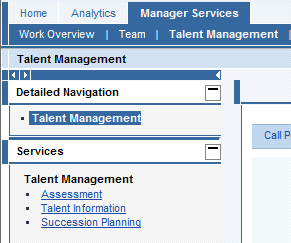
Figure 3
Navigation to the talent calibration screen
The calibration grid displays the employees selected for calibration (Figure 4). The calibration grid displays nine boxes with the X-axis showing Performance and the Y-axis showing Potential. You can calibrate the employees by moving them between grids.

Figure 4
Talent calibration grid
To configure the calibration grid follow IMG menu path to SAP IMG > Talent Management and Talent Development > Calibration Grid. Perform the following customizing activities:
- Specify the settings for the grid (Figure 5). The settings include the description of the grid, the scales to be used, and the long text, values, and descriptions of the values of the X-axis and Y-axis.
Tip!
In the Calibration Grid Fields customizing setting (Figure 6), you can define the nine boxes you wish to use for talent calibration. I have seen clients use six boxes to calibrate their employees, as well. How many fields you use depends on your business requirements.

Figure 5
Custom settings for talent calibration grid
Note
The scales that you use in talent calibration (to evaluate performance and potential of the talent) should be the same that you used in performance calibration.

Figure 6
Custom settings for the talent calibration grid fields
- Specify which grid you plan to use in the talent review meeting. You can create more than one calibration grid, but you cannot use more than one calibration grid (the additional grids may be used in future meetings, if you make that setting in the IMG). You specify which calibration grid you plan to use in the IMG customizing step, Specify Grid to be Used.
Compare the settings you created in Figure 6 to the talent calibration grid in Figure 4. In a typical scenario, the talent management specialist displays the employees to be discussed in the calibration grid so the manager can give his or her assessment (Figure 6). Depending on your business requirements, other managers can give their assessments of the employee and of the direct manager’s assessment. For example, other managers may discuss:
- Leadership quality of the employee. During the review period, what initiatives or leadership did the employee take to positively affect the team and its performance?
- The direct manager’s assessment of the employee. Do the managers agree with the direct manager’s assessment of the employee? If yes, what other qualities do they see or what assessment do they provide? If not, what are the specific reasons?
The talent management specialist can use the review meeting to determine whether the employee is a good fit (as a successor or as bench strength) for any current open positions or for a planned vacancy. If such a position is identified, then during the talent review meeting, the managers can discuss the succession plan. They can create development needs based on a profile match-up between the talent and the position, which they can perform in SAP ERP HCM succession managment.
Note
You can use the SAP Talent Visualization application by Nakisa to do the profile match-up. You can do a profile match-up between positions or between positions and a person. It is important to maintain the qualifications and qualification catalog, which you can use to define requirements for positions. Read Janet McClurg’s Quick Tip, “
Design and Implementation Considerations for Qualifications in SAP HCM,” for more information about qualifications.
- Managers can discuss any derailers they identify in the talent review meeting (Figure 7). Derailers highlight attitude issues and how they might affect the employee’s performance or succession plans. Other managers can share their experiences and discuss what qualities are required for a current open position.

Figure 7
Derailers of an employee
- You can use the talent review meetings to discuss retention issues. You might have a top employee who receives the highest grade in the performance appraisals and talent assessment, but the manager might feel it will be difficult to retain him or her. Other managers might be able to provide suggestions on how to retain the employee during the meeting by discussing what excites the employee and what he or she is seeking.
Talent Groups
In SAP ERP HCM succession managment, the talent management specialist can create talent groups in the portal to group employees with similar employees. Examples of talent groups include:
- High potential employees
- Top employees
- Employees with leadership
- Employees with specific experience
- Employees interested in international assignments
- Mobile employees
You can create talent groups based on your business needs. Categorizing your employees into talent groups helps tailor training requirements for specific talent groups. For each talent group, you include the title of the talent group and the duration for which the employees are assigned to the talent group. These details are stored in infotype 7420 (talent group).
You can also create a support team for the talent group. The support team consists of employees who have access to the talent group and who can make changes to the talent group. For example, support team members can add or delete employees from the talent group. The support team details are stored in the infotype 7430 (support team).
During talent assessments, managers nominate employees to a specific talent group (Figure 8) and the talent management specialist approves it. The manager can nominate an employee to multiple talent groups. By default, the system automatically nominates the person who created the talent group as a member of the support team.
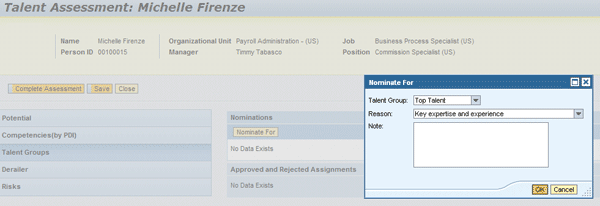
Figure 8
Nominate an employee to a talent group
Configure the following customizations via IMG menu path Talent Management and Talent Development > Talent Groups:
- Define reasons for nomination/approval: Create a new entry and define reasons to approve the nomination of an employee to a talent group. Table 1 shows examples of reasons for nomination and approval.

Table 1
Define reasons for nomination/approval
Table 1 Define reasons for nomination/approval
- Define reasons for rejection. Some examples are misjudgment, bad reference checks, or no interest in international opportunities (derailer).
- Define reasons for delimiting talent groups. Some examples are the talent group has been replaced by a new talent group or there is no longer a business need for the group.
Note
An employee can be nominated to one or more talent groups. When an employee is nominated to multiple talent groups, if the employee is rejected in one talent group, the employee continues to exist in other talent groups. Similarly, when a talent group is delimited, the employees continue to exist in other talent groups where they were nominated. When employees are removed from a talent group, only their nomination to the talent group is removed. The employees’ talent assessments and the talent profiles continue to exist.
Employee Comparisons
During talent calibration, you can choose two or more employees and compare their talent profiles (Figure 9). Talent comparison makes the talent calibration exercise more balanced and meaningful.

Figure 9
Compare employees
For example, say you identify and nominate two employees as future leaders. During the talent review meeting, the participants can do a talent comparison and see which qualities and derailers these employees possess. This helps identify future successors for these employees and also helps identify these employees as successors for key positions.
On the contrary, a manager might oppose the nomination of an employee as a future leader. The talent management specialist can then do a talent comparison between that employee and another employee who is approved as a future leader. The manager and talent management specialist can then have a meaningful discussion to see if there are any prejudices or derailers that they not aware of.

Venki Krishnamoorthy
Venki Krishnamoorthy is an author, speaker, and SAP ERP HCM talent management solutions subject-matter expert. He is currently an independent SAP ERP HCM functional consultant. Venki has over 10 years of experience as a functional lead, project manager, and program manager in the HCM space. Besides implementing SAP HCM solutions, he has implemented and acted as a trusted advisor on SAP ERP HCM talent management implementations, including E-Recruiting, HCM Performance Management, Succession Planning, SAP Talent Visualization by Nakisa, Learning Solutions, and Employee Self-Service and Manager Self-Services. He is the coauthor of three books: E-Recruiting with SAP ERP HCM, SAP ERP HCM Infotypes: Your Quick Reference to HR Infotypes,
and SAP Transaction Codes: Your Quick Reference to T-Codes in SAP ERP.
You may contact the author at krish.venki1@gmail.com.
If you have comments about this article or publication, or would like to submit an article idea, please contact the editor.