In this Round 3 of our “Rumble of the Jungle” we explore Anthropic Claude, and while for most of us OpenAI ChatGPT and Google Gemini almost need no introduction, Anthropic Claude is a more recent product. Anthropic was founded in 2021 by seven former OpenAI employees, including siblings Daniela and Dario Amodei, the latter of whom previously served as OpenAI’s Vice President of Research.
In April 2022, the company announced it had secured $580 million in funding, with a notable $500 million investment from FTX under Sam Bankman-Fried’s leadership--yes, the crypto guy. That summer, Anthropic completed the first version of its AI model, Claude, but withheld its release, citing the need for further internal safety testing and a desire to avoid escalating the race to develop increasingly powerful AI systems.
In February 2023, Anthropic faced a trademark lawsuit from Texas-based Anthrop LLC over the use of "Anthropic A.I." Later that year, on September 25, Amazon announced a strategic partnership with Anthropic, initially investing $1.25 billion with plans to invest a total of $4 billion. As part of the deal, Anthropic designated Amazon Web Services (AWS) as its primary cloud provider and agreed to make its AI models available to AWS customers. In October 2023, Google also invested $500 million in Anthropic, committing an additional $1.5 billion overtime.
By March 2024, Amazon fulfilled its full $4 billion investment as outlined in the previous year’s agreement. In November 2024, Amazon further expanded its commitment, announcing an additional $4 billion investment, bringing its total stake in Anthropic to $8 billion. This agreement also included increased adoption of Amazon’s AI chips for training and deploying Anthropic’s large language models.
As you can see this product is quite recent, but also backed up by several tech industry giants. Let’s give it a try.
Here are the rules of our “Rumble in the Jungle” Hackathon
Alright, same as the other Round 1 for ChatGPT, Round 2 for Google Gemini, and now Round 3 for Anthropic Claude, I’ve kept it simple. We’re focusing on the same code across all tests, no advantage provided to any of them. The test is the same for all three AI chatbots: improving SAP SAC JavaScript code within an SAP SAC Analytic Application that includes a table, a chart, and a button. The goal is to enhance the script so that on the third button click, both the table and the chart are displayed.
The initial SAP SAC script is the same for all chatbots, ensuring a fair comparison. The expected behavior is as follows:
- First click: The chart is hidden, and only the table remains visible. Included in the original code.
- Second click: The table is hidden, and only the chart is displayed. Included in the original code.
- Third click: Both the table and the chart appear. Not included in the original code, and that’s the change the AI Chatbots must perform to a minimum. Certainly, more credits are given for creativity to improve the requirements and user experience!
The challenge for the AI chatbots is twofold: first, they must demonstrate the capability to generate valid SAP SAC JavaScript code, and second, they must successfully modify it to introduce a third state where both elements are displayed. The chatbot that requires the fewest steps to achieve this solution wins.
Additionally, once the code works as expected, I want more enhancements: an initialization command when the page loads and a modification to the button’s text description that will change the default text displayed in the button. Let’s review the original code to be provided to all AI Chatbots.
if (Chart_1.isVisible())
{
Chart_1.setVisible(false);
Table_1.setVisible(true);
}
else {
Chart_1.setVisible(true);
Table_1.setVisible(false);
}
Let’s do this with Anthropic Claude
Step 1: We need to verify whether Anthropic Claude can perform this task. Clearly, this tool wouldn’t be mentioned here if it couldn’t—but for the sake of fairness, we must evaluate it alongside the others. As shown in Figure 1, Anthropic Claude confidently states that it can support SAP SAC scripting. Figure 2 further illustrates the wide range of SAP tools it claims to code—allegedly, quite a lot!
I’ll let these AI agents boast about their capabilities, but there’s a big difference between claiming something and delivering it let alone delivering it correctly. Also, I’m only using the standard, free versions of all AI chatbots, without any additional or upgraded features. Yes, every product offers advanced versions with “enhanced reasoning” options, which could be tested separately, but for now, I’m doing a straightforward, out-of-the-box comparison. And honestly, I remain skeptical about what 'advanced reasoning' truly means beyond being just another catchy marketing phrase—especially when it comes to accurately measuring its impact.
Figure 1. Anthropic Claude confirms it can code in SAP SAC Script
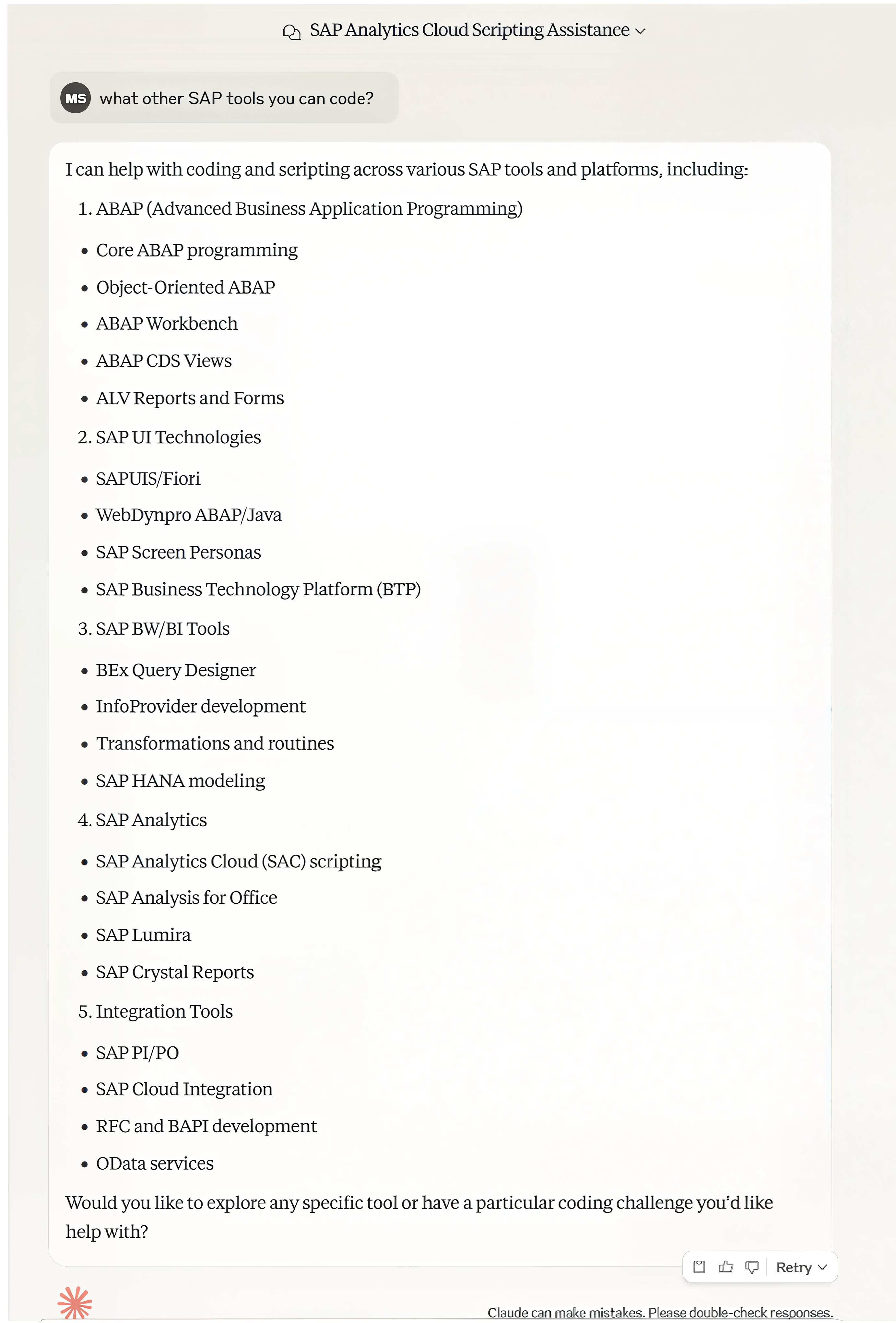
Figure 2. Anthropic Claude confirms it can code in a lot of SAP tools! Like a lot!
Let’s summarize the three AI tools reviewed in this series: OpenAI ChatGPT, Google Gemini, and Anthropic Claude. As shown in Table 1, all chatbots allegedly possess the same capabilities. However, as we saw in Round 2, Google Gemini failed to produce any functional code, while in Round 1, ChatGPT required human intervention to refine its output. Claude, as you can see, performs similarly in terms of capabilities.
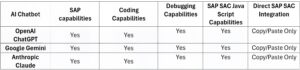
Table 1: Summary of our AI Chatbot battle
Step 2: Build your SAP SAC Analytic Application
We’ve already covered this section in the previous two documents, Round 1 and Round 2. I’m including here as a reminder that we are using the same SAP SAC Analytic Application, as shown in Figure 3.
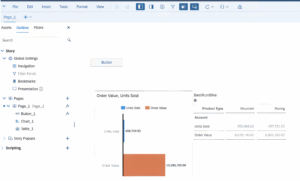
Figure 3. Reviewing the initial SAP SAC Analytic Application setup
Step 3: Provide Anthropic Claude with the same code we used for ChatGPT and Google Gemini, as shown in Figure 4. Like the others, Claude confidently claimed it could handle the task. However, what’s surprising is that its first attempt worked right away—on the very first try! Very impressive, and the code was also remarkably simple. The successfully implemented code is displayed in SAP SAC, as shown in Figure 5.

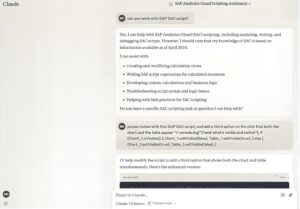
Figure 4— Starting the process with Anthropic Claude
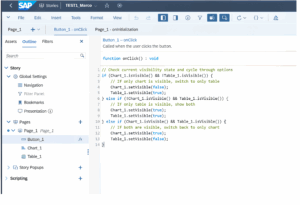
Figure 5— Implementing the SAP SAC code from Claude
After testing the code and confirming it works, the next step is to request a change to the button’s description and ensure it loads when the launch page opens—just as we did with ChatGPT. Keep in mind that Google Gemini’s code failed at the first step and couldn’t add the third state to display both the chart and the table. So far, only ChatGPT has successfully completed this task, but it required multiple attempts and extensive testing.
As shown in Figures 6 and 7, we issued the same request to Claude: update the button description and ensure the button name is set correctly when the application first runs—just as we did with ChatGPT. Surprisingly, as seen in Figure 7, Claude not only provided the updated code but also correctly identified that a separate line of code was needed for the button’s initialization event.

Figure 6— Requesting Claude to update the button description

Figure 7— Requesting Claude to create the code when the page opens
Claude generated two separate output sections as shown in Figure 7, and correctly identifying that SAP SAC Script requires an Initialization Script. Following its recommendation, we copied the first code block into the Page Initialization Event. In addition, as shown in Figure 8, Claude code has been updated in the Button_1 Onclick event, and SUCCESS! What’s truly impressive is that Claude independently created distinct names for the different button states: Show Table Only, Show Both Views, and Show Chart Only. I never explicitly requested these names, yet Claude proactively assigned them and updated the button accordingly in the recommended code generated.
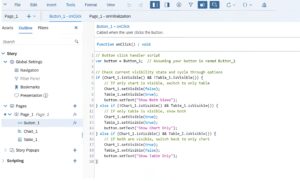
Figure 8— Updating the code recommended by Claude into SAP SAC
As shown in Figure 9, the different stages of the page are displayed as the button description starts changing based on the next status as Claude recommended. As shown, Claude complies and exceeds the initial request with nice customization of the button description, and with significant simpler code than all mighty Google Gemini.
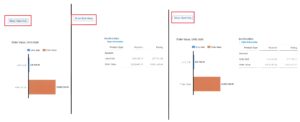
Figure 9— Reviewing the SAP SAC Application with Claude generated code
However, as part of the testing the script for initialization errors out, and I informed Claude the same as shown in Figure 10. Then Claude provides a new code recommendation for the initialization event, and automatically provides a new fix, however, this time much simpler and works!!! You can see the implementation of the same code in Figure 11, and the results in Figure 12.
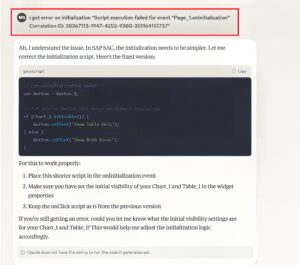
Figure 10— Updating the Initialization event code with optimized code

Figure 11— Updating the Initialization event code with Claude fix

Figure 12— Reviewing initial load using Claude generated code
After updating the code with Claude's recommendations, as shown in Figure 12, I saved the story and ran the page again using the View option. The results were clear—the initialization was applied correctly, the button functioned as expected, and the requested description update was executed successfully, as shown in Figure 12.
Claude delivered! It resolved the code issues with the fewest attempts, requiring just four prompts to fine-tune the initialization code, while the main code worked on the first try using the same inputs that ChatGPT and Google Gemini had. In comparison, ChatGPT needed 10 attempts to get it right, and required human intervention to correct the main code with a new statement and Google Gemini never provided a working solution on the main code. Additionally, Google Gemini’s recommended code was by far the most complex among the three AI chatbots tested for SAP SAC JavaScript. Claude wins by knock out!
As shown in Table 2, the absolute winner hands down, Anthropic Claude.

Table 2. Results of the “Rumble in the Jungle” AI Chatbot showdown
This competition was truly remarkable—not just for the new possibilities it unveiled for SAP users in code optimization, but also for demonstrating the power of tools that can deliver solutions quickly and accurately. The findings are significant, and I couldn’t be more excited to share the results.
Looking back at Figure 2, which highlights the additional skills of Anthropic Claude, I’m genuinely eager to try them all. I encourage you to explore and test these capabilities yourself, let us know how they work for you! It’s exciting to see a tool like this in action, providing valuable support to both developers and business users for code optimization within SAP SAC Script, which was the primary focus of this test.
Conclusion
This journey has been incredible—not only in recognizing that open-source AI chatbots like ChatGPT, Google Gemini, and Claude can support the SAP development process, but also in comparing their capabilities to solve the same problem and evaluating their solutions. The excitement around AI has been clarified through this exploration, highlighting its role as a powerful tool while underlining the necessity of human intervention to validate and refine the outcomes of different AI tools, but nevertheless we found them to be useful tools which they are.
Finally, our winner: Anthropic Claude. It not only resolved the problem quickly but also kept the solution simple and effective, outperforming the others in both speed and clarity. Bragging rights aside, Claude proved to be an easy-to-use platform, and I still cannot believe that it was able to outperform Google and OpenAI in their own game for SAP developers. Feel free to check my other articles created on real-life AI case studies by www.arelliusenteprises.com such as https://sapinsider.org/analyst-insights/leveraging-sap-datasphere-using-intelligent-lookup-and-sap-ai-fuzzy-search-to-deliver-fast-business-solutions/, https://sapinsider.org/probabilistic-supply-chain-and-demand-forecasting-with-sap-ibp-deliver-results-using-data-science/, https://sapinsider.org/expert-insights/automating-your-financial-consolidation-process-using-automatic-jobs-and-job-templates/ and https://sapinsider.org/using-artificial-intelligence-with-sap-for-dynamic-financial-environments/.
I hope you enjoy this article as much as I did. It’s a thrilling look into a constantly evolving world where AI can be integrated into SAP programming, providing valuable support through the AI chatbots discussed here. Perhaps we will broadcast another hand-to-hand combat in the future, maybe with SAP Joule as a contender next time vs. Deep Seek vs Grok3 the world “smartest AI” according to Elon vs. our newly added SAP Databricks in Q1 2025 that leverages Python, Spark, TensorFlow, Keras, PyTorch (good luck explaining this to your financial controller) and many more now within the SAP environment in the cloud.