A default sort allows you to sort accounts by different criteria, such as expense accounts by cost center and assets accounts by asset number. Its role is sometimes confusing, however, and therefore it is underused in the FI module. The author clears up two sources of confusion: terminology and the possibility the system presents of setting up two defaults. The customer or vendor account number has a sort key setting in its master. And, the linked G/L account number has a second (and separate) sort key setting in its (G/L) master.
In the FI module, “assignment number,” previously known as “allocation number,” refers to an additional reference field on the Accounting Line Item screen. It is primarily used to sort accounting transactions by default. Figure 1 shows accounting transactions default-sorted by their posting dates.

Figure 1
Display account line items (transaction code FBL3 or FBL3N) automatically sorts the line items by the assignment field
So what is the big deal about using an extra field to sort line items? The answer is that a default sort allows you to sort accounts by different criteria, such as expense accounts by cost center and assets accounts by asset number.
The role of the default sort is sometimes confusing, and therefore it is underused in the FI module. The first source of confusion stems from terminology, which I can easily clear up. (See the sidebar, “Terminology Adds to the Confusion.”)
The second source of potential confusion here, which is not well-documented in SAP self-help materials, is something that most of us have wondered about, and it is what I want to focus the remainder of this article on. This is the question of what to do when we have not one, but two, places in the system offered to us to set up a default. The classic example is a customer or vendor master, each of which must link to a G/L reconciliation account. The customer or vendor account number has a sort key setting in its master. And, the linked G/L account number has a second (and separate) sort key setting in its (G/L) master!
Note
The screenprints shown in this article are from IDES Release 4.6, and therefore in most cases show the reference column as Assignment. In earlier releases, you see it as Allocation. From this point on, I will use the term “assignment number” to avoid confusion.
Although this gives you the ability to sort customer line items with one kind of default and the corresponding line items of the G/L account with a second kind of default, it can lead to an unpleasant surprise for the end users analyzing this data. Let’s look more closely at that. But first, I’d like to touch on two basics to make sure there is no confusion about an assignment number vs. a sort key.
What Is an Assignment Number?
The assignment number is a freely definable field of up to 18 characters populated on the account line item (technically BSEG-ZUONR), as shown in Figure 2.
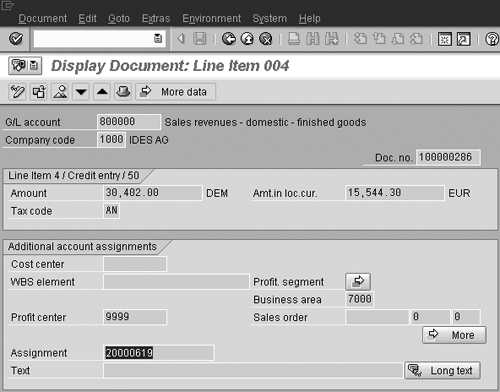
Figure 2
System uses assignment field as default sort criteria
You can enter the assignment number manually, or you can design your accounts in such a way that the assignment field is automatically filled. This is done by configuring so-called sort keys and linking these sort keys to the account numbers. If you configure the system to fill them in automatically, it can take details from the document header table (BKPF) or from the line item table (BSEG) and put in an assignment number field.
Note
Often SAP uses the same term quite differently in different modules. One such term is “allocation,” which has a different meaning depending on what you are referring to.
In the Controlling (CO) module, “allocation” is a term used for transferring (i.e., allocating) costs from one cost center to another. SAP provides two types of allocation methods in CO—distribution and assessment.
Allocation in FI has nothing to do with allocating costs in CO. The allocation number in FI is an additional reference field on the line item of an accounting document.
Realizing the potential confusion of the word “allocation number” in the FI module, SAP, starting with Release 4.6, calls it “assignment number.” However, the change is not well documented, and many in the SAP financial community still refer to it as “allocation number.”
Sort Keys for G/L Accounts
You configure sort keys by transaction code OB16 (IMG menu path Financial Accounting>General Ledger Accounting>G/L Accounts>Line Items>Line Item Display>Determine Standard Sorting for Line Items), as shown in Figure 3. The assignment number can be populated from the contents of up to four fields. Note that this transaction is client-independent, meaning these sort keys are valid for all clients. Technically, these sort keys are stored in table TZUN.

Figure 3a
Standard sort key 001 defined as posting date (BUDAT). Note that the process is referred to by the former term of “allocation” on this screen.

Figure 3b
Standard sort key 001 defined as posting date (BUDAT). Note that the process is referred to by the former term of “allocation” on this screen.
Once configured, sort keys can be linked to account master records (transaction code FS02) as shown in Figure 4. The advantage of linking to the account number is that whenever you post to the account number, R/3 automatically fills the assignment number field in the accounting document line item. Refer to Table 1 for tips for defining sort keys.

Figure 4
Sort key assigned to the account number at the company-code level
In this case, whenever you post to account 800000, the assignment number on the accounting line item is filled with the value of the posting date. Accordingly, the display account line items transaction automatically sorts line items by the posting dates as shown in Figure 1.
| The standard R/3 system has a sort key 014 – Purchase Order (technically a combination of the purchase order number and the item number). The R/3 system uses sort key 014 to automatically clear goods receipts/invoice receipts (GR/IR) accounts. If you don’t set it that way, the GR/IR account does not clear automatically. |
| It is a good idea to set a sort key for expense accounts as 008 – Cost Center, so that you can obtain expense totals by cost center. |
| For bank accounts and check collection accounts, you typically would like to get account balances sorted by value date. The standard system has sort key 027 – Value Date for this purpose. You could also use sort key 003 – Document Date, so that transactions are sorted by document date. |
| For employee accounts, you should keep sort key 015 – Personnel Number, so that you can use the employee number to sort account transactions. |
| To sort assets transactions by asset number and sub-number, set the sort key as 018 – Asset Number. |
| If you are using one-time customers or vendors in your business, you can use sort key 022 – Name and City, for sorting account items by customer (or vendor) name and city. |
| If you want to display purchase price variance (PPV) account transactions sorted by part or material number, you could define your own sort key for material numbers. Create a sort key (transaction code OB16) with technical field MATNR and assign it to PPV accounts via transaction code FS02. |
| Table 1 |
Tips for sort key use |
Sort Keys for Customer or Vendor Accounts
Similar to G/L accounts, you can set the sort keys for customer and vendor master accounts, too. You can use the same sort keys (transaction code OB16) for customer or vendor accounts, and the same concept for displaying customer (or vendor) line items.
Here’s where the possibility for confusion develops. When you display line items of the reconciliation account, R/3 displays the line items sorted by the G/L account’s sort key. However, when you double-click on the G/L line item, you see a different assignment number.
Let me show you with an example. Let’s say G/L account 196900 is a reconciliation account of type D (for customers) and it has a sort key, 026 - Payment Baseline Date. The corresponding customer, 3474, has a sort key, 035 - Rental Agreement. When you display G/L account lines for account 196900, you see line items sorted by the payment baseline date as shown in Figure 5.

Figure 5
Line items of reconciliation account sorted by assignment number of the G/L account (BSIS-ZUONR)
Note that the assignment number of the first line is 19990201, which is the payment baseline date value. Now double-click on the first line and you see a different assignment number (BSEG-ZUONR). What is populated is a rental agreement number, rather than the payment baseline date. Click on More data and you see that the assignment number field for the G/L account is saved under a separate field, Sp. G/L assigt (BSEG-HZUON), as shown in Figure 6.
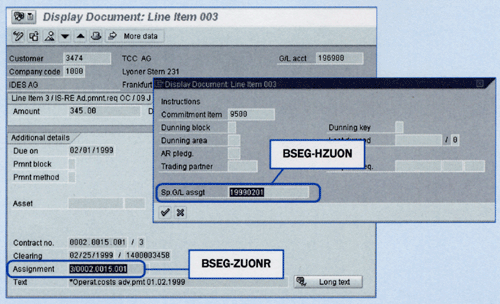
Figure 6
Assignment numbers of the customer master record (BSEG-ZUONR) and corresponding reconciliation account (BSET-HZUON)
In effect, two separate fields store assignment numbers. One stores the reconciliation account and one stores the customer (or vendor) account. This is because the customer’s sort key populated the assignment number on the accounting segment’s line item (BSEG-ZUONR). Refer to the flow-chart in Figure 7 to clarify how the assignment number is populated.

Figure 7
Rules for populating assignment numbers for G/L reconciliation accounts and customer (vendor) accounts
Therefore, when you displayed the line items of reconciliation account 196900 as shown in Figure 5, the system displays line items from the BSIS (G/L line items) and BSAS (G/L cleared items) table. It accordingly showed assignment number BSIS-ZUONR, which was populated from the G/L account’s sort key. When you double-clicked on the accounting document, the system showed assignment number BSEG-ZUONR, which was populated from the customer account’s sort key.

Mitresh Kundalia
Mitresh Kundalia heads the SAP practice at Quality Systems & Software (www.QSandS.com), a consulting firm specializing in SAP S/4HANA, SAP General Ledger, and complex System Landscape Optimization (SLO)-type reorganizations. Mitresh is widely acknowledged as a leading SAP expert, with multiple publications and an SAP-PRESS book to his credit. He has published more than 50 peer-reviewed articles and white papers, and he has given presentations at various SAP conferences and events. Mitresh is the chief solutions architect of General Ledger Migration Optimizer (GLMO), a leading product to accelerate and jump-start the SAP S/4HANA and SAP General Ledger initiatives; SAP Data Reorganization Optimizer (SDRO), an SLO-type product for managing complex system landscape reorganizations; and Group Currency Activation and Conversion (GCAC), a product suite to manage introduction of parallel currencies and conversion of data in a live SAP system.
You may contact the author at Mitresh@QSandS.com.
If you have comments about this article or publication, or would like to submit an article idea, please contact the editor.