Discover a payroll problem you may face in your main payroll driver program when you upgrade from R/3 4.6C to mySAP ERP and see how you can permanently correct it.
Key Concept
Payroll is based on an international payroll driver that SAP provides for each country. The country-specific payroll drivers take the statutory and administrative regulations of a country into account. Payroll’s design allows you to use customizing functions to quickly modify the payroll procedure to meet the particular requirements of your enterprise. For example, SAP uses some include programs (e.g., RPCASFX0 and PCBURZ990) to allow functional/ developmental consultants to add and define their own customer functions.
One of the critical issues that you may face after upgrade is a problem in your main payroll driver program. Any payroll glitches could delay payments and negatively affect all employees in your organization. Also, payroll contains sensitive information such as payments and deductions.
I’ll explain one of the payroll driver problems that you may need to solve after upgrading. This problem concerns a syntax/runtime error that occurs when you execute a payroll driver (e.g., RPCALCX0). This issue may occur with all payroll drivers. After I explain the reason for the problem and its solution, you will know how incomplete customization activities in R/3 4.6C may lead to inconsistency after you upgrade.
Payroll Driver Runtime Error
The error occurs whenever users try to simulate payroll using transaction PC00_M99_CALC_SIMU or execute the regular payroll run with transaction PC00_M99_CALC. The system terminates the payroll driver program RPCALCX0 with the runtime error message The FORM “FUZ_DED” does not exist, as shown in Figure 1. Note that the customer name Z_DED, which I use to explain the international payroll driver error, is just an example. In your organization, you may face similar problems for other country-specific payroll drivers with other names.
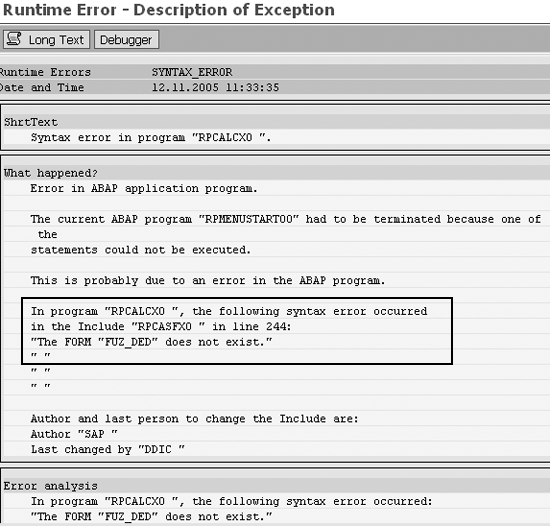
Figure 1
Runtime error after executing payroll driver
The error message indicates that a syntax error exists in the main payroll standard program (international payroll driver program RPCALCX0). At first, you might wonder why the standard payroll program has an error because SAP checked it before releasing it with this version. Next, your investigation should focus on the related customization issues.
In reality, the standard driver program works fine. An inconsistency among function customization activities (internal object number table T52A0), include program RPCASFX0, and include program PCBURZ990 caused the runtime error in the standard payroll driver. The main standard payroll driver program RPCALCX0 calls these two include programs as shown in Figures 2 and 3, which is why the error appears to relate to the payroll driver. To display these figures, use transaction SE38 and enter each program name.

Figure 2
Figure 2 Payroll driver program RPCALCX0 calls include RPCASFX0

Figure 3
Payroll driver program RPCALCX0 calls include PCBURZ990
When you create a customer function using PE04 (logical part), table T52A0 updates automatically. However, the include programs RPCASFX0 and PCBURZ990 do not update automatically. You need to add the customer function source text to program PCBURZ990 and generate program RPCASFX0 from table T52A0. In R/3 4.6C, only the logical customer function was created. As a result the table T52A0 automatically updated. However, no generation occurred in program RPCASFX0 and no one added function source text to program PCBURZ990. Programs RPCASFX0 and PCBURZ990 are consistent because for any customer function in RPCASFX0, a corresponding source text exists in PCBURZ990. The error did not appear in R/3 4.6C despite incomplete customization activity prior to conversion.
Now, I will explain why this error occurs in ECC 5.0. The customized function (e.g., Z_DED) was created in R/3 4.6C as a logical object. As a result, the system automatically updated the internal object number table T52A0 with the new customized function.
During the upgrade, ECC 5.0 generates the include program RPCASFX0 from internal object number table T52A0. Consequently, ECC 5.0 updates the include program RPCASFX0 with a new call statement to perform FUZ_DED (Figure 4). The system tries to locate and execute the content of FUZ_DED in PCBURZ990, which should contain the detailed source text (business logic) of the customer function Z_DED.

Figure 4
As a result of generation during upgrade, RPCASFX0 shows that the function Z_DED updated from table T25A0
However, the include program PCBURZ990 does not contain the source text for this function, which leads to inconsistency between PCBURZ990 and RPCASFX0. This causes the runtime syntax error when the standard payroll driver executes in ECC 5.0. Figure 4 shows the name of the new function in program RPCASFX0. You can get to Figure 4 by double-clicking on the highlighted include program name RPCASFX0 from Figure 2.
Note
The system uses the same logical object names of the function/operation and adds FU or OP as a prefix when you generate program RPCASFX0 from table T25A0. FU and OP represent the object type: FU stands for function and OP for operation. For example, in Figure 4, the logical object name of the customized function is Z_DED, and the system used the same name in program RPCASFX0 with the prefix FU to create the function routine FUZ_DED.
Although this error did not occur in R/3 4.6C, you can avoid this error in ECC 5.0 by performing one of two tasks in R/3 4.6C before your upgrade:
- For any available logical customer functions, complete all related required tasks (e.g., add the source text of customer functions to program PCBURZ990 and generate program RPCASFX0)
- Delete any uncompleted customer functions
Now that you understand how this error happened, let me further explain the payroll driver. The payroll driver executes the calculations and instructions described in the payroll calculation schema. Schemas may consist of set of standard functions and customer functions. When you create new customer functions/operations using transaction PE04 as the logical object, you must enter the source text of the new customized function/operation using ABAP Editor (transaction SE38) in include program PCBURZ990. You must also generate include program RPCASFX0 from internal object number table T52A0. Later, during the payroll run, the main payroll driver program RPCALCX0 calls and executes programs RPCASFX0 and PCBURZ990 (Figures 2 and 3).
Note
Each payroll country version has a country-specific payroll driver that calls a country-specific function. Include programs such as the international payroll driver calls PCBURZ990 and RPCASFX0; the US payroll driver calls PCBURZUS0 and RPCASFU0; and the German payroll driver calls PCBURZDE0 and RPCASFD0. Program RPCASFX0 contains all function and operation names and program PCBURZ990 contains the source text of the customized functions. The error affects all types of payroll drivers.
Note
Your initial impression may be that this is a purely technical problem that your development team (or ABAP developer) needs to resolve. Although include programs are involved, in reality this is also a functional issue that customization caused. Therefore, you could resolve it with functional customization activities.
Solution
To resolve this issue, you need to remove the inconsistency between the include programs RPCASFX0 and PCBURZ990. To do so, delete any call statements in program RPCASFX0 that call unavailable customer functions in program PCBURZ990. In my example, remove FUZ_DED from include program RPCASFX0 (Figure 4). I recommend that you perform no manual changes in include program RPCASFX0. The following two simple steps allow you to delete FUZ_DED automatically:
Step 1. Delete the logical object of the uncompleted function.
Step 2. Regenerate the include program RPCASFX0 from table T52A0 by using generation tool report RPUCT700.
Step 1. Delete the logical object of the uncompleted function. In my example, the uncompleted customized function is Z_DED. This action automatically deletes the related customized function entry from table T52A0.
Enter transaction PE04 or follow the SAP Easy Access menu path Human Resources>Payroll>International>Tools>Customizing Tools>Function/Operation. Click on Function/Operation to see the screen in Figure 5.

Figure 5
Maintain Functions and Operations window
Enter your uncompleted customized function (e.g., Z_DED) in the Name field and click on the Delete button. You’ll see the screen in Figure 6. Click on the Yes button in the confirmation window.
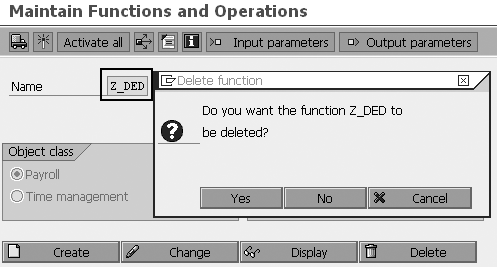
Figure 6
Enter the function and click on the Delete button
After the system deletes your customized function, it becomes unavailable in the internal object number table T52A0 automatically. To verify this, you can display the table T52A0 with transaction SE16 to ensure that the record no longer exists for function Z_DED (Figure 7).

Figure 7
Data Browser for table T52A0 shows no entry exists for function Z_DED (after deletion)
Step 2. Regenerate the include program RPCASFX0 from table T52A0 by using generation tool report RPUCT700. This report is designed to generate the includes to form a list of names of routines imported from table T52A0. The system uses these names to call the actual routines in an include (e.g., PCBURZ990) when the payroll driver executes.
To execute report RPUCT700, enter transaction SA38 or follow the SAP menu path System>Services>Reporting to see the screen shown in Figure 8. Enter the report name RPUCT700 and click on the Execute button to see the report selection screen shown in Figure 9.

Figure 8
Enter program RPUCT700

Figure 9
Selection screen of report RPUCT700 with defaulted parameter values
Figure 9 shows the default values for the following parameters:
- Program class determines the purpose of the object (T, time management, or C, payroll calculation)
- Object type defines how the system uses the object (FU, function, or OP, operation)
- Method determines which method the system uses to execute this report. The Method option has two values, 1 or 2, but 1 is not used anymore.
- Test specifies database status (ON, the system issues a log but does not update the database, or OFF, the system updates the database)
- Log provides more information in the screen
- Overwrite starts the report in the update mode
- Compare evaluates the generated result list with an older list so you can see whether the report’s generation changes anything
Click on the execute icon to start the report in test mode and you’ll see the log data shown in Figure 10. The report log shows that the call statement for function FUZ_DED was removed from the include program. Since you ran the report in test mode, no actual update occurred.

Figure 10
Report log shows the generated list containing the function routine Report log shows the generated list containing the function routine names. ECC imports this list from table T52A0 and updates it permanently in include RPCASFX0 when you execute the report in update mode.names. ECC imports this list from table T52A0 and updates it permanently in include RPCASFX0 when you execute the report in update mode.
To start the report in the update mode, you need to change the test mode value from ON to OFF in Figure 9. Enter the Country grouping parameter value (e.g., 99 for international, 10 for US), choose Overwrite, and then enter the password parameter value (your user name). Click on the execute icon as shown in Figure 11. The system generates the same log data as in Figure 10 and generates changes in program RPCASFX0 as shown in Figure 12.

Figure 11
Selection screen of report RPUCT700 with additional parameters for update mode

Figure 12
Selection screen of report RPUCT700 with additional parameters for update mode
Now, you can notice that the routine/form name (FUZ_DED) of function Z_DED that you saw earlier in Figure 4 does not exist in program RPCASFX0 after you complete the two solution steps (Figure 12). The above two steps remove the inconsistency between RPCASFX0 and PCBURZ990 in your ECC 5.0 system without manual involvement. Your end users will be able to execute the main payroll driver and won’t realize that you encountered this problem.
The lessons learned from this article may not reflect or resolve your particular problem, but I hope that you will find my methodology useful. Remember, your first step should be to check and evaluate the direct symptoms that the error message describes.
Mohamed Khalid Yousif
Mohamed Khalid Yousif is a certified senior SAP HR consultant. Mohamed has a master’s degree in computer science from Khartoum University, Sudan. He is currently the team leader of the SAP HR support team and also was team leader of the ECC 5.0 upgrade project at National Drilling Company, Abu Dhabi, UAE.
You may contact the author at myousif@ndc.ae.
If you have comments about this article or publication, or would like to submit an article idea, please contact the editor.