The ADBC API is a little-known option for exchanging data between two systems. ABAP database connectivity is an option when you need to exchange data to stage in the target system because it provides better control when performing database updates and data retrieval from the non-SAP system. Find out how to set up and use the ADBC API.
Key Concept
The ADBC API consists of a library of classes that connects to an external database in a standardized manner. The availability of various methods makes performing database operations easy, serving as a standardized platform for the connection between the SAP system and the external database. You can set up database systems ranging from Oracle, Microsoft SQL server, and Informix to exchange data using the ADBC API.
Sometimes you need to exchange data between two systems in a system landscape in which the traditional file exchange method can be cumbersome. When dealing with file-based interfaces, you must contend with the overhead with managing files — such as versioning, archiving, and formatting. Any time lag between information being available in the external system and the SAP system receiving the information for processing can cause issues.
In your SAP ERP Central Component (SAP ECC) system, connecting to a database system directly is always an integration option, especially when there are system or design limitations. The option of using database connectivity has existed since SAP R/3 3.1H. Starting with SAP R/3 4.7, SAP has offered the ABAP database call interface —also called the ADBC API.
You can work around these external database system limitations by using the ADBC API. You can use the ADBC API when:
- You have database system and application limitations, such as when the external database has limited capabilities, options, and resource constraints
- Using IDoc or Remote Function Call (RFC) is not possible. For example, you cannot use IDocs or RFCs when you have customizations in your SAP system, which involves more development time.
- You need a better interfacing technique than using flat files to overcome the overheads with managing exchange files, archiving, and deleting
Based on my recent implementation experience, the benefits of using the ADBC API include real-time data transfer between the two systems. In addition, the availability of standard methods simplified development work. Although the ADBC API has been around for a while, it is not yet widely popular. Furthermore, SAP has recently improved the interface.
I provide the steps needed to set up a new connection using the ADBC API, including setting up the system prerequisites, testing the connection, and programming the API using the available classes and methods. The processes I describe apply to SAP R/3 4.7 and later, including SAP ERP 6.0.
System Prerequisites
To begin, let’s look at some of the prerequisites necessary for making the two systems talk to each other. Use transaction DBCO to set up the database connections (Figure 1). The underlying transparent table DBCON holds all the data entered in transaction DBCO. The table is client independent and contains connection details such as connection name, database system, database user name, and password (Table 1).

Figure 1
A typical connection setting to connect to an MS SQL Server database
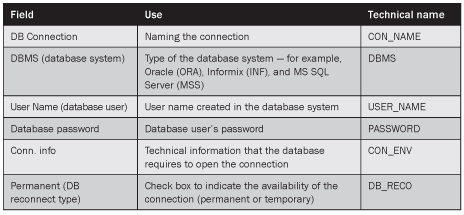
Table 1
The fields that you can use when setting up a connection
In Figure 1, the connection information is organized as MSSQL_SERVER=<network protocol>:<server name> MSSQL_DBNAME=<database name>. You can find more information relating to creating entries in table DBCON in SAP Note 738371: “Creating DBCON multiconnect entries for SQL Server.”
Note
Two other useful SAP Notes when setting up a new connection are:
- SAP Note 178949: “Accessing data on a MSSQL database system not on R/3 database server”
- SAP Note 738371: “Creating DBCON entries for SQL server”
Supporting Tools Available to Perform Tests on Your Connection
Next, let’s look at some of the standard tools that SAP provides that can help you with some of the activities such as testing your connection, looking at the metadata in the remote database system, and running some queries. You can find these tools under package SDB_ADBC and you can access them using either transaction SE80 or SE38. The tools allow you to perform the following:
Test Your Database Connection
ADBC_TEST_CONNECTION is a simple program that you can use to test your database connection to make sure it is correctly set up and the remote system is reachable. This program is useful when a new connection is defined, when the settings are migrated across the system landscape, or when it comes to general setup troubleshooting. When you run the program, you can select the connection name from a drop-down menu. The program attempts to open the connection and reports if it was successful.
Run Tests with SQL Statements
ADBC_DEMO is a program that runs tests to demonstrate the execution of DML and DDL SQL statements on the database (Figure 2). This program is formulated to run a sequence of activities. First, a connection to the selected database system is established. Then a test table is created. A few sample records are inserted into the table, a selection is made from the table, and the table is updated with the modified values. The test table is deleted and the connection to the database system is closed.
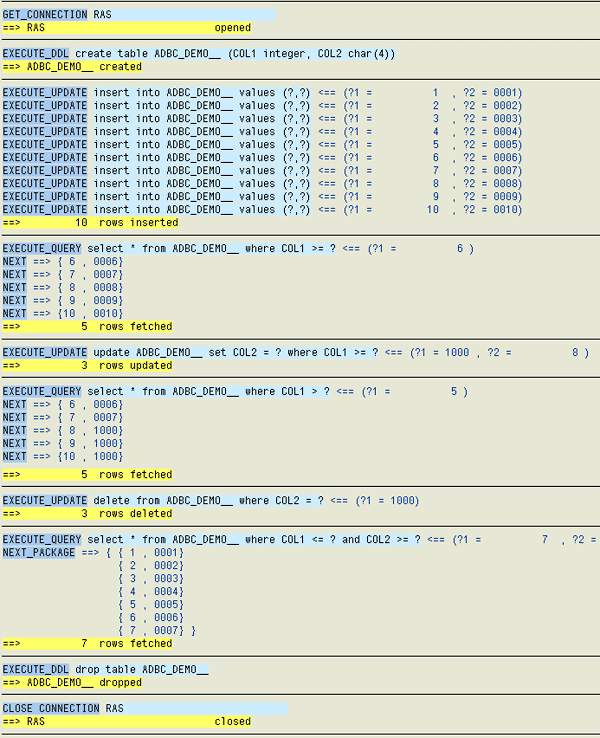
Figure 2
Results of SQL statements run on the data set after successfully establishing a connection
Access Metadata Information in the Remote Database
If you know the table names in the remote database, you can use ADBC_DEMO_METADATA to generate a report that shows the metadata for the table. Indexed in the actual order of the table fields, the report shows field names, data type for field, and length of field, along with the primary keys and database indexes (Figure 3).
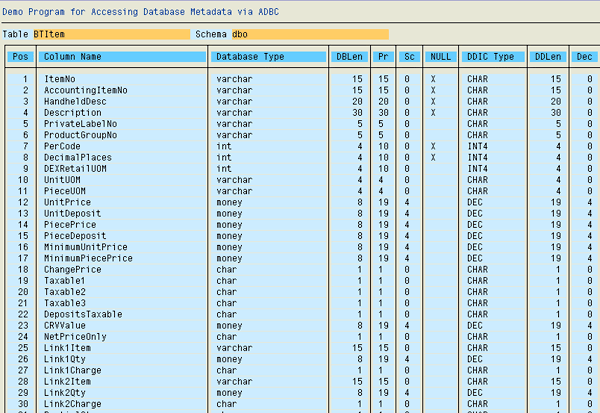
Figure 3
The table structure for a table in the remote database
Run Queries on a Database Table
Use ADBC_QUERY to query tables in the current database and in the remote database to which a connection is defined. For remote databases, this is a convenient option to view data in the SAP environment. This helps SAP developers access data in an external database, which could be an environment unfamiliar to the developer.
Access LOBs in Oracle
If you are using an Oracle database, program ADBC_DEMO_LOBS_ORA allows you to access LOBs in the database. This demo program creates a test table and inserts rows with empty LOBs, puts data into the LOBs, and modifies the data. The program produces a report that demonstrates the use of accessing LOBs using ADBC methods with all the above activities printed on the report.
Program the ADBC API Using the Available Classes and Methods
Now that you know how a new connection is set up and some of the tools available to you, let’s look the programming aspect of this technique. I will show you some of the most useful classes and methods and how you can use them in your application or scenario. All ADBC class names are prefixed with CL_SQL or CX_SQL. The following classes encompass all that is needed to exchange data with the external database.
- CL_SQL_CONNECTION
- CL_SQL_STATEMENT
- CL_SQL_PREPARED_STATEMENT
- CL_SQL_RESULT_SET
-
CX_SQL_EXCEPTION
CL_SQL_CONNECTION
Use class CL_SQL_CONNECTION to open the connection to an external database system. Without opening the connection, statements used in classes CL_SQL_STATEMENT and CL_SQL_PREPARED_STATEMENT are performed on the database the SAP system is running on, which would be the default database.
Let’s look at this class, its methods and attributes, and how it applies in a practical sense. The code sample in Figure 4 uses class CL_SQL_CONNECTION and its methods to open and close the connection to an external database system defined in table DBCON as MYDB.
DATA: w_cref TYPE REF TO cl_sql_connection, w_stmnt_ref TYPE REF TO cl_sql_statement, w_prep_stref TYPE REF TO cl_sql_prepared_statement, p_conname type DBCON_NAME default ‘MYDB’, w_result TYPE REF TO cl_sql_result_set, w_stmnt TYPE string.
|
| Figure 4 |
SQL code in CL_SQL_CONNECTION to open and close connection to an external database system |
Method GET_CONNECTION of this class opens the connection to the external database. All statements enclosed between the TRY… ENDTRY statements catch any exception that might occur during execution and prevents short dumps (Figure 5). Method CLOSE closes the open connection.
TRY. w_cref = cl_sql_connection=>get_connection( p_conname ). CATCH cx_sql_exception INTO w_sqlerr. PERFORM handle_sql_errors USING p_conname CHANGING p_et_dbmsg-thline. APPEND p_et_dbmsg. RAISE connection_error. ENDTRY. TRY. w_cref->close( ). CATCH cx_sql_exception INTO w_sqlerr. gt_dbmsg-thline = w_sqlerr->sql_message. APPEND gt_dbmsg. RAISE connection_error. ENDTRY. CLEAR: w_cref.
|
| Figure 5 |
Method GET_CONNECTION in CL_SQL_CONNECTION |
CL_SQL_STATEMENT
Use class CL_SQL_STATEMENT and its instance methods to execute SQL statements. You can execute DDL and DML statements and stored procedures using this class. Figure 6 shows an example of how you can use the class methods.
w_stmnt = 'Select ItemNo, Itemdesc FROM WHERE Status = 'U' TRY. w_stmnt_ref = w_cref->create_statement( ). w_result = w_stmnt_ref->execute_query( w_stmnt ). CATCH cx_sql_exception INTO w_sqlerr. PERFORM handle_sql_errors USING ' CHANGING gt_dbmsg-thline. APPEND gt_dbmsg. ENDTRY.
|
| Figure 6 |
CL_SQL_STATEMENT example |
In Figure 6, method CREATE_STATEMENT creates statement object w_stmnt_ref of class CL_SQL_STATEMENT. The next step is to use method EXECUTE_QUERY of this class to run the statement passed in the class attribute statement. The result of the execution is obtained using object w_result referring to class CL_SQL_RESULT_SET. When the object is no longer needed, resources should be freed using method CLOSE to avoid performance bottlenecks.
One effective way of building the SQL statement is through the use of field symbols. You can reuse code by dynamically assigning table names, field names, and field values while forming the statement.
CL_SQL_PREPARED_STATEMENT
Use class CL_SQL_PREPARED_STATEMENT to create SQL statements that are prepared once and executed multiple times. You use this class when you want to update a table field when WHERE condition values could change. You can also use this class when you make similar selections under different WHERE condition values.
CL_SQL_PREPARED_STATEMENT helps streamline repeatable database operations by allowing execution of the statement multiple times throughout the code once prepared. Method PREPARE_STATEMENT of class CL_SQL_CONNECTION helps define the statement. Using methods SET_PARAM_STRUCT or SET_PARAM, you can bind input variables to facilitate the passing of values.
Figure 7 shows an example of using CL_SQL_PREPARED_STATEMENT. When the object is no longer needed, use method CLOSE to free resources on the database.
DATA: w_prep_stref TYPE REF TO cl_sql_prepared_statement. DATA: t_stupd type standard table of zint_stupd. DATA: lw_rtab(30), lw_rfld(30), w_rcnt TYPE i, w_count TYPE i, wa_stupd TYPE zint_stupd. CONCATENATE 'update' lw_rtab 'set ImportStatus = ? Where' lw_rfld '= ?' INTO w_stmnt SEPARATED BY space. TRY. w_prep_stref = w_cref->prepare_statement( w_stmnt ). GET REFERENCE OF wa_stupd-importstatus INTO w_vref. w_prep_stref->set_param( w_vref ). GET REFERENCE OF wa_stupd-keyfld INTO w_vref. w_prep_stref->set_param( w_vref ). LOOP AT t_stupd INTO wa_stupd. CLEAR w_rcnt. w_rcnt = w_prep_stref->execute_update( ). ADD w_rcnt TO w_count. ENDLOOP. CATCH cx_sql_exception INTO w_sqlerr. gt_dbmsg-thline = w_sqlerr->sql_message. APPEND gt_dbmsg. ENDTRY. w_prep_stref->close( ).
|
| Figure 7 |
Update field values into a database table using CL_SQL_PREPARED_STATEMENT |
In the code in Figure 7, I want to update field values into a database table. Fields lw_rtab and lw_rfld are placeholders for the actual table and field. Internal table t_stupd, which is defined as dictionary structure zint_stupd, contains the values for the key field and the field that is modified.
CL_SQL_RESULT_SET
You use this class to obtain the result of a SQL query. Variable w_result demonstrates the use of this class (refer to the code shown in Figure 6 for class CL_SQL_STATEMENT). In the code sample in Figure 8, method SET_PARAM of this class binds a variable to obtain the resulting value.
Data: w_status, w_cusnam(8), w_vref TYPE REF TO data. w_cusnam = ‘50000021’. CONCATENATE ' w_cusnam ' INTO w_fnam. CONCATENATE: 'SELECT Status FROM B_Trigger WHERE CustomerNo =’ w_fnam INTO w_stmnt SEPARATED BY space. TRY. w_stmnt_ref = w_cref->create_statement( ). w_result = w_stmnt_ref->execute_query( w_stmnt ). GET REFERENCE OF p_status INTO w_vref. w_result->set_param( w_vref ). w_result->next( ). * Free resources on the database w_result->close( ). CATCH cx_sql_exception INTO w_sqlerr. gt_dbmsg-thline = w_sqlerr->sql_message. APPEND gt_dbmsg. ENDTRY.
|
| Figure 8 |
Example of method SET_PARAM in class CL_SQL_RESULT_SET |
CX_SQL_EXCEPTION
Class CX_SQL_EXCEPTION is used to catch any exceptions that might occur during the processing of a SQL statement. The most common exceptions are related to errors in syntax, which violate database integrity. All database operations must be enclosed within TRY…ENDTRY statements to prevent short dumps, which you can see in the code in Figure 8.
Roger Colaco
Roger Colaco works as a solution architect with Fujitsu America’s SAP NetWeaver practice and has 12 years of SAP experience working on SAP implementation projects. He specializes in integration technologies using IDoc, BAPI, and Web services — to name a few — on the SAP ECC and SAP NetWeaver PI platforms. He has also worked extensively on the logistics modules, managed SAP projects, and is a PMI certified project management professional.
You may contact the author at roger.colaco@us.fujitsu.com.
If you have comments about this article or publication, or would like to submit an article idea, please contact the editor.