/GRC
You can set up ticket authorization between two SAP systems to enable users to apply single sign-on when they need to access both systems. You can use either an HTTP connection or a Remote Function Call connection for this purpose. Use the provided guidelines to determine which authentication type can fulfill your requirement. See how to configure the connection using the destination service with ticket-based authentication in the back-end communication.
Key Concept
The user-specific and secure communication between front-end and back-end business components is a key functionality in modern component-based business applications. SAP NetWeaver Application Server Java functionality allows you to configure a secure connection to remote systems using different protocols and authentication standards. The established communication channel allows a user-specific call, which means that the back-end secure communication uses current user credentials. This guarantees that the business application provides data checking with current user permission.
Component-based business applications require a user-specific and secure communication between front-end and back-end business components. Because the components often run on different machines, establishing the identities of the communicating parties has become an important element in protecting your business operations. For example, if your business application provides access to financial or payroll reports, you have to guarantee that end-user credentials are checked before the system provides the requested information. You need to protect your business-sensitive data against unauthorized access and apply the interoperability between different business applications, which requires establishing secure communication channels.
SAP NetWeaver Application Server Java provides the destination service, which helps you configure and establish secure connections to other business applications, components, or services. The destination service supports different authentication methods, such user- and password-based authentication (e.g., basic authentication and user mapping) and ticket-based authentication (e.g., SAP logon tickets and SAP assertion tickets) in a user-specific back-end communication between remote business applications. I describe the configuration and required settings for the ticket based-configuration.
Ticket-Based Authentication
The basic and user mapping authentication methods are based on the user name and password. Both methods require you to set the user name and password in SAP NetWeaver Application Server Java. In the basic authentication method, the user name and password information are entered directly during connection configuration in the destination service. The same user (the technical user) is the user every time the remote back-end system or application is called. In the user mapping method, the user name and password in the remote system are defined and stored in the User Management Engine (UME). The business-sensitive information and functionality provided by the remote system or application should be available for the permitted user. Therefore, the call must include the current user name (the identification of the user who is requesting data in the remote system). The destination service obtains the user session for the current user from HTTP, calls the UME to obtain user mapping configuration, and switches the user name and password to call the target system.
The second supported kind of authentication is ticket-based authentication, which is based on the X.509 client certificate. The X.509 standard is provided by the International Telecommunication Union (ITU) and today is the most widely used certificate standard. Therefore, SAP uses this standard as the basis of the SAP logon ticket and SAP assertion ticket, which are used in SAP single sign-on (SSO) scenarios.
The central element of the ticket-based authentication is the authentication server, which authenticates the user and provides the authentication ticket (an electronic user certificate). The client application (in front-end communication) or server application (in back-end communication) uses the ticket to authenticate the business application. This functionality works only if the business applications accept the ticket and trust the authentication server. The trust relationship between the identity provider (authentication server) and the business application server is the basic prerequisite of successful configuration of certificate-based communication using SSO.
The digital certificates verify the identity of the public key owner. Therefore, the confidential message senders are assured that the public key they use belongs to the designed recipient. In turn, the message receiver can be sure that the confidential message was signed by declared sender.
The certificate contains following information:
- Name of the public key owner
- Public key that was used to authenticate the certificate
- Name of the certificate authority (the name or unique designation of the authentication server)
- Certificate validity period
- Serial number the certificate authority created
- Certificate authority’s declaration of the intended use of the public key
Ticket-based authentication offers both user-independent and user-dependent tickets. The user-dependent tickets can be sent to the server during the user logon process. The server can then reuse the ticket in the back-end communication (e.g., the SAP logon ticket) or create user-dependent tickets before calling the remote system (e.g., the SAP assertion ticket).
User-Independent Ticket
The destination service allows the use of an X.509 client certificate to authenticate in a remote system. This authentication type is based on the SSL connection channel. The configured (or imported) Key Storage certificate is used for each request to the remote business application. The same certificate is used independent of the user who requests the access to the configured destination. (I discuss this in more detail in the next section.)
SAP Logon Ticket
The SAP logon ticket is a client-side ticket — a digitally signed HTTP cookie. Before users can access any SAP system using the SAP login ticket, they must log in to the identity provider server (authentication server) and obtain an SAP logon ticket. The authentication server must always be available. Otherwise, the system cannot create the SAP logon ticket and the SSO mechanism does not work.
The destination service obtains the current user logon ticket from the HTTP user session and uses it to call business functionality in the target system. This ticket is sent each time the user calls the business functionality in the target system via the destination service. The SAP logon ticket is accepted only on the target server if a trusted relationship between the authentication server and the SAP system has been configured.
The SAP logon ticket functionality requires that the end user does not configure any restrictions in the security settings in the client application (e.g., browser or Adobe Flex-based application) for dealing with cookies. The SAP logon ticket cookie’s name is MYSAPSSO2. The local configuration of the browser cookie’s cache defines maximum duration of the ticket validity, which is typically restricted to eight hours. If the user closes the client application, the SAP logon ticket is deleted before the date expires.
SAP Assertion Ticket+
A special form of the SAP logon ticket is the SAP assertion ticket, which you use to communicate between systems. For both SAP logon tickets and SAP assertion tickets, no user interaction is necessary. In contrast to the SAP logon ticket, the assertion ticket is created on the SAP NetWeaver AS Java server for the logged-on user, is available for one-time use only, and has a short validity period (two minutes).
The SAP assertion ticket is a server-side ticket. This means it is created on the server before the destination service calls the functionality running on the target system. In this case, the destination service obtains the current user from the HTTP user session and creates a user-specific SAP assertion ticket that is valid for the user in the target system. The ticket contains the system ID (SID) setting and the target system client for which the assertion ticket is intended. The system sends the SAP assertion ticket each time the user calls the business functionality in the target system.
The SAP assertion ticket requires a trusted relationship between the sender and receiver. A trusted relationship must be configured between the target server and the server that calls the business functionality (via destination service).
To use the SAP logon ticket and SAP assertion ticket authentication methods, the system must identify the user with the same user ID. Otherwise, the ticket would not be accepted in one system. In this situation, you have to apply user mapping, which is provided by the destination service in SAP NetWeaver AS Java. However, this causes additional administrative investment because the mapping has to be updated each time a new user is created or removed, or if the user changes his password.
I’ll show you how to set up a trusted relationship between SAP NetWeaver AS Java and SAP NetWeaver AS ABAP systems, which requires the use of ticket exporting and importing functionality in SAP NetWeaver Java and ABAP systems.
Set Up a Trusted Relationship Between SAP NetWeaver Java and ABAP
Establishing a secure connection between SAP NetWeaver Java and ABAP using an assertion ticket requires configuration of a trusted relationship between the Java and ABAP systems. The setup requires execution of following steps:
- Step 1. Export the SAP logon certificate from SAP NetWeaver AS Java
- Step 2. Import the SAP logon certificate into SAP NetWeaver AS ABAP
Step 1. Export the SAP Logon Certificate from SAP NetWeaver AS Java
You can export the SAP logon certificate using SAP NetWeaver Administrator, an administrative tool that allows you to administer the SAP NetWeaver AS Java. To call this tool, use the following URL:
https://<hostName>:<portNumber>/nwa
For example: https://wdfd00223395a:51000/nwa and start SAP NetWeaver AS directly.
Log in as an administrator and select Configuration Management > Security > Certificates and Keys (Figure 1).
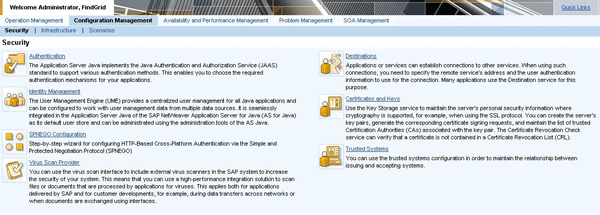
Figure 1
Export certificate in Visual Administrator: Certificates and Keys
The Certificate and Keys section is where you control the maintenance of installed certificates and the assigned permissions that define which applications can access the certificates stored in Key Storage. To export the required SAP logon certificate, select the TicketKeystore entry under Keystore Views (Figure 2). In the Key Storage View Details, select the SAPLogonTicketKeypair-cert certificate and then click the Export Entry button.
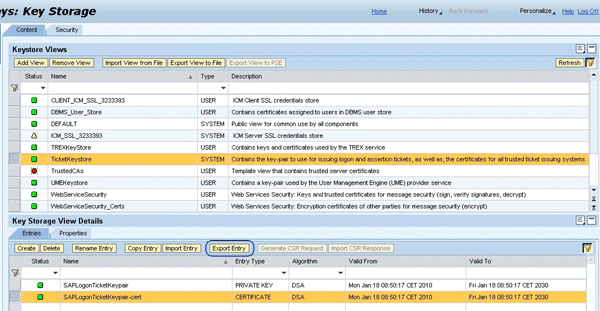
Figure 2
Key storage in Visual Administrator
Figure 3 presents the export dialog where you select the export format. The system proposes Binary X.509 and the Binary X.509 Certificate File to download. To start the download process, click the Download link and enter a location to store the certificate.
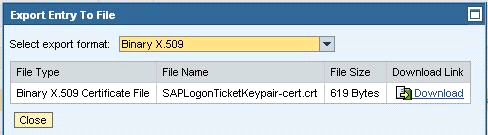
Figure 3
Export the binary representation of the SAP logon certificate
After a successful export, you can open the certificate and view the authentication server identifier, validation dates, and version. Figure 4 shows the General view and Figure 5 shows the Details view.
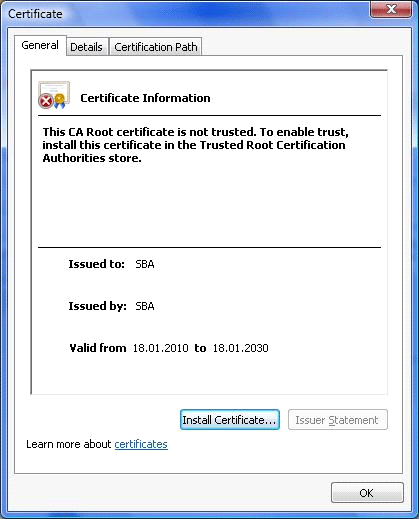
Figure 4
General information about the SAP logon certificate
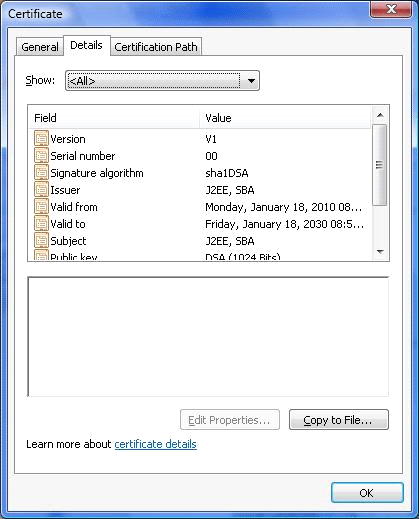
Figure 5
Detail information about the SAP logon certificate
Now you can import the SAP logon certificate into SAP NetWeaver AS ABAP, which results in the setting of a trusted connection from the Java system to the ABAP system. Any tickets created in SAP NetWeaver AS Java are then accepted in SAP NetWeaver AS ABAP.
Step 2. Import the SAP Logon Certificate into SAP NetWeaver AS ABAP
To import the SAP logon certificate, you first need to add it to the component system’s certificate list. Then you need to add it to the access control list (ACL) of the component system. Both of these steps use the trust manager (transaction STRUSTSSO2). To import the SAP logon certificate, log on to SAP NetWeaver AS ABAP as an administrator and call transaction STRUSTSSO2 (Figure 6). Select the Certificate > Import option from the menu bar and follow the installation wizard.
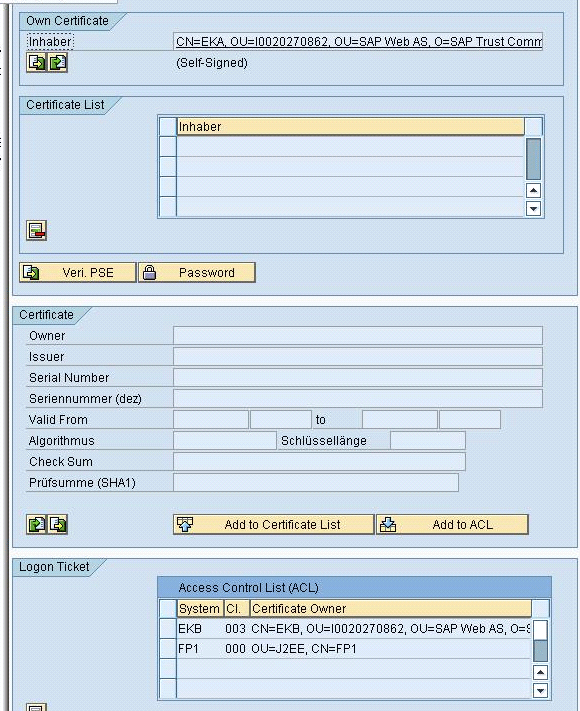
Figure 6
Import the SAP logon certificate into SAP NetWeaver AS ABAP using the trust manager
Figure 7 shows the Import Certificate pop-up screen where you select the certificate location in the File tab. Then select the file location from the drop-down menu in the File path field. Select the Binary option for the file format.
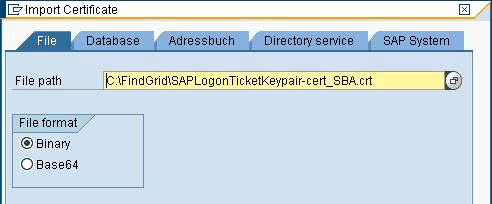
Figure 7
Import the SAP logon certificate from the binary file
After successfully importing the certificate, the trust manager displays it in the Certificate section in the middle of the screen (Figure 8). Then you have to add the newly imported certificate to the certificate list by clicking the Add to Certificate List button. The trust manager opens the Add Entry to Single Sign-On Access Control List dialog box (Figure 9).
Note
In Figure 8, be careful not to change the System ID and Client number data. All certificates are imported into client 000.
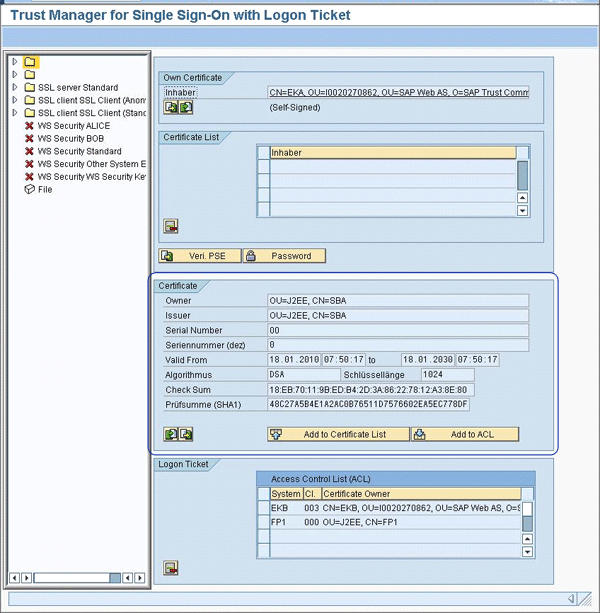
Figure 8
The imported SAP logon certificate in the trust manager
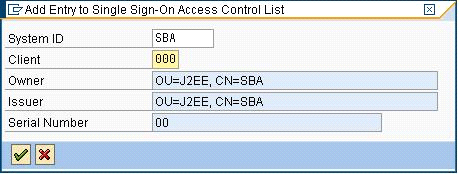
Figure 9
Add the SAP Logon certificate to the ACL
The trust manager automatically adds the imported SAP logon certificate into the ACL list and allows its use in the secure communication (Figure 10).
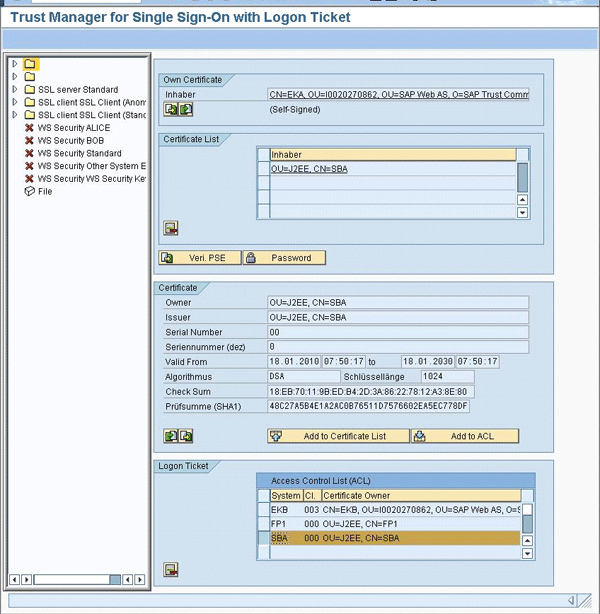
Figure 10
Trust manager with added SAP logon certificate
After you have successfully installed the SAP logon certificate in SAP NetWeaver AS ABAP, the trusted relationship is granted. Now you can set up the ticket authentication method in your new or existing destination configuration setting between SAP NetWeaver AS Java and ABAP.
Configure Ticket-Based Authentication in the Destination Service
To set up the new destination or to modify settings of existing destination, log in as an administrator and select Configuration Management > Security > Destinations. The destination service presents a list of existing destinations. Click the Create button to create a new HTTP or Remote Function Call (RFC) destination. You can also click the Edit button to modify existing one. For a detailed description of how to create an HTTP or RFC destination, see my previous article.
Note
To avoid problems, restart the SAP NetWeaver AS Java server if you modify the authentication settings in an existing destination configuration. This is not required if you modify a new destination.
Configure Ticket-Based Authentication in an HTTP Connection
The configuration of an HTTP destination supports the use of server-side certificates for the Transport Layer Security (TLS). This layer for communication contains the server certificates that are installed on the server in a secure keystore. The system uses the certificates when the destination service opens an SSL connection to the target system, which you can see in configuration options in the section SSL Server Certificates in Figure 11. In this situation, you use need to configure the https protocol in the connection URL, which you can see in the URL input field in the Connection Information section in Figure 11.
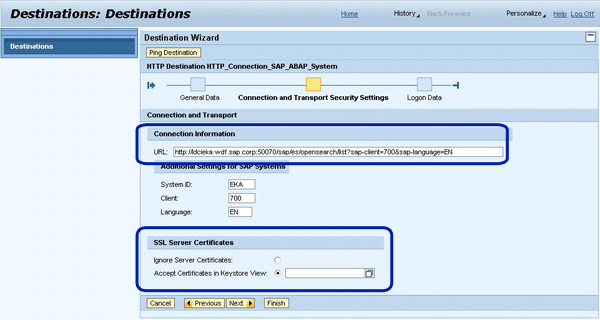
Figure 11
Configuration the HTTP destination using SSL Server Certificates
If you select the Accept Certificates in Keystore View option, you can select an imported server certificate that the system uses each time the destination communicates with the target system (e.g., calls the business application running in target system) using the SSL connection.
Next, you can use the selection box to select the installed certificate. To do that, click the drop-down menu icon to the right of the Accept Certificates in Keystore View input field and the system opens the Keystore View (Figure 12). The Keystore View allows you to select the certificate that is stored in central Key Storage of the SAP NetWeaver AS Java server (Figure 2). To select items, double-click the TicketKeystore item in Figure 12. The system automatically overtakes it into the Accept Certificates in Keystore View input field.
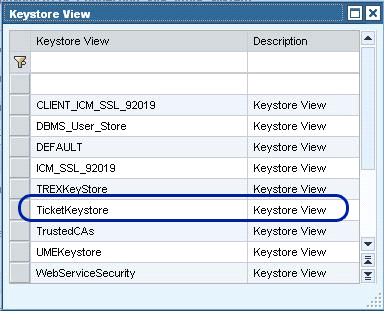
Figure 12
Select a certificate from the Keystore View
In the next step, the destination service requires configuration of logon data. Figure 13 shows you the configuration step where you define the connection authentication method. After you have selected the authentication method, the wizard opens the additional input fields where you enter required information, such as the user name and password for the basic authentication.
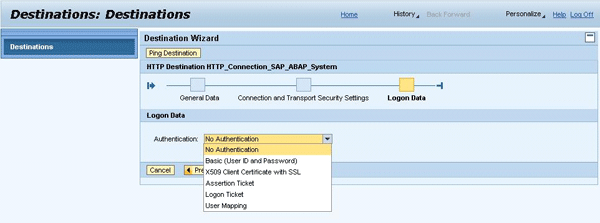
Figure 13
Select the authentication method
Figure 14 shows you the configuration using SAP assertion ticket authentication methods. This ticket-based authentication requires you to set a trusted relationship between the current SAP NetWeaver AS Java system where the destination service is configured and the target system, which is the SAP NetWeaver AS ABAP system. The current SAP NetWeaver AS Java system is the authentication server that creates the SAP assertion ticket using current user and system data. The SAP target system has to accept tickets that the authentication server (SAP NetWeaver AS Java) creates.
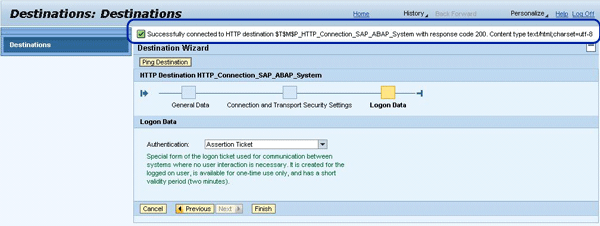
Figure 14
Select Assertion Ticket authentication
If you use the SAP logon ticket authentication method, you need to configure the trusted relationship to the authentication server on both servers — SAP NetWeaver AS Java, where the destination is defined, and the SAP target system. The SAP logon ticket authenticates the end user calling the business functionality on SAP NetWeaver AS Java server (the SAP logon ticket in the client-side authentication). The system then uses this functionality to authenticate the user in the target system (the SAP logon ticket in the server-side authentication).
After the destination data is complete, click the Ping Destination button. The destination service checks if the connection can be established and processes the appropriate success or error message at the top of the screen.
Configure Ticket-Based Authentication in an RFC Connection
The destination service allows you to configure a secure RFC connection to the SAP NetWeaver AS ABAP system. To do that, create a new or open an existing RFC connection configuration and navigate through the General Data and Connection and Transport Security Settings wizard’s step (see the wizard line in Figure 15) to the RFC connection logon data view where you can select one of the following authentication methods (Figure 15):
- Technical User: A basic authentication using user name and password
- Current User (Assertion Ticket): Authentication using server-side SAP assertion ticket
- Current User (Logon Ticket): Authentication using an SAP logon ticket
- User Mapping
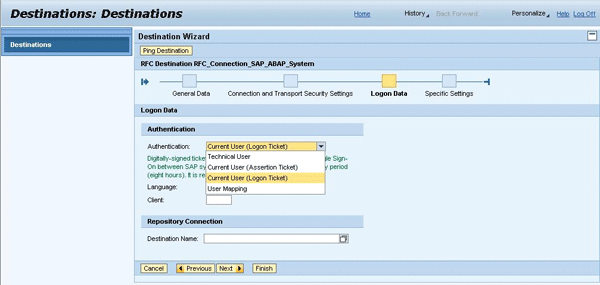
Figure 15
Select the SAP logon ticket authentication
As previously described for the HTTP connection, different authentication methods may require additional information, such as setting the following:
- Language: The language used to connect to the target SAP NetWeaver AS ABAP system
- Client: The client number in the target SAP NetWeaver AS ABAP system
The use of SAP logon and SAP assertion tickets in RFC-based communication requires you to set up a trusted relationship between the respective SAP systems (see the description for the HTTP connection).

Robert Heidasch
Robert is the chief innovation and technology lead in the global Accenture Technology Platform, which is responsible for SAP Leonardo and the new digital technology defining business value and driving the digital transformation of complex enterprise solution for Accenture diamond and strategic clients. Before that he was responsible as innovation and solution lead for the design and architecture of new business applications developed jointly by Accenture and SAP based on the newest SAP and non-SAP technology. Robert is the Accenture certified Senior Digital Architect and Senior Technology Architect. He is coauthor and trainer of a couple of SAP technology-related trainings for the in-memory platform and architecture of new business applications (e.g., SAP HANA, SAP Cloud Platform, and SAP Leonardo applications for solution architects and technical architects, all of which were provided by Accenture in Europe, the US, and Asia). Robert has more than 23 years’ experience designing and developing IT systems. He published several technical and business articles about SOA, SAP NetWeaver and its integration with non-SAP systems (e.g. Microsoft, Oracle, etc.), and SAP HANA technology. He is also an inventor of 38 patents in the US in the area of in-memory technology, artificial intelligence and machine learning, security, semantics, and SOA. He is a frequent speaker in international business conferences and SAP Forum. He is a subject matter expert in customer projects worldwide and has extended experience in team leadership in Europe, the US, and India.
You may contact the author at robert_heidasch@outlook.com.
If you have comments about this article or publication, or would like to submit an article idea, please contact the editor.