

4 minute read

Meet the Authors
Key Takeaways
What you need to know
SAP Datasphere data access control uses permissions data to apply row-level security to users and company codes.
NextTables lets authorized business users update SAP Datasphere permissions without requiring their own Datasphere accounts.
Self-service access maintenance can speed routine changes when organizations define edit rights and review requirements.
A data access control in SAP Datasphere can be configured correctly and still show a user the wrong data.
The data access control is how SAP Datasphere applies row-level security. It reads a permissions table that links users to the company codes they are allowed to see. If that table is not updated when people join, move, or leave, access can fall out of sync. That can delay work or leave access out of step with an employee’s responsibilities.
Software vendor NextTables gives business users a way to maintain those records directly. Its data app lets them edit individual access assignments, with each entry validated before it is saved, while the data team keeps control of the SAP model and how access is enforced. That gives the business more say over routine access changes while the data team retains ownership of the data access control.
Explore related questions
Ask SAPi
Manual Access Handoffs Create Delay and Error Risk
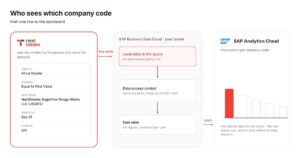
SAP Datasphere uses the permissions table to decide which company data each user can see. That restriction follows the data into the reports built on it, including SAP Analytics Cloud. If a user is missing from the table, the report returns nothing for them.
Keeping the table current is where things slow down. NextTables says the usual ways to maintain the table, including the Data Builder, data flows, file uploads, and APIs, are geared toward technical users. They also require company codes to be entered manually, without a list to select the correct value from.
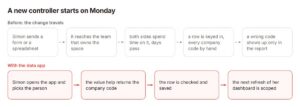
NextTables uses a new-controller scenario to show where that handoff can create delay and error: finance sends the controller’s access details to the team managing Datasphere, which then enters the record manually. In the example, the request takes days to process, and an incorrect company code is not discovered until the report is opened.
The example shows that the delay sits in the maintenance process. Finance already knows what access should change, but the data team still has to enter that change into the permissions table before Datasphere can apply it.
Business Users Can Update Access Without a Handoff
NextTables puts the permissions table behind a data app that authorized business users can maintain themselves. The app checks entries before they are written, while the underlying business data remains in the customer’s enterprise platform.
The company’s webinar demonstrations show how that works in practice.
A finance user sets up access for a new controller before the start date. Searching for the entity returns two subsidiaries with nearly identical names, and the company-code key beside each one shows which is correct. The user sets the effective date, records the reason for the assignment, and saves.
The record is then written into the table SAP Datasphere uses for access decisions. NextTables says its service stores the configuration needed to run the app, while business users can make changes without having their own Datasphere accounts.
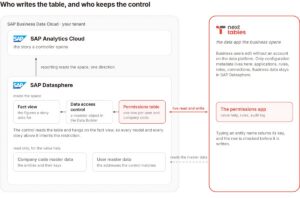
The data team still controls how those records affect access. In NextTables’ setup, it builds the logic that makes assignments active at the right time and connects the permissions table to the existing data access control. The business maintains the assignments; SAP Datasphere continues to enforce them.
Self-Service Changes the Governance Boundary
Moving maintenance to business users changes who can alter the data behind a data access control, even though the data team still owns how it works.
Access to the NextTables app therefore becomes a governance decision of its own. App customers can restrict read and write access by role and at the row level, limiting which records individual users can view or change. The customer still decides who receives that authority and how broadly it extends.
Tracking those changes is another consideration. The company describes an audit log that records changes made through the app and stores them in the customer’s enterprise platform. Access to that history through the NextTables interface remains on the roadmap.
Approval remains a separate issue. Approval workflows and rollback are also planned capabilities, not current features. Until they are available, customers using the app for access maintenance need their own process for deciding which changes require review before they take effect.
What This Means for SAPinsiders
- Treat permissions data as part of access governance. Keep access records aligned with role changes and review them alongside the data access control. That gives teams a clearer view of whether access still matches business responsibilities.
- Define clear boundaries for delegated maintenance. Specify which users can update which records and keep those permissions appropriately scoped. That lets business teams act faster while the data team retains control of the security model.
- Build review into the self-service process. Decide which changes need approval, what evidence should be retained, and how exceptions are handled. That preserves accountability as routine access maintenance moves closer to the business.
More Resources

Data Before Deployment: What the PwC and Palantir Alliance Signals for SAP TransformationPwC and Palantir expanded their alliance on September 3, 2026, with ERP modernization as a priority area and data readiness positioned as the gate before SAP migration begins. SAPinsider research shows why that sequence matters, with 75% of organizations rating harmonized data as critical to SAP S/4HANA plans and only 34% fully transitioned.


AI Automation Solutions for SAP AMS: Managed Resource Programs and Contingent Workforce Operations in 2026The article discusses the importance of AI automation in reducing SAP support ticket volume and rework, contrasting traditional time-and-materials billing with TotalTek's fixed-price model that utilizes AI to address root causes, and emphasizes evaluating candidates based on integration depth, compliance, and predictability in pricing.
9 minute read