While the classification system in R/3 can supply your BW InfoObjects with attributes, limitations in BW can make using all of them impossible. Even if you could provide access to all the characteristics in the classification system via a lone InfoObject, your end users would be sure to grumble as they struggled to work with lists of attributes that could number in the thousands. Dynamic attributes offer a solution to both problems.
Key Concept
Dynamic attributes are InfoObjects with transfer rules that call a custom ABAP routine rather than map one particular field in the data source to an InfoSource. The routine uses a table, which can be an InfoObject, an ODS, or a relational table to define the InfoObject’s values.
The R/3 classification system is a cross-application component in the SAP source system that groups objects with similar properties into classes. While all businesses do not use the R/3 classification system, companies that manufacture configurable products that have variables such as color, size, or brand, often employ it.
Characteristics of objects in the R/3 classification system are like InfoObject attributes in BW. Your BW system can use these attributes for reporting. There are, however, some limitations. While the number of characteristics coming from the classification system can be limitless, technical restrictions as well as other issues restrict how many of these characteristics can be used.
An InfoObject is limited to 712 attributes. If you need to accommodate more, you must create a new InfoObject with the same properties as the original. Problems arise because there is no way to link InfoObject to their attributes. If two InfoObjects are created, users must review long lists to find the attributes they need. If you don’t need to create a second InfoObject, there can still be end-user issues. The attributes originating in the classification system can become unwieldy for BW users when they result in lists with hundreds of entries.
Problems also arise if you would like to use characteristics from the classification system as navigational attributes. SAP recommends that an InfoObject use no more than 80 navigational attributes. If you exceed this number, system performance suffers. So even if you had only a few hundred characteristics from the R/3 system and your end- user community was willing juggle them all without complaints, you would still need to find a non-standard solution if you wanted to deploy them as navigational attributes.
Dynamic attributes offer you a solution for those occasions when you have a few hundred — or even thousand — characteristics coming from the R/3 classification system into BW. I’ll show you how you can use them for reporting on the many characteristics used to make up all the different classes. This approach has been tested and is working at a site as I write.
How It’s Done
You should be aware of a few prerequisites for the solution to work properly. Each class can be linked to only one material and one value for each related characteristic. The number of characteristics per class should be roughly the same and not exceed 100.
Note
Creating a report that compares characteristics across classes is not possible. For cross-class reporting, the model needs to be modified.
Start by identifying the appropriate business content InfoObject that supports your reporting needs such as 0Material. Best practices demand that you always use business content whenever available to save development time. Business content offers InfoObjects that are predefined and ready to use.
Copy the InfoObject in Administrator Workbench and assign the respective dynamic attributes with the corresponding classification, as shown in Figure 1. With the exception of the dynamic attribute assignments, use the same properties as the original business content InfoObject in your copy.

Figure 1
Copy of 0Material with assigned dynamic attributes and corresponding classes
Tip!
Make sure that you use only copies of business content InfoObjects and not the originals before adding the characteristics. If you use the originals, you could lose all your work if your characteristics are overwritten when the business content is upgraded or maintained.
Dynamic attributes are regular InfoObjects with transfer rules that call a routine rather than map one particular field in the data source to an InfoSource (Figure 2). The routine is a custom ABAP program that uses a normal relational table, an ODS, or an InfoObject to define values to fill the dynamic attribute. The table or object defines the relationship between the dynamic attribute and the characteristic and must be maintained manually.

Figure 2
Transfer rules that load the InfoObject with the dynamic attributes
InfoObject CHAR in Figure 3 on the next page shows the links between the dynamic attribute in column Attribute and the characteristic in column T Name of Char in TS. The screen is accessed via Administrator Workbench by right-clicking on the InfoObject and using the Maintain Master Data option. The name of the dynamic attribute is entered in the Attribute field.

Figure 3
The dynamic attributes in column Attribute and the characteristics in column T Name of Char in TS are maintained manually
Tip!
Because the table used to fill a dynamic attribute also defines its relationship to the classification characteristic and must be maintained manually, it is easier to use an InfoObject than a relational table. The data can then be maintained in Administrator Workbench.
More Descriptions
In addition to maintaining the relationships between the dynamic attributes and the characteristics, you must also provide text descriptions of the characteristics so users will know what they are looking at. The easiest way to offer these descriptions is to establish an ODS for all characteristic text coming from the R/3 classification system and load it into the ODS (Figure 4). After it is loaded (Figure 5), separate loads move the appropriate values from the ODS into the dynamic attributes.
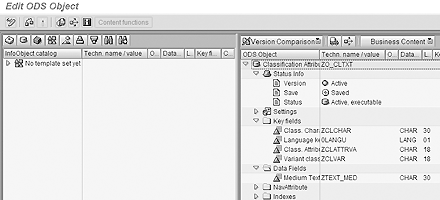
Figure 4
Definition of ODS that holds the text of the characteristics

Figure 5
Text loads into the ODS
The same logic that fills the dynamic attributes with values also supplies the description text. It ensures that text for the appropriate dynamic attribute and its corresponding characteristics are loaded correctly. For example, if a dynamic attribute has only two characteristics assigned, only the text of these two characteristics is transferred from the ODS to the dynamic attribute.
Better Reports
Dynamic attributes can be used in such a way that your reports are more user friendly. In addition to streamlining long lists of characteristics, you can display them with drill-down functionality that allows your users to access the R/3 information they are looking for easily from a BEx report.
First, create a report that lists the allocation of dynamic attributes and the R/3 class characteristics such as Variant classes TEST shown in Figure 6. Design the report so that users can drill down on any of the technical names in column Attribute to access a second report. The second report provides the numbers that are required for analysis (Figure 7).

Figure 6
Report with allocation of classification characteristics and dynamic attributes
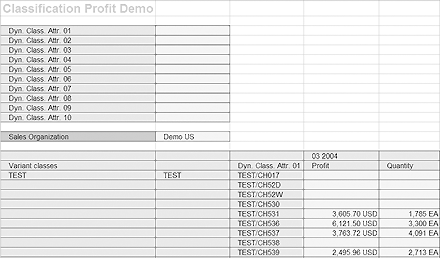
Figure 7
Report on class and dynamic attribute
While all this may sound difficult, it isn’t. A savvy BW team can use standard tools to build the scenario and reports I just described. It takes some time to create the routines and for the manual maintenance. The data load can also be somewhat time consuming depending on the complexity. It is all worth it, however, to reap the benefits offered by the R/3 characteristics system.
Frank Bulacher
Frank Bulacher is manager of SAP CH at Alstom Switzerland. He has worked in BI for more than 14 years in the United States and Europe. Prior to that, he was a consultant in data warehousing and SAP FI/CO. His career has taken him to top-tier and boutique companies. Frank is a graduate of the University of Augsburg in Germany and the University of Wales in Swansea, UK, with majors in banking and computer science.
You may contact the author at f.bulacher@gmail.com.
If you have comments about this article or publication, or would like to submit an article idea, please contact the editor.