
1 minute read

Meet the Experts
Key Takeaways
What you need to know
The purpose of SAP Analysis for Microsoft Office as an MS Excel add-in.
The functionality of SAP S/4HANA combining FI and CO, and the universal journal containing most data finance users' need.
The intention of SAP Analysis Office serving as a “pivot table” to the universal journal to boost the accountant’s or analyst’s efficiency with content reuse and real time query responses.
SAP S/4HANA Finance and SAP Analysis Office go together like peanut butter and chocolate. It is used for multi-dimensional scenarios and helps you analyze large data sets to uncover business insights.
This session will focuses on:
The purpose of SAP Analysis for Microsoft Office as an MS Excel add-in where you can run on demand analysis of OLAP sources in Excel. It connects seamlessly with SAP S/4HANA Core Data Services (CDS) views.
The functionality of SAP S/4HANA combining FI and CO, and the universal journal containing most data finance users’ need.
The intention of SAP Analysis Office serving as a “pivot table” to the universal journal to boost the accountant’s or analyst’s efficiency with content reuse and real time query responses.
Explore related questions
Ask SAPi
More Resources
See All Related Content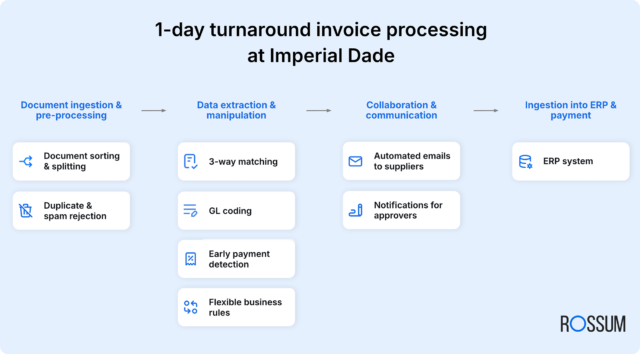
See how Imperial Dade unlocks millions in early payment discounts and cuts invoice processing time by 90%.Imperial Dade replaced fragmented, manual AP workflows with Rossum’s end-to-end automation across subsidiaries and HQ, cutting invoice processing from 7–10 days to 1 day, reducing missed early payment discounts by 60% for millions in annual savings, and achieving 96%+ extraction accuracy with faster approvals and fewer errors.

Live from Las Vegas 2026 Podcast Nikhil (Nik) Premachandra Rao, Data Scientist – KatBotzIn this SAPinsider 2026 Las Vegas live podcast, Nikhil talks about AI, data, and their adoption across enterprises, along with the evolving maturity levels organizations are reaching on their digital transformation journey.
1 minute read

How CIP transformed supplier invoice management at Campus CondorcetCampus Condorcet automated its manual, error-prone invoice processing with Symtrax’s Compleo Invoice Platform, integrating Chorus Pro and SAP to cut processing time, improve traceability and payment visibility, eliminate supplier complaints, and free staff to focus on higher-value work.
3 minute read

SimpleFi Links Better Dashboards With Finance Automation GainsSimpleFi Solutions says SAP finance teams should modernize dashboards and automation together, arguing that effective SAP Analytics Cloud and Business Data Cloud reporting requires disciplined, audience-focused dashboard design plus workflow automation that eliminates spreadsheet-based manual prep, reduces errors and keeps KPI data consistent for faster, more reliable decision-making.
3 minute read