APO allows you to create and maintain lanes of transportation for your own facilities as well as those to and from your suppliers and customers. It also provides the tools to determine the most cost-effective way to transport materials. This overview explains the technology and provides some great tips for using it.
Key Concept
The relationships among each locations in a supply chain can be modeled using transportation lanes in APO. They are created in APO based on master data that is defined in R/3.
I'll offer you a look at creating and maintaining transportation lanes as well as discuss how APO and R/3 communicate to maintain them. I'll also tell you about a little-known but very helpful tool in APO that allows you to maintain several transportation lanes at the same time. First, let's review how the transportation lanes technology has evolved over the course of various APO releases.
Evolution of Transportation Lanes
The APO Core Interface (CIF) plays a vital role in the transmission of transportation lanes from R/3 to APO. Its functionality has been significantly increased with successive APO releases. In APO 3.0 (and earlier), transportation lanes were based on external procurement relationships defined in R/3 such as purchasing information records and outline agreements, which refer to purchasing contracts and scheduling agreements. If any of these master data objects were defined in R/3, then a transportation lane was created in APO. The main shortcoming of this approach was that all the required transportation lanes connecting own locations had to be maintained manually in APO. These early releases also did not support the automatic creation of transportation lanes for subcontracting processes.
With the release of APO 3.1, mass maintenance functionality was added, which significantly improved the manageability for transportation lanes. The transportation lane mass maintenance employed the same user interface as the mass maintenance function for other data objects (e.g., product master). With the added functionality, it became possible to select specific transportation lanes based on the values of any field stored in the transportation lane and update them as required. Before this introduction, transportation lanes had to be maintained manually one by one.
Note
Transportation lanes model the supply relationships that exist among locations in a supply chain. Manufacturing plants and distribution centers are known as "own locations" and are modeled in R/3 as plants. The facilities of external vendors that deliver goods such as raw materials or provide services like subcontractors represent the second group of locations and are modeled in R/3 as vendors.
A customer location type can also be linked to an own location using transportation lanes. While this is not required for normal sales order processing, it is needed when working with sales scheduling agreements and in the case of vendor-managed inventory (VMI) processes. In a VMI process, the vendor monitors the customer's stock level and initiates the replenishment on the customer's behalf.
Another important improvement came with the introduction of APO Release 4.0, making it possible to automatically create transportation lanes between locations. In APO 4.0, CIF performs this function for all materials defined in R/3 where the procurement type is F (external procurement) and the special procurement type is U (stock transfer). In addition, transportation lanes could be created in APO 4.0 for the finished products and the required components in the case of subcontracting. Sales scheduling agreements also can be used to create transportation lanes between the own source location and the customer location. The latter process only works in conjunction with R/3 4.7, which is also known as Enterprise Core 4.7.
With APO Release 4.1, so-called where-used functionality for transportation lanes and other master data objects (e.g., products) was introduced. Source lists maintained in R/3 that define valid sources of supply vendors also can create transportation lanes. This is in addition to the ability to use external procurement relationships.
Not as Easy as It Sounds
Transportation lanes are normally created in APO based on master data defined in R/3 and transmitted via the CIF to APO. While this sounds like it should be a straightforward procedure, it is not because R/3 has no counterpart for the APO transportation lane.
In the R/3 purchasing module, supply relationships are modeled as purchasing information records, contracts, or scheduling agreements. In addition, special procurement types, which define situations where one plant supplies materials to another, are defined directly in the R/3 material master data. While it is possible to have more than one vendor for a given material in R/3, it is not possible to define more than one supplying plant in the material master.
In APO, transportation lanes do not have these restrictions and are able to support multi-source definitions for supplying plants as well as vendors. Frequently, a product planned in APO can be procured from various sources, and depending on which planning algorithm is employed — SNP heuristic, SNP optimization, capable-to-match, or PP/DS heuristic — the system automatically determines the best option.
Create and Maintain Transportation Lanes
A transportation lane is created only once with the first product procured from a specific source. For all subsequent products shipped from the same source, the transportation lane is updated. This means that a transportation lane contains at least one, but most likely multiple products. Because they are direction-dependent, two transportation lanes must be defined if goods movements should take place in both directions. A supply chain network is made up of the nodes, locations, and links among these transportation lanes.
Two important information streams are incorporated into transportation lanes. The first is product related and defines which products can be procured. The second relates to the transportation method and describes how a product is transported (e.g., by air or sea) as well as associated information such as how long the transport takes and what it costs. Planning algorithms like SNP optimization can then select the most appropriate transportation method, supporting not only multi-source but also multi-mode procurement optimization. The transportation method is not known in R/3, so information has to be maintained manually in APO after the transportation lane has been created via the CIF.
Maintain transportation lanes using transaction SCC_TL1 or by following the menu path Master Data> Transportation Lanes. The maintenance screen is shown in Figure 1.
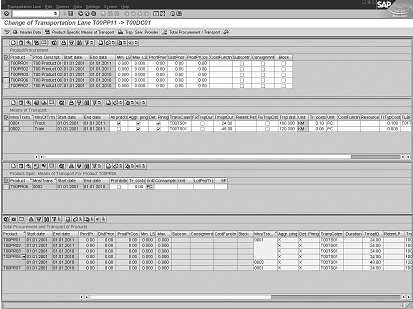
Figure 1
The transportation lanes maintenance screen accessed via transaction SCC_TL1
The top section of the maintenance screen shows the products procured via the transportation lane. Beneath it, the permitted transportation methods for the products are displayed, which is followed by the section that shows specific product/transportation method combinations. Using these combinations is optional. If not defined, a product can be transported using any method specified for the transportation lane.
The bottom section of the screen lists all permitted product/transportation method combinations as defined in the three sections I just described. In my example, all products except T00PR06 must be transported via transportation method 0001 – Truck. Product T00PR06 can be transported using the transportation method 0002 – Train.
Transportation lanes are supply-chain-model-dependent master data objects and must be created separately per supply chain model. The CIF always creates transportation lanes in the active model (000). It's possible to create and maintain transportation lanes in any supply chain model including those in 000 through the Supply Chain Engineer screen (transaction SCE01 or menu path Master Data > Supply Chain Engineer > Maintain Model). You can also use the dedicated transportation lane maintenance transaction noted earlier.
A Great Tool
I'd like to show you a fast way to maintain several transportation lanes at the same time. I noted earlier that there are two ways of maintaining transportation lanes. Using transaction SCC_TL1 (menu path Master Data > Transportation Lanes), however, one — and only one — transportation lane can be selected and maintained. The same applies if you use transaction SCE01 and select a specific transportation lane in the Transportation Lane tab. If you select the Location tab on the Supply Chain Engineer screen, however, you can select one or multiple locations.
First, select the Location tab and right-click on any highlighted location. Select Transportation lane and choose either Incoming Transportation Lanes or Outgoing Transportation Lanes (Figure 2). You now see all transportation lanes that start or end at the selected locations and you are also able to maintain all of them.
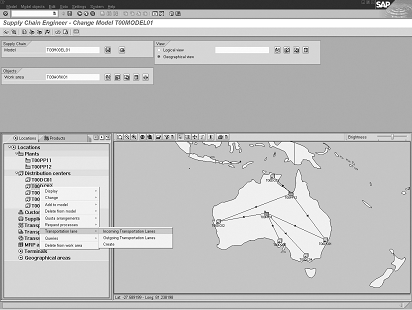
Figure 2
Set Transportation lane along with either Incoming Transportation Lanes or Outgoing Transportation Lanes
Now, go to the Transportation tab and highlight multiple transportation lanes. Right-click on any selected transportation lane and choose Change (Figure 3). The system now shows all selected transportation lanes and you can maintain them. It's that simple!
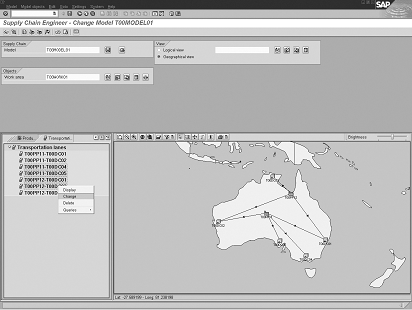
Figure 3
On the Transportation tab, highlight multiple transportation lanes, right-click on any selected transportation lane, and choose Change

Wolfgang Eddigehausen
Wolfgang Eddigehausen is a highly experienced expert in the areas of business process design, re-engineering, and user adaption, as well as process realization in complex SAP-centric environments. He has experience in solution and enterprise architecture and project management (PRINCE2 certified) domains defining enterprise capabilities with a focus on delivering effective and efficient solutions to organizations. Wolfgang's industry knowledge includes public sector, utilities, mining, distribution, general manufacturing, process and steel industries, and consumer goods.
In most roles his task is not only to architect a solution but also to evaluate and define strategic options with a focus on end-to-end solutions rather than systems. This also includes strong emphasis on the user acceptance through an innovative user experience and mobility enablement.
His career includes successful participation and management of projects in Australia, Europe, India, Japan, Singapore, South Africa, Taiwan, and the US. These projects required interaction with all levels of an organization, from the shop floor or office through to the CxO level. Throughout his career, Wolfgang has put emphasis on a holistic approach bringing together people, processes, information, and systems in project management, architecture, and implementation roles.
You may contact the author at we@avox.com.au.
If you have comments about this article or publication, or would like to submit an article idea, please contact the editor.