See how to use your SAP system’s table logging functionality to support a benchmarking strategy for application controls.
Key Concept
On the technical side, many companies are confused about the impact table logging might have on performance. They confuse database-level table logging with application-level table logging and the performance impact of logging master and transactional data (large volumes) with the impact of logging configuration data (low volume). The SAP system performs application table logging, while the relational database software independent of the SAP system performs database-level table logging.
Application controls benchmarking is a strategy that you can use to extend the benefits of certain tests of application controls — automated controls enabled through a program or configuration — into subsequent audit periods. Application controls benchmarking is based on the premise that a computer continues to perform a given procedure (e.g., aging of accounts receivable, edit test) in exactly the same way until someone changes the program. If you verify that a given program or configuration that executes an automated control has not changed since it was last tested, you may choose to not repeat specified testing procedures in a subsequent period, but rather rely on the testing that was performed in conjunction with the benchmark. The benchmarking period might extend, for example, until someone applies a major upgrade to the SAP software or actual changes to the program or configuration.
I am surprised that more companies are not seeking out a benchmarking strategy to reduce their cost of compliance with Sarbanes-Oxley. If a company has a 50/50 mix of application controls and manual controls and spends $2 million a year to test and document controls, a benchmarking strategy could potentially reduce that cost by a fourth to a half.
One approach to implementing a benchmarking strategy is to use the table logging capabilities within the SAP system, which you perform at the application level instead of the database level. SAP table logging records any field level changes that you apply to the contents of the table. The change logs identify the time and date of the change, the user who applied the change, and the before-and-after values associated with the field level change.
Note
Benchmarking application controls is a strategy addressed by the new Public Company Accounting Oversight Board (PCAOB) Auditing Standard No. 5 (AS5). AS5 supersedes Auditing Standard No. 2 and was approved by the Securities and Exchange Commission on July 25, 2007. It is effective for audits of fiscal years ending on or after November 15, 2007. You can find the full text of AS5 at PCAOB’s Web site at
www.pcaob.org.
The PCAOB Auditing Standard No. 5 (AS5) provides specific guidance for benchmarking in paragraphs B28 through B33. Some of the key highlights include:
- You can use benchmarking to extend the benefits of certain tests of application controls into subsequent periods. This is based on the premise that a computer continues to perform a given procedure the same way until you alter the program.
- Management can establish the application controls benchmark as of a given point in time by performing a test of an application control using traditional audit procedures
- If the program that executes an application control has not changed since last tested, management may choose not to repeat this test procedure in the subsequent period
- Benchmarking is generally reestablished every three to five years
Key Factors to Benchmarking Application Controls
AS5 outlines three key factors to assess whether a benchmarking strategy is low risk and therefore well suited for application controls. As indicated in paragraph B31 these factors are:
- The extent to which you can match the application control to a defined program within an application
- The extent to which the application is stable (i.e., there are few changes from period to period)
- Whether or not a report of compilation dates of the programs placed in production exists and whether or not it is reliable. This information may be used as evidence that controls within the program have not changed.
In an ERP IT environment such as SAP, the universe of controls that you can benchmark falls into two categories. First are those application controls and reports that are defined within traditional program code. Second are those application controls that are incorporated into configuration tables. I’ll focus on an approach for benchmarking application controls that are established through configuration tables.
After you’ve identified that an application control is effective and benchmarked through appropriate documentation, the table logging capabilities can provide a basis on which you can establish the benchmark. If you apply changes to configuration of the control or perform a major upgrade, you’ll need to re-test the control and reestablish the benchmark.
Configurable Application Controls
Specific field values in configuration tables set most of the configurable application controls in the SAP environment. Programs dynamically reference the field values in the tables at execution time to invoke the defined application control. Although this dynamic referencing provides greater flexibility in configuring the application and processing data within the SAP environment, it also creates a challenge for benchmarking.
An SAP application controls benchmarking strategy must:
- Associate specific application controls with the tables and fields through which they are defined
- Document the point in time at which users configured specific field values for the application control
- Provide an audit trail of field level changes that users applied to the established application control
Table Logging Approach
You need to activate application-level logging in the SAP system at three levels before it can consistently log changes to the designated tables and rows. The table logging configuration changes I show you require the use of sensitive Basis transactions in conjunction with established change control procedures, so access is typically restricted.
The three levels are table, system, and transport.
Table Level
From a benchmarking perspective, the table logging process begins with the identification of all configurable controls and then mapping them to the associated configuration tables. This mapping identifies those configuration tables for which logging would be required to support the benchmarking strategy. Remember, the underlying premise around configuration tables is that few, if any, changes are applied, so the number of log entries is minimal. You should be very cautious in situations in which the mapping of controls leads to master or transactional tables, because activating logging for these classes of tables could result in performance issues (refer to SAP Note 608835).
The most efficient means to identify all the tables for which table logging is active is through transaction SCU3. This transaction contains a function button, List of the logged tables, that generates a list of all of the tables flagged for logging (Figure 1). The list contains the technical table name and the table description (Figure 2). You can export this list to a Microsoft Excel format through menu path System > List > Save > Local file. You can compare the list of configuration tables that were identified in your mapping of configurable controls to the tables in this list to determine which tables are set for logging and which tables you still need to set for logging.

Figure 1
Click on the List of the logged tables button
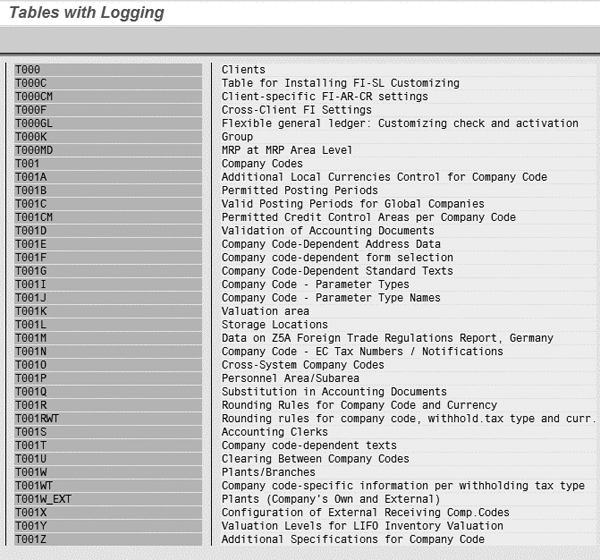
Figure 2
The system lists the tables flagged for logging
You can also check the table logging status at the individual table level. To do so, you need to access the configuration transaction in the IMG. Using the sales order document type configuration transaction VOV8 as an example, the following sequence of screens illustrates how to check the logging status for its associated configuration table (TVAK). You begin by invoking transaction VOV8 and then you select Utilities > Change Logs from the menu as shown in Figure 3.
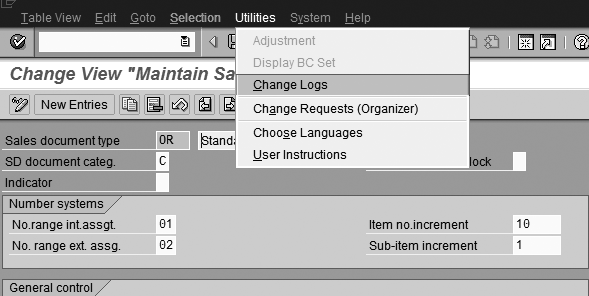
Figure 3
Go to the Utilities menu and click on the Change Logs option
Next, click on the Logging Display Status button to display the table logging status associated with the configuration as shown in Figure 4.
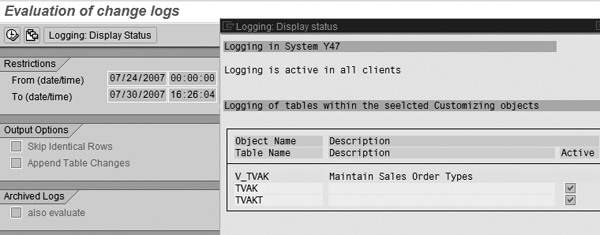
Figure 4
Check tables active for logging
Based on the information displayed on this screen, you can see that logging is active for the TVAK table. You can control the table logging status for individual tables through the Data Dictionary and display or change it using transaction code SE13 (Figure 5).
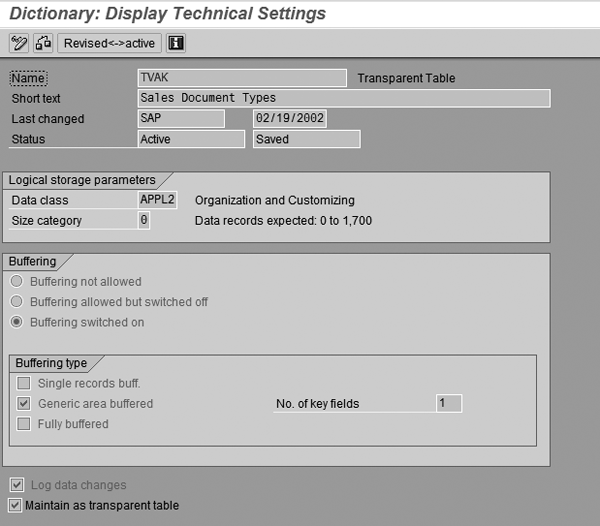
Figure 5
Note that the Log data changes box is checked
The Log data changes box is grayed out so you cannot change it unless you toggle the transaction into edit mode by clicking on the edit icon (pencil) in the top left corner of the application menu bar.
System Level
The second level at which you need to activate table logging is at the SAP system level. You must set the rec/client parameter to a value that enables the recording of changes in one or more clients. You should activate table logging in all the production clients that are within the scope of your benchmarking strategy. You can review the value for this parameter with the RSPARAM report as shown in Figure 6.
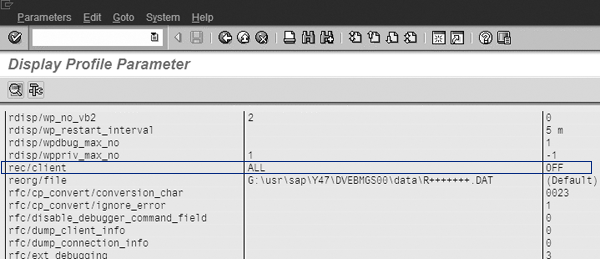
Figure 6
RSPARAM report — review rec/client setting in system-level parameters
The right column shows the default setting OFF, so by default, table logging is turned off at the system level unless you override the setting by a value in the left column. In Figure 6 table logging is turned on for ALL clients in the instance. The setting in the left column overrides the default in the right column, so in this example table logging is active for all clients. This setting can also specify individual clients by client number.
You can also display the rec/client parameter through transaction RZ10 (edit profiles). In most cases access to transaction RZ10 is highly restricted because it enables changes, so the preferred method to display the rec/client system parameter setting is through the RSPARAM report. The initial RZ10 screen requires the selection of the applicable profile, which in this example is Y47_DVEBMGS00_USCLEVY47. Figure 7 shows the Extended maintenance selection. Next you see the parameter settings that include the rec/client setting (Figure 8).
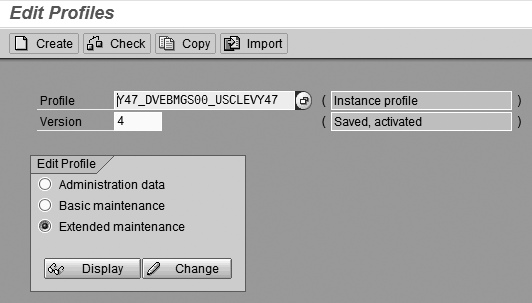
Figure 7
Select Extended maintenance
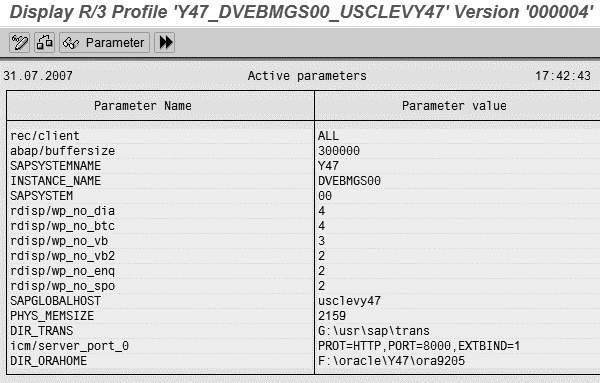
Figure 8
Parameter value for rec/client
You can change and save the parameter values by clicking on the change icon and then saving the changes. The rec/client setting of ALL indicates that logging is active for all clients. Remember, the setting can be more restrictive by listing specific clients by client number.
Transport Level
The third level at which you must activate table logging is in the transport control profile file. If a configuration change occurs due to a transport into a production system, the change is only recorded if the transport control profile contains the entry R3TRANSOPTIONS = recclient = XXX, where XXX has the same client number as the rec/client profile parameter. Note that the format of the setting in the transport control profile differs from the system parameter format and does not include the slash. You can find more information about this in SAP Note 84052.
The transport control profile file name is identified in the transport configuration (transaction STMS) as shown in Figure 9. The transport control profile identified in transaction STMS for the Y47 system is TP_DOMAIN_Y47.PFL. Figure 10 shows the content of the file and the setting for the recclient.
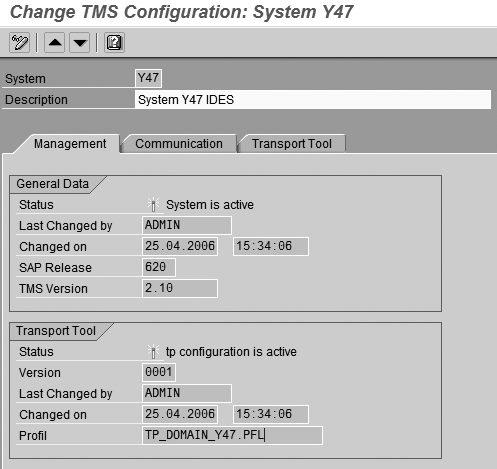
Figure 9
Transport control profile name

Figure 10
Setting for recclient
After you have set table logging at all three levels, the system logs any changes that you apply to configuration tables. That logging occurs if the change is transported into production via normal change control or if the change was made to configuration after the production client was opened via transaction SCC4. This approach provides a single set of change logs upon which you can establish procedures to control and monitor benchmarks regardless of how the changes were applied.
One discussion point that is often raised in regard to logging table changes applied during the transport process has to do with the role that an effective change control process has on the benchmarking strategy. In concept, an effective change control process would ensure that all changes transported into the production environment have been appropriately authorized, tested, and approved. In practice, most effective change control processes today do not include procedures to identify the application controls, benchmarked or not, affected by the transport, nor do they incorporate steps to re-test and reestablish the benchmark. Although modification to change control procedures could address these concerns, without subjecting the transports to the same table logging approach used for online changes, the change logs would not include all changes applied to configuration tables. To eliminate any questions around incomplete change logs, a best practice is to adopt a consistent approach to table logging that includes any changes that are transported to production.
Test Case
Let’s say that an organization has identified and singled out the configuration of the document pricing condition code as a key control for its valuation assertion on receivables. It has tested the control and found it to be effective, documenting the process appropriately along the way. In addition, the organization has mapped the control to the sales order document type configuration that is performed via transaction VOV8 and recorded in table TVAK. It also has activated table logging for table TVAK.
The following sequence of screens illustrates how table logging tracks any changes that are applied to sales order document type configuration table TVAK after client 800 was opened for direct IMG update via transaction SCC4. In Figure 11, the client setting is changed to allow direct changes.
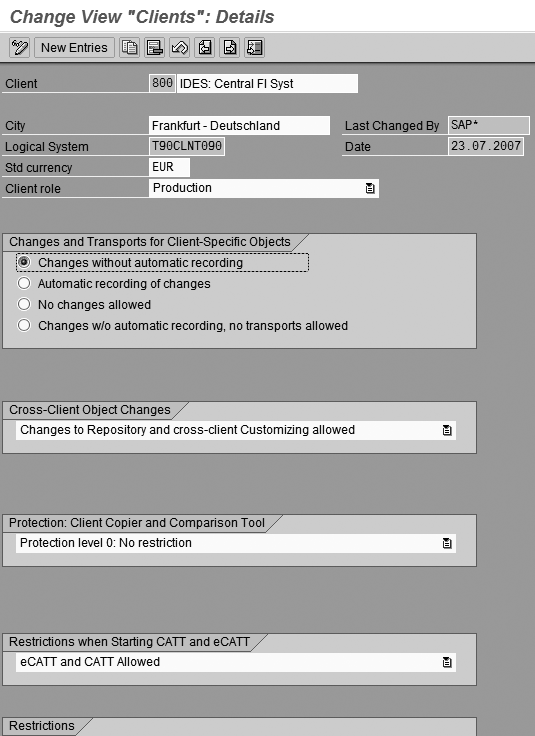
Figure 11
Direct changes to the client are permitted by selecting Changes without automatic recording
The underlying assumption in this test case is that the document pricing procedure represented by value A is a key application control that affects pricing for this sales order type. As part of this benchmarking process, pricing procedure A has been thoroughly tested, documented, and found to be effective. If you change the document pricing procedure value to B, the benchmarking strategy needs to flag that change so that you know that the benchmark testing and documentation for A is no longer valid and that the benchmark needs to be reestablished for B.
The example in Figure 12 illustrates the change from a document pricing procedure value of A to a value of B. After saving this change, the system recorded a log of that change. The change log enables you to track and monitor changes to the application controls that you have benchmarked. You can access the log directly from transaction VOV8 through menu path Utilities > Change Logs (Figure 13).
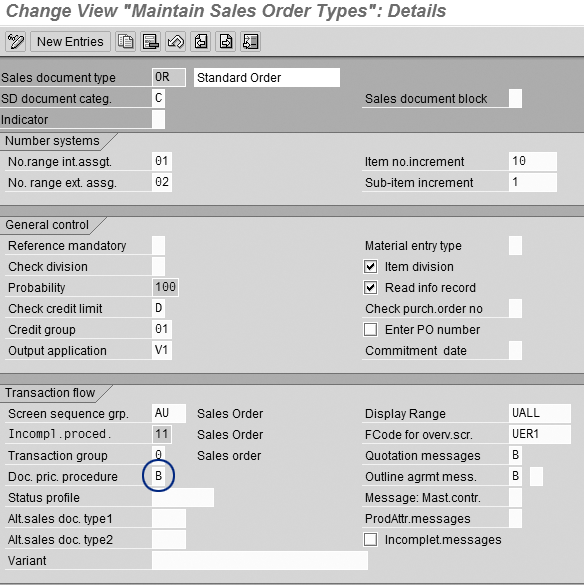
Figure 12
The Doc. pric. procedure value is changed from A to B
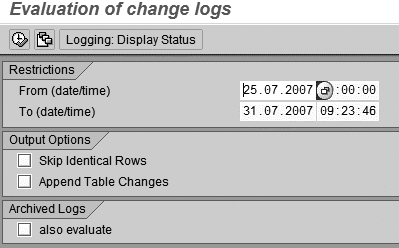
Figure 13
Display change logs for specified date range
The date range you designate should extend from the date the current benchmark was established through the end of the current audit period. This enables you to identify any changes that have been applied to the benchmark since it was established, through either an online update or through a transport. The system displays any changes that have been made to the TVAK table within the designated date range as shown in Figure 14.
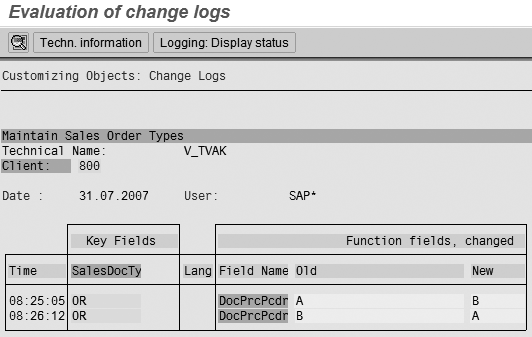
Figure 14
List of changes recorded to table TVAK
The change log shown in Figure 14 identifies the change to the document pricing procedure, who made the change, when the change was made, the document type (row) where the change was applied, and the before-and-after values for the change.
An alternative method to access changes for all configuration tables that are subject to logging is through transaction SCU3 (Figure 15). This transaction enables you to view the same change logs, but through a single transaction code. It is worthy to note that transaction SCU3 is often considered to be a sensitive Basis transaction and it may be necessary to establish a special view-only authorization for its use in the production environment.
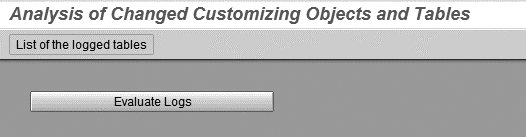
Figure 15
Evaluate the change logs
Click on the Evaluate Logs button to display the selection screen. Input the name of the table for which you want to review changes in the Customizing Object/Table field along with the relevant date range just as before (Figure 16).

Figure 16
Display change logs for specified table and date range
The change log shown in Figure 17 identifies the change to the document pricing procedure, who made the change, when the change was made, the document type (row) where the change was applied, and the before-and-after values for the change.
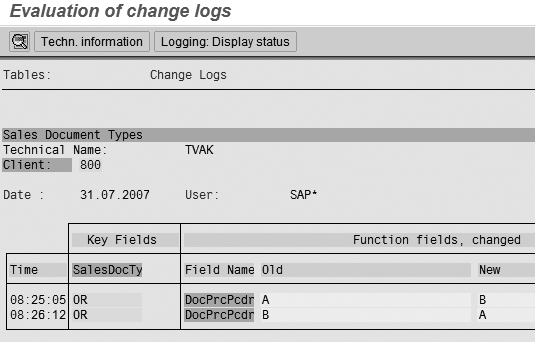
Figure 17
List of changes recorded to table TVAK
Relevant SAP Notes
The SAP Notes in Table 1 provide additional insights and guidance into the table logging capabilities as well as considerations for implementing table logging.
| 1916 |
Logging table changes in R/3 |
| 84052 |
R3trans: Table logging |
| 163694 |
R3trans: Logging table changes |
| 608835 |
Performance problems due to table logging? |
| 114564 |
No table logging for R3trans |
|
| Table 1 |
Table logging SAP Notes |
Richard Castle
Richard Castle is an executive director in Ernst & Young’s Risk and Advisory Services practice. He has more than 24 years of experience in information systems, project management, and related operations. Richard directs SAP Risk Advisory Services for the Midwest and specializes in providing SAP quality and internal controls solutions for Fortune 1000 companies. Richard is a Certified Information Security Manager (CISM) and is a member of the Information Systems Audit and Control Association (ISACA).
You may contact the author at richard.castle@ey.com.
If you have comments about this article or publication, or would like to submit an article idea, please contact the editor.