Two seemingly innocent checkbox items might have negative long-term consequences if you don't understand the questions they actually represent.
The master data for your G/L account numbers offers you several checkbox options. Of these, two seem particularly innocent and friendly. Line item display is the first. Only balances in local currency is the second. Yes or no, on or off? The screenprint in Figure 1 shows both fields. If only all of R/3 customization offered such simple decision variables!

Figure 1
Company Code-Specific G/L Master Data
But maybe the impact of those two checkboxes is not so obvious. Could the wording of the field names mislead the "yes vs. no" decision maker? Perhaps the consequences of "yes vs. no" do not even show up until a few years after your site has been using SAP R/3.
As a quantity of more than 1,000 individual G/L accounts in an organization’s chart of accounts list is not uncommon, these two checkboxes represent more than 2,000 decisions that somebody has to make during the original cutover project. That is about 1,998 too many. Almost every project that I was on in the 1990s relied on rules of thumb for those decisions. Now, almost the year 2003, is it time to revisit that approach?
Some FI/CO Expert readers already know the answer, because you’ve sent me multiple e-mail messages on this subject, wondering if it had been a mistake to go with rule-of-thumb decisions, such as those in Figure 2, all these years.
| Line Item Display |
Only Balances in Local Currency |
|
• Activate for all G/L account numbers except for those that will act as A/R or A/P reconciliation accounts (since the system will already be storing the A/R and A/P detail in those subledgers).
|
• Never activate it for a G/L account number that will act as an A/R or A/P reconciliation account. (Just in case you like to break the rules, the system enforces this on you.)
• Except for those that are used in GR/IR, do not activate for any G/L balance sheet accounts that will be “open item managed.”
• Always activate for any G/L balance sheet account number that will act as a GR/IR suspense account (i.e., automatically credited by the goods receipt for a PO, and automatically debited when that PO’s vendor invoice receipt is recorded).
|
|
|
| Figure 2 |
Typical Rule-of-Thumb Decisions Used with the Two Checkbox Settings |
Since almost all settings in R/3 are "good" or "bad" only in relation to other settings, I’m not in a position to call any one rule of thumb a mistake. Instead, what I’d like to do is to show you what these two checkbox settings are doing to your database. With that clarity, you should then be able to reach your own conclusions.
The "Line Item Display" Checkbox Does Not Impact Your General Ledger’s Line Items!
Whether or not a G/L account’s master has its Line item display checkbox on, your debits and credits posted to that account number are stored in the G/L database tables BSEG (detail) and GLT0 (summary). The only table update that the checkbox controls is one that SAP calls a secondary index, table BSIS. Figure 3 shows a sample set of data from this table.

Figure 3
Sample Set of Data from G/L Secondary Index Table BSIS
You definitely have some G/L accounts where you will want a copy of each debit and credit to be posted into the G/L tables (BSEG, GLT0) and into the G/L secondary index table (BSIS). Figure 4 lists a comparison of what your users can do both with and without the BSIS table being populated.
| BSIS Data is Required |
BSIS Data is Not Required |
|
• Change the status of a G/L account’s debits and credits from Open to Cleared, by matching up activity that nets to 0.00 via end-user transaction code F-03.
• Drill down in end-user transaction code FS10N from an account’s summary balances into the debits or credits that make up that balance.
• Use transaction code FBL3N to generate a list of an account’s debits and credits.
|
• Export an account’s debits and credits out of the R/3
General Ledger into another application such as
Microsoft Excel or SAP BW.
• Drill down from the overview screen of the FI document display transaction into the detail screen of any debit or credit in that document.
• Use transaction code FS10N to display an account’s
summary balances.
• Use the Display line items transaction in the A/R or A/P modules to view the individual debits and credits that comprise a customer’s or vendor’s current account balance.
|
|
|
| Figure 4 |
A Comparison of What Your Users Can Do with and without BSIS Data |
As Figure 4 suggests, at most R/3 sites, enabling the Line item display might not be needed with a reasonable percentage of accounts in most charts of accounts. Yet at most sites, the checkbox is active for almost all accounts.
Does this mean the setting is overused? I’ll let each reader form his or her own conclusions. Some of any evaluation comes down to personal tastes and tradeoff preferences. Just be aware that there is a tradeoff. Each enabled checkbox makes a posting to BSIS. Lots of enabled checkboxes means postings to BSIS from lots of G/L accounts. As a result, the size of the BSIS table could become a problem after a few years. At one site, the BSIS table size had been growing by more than a million records per year and was single- handedly causing the response speed in some G/L standard reports to drag on into minutes (expected response time is less than 5 seconds)! Your site can always archive or delete data, of course, but those steps require time, analysis, and backups. They are not free.
The "Only Balances in Local Currency" Checkbox Does Not Impact How Many Currencies the Debit or Credit Value Is Stored Under!
Whether or not a G/L account’s master has its Only balances in local currency checkbox enabled, your debits and credits posted to that account number are stored in multiple currencies if multiple currencies apply (e.g., transaction currency is CAD, local currency is USD, and group currency is euro). The only table update that the checkbox controls is the G/L summary database, table GLT0.
This on/off setting becomes easier to understand if you pretend that the field name is "Do You Want a Separate Subtotal Kept for Each Source Document that Has a Transaction Currency Other Than Your Company Code’s Main Currency?"
Source documents, of course, are things like journal entries, vendor invoices, and sales billings. Even if your company code’s main currency is USD, any given journal entry, vendor invoice, sales billing, and so on can be recorded in euros or Mexican pesos or Japanese yen (among others). The question answered by the checkbox is not if you want end users to be able to display a G/L account’s total balance in both your company code’s main currency (e.g., USD) and one or more company code parallel currencies (e.g., euro). Instead, the question answered by the checkbox is if you want your end users to be able to display a euro (or peso or yen) subtotal for all of the G/L account’s source transactions that were recorded in euro (or peso or yen).
In the following example, I took two G/L account numbers from a USD company code and made manual journal entries to both into fiscal period 10/2002. For three of the entries, I used Canadian dollars as a transaction currency in the amount of 100 CAD each. For four others, I used USD in the amount of 100 USD each. The company code that I used has a group (i.e., parallel) currency of euro activated. The exchange rate I used for CAD-to-USD conversion was 1.50 to 1.00. To allow for an exaggerated contrast, the exchange rate I stored in the system for CAD-to-euro conversion was approximately 1.00 to 0.65. Finally, I kept the USD-to-euro exchange rate a bit less than 1.00 to 1.00.
Figure 5 shows the results of these journal entries to the G/L summary table, GLT0, for G/L account 1823250, which has the Only balances in local currency checkbox active, and for G/L account 1823400, which does not have the checkbox active. Note that column TSL10 represents the monetary values subtotaled by transaction currency, column HSL10 by company code local currency (USD), and column KSL10 by company code group currency (euro).
Figure 5 teaches us two lessons. First, notice how R/3 creates an extra row for currency CAD only for the G/L account 1823400, an account that did not have its checkbox active. In fact, even though G/L account 1823250 also had three 100 CAD journal entries posted to it, R/3 immediately converted those 100 CAD values to 150 USD values prior to subtotaling into this GLT0 table. Why? Because for this account, you had the Only balances in local currency option enabled. Second, notice how the two debit values in the KSL10 column for G/L account 1823400 sum up to the exact same absolute number in the KSL10 column for G/L account 1823250.
Does this second observation mean that your end users are still able to view balances in either the company code’s local currency of USD or the company code’s group currency of euro? In Figure 6, you see that it is possible to use standard transaction code FS10N to do this.
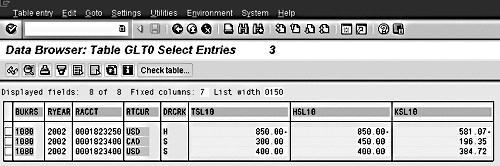
Figure 5
The Results in Table GLT0 of Three 100 CAD and Four 100 USD Journal Entries Posted to "Only Balances in Local Currency = Yes" Account 999111
The conclusion? Figure 7 lists what, to me, becomes the primary impact of the checkbox.1

Figure 6
Displaying Balances for "Only Balances in Local Currency?" Account 1823250 in Two Currencies via Transaction Code FS10N
| A GLT0 Data Record in Each Transaction Currency Is Required |
A GLT0 Data Record in Each Transaction Currency Is Not Required |
| • Use transaction code FS10N to view how much money has been posted in any particular foreign currency to an account. |
• Use transaction code FS10N to view an account’s balances in more than one of the company code’s currencies (e.g., local = USD, group = euro). |
|
|
| Figure 7 |
A Comparison of What Your Users Can Do with and without GLT0 Data Subtotal Records in Each Transaction Currency |
The G/L account’s master data file offers several checkbox-type settings. If you put a checkmark in the box, the setting is active. Without the checkmark, the setting is inactive.
Many sites rely on a few rules of thumb regarding when to put the checkmark and when not to for the fields called Line item display and Only balances in local currency during the original R/3 implementation projects. In some cases, the impact of such rule-of-thumb decisions is cumulative over time and therefore does not arrive until years after the fact. This "years after the fact"at some sites is now. So, I explain in this article exactly what those two checkbox settings are doing to the database as a way to help out any site that is now taking a second look at its "on vs. off" design decisions on those master data fields.
The logical guess is that if the Line item display box is not checked, then R/3 does not store the debit and credit detail for that G/L account number. This is false. Details are always stored in G/L table BSEG. Instead, the checkbox determines whether or not the so-called G/L secondary index table, BSIS, is populated. This BSIS table acts as the source for two popular standard transaction codes: Clearing (F-03) and Line Items Display (FBL3N). For most other G/L detail transactions (such as Document Display and exporting the detail to Excel or BW), the BSIS table is not used. To have the checkbox active comes at a price: Extra data records are stored in the BSIS table.
It is also logical to assume that if the Only balances in local currency box is checked, then R/3 does not store multiple currencies. This is false. If your company code has a parallel currency (such as a group currency) activated, R/3 keeps a totals balance for all G/L accounts in both currencies.
Instead, the checkbox determines whether or not the G/L summary table, GLT0, stores subtotals of each unique currency used as a transaction currency in the various source transactions posting to the account. Having a subtotal like that in the GLT0 table allows your end-users to view the subtotals of foreign currency source transactions via the standard Display balances transaction code (FS10N). Again, to have that checkbox active comes at a price: Extra data records are stored in the GLT0 table.
1
Kurt Goldsmith
Kurt Goldsmith is a senior business consultant for Enowa Consulting, specializing in the diagnosis and resolution of productivity-related integration issues between a company’s division of labor (end users, managers, executives) and SAP software (R/3, BW, APO, CRM). He also has a lifetime performance record of one win and two third-place finishes from five career starts as a thoroughbred racehorse trainer.
You may contact the author at kurt.goldsmith@enowa-consulting.com.
If you have comments about this article or publication, or would like to submit an article idea, please contact the editor.