Get a brief overview of the new administration setup in SAP BusinessObjects Planning and Consolidation 10.0, version for SAP NetWeaver, including updated features that affect models, dimensions, properties, hierarchies, script logic, transports, and more.
Key Concept
The Script Logic Editor is a new feature in SAP BusinessObjects Planning and Consolidation 10.0, version for SAP NetWeaver that increases flexibility for developers who need to adjust script code or comment on it.
You can perform administration activities more efficiently thanks to the new, modern aspects of SAP BusinessObjects Planning and Consolidation 10.0, version for SAP NetWeaver.
Note
This article addresses only SAP BusinessObjects Planning and Consolidation 10.0, version for SAP NetWeaver, and is based on Service Pack 3, except where noted. Also, additional features may be available by the time of the software’s general availability, which is scheduled for February 2012. SAP BusinessObjects Planning and Consolidation 10.0, version for Microsoft has already been released.
Let’s look at the following updated administration functions in detail:
- General: The user interface consists of Adobe Flex screens. Navigation is faster via hypertext. There is a “Do you want to save?” prompt when leaving a screen, which helps prevent the unintentional loss of data.
- Models: You can use the SAP-delivered consolidation and ownership models for quick-start scenarios. You can manage Web parameters administration and SAP NetWeaver BW configuration, which makes them easier to maintain. There is instantaneous notification if you don’t have the right dimensions in the model, making the creation of models easier.
- Dimensions: Member IDs can now be 32 characters long, providing more flexible naming conventions. You can maintain the dimension members without a Microsoft Excel member sheet. This eliminates conflicts that result from multiple Excel sessions. You can sort members and search on the ID or property value, making master data maintenance easier.
- Properties: A property has an ID and now can also have a name (Figure 1). This allows for more flexible naming conventions and easier identification. When you create or maintain a dimension, the system proposes properties for the dimension, depending on whether it is used for consolidation or ownership purposes (Figure 2). This approach takes the guess work out of determining what properties to use.
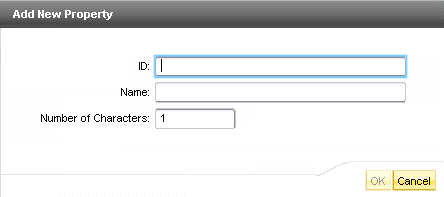
Figure 1
Add New Property screen
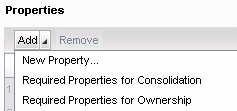
Figure 2
Specify the purpose of the property
- Hierarchies. Like a property, a hierarchy can have both an ID and a name. You can apply a hierarchical order to view members, so it is easier to validate the assignments of members to their parents in a hierarchy. Further, in an Excel member sheet, hierarchies are handled as a structure component rather than as a column. They are easier to create, and you can undo edits (if not saved), making master data maintenance easier.
- Script logic: Figure 3 shows the new Script Logic Editor. With the new editor, auto-complete functionality is now available, which allows you to look up commands quickly and easily. The keyword sidebar lets you look up keywords and then drag and drop them into the code. The Comment and Uncomment buttons allow you to comment on multiple lines of code at once. A separate window displays errors raised by the logic validation for easy troubleshooting. The Pretty Print button automatically indents and color codes the programming logic to make it more readable. All of the logic files are located centrally by environment (formerly known as appsets) instead of by model (formerly applications).
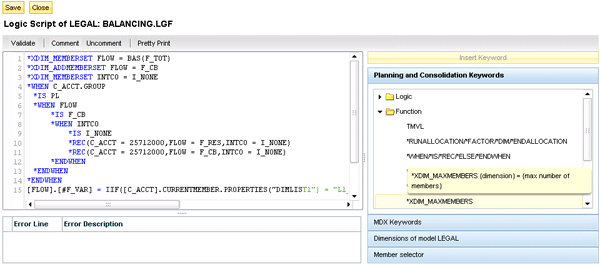
Figure 3
Script Logic Editor screen
- Security: Security is tightly integrated with SAP NetWeaver BW because users must exist in SU01 (user maintenance) first, which makes it easier to maintain user IDs. Matrix security is now supported, too. This allows access to one account for all profit centers, and all accounts for just one profit center. Task profiles automatically generate roles in SAP NetWeaver BW. As shown in Figure 4, you can now manage task profiles using an intuitive interface, and you can group task profiles in folders (no more administrative check boxes).
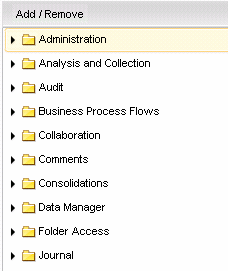
Figure 4
Task profile categories
- Single Sign-On (SSO): SSO is now supported, so user credentials don’t have to be provided more than once. Multiple values can be selected for assignment and maintenance in most of the security screens, cutting down on security maintenance time.
- Business process flows: Business process flows now have workspaces for substeps. This arrangement makes it easier to group related actions together in one tab. In SAP BusinessObjects Planning and Consolidation 10.0, version for SAP NetWeaver end users can customize their own workspaces to suit how they perform their business tasks. Also included is a new Stop Editing button, which allows for a real-time test during configuration. Template object versions include deployed, draft, and inactive statuses, all of which make it easier to manage business process flows development.
- Transports: Performance during transport is faster than in prior versions of the planning and consolidation application. Now planning and consolidation, as well as SAP NetWeaver BW objects, can be transported from one user interface. Because there are improved debugging options and tighter dependency checks during the transport process, transport problems should decrease. However, the most important improvement is granular transports: Now you can transport individual objects (e.g., a model) rather than the entire environment. Many developers have been asking for this feature since planning and consolidation was first put on SAP NetWeaver BW in version 7.0. Figure 5 displays some of the objects that can be transported, as opposed to an entire environment.
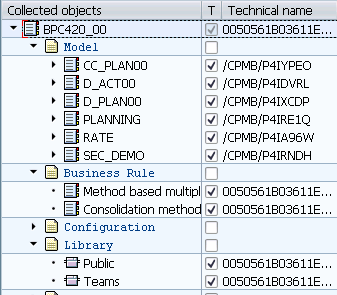
Figure 5
Planning and consolidation objects in the SAP NetWeaver BW transport connection
Charles “Tim” Soper
Charles “Tim” Soper is a senior education consultant at SAP. For the last 17 years, he has been teaching SAP classes on a variety of topics in financial and managerial accounting, business warehouse, business consolidations, and planning. He is the planning and consolidation curriculum architect and has written SAP course manuals. He also works as an SAP Senior Educational Consultant. Early in his career, he worked for Eastman Kodak Company in Rochester, NY, as a senior financial analyst. He has an undergraduate degree in economics and an MBA in finance from the University of Rochester.
You may contact the author at Charles.Soper@sap.com.
If you have comments about this article or publication, or would like to submit an article idea, please contact the editor.