The "Accruals" check box combined with an unobvious setting in the condition type instructs your R/3 system as to what kind of invoice you expect from vendors for indirect procurement costs—one for multiple purchase orders (POs) or one for just a single PO. The author explains why this choice can be confusing.
Key Concept
Most businesses have two kinds of vendors in each PO. The vendors for some kinds of indirect costs (such as duty) send a single invoice for each PO, while the vendors for other kinds of indirect costs (such as marine insurance) send a periodic invoice that covers a great many POs. If you would like SAP R/3 to accrue for these costs automatically each time a goods receipt for a PO is recorded, both scenarios require that you activate the Accruals check box in the condition type customization screen. However, the required setting to distinguish between the one-to-one invoicing situation (which you typically would want to post against the PO via the Logistics Invoice Verification [LIV] transaction) and the one-to-many invoicing situation (which you typically would want to post as a general invoice in the Accounts Payable module) is confusing. This is because the setting involved — a condition category of B — interacts with a choice the end user makes on the LIV screen between goods/services costs and planned delivery costs.
I recently spent a few months implementing SAP R/3 at a site that incurred five separate kinds of external costs with each purchase order (PO) that it sent out to a vendor. In addition to the obvious costs for the raw materials and the inbound freight came costs paid to vendors for marine insurance (cargo came by boat), for duty (US Customs), and for an initial stocking fee (rented warehouse). Five costs. Five vendors. One PO.
Although your company might not have quite this situation, you probably have instances in which a single PO leads to more than one vendor sending you an invoice. But what type of an invoice? Will that additional vendor look for single payment on a lot of activity that covers a large number of POs? Or will the vendor send a separate invoice for each relevant PO?
Your standard SAP R/3 system's automatic accounting can handle either of those two scenarios. However, the customization settings you'll need to work with could fool even an expert into thinking that your options are limited to just one. I will clear up this confusion with a couple of pointers and plenty of screenprints.
Sales Accrual vs. Purchasing Accrual
In the January 2004 issue of FI/CO Expert, I wrote an article about a customization setting in R/3 called the Accruals check box. You find this setting in the master definition screen for any condition type (i.e., price variable), such as the example shown in Figure 1.

Figure 1
An example condition type with its Accruals check box activated
In the January issue, I focused on the two unique ways that R/3 reacts to this setting in the Sales versus Purchasing modules in regard to the automatic accounting performed. One setting. Two different reactions. Confusing.
However, there also exists a small subtlety in how that Accruals check box affects the automatic accounting that you get within the Purchasing module. It represents an instruction you give to the system regarding what kind of invoice you expect to get from your vendor—one that covers the activity from multiple POs (which you likely would want to post as a general invoice in the Accounts Payable module, or one that covers just a single PO that you would likely prefer to post against a specific PO using the LIV transaction). Let's look at that next.
Accrual vs. Delivery Cost
Within each price variable that you make possible for use (i.e., via a condition type), you can tell the system whether or not the cost value for that variable should be treated as an accrued cost. All you need to do is to activate the check box.
However, notice in Figure 2 another setting in the condition type. The field is called Cond.category. This can mean many things. For this discussion, however, you only need to think about two things — a vendor invoice covering multiple POs, and a vendor invoice covering a single PO. Which of these two cases do you guess is met with the condition category setting shown in Figure 2, and which with the condition category setting shown back in Figure 1?
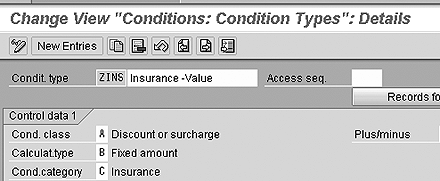
Figure 2
An example condition type with condition category set to C
The "Planned Delivery Costs" Option
Did you guess correctly? Maybe you are not sure. To find out, you can take a quick look at the first screen of transaction code MIRO, also known as LIV (Figure 3). If you want to post an incoming invoice against a PO, you should use the transaction. However, what kind of PO-related invoice are you posting—one from the supplier, or one from an indirect participant such as the freight carrier? If your Purchasing module's condition types have unique condition category settings—price versus delivery costs versus tax versus insurance versus, etc.—the system is able to know the difference.
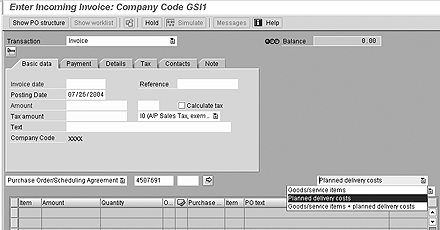
Figure 3
An example of the LIV data entry screen
This is why the LIV transaction data entry screen has a field located below the vendor information where the end user can choose one of three options: Goods/service items, Planned delivery costs, or both. I've shown you an example in Figure 3.
When the end user chooses Planned delivery costs or Goods/service items + planned delivery costs, the system brings into the screen any pricing row from the PO that is linked to a condition type that has the condition category of B.
Putting It All Together with GR/IR Maintenance
To fully understand the subtle difference between the automatic PO accounting you'll get from an accruals condition type that has a condition category of B (delivery costs) and one that has a condition category other than B (such as C or no letter at all), it helps to remember that the purchasing cycle in R/3 does not end with the vendor's invoice. It ends with the matching of debits to credits belonging to the PO suspense account, more commonly referred to as the GR/IR account.
This kind of account aims to absorb the timing differences that often occur between when you receive what you ordered and when you are billed for what you ordered. Saving a goods receipt of four units (pieces or pounds or boxes) against a PO leads to a credit posting to your GR/IR account, and saving an invoice receipt for five units (pieces or pounds or boxes) leads to a debit posting to your GR/IR account.
You have been billed for five units. You only received four units. This is the role of the GR/IR account — to help you keep track of quantity discrepancies. The system does not allow you to automatically clear (i.e., change the status from "open" to "cleared") the GR/IR debits and credits for a particular PO item when a quantity difference exists.
If a discrepancy exists for a long enough time period, the accounting department might decide just to expense that difference. As you might already know, you can do this in R/3 through the GR/IR maintenance transaction.
However, any G/L account number that is associated with a condition type of condition category B is also treated as a GR/IR account! This is not true for condition types with a setting other than B. This has a huge impact on the kind of automatic accounting you end up with when you use an accruals condition type.
To see this, look at the three condition type rows I have in my PO item shown in Figure 4 (ignore the NAVM row since that has a 0.00 value). The first row is for the price I am paying to the supplier for 60 units of raw material. The two rows at the bottom are for indirect vendors. In both cases, I have activated the Accruals check box (review Figures 1 and 2, if necessary). However, only in the case of the ZDUT condition have I set the condition category to B (delivery costs).
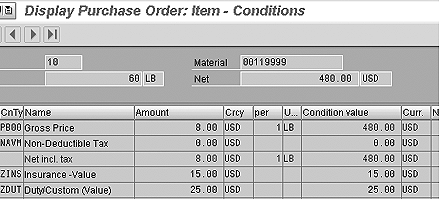
Figure 4
PO item with three non-zero condition type rows
Now, let's pretend that I just received the invoices for all three of my different kinds of costs—the parts, the marine insurance, and the duty. I decide to perform the data entry for the marine insurance invoice and the duty invoice first, because one of those had a slightly higher cost than what I had expected—$27 (instead of $25) for the duty.
I call up the LIV screen, type in my PO number, and choose to see only the Planned delivery costs, such as what you can see in Figure 5. Notice in that screenprint that the system shows only the costs associated for the duty row (condition type ZDUT) that you saw back in Figure 4. The system expects no po-specific vendor invoice related to the insurance row (condition type ZINS). When I save this data entry, I get the automatic accounting result shown in Figure 6.

Figure 5
The Planned delivery costs data entry screen for my example PO
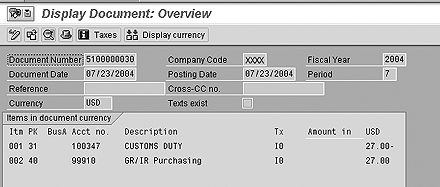
Figure 6
The automatic accounting results for the duty IR on my example PO item
Now, let's say that my 60 units of ordered goods arrived and that I want to record this in R/3 against my PO. In Figure 7, you see the automatic accounting result—all the costs are absorbed into inventory (note that my material is set up for moving average costing), and this debit is offset by three different suspense accounts rows. There is one each for the parts supplier ($8 per unit x 60 ordered units = $480), the insurance vendor ($15), and the duty vendor ($27, not the $25 from the PO because I posted the real invoice prior to the goods receipt).
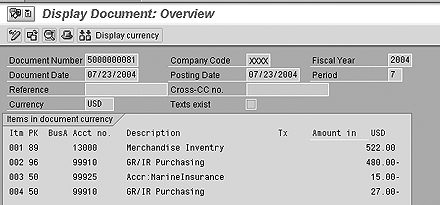
Figure 7
The automatic accounting result for the GR on my example PO
You have one more step—GR/IR matching. In my example, I posted both a debit and a credit to my GR/IR account for the duty costs of 60 units at $27. So, I would expect to be able to automatically match these (i.e., "clear") using a standard program such as transaction F13 (automated clearing). I have no quantity differences there.
However, for the marine insurance costs, I have so far only posted the goods receipt side. The $15 shown in the screenprint in Figure 7 was associated with 60 received units of raw materials. Will the system pick this up as a GR/IR quantity difference the next time I run transaction code MR11 (GR/IR maintenance)?
As you can see in Figure 8, the answer is no. The G/L account number 99925 that I used to post my accrued marine insurance costs is not treated by R/3 as a GR/IR account. I want to point out, however, that the exact same G/L account number would be treated as a GR/IR account if I had set up my ZINS condition type with a condition category of B.
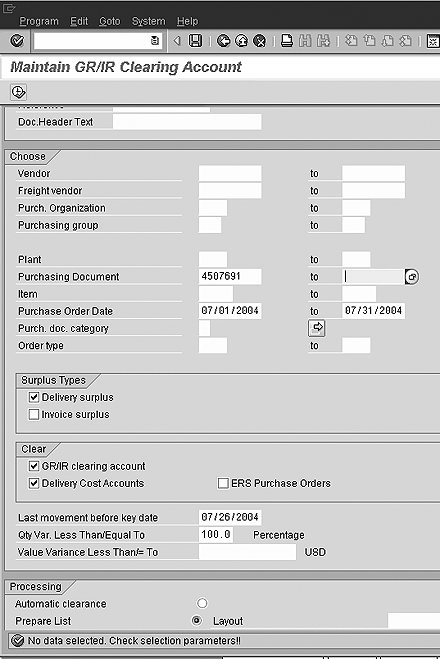
Figure 8
The GR/IR maintenance transaction for my example PO item
Kurt Goldsmith
Kurt Goldsmith is a senior business consultant for Enowa Consulting, specializing in the diagnosis and resolution of productivity-related integration issues between a company’s division of labor (end users, managers, executives) and SAP software (R/3, BW, APO, CRM). He also has a lifetime performance record of one win and two third-place finishes from five career starts as a thoroughbred racehorse trainer.
You may contact the author at kurt.goldsmith@enowa-consulting.com.
If you have comments about this article or publication, or would like to submit an article idea, please contact the editor.