
1 minute read

Relying on legacy systems to carry out different business processes is a common practice. Whether it’s a large enterprise with a vast consumer base or a startup targeting local audiences, most enterprise-level applications still depend on outdated systems. One such example is SAP ECC (SAP ERP Central Component), a once-renowned software for businesses of all sizes. With its complex technical architecture and aging capabilities, many organizations are now considering SAP ECC to S/4HANA migration to modernize operations and stay competitive.
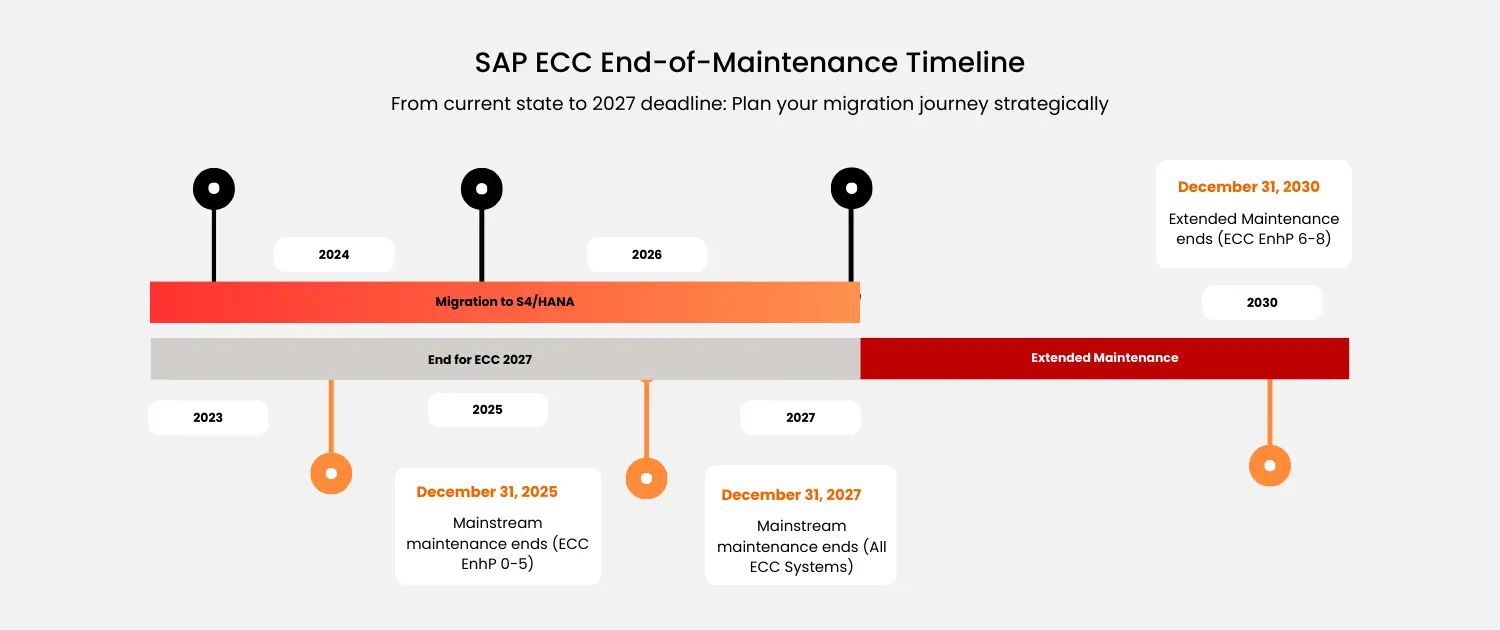
According to the latest news, they will be completely withdrawing support for the ECC application by the end of 2027. This means that enterprises using it needs to make an immediate shift to the next-gen ERP software from SAP, S/4 HANA. While it might sound like a piece of cake, the migration from a legacy system to a much more advanced and modern ERP won’t be easy at all, especially when there are numerous interim hurdles to be overcome. Keeping that in mind, we have compiled a comprehensive guide to assist you in planning for a seamless SAP ECC to S4HANA migration.
SAP S/4 HANA: A Glimpse of the Advanced ERP Solution
Amalgamating the goodness of artificial intelligence, natural language processing, and other state-of-the-art technological innovations, S4HANA is the next-gen ERP solution for small to large-scale enterprises. It is expected to replace its predecessor, ERP Central Component completely by the end of 2027, thereby establishing itself as one of the key offerings from SAP. The most profound benefit of this new ERP system that sets it apart from its predecessor is its underlying dependency on SAP HANA.
Explore related questions
This is an in-memory database that interacts directly with the server, without consuming any disk space to execute the data queries or temporarily store the information. Owing to this, handling huge data volumes will become much easier and can be done swiftly at a lightning speed. Enterprises can easily leverage SAP S/4HANA to analyze datasets and gain in-depth insights into customer preferences and behaviors. This will further enable them to optimize the business strategies and offer an intuitive omni-channel user experience across all touchpoints.
On top of everything, S/4HANA comes with numerous integrations, including SAP Business One, Adobe Commerce, Salesforce, Zoho CRM, and so on. Therefore, it will be easy to extend its capabilities and functionalities to seamlessly manage and automate all processes involved while making the business future-ready.
Step-By-Step Migration Guide of SAP ECC to SAP S/4HANA
Shifting from one legacy system to a new one is never easy. Not only do you need to plan extensively from beforehand but you also need to pay undivided attention to risk analysis and mitigation strategies. No matter how detailed your planning is, the fear of business disruption, system outage, and data security will always linger in the air, especially if you plan in a haste. This is why we have explained the steps to SAP S/4HANA migration from ECC in a chronological order to help you understand the process complexity and determine the time and effort estimate properly.
1. Determination Of SAP S/4HANA Deployment Model
The very first step involved with the migration of ERP system is determination of the deployment model through which you want to launch S/4 HANA in your existing IT infrastructure. SAP offers four different deployment models to help enterprises choose the ideal one as per their business and technical requirements. These are:
SAP S/4HANA Cloud: Public Edition
Enterprises who are moving to cloud for the first time can opt for this public model based on SaaS offering. Users can access the entire ERP software from their systems while the underlying infrastructure and platforms will be under the sole control of SAP. Since you will be sharing the network with other users, security and privacy will need your undivided attention so that no issue might arise in the future.
SAP S/4HANA Cloud: Private Edition
The most efficient deployment model for SAP S/4HANA will be the private cloud where existing users will be allowed to retain all the previous extensions and system configurations without making any major changes in them. It is hosted on a completely private network having only a single user and protected by a strong firewall mechanism.
SAP S/4HANA Cloud: On-Premise Edition
From managing and virtualizing the hardware infrastructure to implementing the appropriate platform and operating systems, you will be responsible for everything with this deployment model. Even though it will give you the independence to customize the model flow to meet your specific requirements, you need to go through the hassles of managing everything by yourself without the involvement of any third-party service provider.
SAP S/4HANA Cloud: Managed By HEC
One of the best deployment models of SAP S/4HANA is the on-premise one managed by HEC. Here, you will have the option to host the software on your personal data center or hand over the infrastructure control to SAP through IaaS offering. Furthermore, it will allow you to acquire BYOL or Buy Your Own License, thereby ensuring you can exercise more freedom and flexibility in the application’s usage and maintenance.
| Feature | Public Cloud (SaaS) | Private Cloud | On-Premise | HEC Managed |
|---|---|---|---|---|
| Implementation Time | 3-6 months Fastest deployment |
6-12 months Moderate timeline |
12-18+ months Longest timeline |
8-14 months SAP-managed setup |
| Hosting Model | Multi-tenant shared SAP managed |
Single-tenant dedicated Cloud infrastructure |
Customer data center Full ownership |
SAP IaaS Dedicated environment |
| Customization Level | Minimal Standard processes only |
High Extensive modifications |
Maximum Unlimited control |
High Managed flexibility |
| Migration Approach | Greenfield only Clean slate required |
All approaches Greenfield, Brownfield, Selective |
Brownfield preferred System conversion |
Flexible Brownfield & Greenfield |
| IT Resources Needed | Minimal No infrastructure team |
Medium App management focus |
Large team Full IT infrastructure staff |
Small-Medium Focus on customizations |
| System Updates | Automatic Quarterly, mandatory |
Flexible Every 2 years required |
Customer-controlled Flexible timing |
SAP-managed Coordinated schedule |
| Data Control | Shared infrastructure Limited control |
Dedicated environment Enhanced control |
Complete sovereignty Maximum control |
Dedicated SAP infra High security |
| Best for | • New SAP customers • SMBs • Standard processes • Fast deployment |
• Mid-large enterprises • Complex processes • ECC migration • Cloud + flexibility |
• Large manufacturers • Heavy customization • Data sovereignty • Existing IT infra |
• Enterprises wanting cloud • Need managed services • SAP expertise • Hybrid strategy |
2. Data Analysis and Collection
The next step is to categorize your business data into three segments, namely hot, warm, and cold depending on the frequency of access and criticality. It will help you efficiently plan the migration of ECC to S/4HANA without compromising the data volumes or putting excess load on the live server. Below we have explained the three categories that you need to consider while analyzing all the relevant business data post scraping and collection.
Hot Data
These are accessed most frequently by multiple business processes and workflows, like financial transactions, customer information, and so on. As a result, they should be migrated and stored on the tenant database at the very beginning with appropriate data encapsulation and privacy protocols.
Warm Data
The next category defines datasets which are accessed less frequently but are equally essential to carry out the pre-decided operational workflows. These are mainly responsible to optimize the overall performance and enhance business efficiency, which is why you need to store them on the S/4HANA tenant database before migration.
Cold Data
Cold data refers to information sets which are not accessed at all or belong to historical timeline. Rather than storing them on the live server, you can opt for archiving the legacy information to reduce further load increase. It will also free up the system resources and help you remain compliant with data security and privacy regulations simultaneously.
3. Legacy Data Archiving Prior Migration
Although legacy data is not accessed too often, you cannot rule out the possibilities of historical information that might play a crucial role for future decision-making process or references. That’s why preserving these is prudent for every organization planning to migrate to S/4HANA from SAP ECC. The best way to handle legacy datasets is by archiving and storing them in the on-premise server so that they can be easily accessed later on as and when required. Apart from this, you can also archive the custom ERP codes in your existing system so that you won’t have to work on them once again from scratch.
4. Fit-Gap Analysis
The next step is to conduct a thorough fit gap analysis to realize the key risk areas and the impacts your business might have to bear after implementation of SAP S/4HANA. It is a process by which professionals determine the existing gaps between specific business requirements and the new features of this ERP software. If both these factors are not aligned properly, disruptions and system outages are bound to happen post migration. It can also lead to production leaks and major server downtime, thereby affecting the customer experience. So, conducting the fit gap analysis and identifying the key areas where the loopholes exist should be your topmost priority. Once acknowledged, you should start planning to merge these gaps and implement risk mitigation strategies.
5. Readiness Check
SAP offers a pre-developed readiness check tool to help professionals understand if the existing systems and platforms are compatible with the new software or not. It will help you in the following ways:
- Analysis of the existing SAP ECC to understand whether it’s ready for the migration or not.
- Identification of different simplification components of the current S/4HANA version and their impact on the business processes.
- Assessment and analysis of big datasets to optimize system performance and storage of the information at appropriate locations.
- Evaluation of the current workflows and alignment of business requirements with the features of the new application to be implemented.
6. Infrastructure Analysis and Preparation
If the existing infrastructure is not analyzed properly, there might be problems with hardware and software compatibility, performance, and production server uptime. This is why you should run a thorough check to determine the potential risks and issues that could impact the migration process severely, stalling it midway. For instance, you have to check the technical configurations and hardware setups so that the minimal requirements of SAP S/4HANA implementation could be met. Apart from this, you also need to evaluate the server capacity of handling varying load, database memory space, and the network bandwidth.
7. Pre-Production Implementation
Instead of deploying the SAP S/4HANA cloud directly to the live server, it would be best to implement the system first in a pre-production environment for beta testing and scaling the requirements on the go. For this, you can opt for the Brownfield deployment process by which the existing ERP Central Control software will be upgraded to S/4HANA while retaining all the current system configurations and tech stack. This will further help you to mitigate the risks, cover the loopholes, and scale the platform to meet the specific business requirements for a seamless transition.
Know More – SAP S/4HANA Modules
Conclusion
Even though 2027 seems to be quite far away, delaying the SAP S/4HANA migration from ECC will never do any good. Instead, it might cause inefficient transition, loss of data volumes, prolonged system outages, and disrupted workflows. This is why you should start planning for the shift and collaborate with a professional to seamlessly execute the steps and foster digital transformation for your business.
More Resources
See All Related Content

The Importance of Developing a Data and Analytics StrategyDeveloping a robust data and analytics strategy is now essential for SAP-centric enterprises, enabling finance and technology leaders to modernize operations, integrate data effectively and leverage analytics as a core operational asset to drive decision-making.
3 minute read
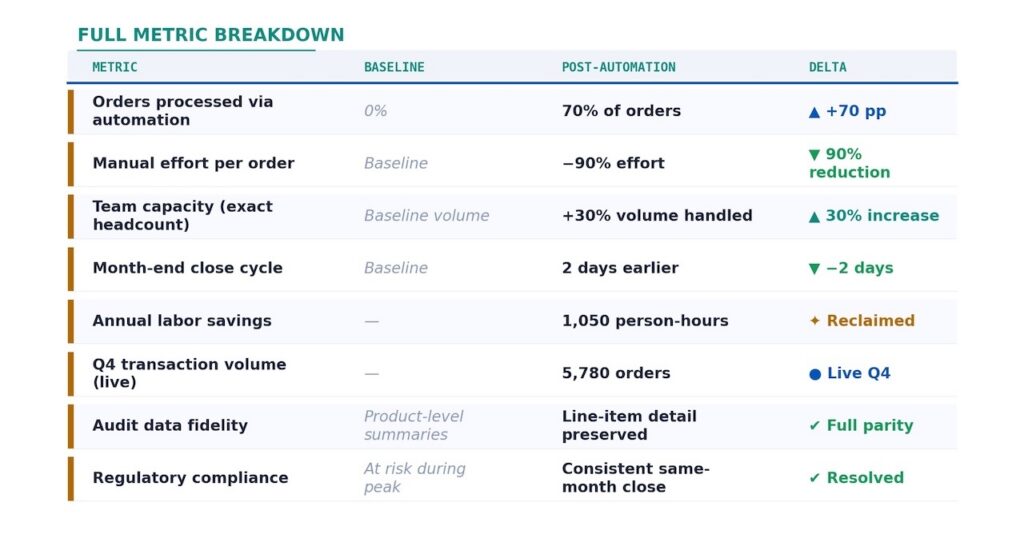
Closing the Loop: Using SAP Generative AI to Automate Consignment Order ProcessingA global agricultural company automated its consignment sales order processing to efficiently handle peak periods of dealer order influx into SAP S/4HANA, achieving a 30% increase in order processing with 90% less manual effort and reducing month-end close times.
6 minute read
SAP Greenfield vs. Brownfield Implementation: How to Choose the Right Path for Your TransformationOrganizations transitioning from SAP ECC to S/4HANA must choose between Greenfield, allowing for a complete redesign of business processes, and Brownfield, which offers a quicker transition leveraging existing investments, with the decision depending on their readiness for change and transformation goals.
1 minute read