/Project Management/Mobile
Use this practical guide to identify, evaluate, and select the right mobile platform for field users through a thorough mobility assessment. This process allows businesses to avoid the pitfalls of failed mobility implementations and achieve greater success.
Key Concept
A thorough mobility assessment performed in the early stages of a mobility platform project can greatly reduce associated risks and increase user adoption. This assessment involves the process of selecting the right solution to meet specific business requirements and understanding the different options available.
There have been rapid strides in mobile technologies, mobile devices, and mobile solutions in recent years. Companies are on the cusp of a mobility revolution similar to the Internet boom of 1990s. The progression of mobile technology has driven companies to bring more mobile devices into their workforce to enable faster and more efficient sales and service to their customers. This mobile revolution is driven by the following factors:
- Mobile applications. The Apple iPhone, Apple’s App Store, and the Apple iPad have been game-changers that are fueling exponential growth in mobility application development. The number of consumer apps has grown greatly in the iPhone operating system and Google Android platforms. There are currently about 500,000 apps on the Apple store and 90,000 apps on the Google app store. SAP also recently announced the launch of a mobility app store focused on business applications.
- High-speed wireless. The 3G wireless speeds on mobile devices currently have a speed of 2 megabits per second, which is equivalent or faster than the speeds provided by DSL, eliminating earlier mobile device restrictions compared to someone being on a connected desktop or laptop. The arrival of 4G increases the speeds to 1 gigabit per second while stationary and 100 megabits per second while moving. These faster speeds enable development of newer apps and also provide business users timely access to critical business information.
- User interface (UI). The UIs on devices such as the iPad are very intuitive and easy to use, which increases users’ willingness to enter information.
-
Reduction in deployment costs. The availability of out-of-the-box or packaged applications has reduced deployment times, which in the past have been a hindrance to many mobility projects. The introduction of over-the-air deployments and upgrades has enabled quicker deployment times, which result in considerable reductions in support costs for IT and business. Packaged mobile apps will soon replace custom-built ones as the predominant deployment model inside the enterprise.
See the sidebar “Mobility Solution Options for SAP Customers” for a rundown of SAP-related mobility choices that companies can consider.
Mobility Solution Options for SAP Customers
The current mobility solution space is huge and, as a result, it can be a chaotic world for any company to enter. It is also difficult for businesses to decide what their solution options are, and after that which ones to deploy. Briefly, these options include:
Business and IT Considerations
When selecting a mobility solution, it is essential to evaluate considerations from both your IT and business organizations. The requirements and factors for each organization can vary, and it is important to weigh all these factors when selecting a mobility platform.
Business Considerations
The business is responsible for defining how your end-state mobility solution looks. The key considerations and responsibilities for the business during the implementation should include:
IT Consideration
Although the business considerations are key to driving your final mobility solution, the IT side also has the following considerations to take into account when evaluating the business needs:
How to Conduct a Mobility Assessment
The process to select the right mobility solution is an important first step in your implementation, and needs to be a well-planned and focused exercise. To perform this assessment and select the right solution, take the following steps:
Step 1. Initiate the Assessment
Before the assessment fully kicks off, you can perform several initiation steps to ensure the execution of the assessment goes smoothly. During this initiation step, the first task is to build a strong case for the assessment. This proposal includes input from key stakeholders, as well as projected operational improvements, efficiency gains, and cost savings. The initiation step also includes the planning of resources that you need to run the assessment. The resources that you allocate for this assessment can either be external (i.e., consulting) resources, an internal team, or a combination of both. At minimum, your resource list should include:
- An assessment lead
- A representative from each affected department of organization
- Key IT resources
In addition to your resources and budget, you need to set a timeline to complete the assessment. Typically, these assessments range from two to six weeks depending on the complexity of the mobility initiative. Finally, once the resources, budget, and timeline are in place, you must get approval for the assessment and plan for your project kick-off.
Step 2. Perform the Assessment
Now that you are ready to begin your mobility assessment, your first action is to gather stakeholder input through informal surveys and questionnaires, which ask fundamental questions to help you determine the organization’s pain points, wish lists, and other concerns.
The feedback you get from these questionnaires provides insight into the business mobility preferences and serves as a starting point to prepare valuable material for the core of the assessment: visioning workshops. During these workshops, key members of the business technology teams come together to work through their business processes as they apply to mobility. For example, you can have a workshop with your sales organization stakeholders to outline the functions that should be available remotely to sell products on a mobile device. In the workshop, discuss the process to follow while working on a mobile device (e.g., restrictions around connectivity, authorizations for different types of users).
These workshops provide the groundwork for your requirements, mobility processes, scope, and potential pitfalls to avoid. When planning your resources for the assessment, your workshop lead and workshop participants’ selections are critical to the success of the project. Don’t underestimate the need for basic support in your resource planning. Your workshop lead needs a strong assistant to take excellent notes and document all outcomes (e.g., actions, pending decisions) from the workshop. It is also valuable to use a workshop facilitator who is engaging and highly respected within the organization.
During the workshops, identify high-impact target areas in which to perform benchmark analysis (e.g., increased sales volumes, speed of service). Look for and highlight common ground about top priorities and technology preferences, both across your business organization and between the business and IT. To help facilitate this process, consider inviting leading solution vendors to perform mini-demonstrations and hands-on reviews of their products to evaluate the various levels of fit for each solution. Potential benchmarks include:
- Field sales efficiency improvements
- Speed of decision making
- Increase in sales volume
- Improvements in security issues
- Sales revenue by employee
- Lead cycle times
- Order cycle times
When the workshops are complete, document and analyze the results. These documents include a business benefits and potential gains summary, requirements list, mobility process flows, and all technology and security considerations. As a culmination of these documents, you should develop a comprehensive mobility vision and roadmap document, as well as a gap analysis of the mobility business requirements with the potential vendor solutions. A visual element can be extremely helpful in the vendor solution process. Consider a business value versus implementation effort chart (Figure 1). This chart provides a quick view of what potentially can be your quickest items to implement. The items that fall into the upper-left corner are quick-win items to implement, as they add great value to your business with low effort. The items in the upper-right section bring great value to your business, but carry the biggest risk due to the level of effort.
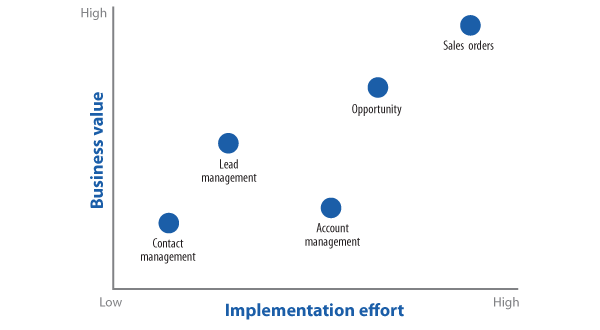
Figure 1
Comparing business value against implementation effort
Step 3. Determine Action Plans
When you finish the workshops and finalize your vendor selection and documentation, your next step is to plan for your mobility implementation. The immediate concern at this point is to develop your actual roadmap of phased deployments across the company. Your final deployment strategy and roadmap should be well documented and supported with strong business cases based on the input you received from your stakeholders during the assessment. Your final action is to present this roadmap to your management and executive teams to seek approval for your formal implementation.
Lessons Learned and Key Takeaways
We’ve worked with several companies over the last few years that have learned key lessons and takeaways from their mobility initiatives. Below is a list of some of the more critical factors from these companies that you should take into account when you embark on your own mobility assessment and implementation project:
- Understand the business requirements. Knowing what the mobile sales and service force does on a daily basis ensures greater success for your mobility project. Where do sales reps work? Do they work in a high-tech environment where a clean room situation exists (i.e., no mobile devices are allowed to be connected)? Do they work in remote areas where connectivity does not exist? Do they work in rough environments where a rugged device is required?
- Avoid unrealistic expectations. Field reps will usually not use a solution that expects too much from them, so do not overcomplicate the user tasks.
- Watch for a lack of infrastructure to support a solution. A mobile team whose members work in remote areas worldwide absolutely requires an offline option.
Note
For complex sales or service orders, particularly in businesses with large-scale or complex machines, a small mobility device is not feasible to use. By the nature of complex machines with many components and orders with a large number of line items, the screen size on a small device limits usability. The more drop-downs and selections, the better. Asking for someone to scroll through multiple pages or manually enter text, especially on smaller devices, is not practical.
- Use mobile technologies such as the Internet, global positioning systems (GPS), and scanning when designing new business processes. Support multiple devices and applications, even if there is only a standard company device offered currently. You should also plan for mobility apps to be developed, deployed, and supported on multiple devices. Don’t try to provide all SAP data to all people all the time. Optimize integration with back-end SAP systems, and encrypt data on mobile devices.
Ashish Saxena
Ashish Saxena is a director at Accrete Solutions, LLC, in Seattle, WA. He has experience in SAP CRM and SAP ERP Central Component, as well as business experience in customer service, logistics, and sales. He is a CRM practitioner with strong expertise in mobile enablement of service and sales processes. His SAP implementation experience includes multiple full life-cycle SAP CRM and SAP ERP projects, with responsibilities including project and program management and team leadership, strategy and business process design, scoping and blueprinting, solution design, deployment, and support. He is also a Project Management Professional (PMP) from PMI.
You may contact the author at ashish@accretesol.com.
If you have comments about this article or publication, or would like to submit an article idea, please contact the editor.
LeighAnne Holtzman
LeighAnne Holtzman is a manager at Accrete Solutions, LLC, in San Jose, CA, and has six years of experience in SAP CRM. Her focus is in the areas of SAP CRM service and middleware, as she has experience in business process transformation initiatives. She is a Project Management Professional (PMP) from PMI.
You may contact the author at leighanne@accretesol.com.
If you have comments about this article or publication, or would like to submit an article idea, please contact the editor.