The Personnel Administration (PA) submodule contains a plethora of interrelated infotypes. Your business process may demand that changes made in one infotype affect the fields of another, or that they trigger an entirely separate activity. Imagine yourself in a situation where you may be required to create a tax infotype automatically for an employee when he is hired. Or you want SAP Office mail to be sent automatically to an administrator when an employee is transferred into her region. How do you deal with this type of requirement? Using dynamic actions is the answer.
The Personnel Administration (PA) submodule contains a plethora of interrelated infotypes. Your business process may demand that changes made in one infotype affect the fields of another, or that they trigger an entirely separate activity. Imagine yourself in a situation where you may be required to create a tax infotype automatically for an employee when he is hired. Or you want SAP Office mail to be sent automatically to an administrator when an employee is transferred into her region. How do you deal with this type of requirement?
Using dynamic actions is the answer. Dynamic actions are a set of statements executed automatically by the R/3 system when infotypes are maintained. (See the sidebar, “Actions Allowed Via Dynamic Actions.”) You may create new actions or amend existing ones via a standard R/3 screen (
Figure 1). For more tips and information about how dynamic actions work, click here:
Download.
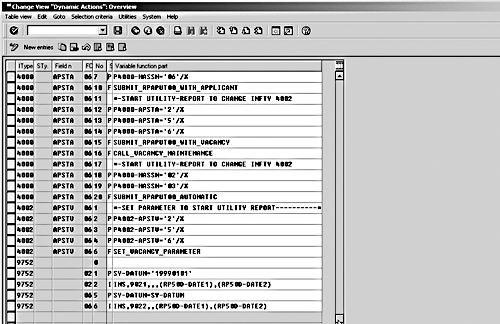
Figure 1
Maintenance and overview screen
I have noticed that dynamic actions are underused in many SAP implementations because of a lack of knowledge about their features and of the variety of ways in which they can be applied. Here are some rules and tips from my personal experience to help you make better use of the functionality.
Tips for Working with Dynamic Actions
1. Eliminate the Personnel Number Locking Problem When Performing Infotype Updates
In its simplest form, the F statement is used to call a FORM, either in the infotype module pool or any other external program. The FORM routine could perform infotype updates, but then a question arises: “How do you deal with PERNR (personnel number) locking?” When the user enters a personnel number in transaction PA30 or PA40, the particular employee is locked by SAP. The FORM routine attempting to perform an infotype update would find that the employee is already locked and thus could not proceed.
Sidebar: Actions Allowed Via Dynamic Actions
No dynamic action is executed if the function character has a value other than one of the following:
P: Performs plausibility checks, which allow you to check certain conditions.
I: Calls an infotype for processing.
W: Called after the I statement and used to assign values to screen fields while creating or copying another infotype record through the I statement.
F: Calls a FORM routine (subroutines in ABAP) during your action. The routine may reside in or out of the module pool MPNNNN00.
V: Lets you treat a number of fields collectively for which you want to define a common dynamic action.
M: Sends SAP Office mail.
To solve this problem, use function modules DEQUEUE_EPPRELE and ENQUEUE_EPPRELE.
Figure 2 provides an excerpt from such a program. This program fragment first unlocks the personnel number by using the function module DEQUEUE_EPPRELE, updates any other infotype, and brings everything back to its original state by setting the lock on the number using the function module ENQUEUE_EPPRELE.
| REPORT MYPROGRAM1 NO STANDARD PAGE HEADING.
DATA: BEGIN OF COMMON PART DYNMEAS.
“ EXACTLY AS DEFINED IN MPNNNN00
DATA: BEGIN OF DYNMEAS OCCURS 5,
ACTIO(4),
INFTY(4),
SUBTY(4),
OBJPS(2),
SUPDG,
BEGDA TYPE D,
ENDDA TYPE D,
SEQNR(2) TYPE P,
END OF DYNMEAS.
DATA: END OF COMMON PART.
DATA: BEGIN OF COMMON PART INITIAL_VALUES.
“ EXACTLY AS DEFINED IN MPNNNN00
REPORT MYPROGRAM.
FORM MYSECONDFORM.
.......
......... “collect data :
“populate bdcdata table using bdc_dynpro and bdc_field performs.
CALL FUNCTION ‘DEQUEUE_EPPRELE’
EXPORTING
PERNR = PNNNN-PERNR.
.........
Call transaction ‘PA30’using bdcdata mode ‘E .
Refresh bdcdata.
Clear bdcdata.
.........
CALL FUNCTION ‘ENQUEUE_EPPRELE’
EXPORTING
PERNR = PNNNN-PERNR. |
|
| Figure 2 |
Excerpt from infotype update program that eliminates PERNR locking problem REPORT MYPROGRAM. |
2. Passing Data to and from External Programs
Passing data to external forms: It is not possible to pass parameters to external forms called via the F statement. However, with programming, you can create a common data area accessible by both the form and the
MPNNNN00 module pool. You define a
COMMON PART area in the
DATA section of the external program containing the
FORM routine (you may define a
COMMON PART portion in the program containing your
FORM regardless of whether
PERNR locking is involved).
The data objects defined in such an area must exist in the
MPNNNN00 module pool under the same
COMMON PART (
Figure 3). (INCLUDE MPPDAT00contains the common parts defined in module
MPNNNN00. To find out how many
COMMON PART areas exist for an infotype, view the source code of this include. You also can search for
COMMON PART in the entire ABAP program
MPNNNN00 via the ABAP Editor.). At the execution of the dynamic action, the infotype program provides the
FORM routine with the data objects (defined in
COMMON DATA) along with their updated contents. You can then make any necessary changes to these data objects. Consider the following example, which demonstrates the use of
COMMON PART areas. After execution of the form, a wage type M610 is created in IT0267 (One-Time Payments Off-Cycle) with an amount of $150.
The module pool
MPNNNN00 stores the infotype update information pertaining to I and W statments in internal tables
DYNMEAS and
INITIAL_VALUES respectively. You can access these tables via the usage of
COMMON PART areas (see Figure 3). On execution of the routine
MYFORM, the
MPNNNN00 module pool populates the two tables with the most recent contents. You can modify these tables to suit your particular requirement.
| REPORT MYPROGRAM1 NO STANDARD PAGE HEADING.
DATA: BEGIN OF COMMON PART DYNMEAS.
“ EXACTLY AS DEFINED IN MPNNNN00
DATA: BEGIN OF DYNMEAS OCCURS 5,
ACTIO(4),
INFTY(4),
SUBTY(4),
OBJPS(2),
SUPDG,
BEGDA TYPE D,
ENDDA TYPE D,
SEQNR(2) TYPE P,
END OF DYNMEAS.
DATA: END OF COMMON PART.
DATA: BEGIN OF COMMON PART INITIAL_VALUES.
“ EXACTLY AS DEFINED IN MPNNNN00
DATA INITIAL_VALUES LIKE PINIT OCCURS 10 WITH HEADER LINE.
DATA: END OF COMMON PART.
FORM MYFORM.
…………………………………………
…………………………………………
CLEAR DYNMEAS.
DYNMEAS-ACTIO = ‘INS’.
DYNMEAS-INFTY = ‘0267’.
DYNMEAS-SUBTY = ‘M610’.
DYNMEAS-BEGDA = ‘20040101’.
DYNMEAS-ENDDA = ‘20040101’.
DYNMEAS-SEQNR = ‘01’.
APPEND DYNMEAS.
REFRESH INITIAL_VALUES.
CLEAR INITIAL_VALUES.
INITIAL_VALUES-FIELD_NAME = ‘P0267-BETRG’.
INITIAL_VALUES-FIELD_VALUE = ‘150’.
INITIAL_VALUES-SEQNR = ‘01’.
APPEND INITIAL_VALUES.
CLEAR INITIAL_VALUES.
INITIAL_VALUES-FIELD_NAME = ‘P0267-WAERS’.
INITIAL_VALUES-FIELD_VALUE = ‘USD’.
INITIAL_VALUES-SEQNR = ‘01’.
APPEND INITIAL_VALUES.
CLEAR INITIAL_VALUES.
……………….
……………..
ENDFORM. |
|
| Figure 3 |
Accessing data objects with COMMON PART |
Passing parameters dynamically (not hard-coded) to an I statement or a W statement: If you are not sure about the values of parameters to be passed onto an I or a W statement while writing an action, you can pass them with variable names rather than constant values. Say you are writing an action for Basic Pay (infotype 0008) and you want to trigger the creation of a bonus record in infotype 0014. The bonus type, bonus amount, beginning date, and ending date of infotype 0014 are not known and must be calculated at runtime. Such variables may be fields defined in the module pool MPNNNN00 or in fields of the structure
RP50D. You can either use the standard fields of structure
RP50D or define your own by enhancing the customizing include
CI_PRP50D.
Figure 4 shows the unused fields of structure
RP50D you can use to return values from
FORM routines via F statements.
The examples in
Figures 5 and
6 show a form routine
MYFORM being called to perform this task. It passes values back to the
MP000800 module via
RP50D.
RP50D is a table definition and is not defined in a common part. The statement
TABLES: RP50D is required to use the
RP50D structure.
The program uses the function module
HR_READ_INFOTYPE to read infotype 0001 on the begin date of the new
IT0008 record. Then it calculates the bonus type, bonus amount, begin date, and end date for the desired bonus. The I and W statements make use of the fields of structure
RP50D to create the desired bonus on
IT0014. This is how you can avoid hard-coding values that are computed at runtime.

Figure 4
Unused fields in structure RP50D
| F MYFORM(MYPROG)
I INS,0014,(RP50D-FIELD1(4)),,(RP50D-DATE1),(RP50D-DATE2)
W P0014-BETRG=RP50D-FIELD1+4(10) |
|
| Figure 5 |
Calling the form to calculate the value dynamically |
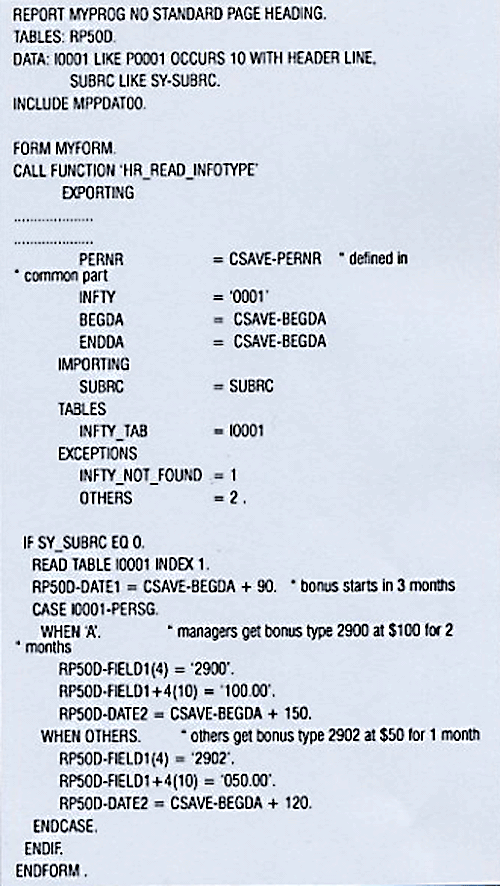
Figure 6
Form Routine MYFORM
Using P statements to check conditions based on other infotypes’ data: The approach of passing dynamic parameters is not limited to just I and W statements. You can use the P statement in conjunction with the F statement to formulate conditions based on the data of other infotypes evaluated at runtime. Suppose you are writing an action for Basic Pay (infotype 0008) and you want a “Child Allowance 1" or “Child Allowance 2" to be created when the employee has two or fewer or three or more children respectively. For this you would create Additional Payments with infotype 14 having wage types 2001 or 2002. This problem involves three infotypes:
- 0008 — The one that calls the dynamic action
- 0014 — The one to be triggered
- 0002 — The one upon whose data (number of children – field ANZKD) the plausibility check is based.
The action entries of table T588Z are shown in
Figure 7. The corresponding FORM routine that reads the number of children from infotype 0002 is shown in
Figure 8. The value is stored in the field
FIELD1 of structure
RP50D for use in the plausibility checks that follow. Depending on the value read from infotype 0002, one of the two I statements is triggered.
| F MAKEP(MYPROG)
P RP50D-FIELD1>2
I INS,0014,2001,,,20030101,99991231,
P RP50D-FIELD1<3
I INS,0014,2002,,,20030101,99991231, |
|
| Figure 7 |
Actions evaluating other infotypes’ data |

Figure 8
Form routine that reads the number of children
3. Using the P Statement to Accomplish Business Needs
A particular option can be applied in a variety of ways. A good example is the P statement. Let’s take a closer look at the incorporation of a field subset within a P statement.
In some situations it may be desirable to perform checks on a subset of a field rather than on its entire value. Suppose you want to check whether the current date is the first of the month — i.e., the last two (seventh and eighth) digits of field
SY-DATUM must be equal to 01. To achieve this, you would conduct a plausibility check in the following form:
.......... P Fieldname+offset(length)=’01’
“Offset” denotes the position (from left) of field
“Fieldname”.
“Length” is the number of characters to be read. Suppose
SY-DATUM is equal to 20030101. You could access the last two digits (date takes two characters after the sixth one) by putting your variables in the form as shown below:
.......... P SY-DATUM+6(2)=’01’.
Rules for Working with Dynamic Actions
Why do dynamic actions sometimes fail to achieve their purpose? Here are some rules to keep in mind:
1. Avoid Syntactical Mistakes:
No checks determine the consistency and validity of your dynamic action. This makes careful measures, such as checking spelling, indispensable. The correct use of commas and parentheses, which is well-documented by SAP, is also essential. In addition, here are a few more tips:
Avoid spaces in the variable function part: There should not be any spaces between variable names within your statement. For example, PSAVE-ANZKD<P0002-ANZKD is correct, whereas PSAVE-ANZKD < P0002-ANZKD is not.
Use of quotation marks and brackets: Table 1 gives a quick review of the correct use of quotes for specifying constants, and brackets for specifying field names when writing P, I, and W statements.
| Statement |
Quotation marks allowed for specifying constants? |
Brackets allowed while specifying field names? |
| P |
Yes |
No |
| I |
No |
Yes |
| W |
Yes |
No |
| Table 1 |
Use of quotation marks and brackets in dynamic actions |
2. Avoid Semantic Errors
You also must watch out for the following semantic errors, which are misconceptions that may cause the action to fail even though it is syntactically correct:
Writing logical OR and AND conditions in plausibility checks: One of the common pitfalls is the wrong usage of the logical OR and AND variants of the P statement:
- OR: A statement following the P statements is executed if any of the specified conditions is true.
- AND: A statement following the P statements is executed if all specified conditions are met.
When writing plausibility checks, use the /X at the end of the variable part of all statements that you wish to link via an OR condition. If no /X addition is used, the default is taken as the AND condition. The OR and AND may be used in conjunction to formulate conditions.
Let me illustrate with a few examples of OR and AND
conditions. I have shown only the P statements.
P T001P-MOLGA=’99’
P PSAVE-STAT2=’3’
I …………….
Meaning: A check that evaluates the country grouping and a person’s employment status. The I statement is executed if
T001P-MOLGA equals 99 and
PSAVE-STAT3 is equal to 3 (i.e., employee is active).
Consider another case. Suppose you want to add
MASSN to your check. You need the action to trigger if the country grouping is international (99) or the action type is 02 and the employment status is 3 (i.e., employee is active).
P T001P-MOLGA=’99’/X
P PSAVE-MASSN=’02’/X
P PSAVE-STAT2=’3’
I …………….
Meaning: The I statement is executed if (
T001P-MOLGA equals 99 or
Psave-massn equals 02) and
PSAVE-STAT3 is equal to 3.
A common mistake is omitting /X from the P statements that are supposed to be linked via an OR condition. Consider the following:
P T001P-MOLGA=’99’/X
P PSAVE-STAT3=’01’
I …………….
Since the second P statement does not conclude with /X , the OR condition is not implied. The I statement, in this case, is executed when
T001P-MOLGA equals 99 and
PSAVE-STAT3 is equal to 01.
Provide all required fields when using I statement with background variant: The I statement can be made to run in the background without causing the called infotype maintenance screen to pop up. However, certain errors may still cause it to be displayed. A subtype is mandatory for some infotypes, but the user may have mistakenly not specified the subtype when calling the infotype via the I statement. Another cause may be that the W statements provided are not sufficient. One or more of the required infotype fields have been omitted.
Actions with 02 and 06 values: You can write actions that trigger activities in various maintenance modes. They are 02 (change), 04 (create), 06 (create and change), 08 (delete), 10 (change and delete), and 12 (create and delete). A strange behavior is observed when writing actions that involve both 02 and 06 values specified in the function code column. Consider the following example:
02 1 P SY-DATUM=’19990101’
02 2 I INS,9021,,,(RP50D-DATE1),(RP50D-DATE2)
06 3 I INS,9022,,,(RP50D-DATE1),(RP50D-DATE2)
The intention is that the first I statement should be executed only when an existing infotype record is changed and the specified P condition holds true. Moreover, the second statement is executed in either the change or create case, regardless of whether the condition mentioned by P statement is true or not. Keep in mind that the two I statements are independent, dynamic actions.
However, this is not the case practically. When the infotype is changed and the condition is true, all runs fine. Even if a record is inserted, the system correctly executes the second I statement without checking any condition. The problem arises when an infotype record is changed and the condition is not met. The second I statement, in this case, is never executed. To correct this problem, use a dummy (an always true) condition. The rewritten form of such action follows:
02 1 P SY-DATUM=’19990101’
02 2 I INS,9021,,,(RP50D-DATE1),(RP50D-DATE2)
06 3 P SY-UNAME=SY-UNAME
06 4 I INS,9022,,,(RP50D-DATE1),(RP50D-DATE2)
The above construct runs by considering the whole as two separate and independent actions.
Correct placement of commas: While writing I statements, avoid misplacement of commas — one of the most severe, commonly made mistakes. The parameters sequence in the variable part of the I statement follows: operation—infotype number—subtype—object ID–start date—end date. You should strictly adhere to this sequence. If a field is missing, always include a comma. A few examples of correct statements are:
INS,0041,,,(P0000-BEGDA),(P0000-ENDDA)
COP,0012,,,(P0001-BEGDA),(P0001-ENDDA)
INS,0416,0001,,,
Rehan Zaidi
Rehan Zaidi is a consultant for several international SAP clients (both on-site and remotely) on a wide range of SAP technical and functional requirements, and also provides writing and documentation services for their SAP- and ABAP-related products. He started working with SAP in 1999 and writing about his experiences in 2001. Rehan has written several articles for both SAP Professional Journal and HR Expert, and also has a number of popular SAP- and ABAP-related books to his credit.
You may contact the author at
erpdomain@gmail.com.
If you have comments about this article or publication, or would like to submit an article idea, please contact the
editor.