For third-party sales operations, it is important to set up master data and conduct continuous maintenance. Ignore these and face significant cost.
Key Concept
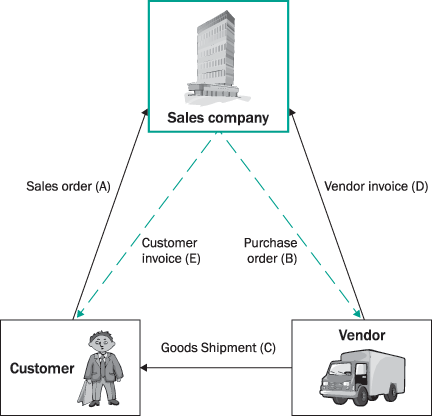
Third-party sales is a typical scenario in today’s competing global economies, where the “best of breed” products are manufactured for a given company by smaller niche manufacturers or associated business partners. The end customer is not necessarily aware of these business affiliations, as the shipping is under the original seller’s documentation. Customer invoices are generated by the original sales partner as well. This model is used increasingly in the process and manufacturing industries, consumer packaged goods (CPG), high-tech, and others.
Although the third-party sales process
is relatively simple, it uses links to
other SAP modules, such as Sales & Distribution,
Procurement, Logistic Invoice Verification,
and Customer Invoicing. A lack of understanding
of these links on the part of execution
personnel can disrupt a smoothly running
system, creating inefficiencies and destroying
customer satisfaction. I’ll show
you how to automate the processes smoothly
and how to configure third-party orders
and set up master data to ensure trouble-free
operations. If you are new to the third-party
sales concept, see the sidebar, "Basic
Guide to Third-Party Sales."
Prerequisites
For third-party order processes to
run efficiently and smoothly, you must
set up the configuration and master data
correctly as follows:
Configuration
The sales document type is of the utmost
importance, as it determines whether
the sales order is a third-party order.
I recommend that you set up a third-party
order by an Item Category at
item Level (Figure
1), say ZTAS within Item
category group NORM.
It may be beneficial to set up different
item categories if the customers are
in different areas of business, say general
chemicals or specialty chemicals. It
may also be beneficial to set up different
order types, with a combination of item
categories. Follow menu path Sales & Distribution>Sales>Sales
document>Sales Document Item>Define
Item Categories.>New Item.
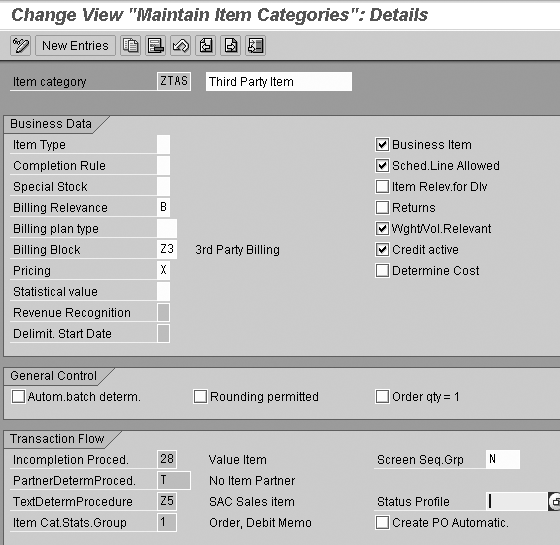
Figure 1
Creation of new item category, ZTAS
Master Data
Third-party orders are strongly influenced
by master data, so it needs to be set
up with particular care. The master data
maintenance for new materials, vendors,
contracts, and transfer prices also cannot
be overemphasized.
Material master: The
purchasing view of the material master
needs to have the automatic purchase
order (PO) (Autom. PO)
flag checked (Figure 2).
This ensures that the purchase requisition
is converted into a PO.
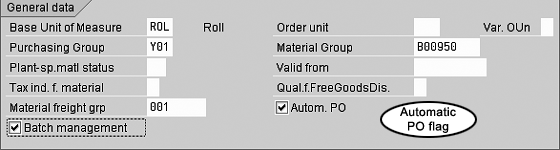
Figure 2
Set up flags in Material Master purchasing view
Vendor master: The
automatic PO flag needs to be set for
automatic PO creation on the purchasing
data view (Figure 3).

Figure 3
Set up flags in Vendor Master purchasing data view
Purchasing Contracts: The
contracts (Value Contracts)
with vendors necessitate setup of a
number of predetermined pieces of information
required for the automatic creation
of POs. These need to be set up carefully.
Important fields to consider are:
- Vendor’s material
number: Vendor material
number (Vend. Mat.)
is required to automate the creation
of the PO in the vendor’s
system as a result of an EDI process.
An incorrect material number can
cause a major problem (Figure
4).
- International commercial
terms (Incoterms): The
Incoterms are info records and
are adopted from the sales order.
- Transfer Pricing: The
price at which the material will
be transferred between vendor and
sales company is decided and maintained
as Net order price.
- Confirmation Control Key: This
is necessary to receive an order
confirmation, which creates an inbound
delivery with reference to the PO
at a later stage. An inbound delivery
will not be created if ConfContrK is
not set up. Use standard confirmation
control key 0001.
- Under- and Overdelivery
tolerances: Set Underdel
tol. and Overdeliv. Tol. to appropriate
amounts, or the system sets the
PO to complete if there is a short
or excessive delivery. Overdelivery
tolerance blocks a goods receipt
in the event of a delivery exceeding
the overdelivery tolerance.
- Maintain Source List: The
source list, particularly the Vendor
field, needs to be maintained within
the contract. Otherwise the system
does not create the PO and subsequent
processes of inbound delivery (Figure
5).
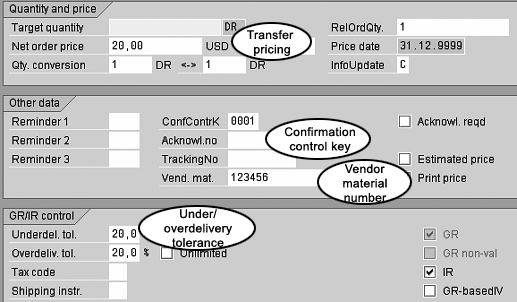
Figure 4
Key fields on the Value Contract view
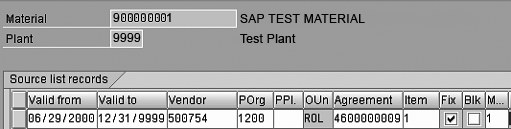
Figure 5
Maintain Vendor on the Maintain Source List screen to ensure proper creation of subsequent processes
See Table 1 for a
reference chart showing a number of
common problems with third-party sales
orders, along with their causes and
solutions.
| Document |
Problem |
Reason |
Resolution (including
transaction code) |
| Purchase
requisition |
Purchase requisition not created |
1. Sales order blocked because
of credit limit.
|
1. Order needs to be released
by Credit Management (VKM3).
|
| 2. Sales order incomplete. |
2. Edit order (VA02)
and complete it. |
| Purchase
order |
PO not created |
1. Purchasing contract not
created.
|
1. Create purchasing contract
(ME31K).
|
| 2. Purchasing source list not
created. |
2. Create purchasing source list
(ME01). |
| 3. Flag for automatic PO creation
not set in material master. |
3. Set flag in material master
(MM02). |
| 4. Flag for automatic PO creation
not set in vendor master. |
4. Set flag in vendor master
(MK02). |
| 5. Purchasing group used different
than that set in material master
and contract. |
5. Check purchasing group (MM02/ME32). |
| Purchase
order |
EDI not sent to vendor |
1. Vendor is not relevant
for EDI (non-EDI vendor).
|
1. Validate vendor is relevant
for EDI.
|
| 2. Error during output message
creation in PO. |
2. Check output in PO (ME22N). |
| Purchase
order |
Fax not sent to vendor |
1. Fax number of vendor not
in correct format (country-specific
rules, e.g., in Germany, no spaces,
no leading 0).
|
1. Check fax number in PO
(ME22N).
|
| 2. Company fax number maintained
incorrectly in SAP user profile. |
2. Maintain fax number correctly
in your user profile (SU3). |
| Inbound delivery |
Confirmation not posted in PO |
1. (For EDI vendors) Shipping
(ASN) not confirmed by vendor.
|
1. Contact vendor to confirm
shipment.
|
| 2. (For EDI vendors) PO via EDI
has not reached vendor. |
2. Check confirmation status
periodically (ME23A)
in PO. |
| 3. (For non-EDI vendors) Inbound
delivery not posted. |
3. Post inbound delivery manually
(VL31N). |
| Goods receipt |
GR not posted |
1. Confirmation, i.e., inbound
delivery, not posted.
|
1. Be sure inbound delivery
is posted.
|
| 2. Delivery date in confirmation
is not current date. |
2. Check confirmation status
periodically (ME2L). |
| Goods receipt |
POs show up in Open Pos
List (ME2L)
even when delivered (partially) |
1. Delivery complete indicator
in goods receipt/ PO not set.
|
1. Set delivery complete indicator
in PO (ME22N).
|
| 2. No Under-/ Overdelivery tolerances
in material master, contract, or
PO maintained. |
2. Set delivery complete indicator
in PO (ME22N)
to fix immediate problem and maintain
tolerances in material master and
contract for future transactions. |
| Customer
sales invoice |
Sales invoice not created |
1. Sales order incomplete, blocks
credit, or has billing block set,
or good receipt not posted. |
1. Fix each error manually to
create customer invoice, as one
of the process steps has failed. |
| Table
1 |
Eight
common problems, their causes,
and their solutions |
Process
Typically, material types control
whether a material is produced only
internally, is ordered only from third-party
vendors, or whether both are possible.
For example, a material that is defined
as a trading good can only be ordered
from a third-party vendor. However,
if you manufacture your own finished
products, you may also want, from time
to time, to be able to order the same
type of product from other vendors.
In addition, procurement type could
be “internal” (i.e., company
production), “external” (i.e.,
vendor-supplied), or “both.” If
a product could be procured internally
or produced, it should be set to “both.”
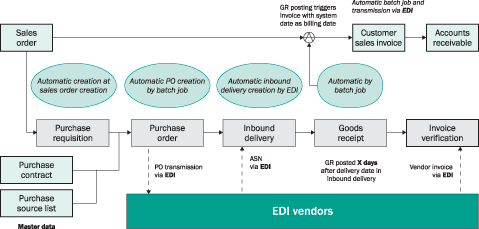
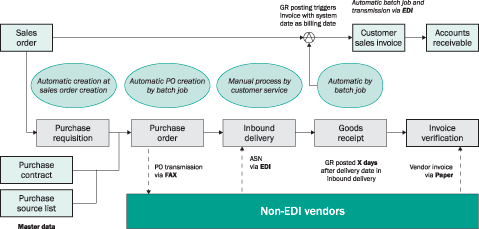
The important steps involved in third-party
order processes are as follows:
- Purchase requisition: The
third-party sales order creates a
purchase requisition at the time
of sales order creation.
How to automate it: Set
up a contract for the material
with an automatic update of info
records, which creates a vendor
info record in background. In
addition, the source lists are
created to link material with
the vendor. Where there could
be multiple vendors, the preferred
vendor is set up within the Source
list. The purchase requisitions
are thus created with procurement
source (i.e., vendor assignment),
automatically in the background
at the time of creation of a
third-party sales order.
- Purchase order: The
purchase requisition is automatically
converted into a PO for the vendor.
The PO refers to the purchasing requisitions
created at sales order creation and
adopts important data and features
automatically.
How to automate
it: The purchase
requisitions with vendor
assignments are converted
into POs by a batch job using
transaction ME59 ABAP
program with requisite parameters.
This ensures automatic creation
of POs. The materials and
vendors are set up with Automatic
PO flags.
- Inbound delivery: The
vendor ships the material to the
customer and the communication, in
the form of an advance ship notification
(ASN), creates an inbound delivery.
Inbound deliveries provide online
shipping visibility. The data from
the PO is adopted in the inbound
delivery.
How to automate it: Inbound
deliveries are created automatically
in background by a batch job
using transaction VL31N ABAP
program with requisite parameters.
Typically, this batch job runs
nightly.
- Goods receipt for inbound
delivery: After a certain
number of days, typically the transportation
time, a batch job run performs
goods receipt posting with reference
to inbound deliveries. The inbound
delivery date is of the utmost
importance; this must be an accepted
number of days that matches the
arrival date of the shipping agent
closely. The batch jobs check this
date for creation of a goods receipt
an accepted number of days after
this date.
How to automate it: Goods
receipts are created automatically
in the background by a batch job
using transaction MIGO ABAP
program with requisite parameters.
Goods receipts are performed in a
given period, such as seven days.
This period (X)
can be set up within the program
variant with adjustment of posting
date for inbound delivery. Typically,
this batch job runs nightly.
- Invoicing: The
goods receipt posting triggers an
automatic batch job for creation
of customer sales invoices and communication
to the customer via EDI. The sales
invoices reference the sales order.
The data from the inbound delivery
is adopted in the billing document.
How to automate it: The
invoice creation can be done
automatically in background by
a batch job using transaction VF06 ABAP
program with requisite parameters.
- Invoice verification: The
invoice verification for payment
of vendor invoice is processed any
time after the goods receipt is posted.
How to automate it: Typically,
it is not automated unless the
vendor is an Evaluated Receipt
Settlement (ERS) vendor.