The problem of employees who are remunerated at multiple rates is not new. To deal with it, the author proposes a model using R/3's standard HR Personnel Administration (PA), Cross Application Time Sheet system (CATS), and Organizational Management (OM).
You are part of the HR/payroll department of a large manufacturing/service organization. You have people in the company who must be paid at a different rate because they have temporarily filled a position that attracts higher pay. Or, in another situation, an employee has been “reorganized” to work in another unit because of capacity and demand issues. This new unit has a lesser rate of pay, and the union representative just reminded you that, according to the union-negotiated contract, he is entitled to the higher pay for at least four months.
You have R/3 HR and you can pay at a different rate by using a different pay scale group and level for these cases. However, if you have to intervene and modify time cards, you won’t get other things done, potentially risking the timeliness of pay processing. You can ask the clerical support department to take care of this extra workload, but how would it know who is qualified for what rate? How would you prevent errors in data entry that may result in incorrect pay?
The problem of employees who are remunerated at multiple rates is not new (HR departments refer to such employees as "multi-rated"). To deal with it, I propose a model using R/3’s standard HR Personnel Administration (PA), Cross Application Time Sheet system (CATS), and Organizational Management (OM). The model I developed has resulted in significant improved accuracy when entering rates, reduced time for validating rates, and the provision of a single-point repository for variable rate information for an employee.
The standard PA module does not offer any features to administer occupation-based pay. R/3 time-to-pay processes are typically driven by wage types. Time Evaluation is an R/3 feature that allows the derivation of pay based on pre-set rules. This does not meet the requirements of the situations I described because these rules cannot be predicted. A worker does not know in advance what job he or she might be required to do.
The Principle of the Model
To account for occupation-based pay, you can use a combination of the CATS and the PA/OM modules. This method is based on standard R/3 modules with a few lines of ABAP code using standard user exits. The integration of these modules to deliver a multi-rate functionality is not documented in any commonly available SAP literature. The underlying principle, which I will describe in detail, is as follows:
- Identify jobs in the organization that an employee is capable of doing (using OM).
- Assign appropriate rates to these jobs (using OM).
- Once the catalog of jobs is ready, assign them to employees as required, marking which one is a person’s default job, which one is not his/her default but which he or she is qualified to do, and which ones have a protected rate (using the PA module).
- When doing time entry, enter the job that the person has actually performed. The system automatically determines the rate associated with the job and includes it in the CATS time card record.
- If a job that is entered in the time card is not one for which the employee is qualified, the system flags an error message and prevents the saving of the time card (with CATS user exits).
I will begin with a review of data structures that are required to drive this process. I will introduce you to all the important data items that form the backbone of this solution, first through a data model and then through the actual R/3 tables that represent this model. With a step-by-step guide, I will show you how to identify jobs, assign appropriate rates, and assign them to your employees, followed by time entry and validation. I will also introduce you to ABAP code that you can write to complete the validation process.
The Data Model
Figure 1 shows how information about jobs is stored in the system. The employee is hired into a position. The position is part of an organizational unit, and is described by a job. A job can have many different positions, but an employee fills one and only one position in the organization — one that is vacant. The job that describes this position is the default job of the employee. The employee may have several potential jobs that he or she is qualified to do. The employee also has a job that specifies a protected rate for the employee. See Table 1 for a list of R/3 tables that represent these entities.

Figure 1
Mapping for a job in the R/3 system
| Entity or Relationship |
Table |
| Employee |
PA0002 (last and first names) |
| Position |
HRP1000, object type S |
| Organizational unit |
HRP1000, object type O |
| Job |
HRP1000, object type C |
| Rate table |
T510 (using pay scale group and level) |
| Organizational unit has position |
HRP1001, relationship A003 between object types O and S |
| Rate table specifies the rate for job |
HRP1005 (using pay scale group and level) |
| Position is filled by employe |
HRP1001 relationship A008 between object types S and P |
| Employee has a potential for job |
HRP1001 relationship A038 between object types P and C |
| Employee is rate-protected by job |
HRP1001 relationship A501 (custom, not standard SAP) between object types P and C. See SAP HR Org Management IMG documentation to create a custom relationship |
|
|
|
| Table 1 |
Table names in R/3 |
Identify Jobs
You can identify jobs that an employee is capable of doing through the job object (object type C) in R/3. Jobs are defined using the PO03 transaction. The short description is standardized with a convention that is easy to remember and clearly represents the type of work the person might be doing. It must also be unique so that it represents one rate. For example, C 40003363 is an object ID of a job that is called “No 2 OPERATOR” in its short description.
Assign Rates
Rates are defined in table T510 with pay scale group and level as the key. These rates are linked back to the jobs through the Planned Compensation infotype (1005).
Assign the Default, Potential, and Protected Jobs
The default job is always defined through the hiring event, as part of the process of describing the position that the employee fills in the organization. For example, in the Organizational Assignment screen shown in Figure 2, employee number 80002215 (Employee X) is attached to a position called CONTROL OPERATOR (S 40001113) described by a job called Op. Z (C 40003316).

Figure 2
Organizational Assignment screen
In Figure 1, the arrows indicate the direction in which the relationships should be read. The crow's feet represent the word "many." For example, an employee has a potential for many jobs.
The potential job is set up with a relationship between the person and the job. This is because an employee may have several potential jobs. This is done through transaction code PO03, using relationship B038.
Figure 3 shows Employee X being linked to a potential job of NO 2 OPERATOR from 05/07/2002.
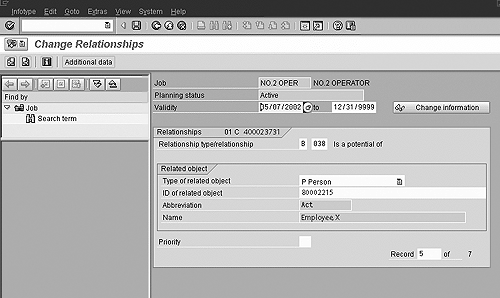
Figure 3
Link to a potential job
A rate protection is similar to a potential job. It is defined for an employee, and through a relationship with the job. The relationship used in this case is a custom one, called Describes Protec Rate for. Figure 4 demonstrates how Employee Y is linked to the job of NO 1 OPERATOR via a rate protection relationship (the practice of guaranteeing a worker a particular rate regardless of the job being done is known as rate protection).

Figure 4
Rate protection relationship
Validate the Job in CATS and Supplement Rate Information
Look at Figure 5. Notice that it is possible to view the default and potential jobs from this screen by using the drop-down list on the job field.
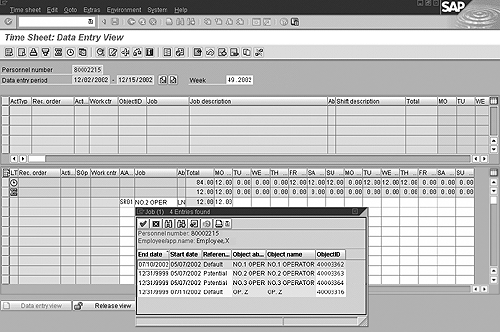
Figure 5
View of default and potential jobs
When doing time entry, you enter the job that the person has actually performed. The system automatically determines the rate associated with the job and includes it in the CATS time card record.
This is done through SAP Enhancement (user exit) CATS0002. You can use CATS0002 to enter additional items of information for a record, which are integrated into the time sheet.
Supplementing recorded data simplifies data entry for the user. The user exit looks at the planned remuneration infotype of the job entered in the time card and populates the pay scale group and level field. The pay scale type and area are derived from infotype 8 of the employee master record. You can hide the fields that are filled automatically using data entry profile field settings. See Figure 6 for an example ABAP code for this exit.
 DATA: v_lines1 TYPE i.
DATA: i_hrp1000 LIKE hrp1000 OCCURS 0 WITH HEADER LINE.
DATA: i_hrp1001 LIKE hrp1001 OCCURS 0 WITH HEADER LINE.
DATA: i_pernr LIKE pdpnr OCCURS 0 WITH HEADER LINE.
DATA: i_psp LIKE pdpsp OCCURS 0 WITH HEADER LINE.
DATA: i_day_psp LIKE pdsppsp OCCURS 0 WITH HEADER LINE.
DATA: i_t77ed LIKE t77ed OCCURS 0 WITH HEADER LINE.
DATA: wa_t554s LIKE t554s,
      wa_i0001 LIKE p0001,
      wa_pa0001 LIKE pa0001,
      wa_pa0008 LIKE pa0008,
      wa_hrp1005 LIKE hrp1005,
      v_flag1(1),
      v_payscale_level LIKE hrp1005-trfs1.


************************************************************************
*              POPULATE PAYSCALE GROUP AND LEVEL                       *
************************************************************************

        LOOP AT enrich_table.


          CLEAR wa_hrp1005.
          SELECT * UP TO 1 ROWS FROM hrp1005 INTO wa_hrp1005
                 WHERE otype EQ 'C' AND
                 objid EQ enrich_table-jobid AND
                 begda LE enrich_table-workdate AND
                 endda GE enrich_table-workdate.
          ENDSELECT.


          IF sy-subrc NE 0.
            MESSAGE ID 'Z1'
                    TYPE 'E'
                    NUMBER '000'
                    WITH 'Payscale Group and Level missing for'
                    enrich_table-job
                    enrich_table-pernr
                    enrich_table-workdate.
          ENDIF.

          enrich_table-trfgr = wa_hrp1005-trfg1. "payscale group
          enrich_table-trfst = wa_hrp1005-trfs1. "payscale level

          MODIFY enrich_table.


        ENDLOOP. enrich_table
|
| Figure 6 |
Example of ABAP code for user exit CATS0002 (ABAP code written by S. Balakrishnan) |
If you enter a job in the time-card entry for which an employee is not qualified, the system flags an error message and prevents the saving of the time card.
This is validated through user exits CATS0003 or CATS0006. You can use CATS0003 to implement additional checks based upon a person’s HR master record. The checks you define are carried out whenever you perform an action meriting a system check during data entry. You can use CATS0006 to supplement the standard checks for all time sheet data according to your requirements. The validations are performed when you save or check data and when you switch between views or change the data entry period. See Figure 7 for example code to perform this check using CATS0006.
 *----------------------------------------------------------------------*
*   INCLUDE ZXCATU06                                                   *
*----------------------------------------------------------------------*
DATA: v_lines1 TYPE i.
DATA: i_hrp1000 LIKE hrp1000 OCCURS 0 WITH HEADER LINE.
DATA: i_hrp1001 LIKE hrp1001 OCCURS 0 WITH HEADER LINE.
DATA: i_pernr LIKE pdpnr OCCURS 0 WITH HEADER LINE.
DATA: i_psp LIKE pdpsp OCCURS 0 WITH HEADER LINE.
DATA: i_day_psp LIKE pdsppsp OCCURS 0 WITH HEADER LINE.
DATA: i_t77ed LIKE t77ed OCCURS 0 WITH HEADER LINE.
DATA: wa_i0001 LIKE p0001,
      wa_pa0001 LIKE pa0001,
      v_shiftgr LIKE t77db-dienstgr,
      v_flag1(1),
      v_flag2(1),
      v_position LIKE hrp1001-objid,
      v_def_job LIKE hrp1001-objid,
      v_absent_hours LIKE catsdb-catshours,
      v_worked_hours LIKE catsdb-catshours,
      v_week LIKE scal-week,
      v_curr_week LIKE scal-week.


************************************************************************
*                         VALIDATE JOB                                 *
************************************************************************


*[build look-up table for JOBID and JOBTXT

        DESCRIBE TABLE i_hrp1000 LINES v_lines1.
        IF v_lines1 EQ 0.

          SELECT * FROM hrp1000 INTO TABLE i_hrp1000
                 WHERE plvar EQ '01'
                 AND otype EQ 'C'
                 AND istat EQ '1'
                 AND begda LE check_table-workdate
                 AND endda GE check_table-workdate
                 AND langu EQ 'E'
                 AND seqnr EQ '000'.

          LOOP AT i_hrp1000.
            TRANSLATE i_hrp1000-short TO UPPER CASE.
            MODIFY i_hrp1000.
          ENDLOOP.

        ENDIF.

*]

        LOOP AT check_table where WORKDATE between DATEFROM AND DATETO.

          CLEAR v_flag2.
          IF check_table-job NE space.

*[ get default job
            CLEAR: v_position, v_def_job.
            SELECT objid UP TO 1 ROWS FROM hrp1001 INTO v_position
                     WHERE otype EQ 'S'
                     AND   plvar EQ '01'
                     AND   rsign EQ 'A'
                     AND   relat EQ '008'
                     AND   istat EQ '1'
                     AND   begda LE check_table-workdate
                     AND   endda GE check_table-workdate
                     AND   sclas EQ 'P'
                     AND   sobid EQ  check_table-pernr.
            ENDSELECT.

            SELECT objid UP TO 1 ROWS FROM hrp1001 INTO v_def_job
                   WHERE otype EQ 'C'
                   AND   plvar EQ '01'
                   AND   rsign EQ 'A'
                   AND   relat EQ '007'
                   AND   istat EQ '1'
                   AND   begda LE check_table-workdate
                   AND   endda GE check_table-workdate
                   AND   sclas EQ 'S'
                   AND   sobid EQ v_position.
            ENDSELECT.
*]

*[ get potential jobs
            SELECT * FROM hrp1001 INTO TABLE i_hrp1001
                     WHERE otype EQ 'C'
                     AND   plvar EQ '01'
                     AND   rsign EQ 'B'
                     AND   relat EQ '038'
                     AND   istat EQ '1'
                     AND   begda LE check_table-workdate
                     AND   endda GE check_table-workdate
                     AND   sobid EQ check_table-pernr.
*]

*[      compare entered job with default and potential jobs
            CLEAR: i_hrp1000, v_flag2.
            READ TABLE i_hrp1000 WITH KEY short = check_table-job.
            IF i_hrp1000-objid EQ v_def_job.
              v_flag2 = 'X'.
            ELSE.                      " is it a potential job?
              LOOP AT i_hrp1001.
                IF i_hrp1000-objid EQ i_hrp1001-objid.
                  v_flag2 = 'X'. "no problem
                  EXIT.
                ENDIF.
              ENDLOOP.
            ENDIF.
          ENDIF.

          IF v_flag2 NE 'X'.

            CLEAR i_messages.

            i_messages-msgid = 'Z1'.
            i_messages-msgty = 'E'.
            i_messages-msgno = '000'.
            i_messages-msgv1 = 'Please enter valid job'.
            i_messages-pernr = check_table-pernr.
            i_messages-catsdate = check_table-workdate.
            APPEND i_messages.

          ENDIF.
* ] "job validation over
|
| Figure 7 |
Example of ABAP code for user exit CATS0006 |
A Word about Rate Protection
Guaranteeing a worker’s rate is typically part of the payroll process. In the time-keeping process, you capture the details of the work the person has completed. In the payroll process, you ensure that the person is paid accurately.
It is certainly possible to add more logic to the same user exit that populates the Pay Scale Group and Level (CATS0002) and ensure that if a rate protection exists, only the protected rate is populated on the CATS fields TRFGR (Pay Scale Group) and TRFST (Pay Scale Level). This transfers the responsibility of ensuring rate-protected pay from payroll to timekeeping. The ABAP code for that is similar to the code shown for user exit CATS0002 (Figure 6). All you need to add is a check for rate protection using the tables shown in Table 1 (Employee is rate-protected by job). The downside of this method is that it overwrites, and therefore destroys, the pay scale information about the job that was actually done, replacing it with information about the protected job.
It is possible to avoid this problem by applying rate protection as a pre-processing step before running payroll, instead. By doing this, you also retain the responsibility of ensuring rate-protected pay with the payroll process.
Reporting Assigned Jobs
You saw that it is possible to view the assigned jobs (default, potential and rate-protected) using the drop-down window in the CATS screen shown in Figure 5. This, however, may not fulfill other multi-employee documentation and analysis needs.
You can use a standard org structure display report (S_AHR_61016528 - Structure Display/Maintenance) to report on job assignments for employees with multiple jobs. See Figure 8. You need to define a special evaluation path that covers the relationships defined so far.
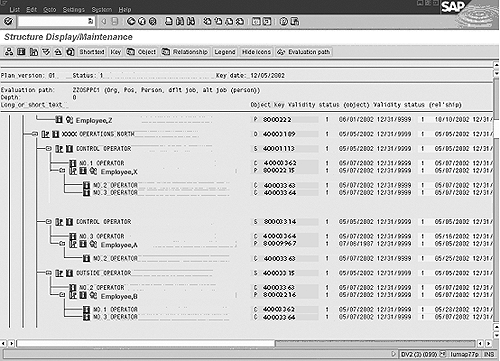
Figure 8
Org structure display report
To define evaluation paths, follow the IMG path Personnel Management> Organizational Management>Basic Settings>Maintain Evaluation Path or use transaction code OOAW. The evaluation takes place from top to bottom in the sequence of the numbers entered in the path definition. The path definition may consist of several lines. Each line relates one type of object to another type from left to right, via a relationship. You can chain relationships by relating the object type on the right of a line to another object type in the next line. The leftmost object of the first line is the root from which the evaluation starts. In the example in Figure 9, the organization is related to a position, the position is related to a job (default) and also to a person, and finally the person is related to another job (potential).
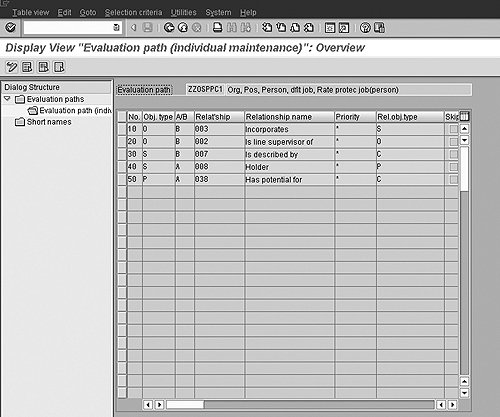
Figure 9
Evaluation path overview
Tip!
The job field is not normally available in the time sheet. You can make it available by using one of the many user fields provided by R/3 in the CATSDB table (CATS_ADDFI- FIELD1 to CATS_ADDFI-FIELD10). Mapping of the user field to the job field is achieved through configuration by using IMG menu path Cross Application Components>Time Sheet>Customer Specific Modifications>Create Customer Fields>Make Field Assignment. It is prudent to map Job Abbreviation, Job Description, and Job Id fields to a CATS user field.
While setting up jobs, create a unique job for each rate. The job abbreviation is limited to a few characters only. However, this is the field that is easiest to remember and enter in the time sheet. Make sure that this job abbreviation is unique across all jobs defined for that site. Make this the “input permitted” field on the time sheet using CATS profile configuration IMG menu path Cross Application Components>Time Sheet>Time Recording>Choose Fields>Data Entry Section. Mark the Job Id and Job Abbreviation fields hidden or display only to reduce clutter on the time sheet.
The evaluation path ZZOSPPC1 shows the organizational unit, the positions under it, the people in those positions, the default jobs of those people (which are the jobs describing the positions), and the potential jobs that each person holds (which appear under the Person objects). Identification of objects is reasonably simple: O is an organization unit, S is a position, C is a job, and P is an employee (person). The icons at the head of each branch in Figure 8 also help distinguish these four objects in this report, improving its readability. These icons can be turned on or off as can the object IDs appearing on the report.
I’ve shown how CATS can be integrated with the OM and PA modules to solve a common business problem — pay-rate validation. Although programming the user exits and building the organization structures as described take a significant amount of time, I have found that it is a small investment for a relatively error-free employee time- sheet entry in the long run.
Deepankar Maitra
Deepankar Maitra has more than 25 years of consulting experience specializing in SAP-based solutions for human resources, supply chain, and reporting in multi-national companies around the world. He has successfully directed large implementation projects as solution architect, delivery manager, global lead, and country lead. His expertise lies in pragmatic harmonization of data and synthesis of processes using tools that improve process execution through quantum leaps in productivity.
You may contact the author at deepankar.maitra@accenture.com.
If you have comments about this article or publication, or would like to submit an article idea, please contact the editor.