This first article in a series on Manager Self-Service, one of the standard Business Package applications that come in your SAP Enterpise Portal, helps you to understand how it can change the way decision-makers use financial information in your company.
(MSS) is one of the standard Business Package applications that come ready to run in your SAP Enterprise Portal. MSS connects to your SAP R/3 system to deliver portal-based information to managers.
This first article in a series on MSS will help you to understand what MSS is, how it can change the way decision-makers use financial information in your company, and what system changes are required to make MSS available. It specifically addresses the FI/CO community and focuses on the budget and cost information that managers need at their disposal.1 Using the example of a mistyped cost center number, I’ll show you how it works.
Tracking a Mistyped Cost Center Number Before and After Manager Self-Service
Imagine the following situation: A posting goes to the wrong cost center because the cost center number was mistyped.
For many, the ensuing scenario might be as follows: The cost center manager—let’s call her Sally—notices a large amount on the monthly cost center report. As she cannot explain the difference to budget, she asks her cost accountant—Charlie—for a line-item report.
Sally reads the printed line-item reports (quite a few pages) and finally finds a large single posting (third-party costs) that she suspects should not be on her cost center. Because there is no way for her to drill down to the original document, she can’t be sure. During a lengthy study of the report, she finds two additional postings she cannot explain.
After a couple of e-mails and phone calls, she and Charlie identify the postings in the system. The cost accountant traces back the original documents in the system and identifies the erroneous data entry.
Finally, Charlie is able to enter adjustment postings into the system. This causes additional headaches, because period-end closing was done before the monthly cost center reports were sent to the managers. Now Sally is calling Charlie to ask whether the costs have been cleared from her cost center.
Using MSS, things would have proceeded differently. Through the MSS portal, managers are automatically alerted to situations like this by a cost center monitor. Sally is notified about an extraordinarily large posting on one of her cost centers for a cost element (third-party costs), although she does not budget for that particular cost element. (See Invoice: Great Subject Corp. line item in Figure 1.)
She clicks on Invoice: Great Subject Corp. and is taken to an R/3 transaction displaying that particular line item. Sally follows the drill-down path to the original document and finds an invoice from a company she has never heard of. This posting is not for her cost center.
She now accesses the form called Request for an Adjustment Posting in her portal (Figure 2). Sally enters the line-item number from the alert and enters a comment: "This third-party invoice is not for my cost center. Please check the assignment." Then she clicks Submit.
Charlie, the cost accountant, receives the notification via workflow. Charlie can navigate to the display of the line item directly from the received message. He checks the original document and realizes that there must have been a typing error when the document was assigned to the cost center.
Charlie can then go to the appropriate R/3 transaction and enter an adjustment posting directly from the message in time for the month-end closing. During the adjustment process, Sally can monitor whether her requests have been processed via Status Overview of My Service Requests in the portal.
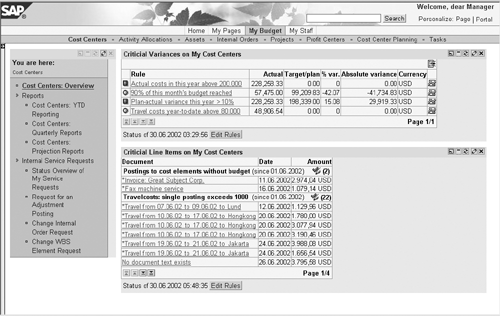
Figure 1
Monitoring your cost centers

Figure 2
Internal service request for an adjustment posting
Managing and Monitoring "My Budget"
In this example, Sally and Charlie used the cost center monitor. You have seen how it routes information to users so that they don’t have to search for it. SAP delivers other such services, referred to as "iViews," for its Enterprise Portal. MSS contains a number of transactions to address common tasks for line managers, such as cost and people management.
Within the "My Budget" (cost management) section of MSS, iViews allow decentralization of budget and expense monitoring, whereby the finance staff can provide managers with information. This is where the name "Manager Self-Service" hails from. The idea is to make managers more self-reliant, and, in the process, to relieve central departments of recurring requests. In particular, MSS provides:
- Visual alerts to managers for cost overruns, based on rules the finance department or the managers define themselves. See Figures 1 and 3.
- Web access to frequently used reports, and reports that allow for further research, such as Report Writer or BW Web reports. Keep in mind that occasional users of financial information have different report requirements. For example, they do not want selection screens to key in the same range of internal orders each time they run a report. Therefore, the systems store the selection criteria per user.
- Web forms built in a framework, SAP internal service request (ISR), which you can adapt. These forms allow the manager to request various types of services from central departments, such as the adjustment postings shown in my example. This enables managers to initiate and trace such requests, tasks previously accomplished by e-mail, telephone, and paperwork management. See Figure 2 for an example of an ISR Web form.
MSS has been generally available to all customers since December 2002. Surveys with early customers show that MSS has proven to contribute to the following goals:
- Saving managers’ time: Line managers spend less time searching for information about costs and budgets. The communication with central service-providing departments becomes easier and less time-consuming because of more clearly defined communication channels and Web forms for service requests. Everything is in the portal.
- Saving central departments’ time: By channeling requests through SAP internal service requests, accounting departments can better respond to requests, and are provided with all the information they need, reducing further inquiries to line managers. Managers can access their cost reports online with full drill-down capability, instead of asking their cost accountants to do so.
- Increasing managers’ awareness of costs: Managers start to use the tools to monitor costs in their area of responsibility. Some even create their own rules for alerts after getting used to the default rules.
Return-on-investment (ROI) studies have shown that MSS can easily save $500 per manager per year, based on calculations that multiply time savings by personnel costs.
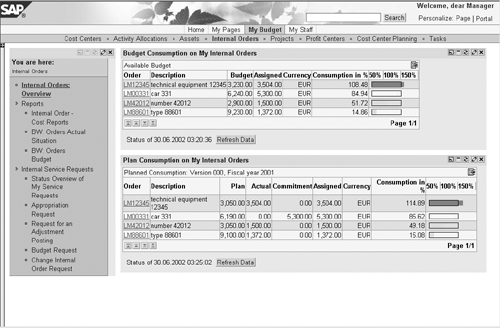
Figure 3
Monitoring budget consumption on internal orders
Note!
MSS operates within the SAP Enterprise Portal 5.0. It requires R/3 release 4.0B or greater—SAP recommends 4.6C and above. (See
Figure 4.) You must install SAP R/3 Plug-in 2002.2 or higher into your R/3 system, as the iViews in MSS use it to connect to R/3. Optionally, you might want to include an Internet Transaction Server (ITS) and a BW system (from release 2.1C) — two components that most SAP customers already have in place. The degree of drill-down capabilities and the extent of the services you want to extend to managers will dictate whether you need these optional building blocks. Be sure to let your IT teams know what capabilities you want set up so that they can tailor the underlying infrastructure accordingly.
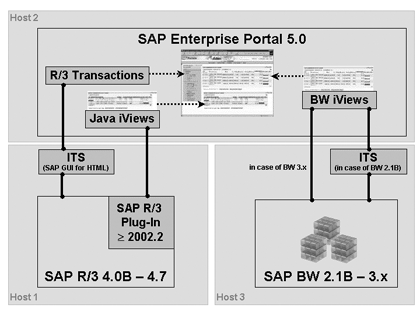
Figure 4
System landscape for Manager Self-Service
1
Markus Kuppe
Markus Kuppe joined SAP AG in 1997 and has since headed various development projects for cost management applications and enterprise portals. He is now Director of Product Management for the mySAP Financials Portal Solutions, creating new collaborative financial applications with and for customers. Markus holds a graduate degree in mathematics from the University of Darmstadt, Germany.
You may contact the author at Markus.Kuppe@sap.com.
If you have comments about this article or publication, or would like to submit an article idea, please contact the editor.