Understanding how data is organized and indexed in SAP can go a long way for users when they want to access information fast. This article explores the secret world of SAP indexes and database tables and explains why FI/CO reporting transactions so often time-out on users, and what steps can be taken to prevent long wait times from happening.
If your users have ever had an SAP FI/CO reporting transaction time-out on them — or at least had a transaction run long enough for them to get a cup of coffee, check e-mail, and surf eBay awhile before getting the sought-after results — this article is for you. I’ll help you explain to your users why those things happen and what steps they can take to prevent long wait times from happening. Stay tuned as we explore the secret world of indexes.
Understanding a little bit about how data is organized in SAP can go a long way for users when they want to access information fast. Whether retrieving Cost Center line items via transaction KE5Z, running Profitability Analysis reports with KE30, or even listing Materials Management documents with MB51, understanding indexes is the key to speed. Thankfully, it doesn’t require any real technical knowledge or proficiency. In fact, the basic principles are inherent in something that everyone already understands and knows how to use — a residential phone book.
A phone book (and here I’m referring to the often-heavy, physical book delivered to your home every-so-often by the phone company, usually on a rainy day) can be thought of as a physical database. There are many individual entries in the phone book, each entry (known as a "record" in database terminology) being a unique combination of a person’s last name, first name, and phone number. And those records are physically sorted and displayed in alphabetical order, by last name and then by first name.
The phone book can be thought of as having a single "index" comprised of the fields Last Name, First Name, in that sequence. If you want to look up a person’s phone number, and you know both the last name and first name, then this is a very effective index — you can look up the phone number very quickly.
If you only know a person’s last name, this is still an effective index — you can still quickly find the phone number or phone numbers for anyone with the last name that you know.
The index is not very effective, however, if you only know a person’s first name, such as "Tina," whom you met at the local pub — in fact, the index is pretty much useless. To find the right phone number, you would have to start at the beginning of the phone book and look at every entry until you found the one you were looking for. In database jargon, this ugly practice is known as a "Table Scan," and it’s clearly something to be avoided at all costs.
Being a physical entity, a residential phone book can really have just one index. But SAP database tables, being "virtual" in nature — e.g., the data being stored on computer hard drives — have no such limitation.
Therefore, if the phone book data were resident in SAP, it would be possible to have it "indexed" in both desired ways: by Last Name, First Name ("Leno, Jay"; "Letterman, Dave"; etc.); and also by First Name, Last Name ("Dave, Letterman"; "Jay, Leno"; etc.). This does not mean that the whole phone book would be stored in SAP twice (sorted once each way) — databases are smarter than that!
If the phone book were stored in SAP and indexed in both ways, as described above, the phone book records themselves would be stored once, and the two indexes would exist "on-the-side." These indexes (which take up hard-drive space as well) can be thought of as "pointers" to data records.
If each record in the phone book were given a unique number as a label, then the First Name, Last Name index might contain the information that the record for "Michael, Jackson" was number 14, the record for "Michael, Johnson" was number 73, and so on.
If anyone were to query the phone book for the phone numbers of all people with a first name of "Michael" from this index, the system would quickly know to retrieve the phone numbers of record numbers 14 and 73.
When thought of in the context of a phone book, users find indexes to be pretty straightforward. Well, SAP transaction data tables (for General Ledger Accounting, Cost Center Accounting, Profit Center Accounting, etc.) are nothing more than "phone books" (e.g., databases) that have a lot more "characteristic" fields than First Name and Last Name. Common fields in FI/CO transaction data tables include: Document Number, Document Type, Controlling Area, Company Code, Business Area, Profit Center, Account Number, Period, Year, Posting Date, Creation Date, Creation Time, User, Version, Debit/Credit Indicator, Amount, and Currency, to name but a few.
Some users might want to search by document type; others might want to search by date range; yet others might want to search by account number(s); etc. And/or they all might want to use a combination of these criteria.
Luckily, each SAP transaction data table comes delivered with at least one index (known as the "primary index") and sometimes more (known as "secondary indexes"). Users who know what those indexes are also know the fields they need to populate in their queries (standard and custom reports, line item queries, etc.) in order to obtain the fastest results.
Again, think of the (physical) residential phone book: everybody knows that the heavy thing is useless unless you know someone’s last name. And when I stop to think about it, I find it pretty astonishing that most people, when querying SAP, don’t know what indexes exist for them. Often times, people force the system into doing the dreaded Table Scan by giving it the equivalent of a First Name to go by, when the only available index starts with the Last Name field.
Tip!
A necessary precursor to working with indexes in SAP is knowing in what data tables the desired data resides. FI and CO data resides in a large number of different tables. The BKPF, BSEG, BSIS, and BSAS tables are common FI tables that are queried. The COBK, COEP, COEJ, COSS, and COSP tables are common CO tables that are queried. GLPCA, GLPCP, and GLPCT are common Profit Center Accounting tables that are queried. As local configurators, consultants, and ABAP programmers, you must educate your users on where their important data resides within the system. If you yourself need help, SAP archiving functionality and documentation are good sources for this kind of information.
Anybody who can use a keyboard and a mouse (and who can finagle the right authorizations) can figure out what indexes exist for any given SAP table. All a user needs to do is display the table definition in the SAP data dictionary, via transaction SE11 or SE12. The "primary index" is comprised of those fields that are checked in the column named "Key."
Suppose, for example, a user were to display the BKPF table (which holds the header information for all General Ledger documents — the document number, document date, etc.). He or she would see that the primary index is comprised of the fields: MANDT (client), BUKRS (company code), BELNR (document number), and GJAHR (fiscal year), in that sequence, as shown in Figure 1.
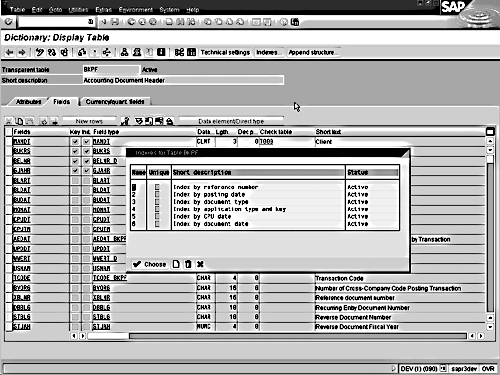
Figure 1
Fields Comprising the Primary Index for the BKPF Table
With this information about the BKPF table, users should now understand why it’s no coincidence that in the standard SAP transaction for displaying G/L documents (FB03) they are prompted to enter a company code, document number, and fiscal year. (Note that the client is "known" implicitly by the system, and thus users are not prompted to enter that information.)
If users were to select the "List" option in FB03, in which they can display a list of G/L documents that meet certain criteria, they should now also understand that it would be ill-advised to execute the transaction for a document number or set of document numbers without specifying a company code.
If no other criteria were specified, this would surely force SAP into the evil Table Scan … and if their system has been live for any period of time, they would have to wait awhile for their results — trust me!
Because people often search for G/L documents without knowing the exact document numbers they are looking for, SAP delivers a number of "secondary indexes" on the BKPF table, which the system can automatically use as alternatives to the primary index.
To view secondary indexes for an SAP table, users need to click the "Indexes" button when displaying the table with SE11 or SE12. One of three things should happen:
1. They’ll be told that no secondary indexes exist.
2. Or, if a single secondary index exists, they may be taken automatically to that index’s details.
3. Or, if multiple indexes exist, they will have to choose one from a list and then "drill-down" to see the details.
The index itself is simply a listing of one or more fields in a particular sequence — just like "Last Name, First Name"!
For example, there is a secondary index on BKPF to facilitate searches by company code and document date, and it looks like this (see Figure 2): MANDT (client), BUKRS (company code), BLDAT (document date), BSTAT (document status).
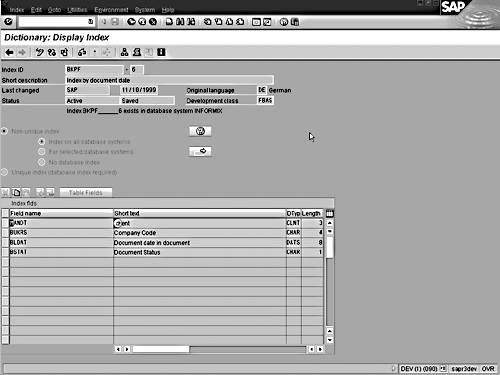
Figure 2
Secondary Index on BKPF
When a transaction of any kind (reporting or otherwise) accesses an SAP table, it can and will use only one of the available indexes in its processing.
It’s important to understand this last point because sometimes there are several indexes the system could use, and it is forced to make its own choice — and users can only hope it’s a good one!
That "best guess" is based on something very complicated called a "database optimizer" … which goes "eenie-meenie-miney-moe!" (just kidding!).
Actually, the optimizer is an algorithm resident in the database that tries to pick the index it thinks will yield the fastest results, using an important principle called "selectivity."
The best index is usually the one deemed "most selective" by the optimizer.
It’s difficult to demystify the complex concept of "selectivity" for users, but you can attempt to explain it to them in this way: the more "divisive" an index is, the more "selective" it is.
The reason that a physical phone book (again, the heavy one by your phone) is sorted first by Last Name instead of by First Name is that there are far more different last names than first names; thus, an index that starts with the field Last Name is more divisive (and thus, more selective) than one that starts with the field First Name.
In the SAP world, clearly the most selective indexes are those that begin with fields whose values are constantly changing: document numbers, date fields, etc. But of course those indexes are only good in reporting if a user can specify those items to begin with.
On that note, if the existing indexes do not meet your users’ requirements — e.g., do not contain the fields they normally specify with particular values when reporting — your users can have their own secondary indexes created.
Since index creation is a development task (albeit a simple one), a user needs to turn to you and/or other SAP technical personnel (ABAP programmers or basis folks, etc.) for assistance.
Indexes are created in a company’s SAP development environment and are then transported via regular CTS to the productive SAP environment. In order to create an index (via SE11 or SE12 using the "Create" option under the "Indexes" button), users need to know only the table name and the fields (in the desired sequence!) for the index.
Tip!
Here are three general rules of thumb users should follow when deciding on the indexes they require:
1. Only choose fields for the index that have at least 10 different unique values. If a field is not this "divisive" of the data, then including the field in an index will generally not yield worthwhile performance gains.
2. Do not include the same fields in several different indexes (e.g., minimize overlap). Doing so would only increase the risk that the "database optimizer" could choose a less-than-ideal index for any given query.
3. Try to limit the indexes to 4 or 5 fields. Indexes do require a goodly amount of database space — and in the case of very selective indexes on large tables, the space is not always inconsequential.
If an FI/CO reporting transaction is running a long time, it can only be for one of three reasons:
A. The user did not specify enough criteria for the system to utilize an existing index.
B. The optimizer had to "choose" between indexes, and chose poorly.
C. The transaction is selecting a large amount of data.
For scenarios A and B, ABAP programmers can help users identify if an index (and/or what index) is being used by doing a "trace" (using transaction ST05) on the transaction. Armed with this information, users can do one of three things: change their selection criteria and try again; have a new index created for them; or have a poor index deactivated for them (by a technical person).
For scenario C, there is little users can do except limit their selection criteria further and try again — or they can go get a fresh cup of coffee.
One last tip about using indexes. When running any FI/CO transaction, users should key in distinct values for fields instead of ranges, because SAP will sometimes be unable to use an index if the user has only specified a range for one of the index fields. In techno-speak, "direct reads" are not possible without specific addresses! The system can retrieve multiple pieces of information from different places quickly if you have specified all the different places individually; with ranges, the system must check all addresses to see what falls in the range versus out of the range — a time-consuming process.
Good luck. Let the indexes be with you.
Tom Spetnagel
Tom Spetnagel, a former platinum consultant and top performer for SAP America, is a specialist in R/3's Controlling module. Since 1995, Tom has helped several major R/3 customers implement CO and has taught a number of Profitability Analysis and Product Costing classes at SAP training centers as well. Tom is currently the senior FI/CO configurator at Cox Target Media near Tampa. He has both an MBA and a master's degree in aerospace engineering from Georgia Tech and an undergraduate degree in aerospace engineering from the University of Michigan.
You may contact the author at thomas_spetnagel@coxtarget.com.
If you have comments about this article or publication, or would like to submit an article idea, please contact the editor.