Do your safety stock levels always seem too high or too low? It's possible that you have not chosen the right APO method or have set it up in a less-than-optimal manner. We explain the considerations, drivers, and settings for using APO's extended safety stock method and show you why it might be more accurate than APO's basic method.
In the September issue of SCM Expert, I showed why it
is important to align your APO safety stock methods with your supply
planning methodologies available in APO's Supply Network Planning
(SNP) application. This alignment depends on making the right choices
when setting up your safety stock methods.
The previous article covered the APO's basic safety stock
methods, which require that you define either a safety stock quantity
or a safety days' supply. The latter, in turn, is transferred
to a quantity figure based on the expected demand. As a consequence,
the safety stock is based on subjective decisions made by the planner.
Also, the data maintenance can become time-consuming when using
the basic safety stock methods, especially when time-dependent methods
are used. As a result, safety stock definitions are not likely to
be monitored with the care they require and are often too low or
too high.
The extended safety stock methods overcome these problems and provide
tools to determine the required safety stock levels more accurately.
I'll explain all the options available to you for the extended
safety stock methods. By the time you finish reading this article,
you will have a clear idea of how you can set them up to achieve
optimal safety stock levels.
Key Considerations
Before you begin setting up your extended safety stock methods,
you have a number of safety stock level aspects to consider. Let's
review them.
Variance orientation. Extended safety stock methods
calculate the variance between the last known forecast and the realized
demand. By doing so, the system can identify products where variances
are higher and thus require a higher safety stock, and vice versa.
The forecast variance, together with the user-defined service level,
are the most important influencing factors that drive the required
safety stock levels. Variances occur not only when comparing the
demand forecast and the realized demand, but also when comparing
the planned (estimated) lead time and the actual lead time. Consequently,
extended safety stock methods can monitor not only the demand variance,
but also the supply variance.
The supply variance is the result of comparing the various lead
times, such as those from manufacturing or purchasing, with the
actual time it takes to procure the product. Both demand and supply
variability can be used to determine the safety stock levels, whereby
only one of the two is mandatory. Safety stock levels can thus be
based purely on demand or supply variability or on both.
Network. The supply chain is a complex network
with many interdependencies that you need to understand so that
you don't over- or underestimate the required safety stock
levels. This applies to intra-company as well as inter-company supply
chains. Uncoordinated safety stock levels within a supply chain
potentially lead to poor service or unnecessarily high stock levels.
Extended safety stock methods calculate the required safety stock
in a network approach whereby each member of the supply chain builds
up safety stocks only for demand or supply variances that need to
be considered. This is achieved through a multilevel demand propagation
and supply lead-time determination, including production, transportation,
and purchasing.
Note
Up to and including APO 3.1, all time zones used at locations
that are part of the extended safety stock calculation must
be set to UTC. SAP does not guarantee that lead times are correctly
calculated across time zones. As of APO 4.0, this constraint
is gone.
Model.
- The demand pattern is regular and not sporadic. “Regular”
in this context is relative. Demand may still vary from period
to period, just not extremely.
- Any shortfall in delivery can be compensated by a delivery at
a later stage. Based on this so-called “back-order case,”
the system builds up safety stock at the upstream location (the
manufacturing site) rather than the downstream location (the distribution
center). Consider this assumption carefully and put it into a
business context. If late delivery leads to a loss of the order
(“lost-order case”), then do not use the extended
safety stock methods.
Due to the network orientation, it is meaningless to run the extended
safety stock calculation for one location only; it is always carried
out for the entire network of the specified product. This is true
even if the data selection is limited to a specific location product.
In this case, the entire network for this product is evaluated,
but only one safety stock value, namely that in the selected location,
is updated.
Offline calculation. APO calculates safety stock
based on an extended safety stock method in a separate program that
needs to be executed regularly. How often depends on the business
situation. Sudden, big changes in any of the influencing parameters
require an early recalculation. In most situations, a monthly or
weekly run should be sufficient. The safety stock calculation program
updates the auxiliary key figure Safety Stock (planned),
which can be updated manually using the SNP Interactive Planning
transaction (/SAPAPO/SNP94). The basic safety stock methods
use the same key figure.
As of APO 4.0, the data is written into a time-series key figure
and not into an auxiliary key figure. The basic safety stock methods
continue to use an auxiliary key figure. Using a time-series key
figure has the advantage that values stored in it can easily be
exported and used for reporting and evaluation.
The Drivers
During the calculation of the safety stock, APO uses various parameters.
Some of these parameters have to be defined per location product
(e.g., the service level), while others are calculated based on
existing data (e.g., the forecast variance). The settings of the
user-definable parameters need to be done with the utmost care,
as the calculated safety stock might easily differ by more than
100 percent depending on the selected values.
Demand forecast error. The method to calculate
the forecast accuracy (or its error) is mean absolute deviation
(MAD). It is based on a period that is defined by the planner. The
forecast and actual sales data are taken from APO's Demand
Planning (DP) module. The calculated demand forecast error is statistically
“normalized,” which means brought in relation to the
forecast quantity. A forecast error of, for example, 50, compared
to a forecast of 1,000, is seen as a forecast error of 50/1,000,
or 0.05, or 5 percent.
Lead-time deviation. The expected as well as the
achieved production, stock transfer, and purchasing lead-time need
to be measured and stored. The required data is not directly available
in the standard APO system. It must be gathered, preferably in SAP
R/3, and stored in the APO DP module. The lead time is observed
over a time period that is defined by the planner.
If short periods are used to determine the demand forecast error
or the lead time deviation, the safety stock is more reactive to
the recent forecast quality, but it might also show undesired overreactions.
In most new APO implementations, the required historical data is
not yet available.
As of APO 4.0, it is possible to alternatively use planner-defined
variances for these parameters. They are stored in the location
master. These values can be used on an ongoing basis instead of
calculating them with every extended safety stock planning run.
This has a positive impact on the runtime, but you need to monitor
that the location-master-defined variance is close enough to the
real value.
Service level. Extended safety stock methods offer
two different ways of defining the desired (target) service level.
- The a (alpha) service level is an event-driven measurement.
It is the comparison of orders that were satisfied (activities
or events) to the total number of orders. An order that was not
totally satisfied (delivered in full) is a shortfall event. The
extended safety stock methods AS and AT use this service calculation
approach.
- The ß (beta) service level is based on the product quantity
shipped per period. This is a quantity-based service level. It
is the comparison of the total quantity shipped over a certain
period to the total required quantity. The shortfall in this case
is not an event but a quantity. The extended safety stock methods
BS and BT use this service calculation approach.
The two service-level measurement approaches lead to different
results. For example, Table 1 shows six periods
with one order per period and a demand of 100 per order. In period
3, the order could not be satisfied in total and a shortage occurred.
The a service level is five out of six, or 83.3 percent. The
ß service level is 580 of 600, or 96.7 percent.
| Period |
Order lines/demand quantity |
Order lines totally
satisfied |
Supply quantity |
| 1 |
1/100 |
1 |
100 |
| 2 |
1/100 |
1 |
100 |
| 3 |
1/100 |
|
80 |
| 4 |
1/100 |
1 |
100 |
| 5 |
1/100 |
1 |
100 |
| 6 |
1/100 |
1 |
100 |
| Total: 6 |
1/100 |
5 |
580 |
| Service Level: |
|
a = 83.3% |
ß = 96.7% |
|
| Table 1 |
Service-level comparison |
Using the same data, this example shows that the a service level
is lower than the ß service level. This is usually the case.
Based on the target service level, the system calculates a safety
factor, which is a function of the target service level based on
the assumption of a normal distribution of orders and order quantities.
With rising service levels, the safety factor rises, and vice versa.
The main task when defining the service level is to conceptually
align how the organization measures the service level and how the
extended safety stock methods are used. If an organization measures
the service level in accordance with the a service-level method,
then the desired a service level needs to be defined in the
product master, and either the extended safety stock method AS or
AT must be used.
Reorder cycle. The reorder cycle describes the
usual number of periods between two reorder planning runs. It is
used in connection with the extended safety stock methods AT and
BT. The reorder cycle time is always defined in days using the product
master field Target Days' Supply on the Lot
size tab.
Periodicity. The reorder cycle (the number or
periods) goes hand in hand with the definition of the type of period
used for planning. The possible types are used in the planning bucket
profile and include, for example, days, weeks, and months. The entire
demand of one period is accumulated and occurs at the beginning
of the period. It is assumed that one procurement order is created
per period and that the goods receipt takes place at the beginning
of a subsequent period in accordance with the product lead time.
The product lead time should always be a multiple of the bucket
length. The periodicity is defined via the used planning buckets
profile.
Reorder quantity. The reorder quantity is used
with method BS and describes the usual lot size used when the product
is reordered. It is defined demand-dependent as a number of days'
supply. The reorder quantity is defined via the Target Days'
Supply field on the Lot size tab of the Product Master transaction.
As of APO 4.0, it is possible to alternatively use the fixed lot
size defined in the location product master instead of the demand-dependent
value described above.
Note
The above definitions have no impact on the actual reordering
planning runs in SNP or PP/DS. They merely “inform”
the extended safety stock methods on how the product is intended
to be procured. The system cannot check whether the definitions
are in line with the planning principles used in SNP or PP/DS.
Demand forecast.Note that the extended safety stock methods only use the product
forecast and no other dependent requirements or sales orders. This
is also true in cases where forecast consumption is used. The product
forecast is used to generate the network demand for products at
lower levels of the supply chain. The network demand is the total
demand of the product caused by other products further up in the
supply chain. The network demand is usually not visible in APO,
but it can be calculated for information purposes using macros.
Lead time. The product's lead time is described as the time
between placing an order and receiving the products. The method
with which this lead time is calculated differs depending on the
procurement type (E, F, X, or P — see below) and is aligned
with the methodology used in SNP. This includes the usage of SNP
Production Process Models (PPMs) only. During the lead determination,
different rules are applied to the planned product and to the observed
product. The planned product is the one for which the safety stock
is determined (planned), and the observed products are all those
that are used to determine the overall lead time.
- E (in-house production), planned product: If
a PPM exists for the product, the lead time is one day per activity
defined in the PPM. Should no PPM exist, an error message is displayed
and no safety stock is determined.
- E (observed product): If a safety stock method
is defined, the lead time is set to zero. If no safety stock method
is defined and a PPM exists for the product, the lead time is
one day per activity defined in the PPM. Should no PPM exist,
the lead time is set to zero.
- F (external procurement), planned product:
If a transportation lane exists, the lead time is the sum of the
product's goods issue time at the shipping location, the
transportation time as defined in the transportation lane, and
the product's goods receipt time at the receiving location.
If no transportation lane exists, the rules for procurement type
P apply.
- F (observed product): If a safety stock method
is defined, the lead time is set to zero. If no safety stock method
is defined, the rules under “planned product” apply.
- X or (in-house production or external
procurement), planned product: If a PPM exists for the
product, the lead time is one day per activity defined in the
PPM. If no PPM exists, the lead time is determined via the transportation
lane. If a transportation lane exists, the lead time is the sum
of the product's goods issue time at the shipping location,
the transportation time as defined in the transportation lane,
and the product's goods receipt time at the receiving location.
If no PPM and no transportation lane exist, the rules for procurement
type P apply.
- X (observed product): If a safety stock method
is defined, the lead time is set to zero. If no safety stock method
is defined, the rules under “planned product” apply.
- P (external procurement planning), planned product:
The lead time is the product's goods receipt time at the
receiving location plus the planned delivery time (both from the
location product master). Vendor contracts, as is the case with
SNP, are not considered when determining the lead time.
- P (observed product): The rules under “planned
product” apply.
The overall lead time of a planned product is added over all levels
of the supply chain. Observed products with their own safety stock
definitions (not only an extended safety stock method) have a default
lead time of zero.
Lead-time determination is the most complex and time-consuming
task during the extended safety stock calculation. It is advisable
to delete procurement options that are no longer used.
Safety horizon. The safety horizon is based on
the reorder cycle and the product's lead time, combining the
two definitions. The safety horizon describes the time period required
to overcome a detected stock shortage.
Figure 1 provides an overview of the extended
safety stock method drivers.
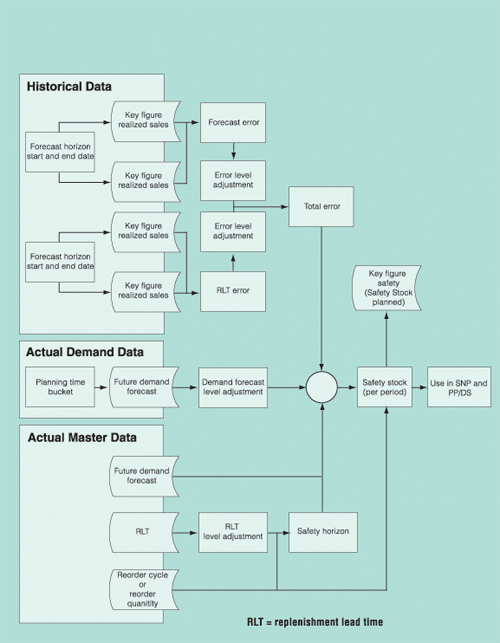
Figure 1
Extended safety stock method drivers
Below are the most important master data objects that need to be
maintained in the product master before the extended safety stock
calculation can be carried out.
- Safety Stock Method (mandatory)
- Service Level (mandatory)
- Target Days' Supply (mandatory)
- SNP Relevance flag (mandatory). Note that if
this flag is set to 1, no safety stock is calculated.
Maintain these objects in the transportation lane:
- Validity Date. Only transportation lanes with
a valid time interval are used.
- Block Indicator. If this indicator is set,
the extended safety stock calculation does not use the transportation
lane.
Maintain these objects in the PPM:
- Usage Type. It must be “SNP.”
- Validity Date. If you set this, only PPMs with
a valid time
interval are used.
- Status. Only active SNP PPMs are used.
The Safety Stock Calculation Run
Once the extended safety stock transaction (menu path Supply
Network Planning>Planning> Safety Stock Planning,
or transaction MSDP_SB) has been started, the screen shown
in Figure 2 appears. Populate the fields as described
below.
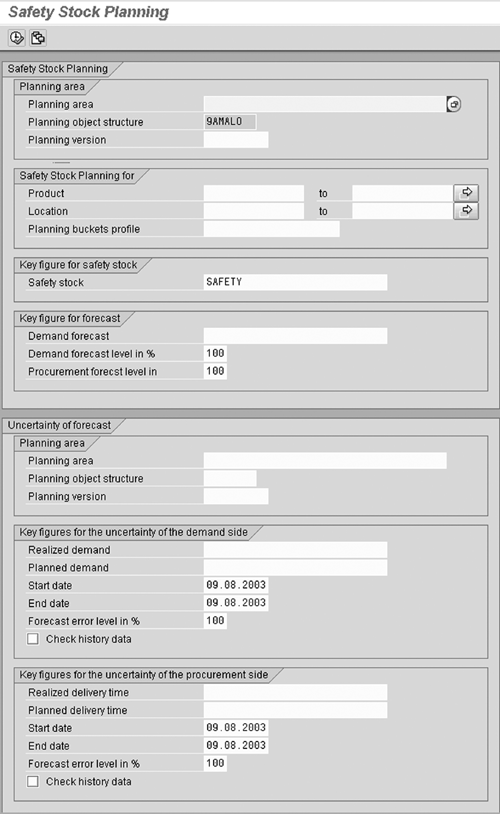
Figure 2
Extended safety stock transaction
Planning area. The Planning area
and the Planning object structure determine the
key figures that are used to predict the future demand situation.
Enter 9ASNP02, the planning area of the standard-delivered
system.
Planning object structure. This field is set to
9AMALO and cannot be changed. It is part of planning area
9ASNP02. It must also be part of any other custom planning
area with this name if custom planning areas are used.
Planning version. This determines, together with
the Demand forecast key figure, which demand values
are taken into account. For the same location product, different
demand elements could exist per planning version.
Product. One or multiple location products can
be included in the extended safety stock planning run. Any product
included in this selection must have an extended safety stock method
defined in the product master in all used locations. The same applies
to the Service level and Target Days'
Supply. Both values must not be zero. Exclude all location
products from extended safety stock if they do not have an extended
safety stock method!
Location. This determines, together with the Product
selection, the range of the products included in the extended safety
stock planning.
Planning buckets profile. This profile determines
the number of periods for which the safety stock is calculated and
the granularity of calculated data. The start date is always the
current day. If, for example, the profile has a bucket size of week,
the system populates the daily safety stock figure with identical
values during the seven-day period. The Planning buckets
profile can have mixed buckets (e.g., days and weeks).
You may use the standard-delivered Planning buckets profile
9ASNP, which is used in SNP Interactive Planning.
Safety stock. This key figure defaults to SAFETY,
which is used in the standard-delivered system to store safety stock.
It can be changed to any other key figure. Specify a non-valid key
figure to carry out a simulation run. The system then calculates
the safety stock values and displays them in the log without
saving the results.
Demand forecast. This key figure is used to read
the future demand (forecast) of the product per location. It must
be part of the planning area defined above. In the standard-delivered
system, the key figure 9ADFCST contains this information.
Note that for all periods where the demand (forecast) is zero, the
safety stock is also set to zero.
Demand forecast level. This key figure determines
the percentage of the forecast that should be used when calculating
the safety stock. The forecast is read from the Demand forecast
key figure as defined above. If this level is set to 70 percent,
the forecast on which the safety stock calculation is based is reduced
to 70 percent of the original value. It does not mean that the safety
stock is reduced to 70 percent of the value. This level can also
be set to above 100 percent to plan safety stock values that can
cope with more than the forecasted demand.
Procurement forecast level. Change this level
to values other than 100 percent if you anticipate that the forecasted
procurement lead time will go up (greater than 100 percent) or down
(less than 100 percent). Unlike the forecasted demand that is read
from the Demand forecast key figure, the procurement
forecast of the lead time is derived from master data objects (e.g.,
the product master or transportation lane). The lead times stipulated
in these master data objects are adjusted according to this level.
This level changes the anticipated procurement lead times and, indirectly,
the safety stock values.
Planning area. The planning area in this segment
is where the historical data is stored. It does not need to be,
and usually is not, the same planning area as the one defined earlier.
In the standard-delivered system, the planning area 9ADP01
is set up as an example. In most cases, custom planning areas are
used within DP. This Planning area determines the
key figures that can be used to read the required data (e.g., the
historical forecast).
Planning object structure. The planning object
structure that needs to be defined here is the master planning object
structure of the planning area defined in this section.
Planning version. This determines, together with
the key figures defined below, which data is taken into account.
Realized demand. This is the key figure where
the actual historical sales are stored. It must be defined per product
and location to be used for the extended safety stock planning algorithm.
Planned demand. This key figure contains the historical forecast.
The system calculates the forecast deviation based on this and the
Realized demand key figure.
Start date and End date. The extended safety
stock algorithm calculates one demand forecast error value for the
entire horizon as defined in the start date and end date. Changing
this horizon to include or exclude periods with higher (or lower)
demand forecast errors than normal has an immediate effect on the
calculated safety stock values.
Forecast error level. If the demand forecast error
is expected to be higher (or lower) in the future than it was in
the period defined by the start date and end date, then this level
can be set to the appropriate percentage. This level changes the
demand forecast error level and, indirectly, the safety stock values.
Realized delivery time. This is the key figure
where the actual (realized) delivery times are stored. This information
has to be obtained from the OLTP system and stored in a key figure.
It must also be defined per product and location to be used for
the extended safety stock planning algorithm.
Planned delivery time. This key figure contains
the historical estimation of the delivery time. The system calculates
the delivery (lead) time deviation based on this and the above key
figure.
Start date and End date. The extended safety stock
algorithm calculates one procurement lead-time error value for the
entire horizon defined in the start date and end date. Changing
this horizon to include or exclude periods with higher or lower
procurement lead-time errors than normal has an immediate effect
on the calculated safety stock values.
Forecast error level. If the procurement lead-time
error is expected to be higher or lower in the future than it was
in the period defined by the start and end dates, then set this
level to the appropriate percentage. This level changes the procurement
lead-time error level and, indirectly, the safety stock values.
Results log. Switch this flag on to view a comprehensive
list of lead-time, demand, and forecast errors, as well as the calculated
safety stock per period. Note that this flag is not visible in Figure
2. It is at the very bottom of this screen.
Other Considerations
During the extended safety stock calculation, the system carries
out a heuristics-based product planning. This planning cannot deliver
results if so-called “cycles” are defined in the supply
chain. A cycle can exist if a product is procured by location A
from location B, which in turn procures it from location A. Another
possibility is that a component defined in a PPM is at the same
time a finished product (possibly a byproduct). These cycles must
be eliminated before the extended safety stock calculation can take
place.
To detect such cycles, set the constant gc_cycle_test
in the SAP include /SAPAPO/LMSDP_SBTOP to the value X.
Note that setting this flag has a significant negative performance
impact.
As can be seen above, the extended safety stock methods require
historical information regarding forecast and sales as well as projected
and realized lead time. Should this data not be easily obtainable
in the DP planning area or have a significant performance impact
on the DP transactions, then the creation of a special planning
area only for safety stock calculations makes sense. This special
planning area, together with a new planning book, can be enriched
by various safety-stock-related functions and simulation possibilities,
providing the planner with a very sophisticated “safety stock
workbench.” The final safety stock result is then copied to
the standard SNP planning area, where the safety stock data is used
as if it was created in it directly.

Wolfgang Eddigehausen
Wolfgang Eddigehausen is a highly experienced expert in the areas of business process design, re-engineering, and user adaption, as well as process realization in complex SAP-centric environments. He has experience in solution and enterprise architecture and project management (PRINCE2 certified) domains defining enterprise capabilities with a focus on delivering effective and efficient solutions to organizations. Wolfgang's industry knowledge includes public sector, utilities, mining, distribution, general manufacturing, process and steel industries, and consumer goods.
In most roles his task is not only to architect a solution but also to evaluate and define strategic options with a focus on end-to-end solutions rather than systems. This also includes strong emphasis on the user acceptance through an innovative user experience and mobility enablement.
His career includes successful participation and management of projects in Australia, Europe, India, Japan, Singapore, South Africa, Taiwan, and the US. These projects required interaction with all levels of an organization, from the shop floor or office through to the CxO level. Throughout his career, Wolfgang has put emphasis on a holistic approach bringing together people, processes, information, and systems in project management, architecture, and implementation roles.
You may contact the author at we@avox.com.au.
If you have comments about this article or publication, or would like to submit an article idea, please contact the editor.