In part two of his series on payroll schemas and rules, the author gives four tips on making new rules or changing existing rules. He covers how to stay compatible with SAP's standard schemas and rules, where to place custom rules in the payroll schema, how to salvage poorly written or incorrect custom rules, and when to create custom functions or operations, instead of using payroll rules.
In the first part of my series on the payroll schema and rule process, I showed you how to construct a simple and flexible payroll rule to calculate cost of living adjustment (COLA) payments for employees in R/3 Payroll.1 Now I’m going to give you four tips on making new rules or changing existing rules:
- How to stay compatible with SAP’s standard schemas and rules
- Where to place custom rules in the payroll schema
- How to salvage poorly written or incorrect custom rules
- When to create custom functions or operations, instead of using payroll rules
Stay Compatible with SAP’s Standard Schemas and Rules
When at all possible, create a new rule instead of modifying an SAP standard rule. When you modify a standard rule, problems can occur when you upgrade the system or apply HR Support Packages (HRSPs). For example, SAP might deliver some changes to its standard rules, and those changes will overwrite your modifications. A better practice is to copy a standard rule to a custom one and apply your changes there. This also means that when the system is upgraded or HRSPs are applied, you need to compare SAP’s standard rules and schemas to the ones you have modified, to see if there are any changes that need to be applied to your customized copies. You can use report RPULCP00 to see which objects, including rules and schemas, have been changed in each HRSP.
SAP’s standard rules for moving wage types to the result table (RT) — X020, X023, X024, and X025 — can do the work for you(Table 1). In the previous article, I created a COLA wage type, 0COL, and stored it in the input table (IT). Since all wage types have to go to the RT before the end of payroll, I relied on SAP’s standard processing classes and rules to move the wage type from the IT to the RT. That is a good practice. Many times rules are written that update cumulations (operation ADDCU) and store the wage type directly to the RT (ADDWTE*).
| Rule |
Description |
| X020 |
In the Gross Compensation schema (UT00), this rule uses processing class 3 to determine which wage types to move to the RT or to keep in the IT. Usually, only payment wage types are present at this point, since infotypes 14 and 15 (Additional Payments and Deductions) generally have not yet been read into payroll. If the wage type does not have to be prorated later, you could pass it on to the RT. Examples are overtime and sick-time payments. |
| X023 |
In the Process Additional Payments and Deductions schema (UAP0), this rule uses processing class 20 to determine how to handle wage types. Infotypes 14 (Recurring Payments and Deductions) and 15 (Additional Payments) have been read into payroll just before this point. Like rule X020, payments that do not have to be prorated can be moved to the RT here. Deductions need to be kept in the IT for subsequent processing. |
| X024 |
In the Process Deductions, Benefits schema (UDD0), this rule uses processing class 41 to determine which wage types to send to the RT. At this point, deduction processing and payment proration are completed so almost everything left in the IT can be moved to the RT. |
| X025 |
Many times this comes directly after rule X024, and it uses processing class 4. Between rules X023 and X024, you will find calculations for the amount of total employee deductions and prorated payments —for example, some worker’s compensation calculations in Canada. |
|
| Table 1 |
Rules that move wage types to the RT |
While this can work, it does have risks. Sometimes SAP’s standard rules expect information to be in the IT at a certain point. If you have manually forced a wage type to the RT, the system might not operate correctly. A good example is the proration logic in the “part-time factoring” part of the schema. This logic is commonly found in the xAL0 or xxAL schemas (where x and xx equal the country indicators from table T500L). Wage types that are supposed to be prorated have to be in the IT at that point, so if you have already moved such a wage type to the RT prior to that, you could experience problems when an employee’s payroll results have to be prorated.
An underlying principle is that wage types are only moved to the RT when you are finished with them. It is much easier to manipulate and change wage types in the IT than in the RT. Several standard rules move wage types to the RT,2 as you saw in Table 1.
Tip!
Use report RPDLGA20 to see which wage types have certain processing class settings.
Where to Place Custom Rules in the Payroll Schema
SAP has a consistent data flow and structure in the various country payroll schemas. The common structure is shown in Table 2. An exception to this is the schema for Japan payroll, which is significantly different from other countries. There are always country- specific processes. This is only a general framework using the U.S. payroll schema as an example.
| |
| Initialization and setup |
Read basic employee data and previous payroll results. Set up environment for payroll calculations |
COPY UIN0 US Payroll: Initialization of payroll
COPY UBD0 Basic data processing
COPY UPR0 Read previous result of current period
COPY XLR0 Import previous payroll results
COPY UMO0 Final processing |
Read time data and
calculate time wage types |
Read data from time evaluation cluster, generate payment wage types, perform wage type valuations (rate * number = amount). At the end, wage types can be moved from the IT to the RT (rule X020, processing class 3) |
| COPY UT00 gross compensation and time evaluation |
| Read and process additional payments and deductions |
Read and process additional payments and deductions from infotypes 14, 15, 267, and some benefits infotypes |
| COPY UAP0 Process additional payments and deductions |
| Prorate gross payments |
Prorate wage types for mid-period changes such as hires, terminations, and other infotype 0 and 1 changes. At the end, wage types can be moved from the IT to the RT (rule X023, processing class 20). |
| COPY UAL0 Proration and cumulation gross |
| Process deductions and benefits |
Process the priority of deductions, perform additional benefits processing, process loans and deductions that cannot be taken due to lack of funds, calculate taxes. At the end of UDD0, you can move wage types from the IT to the RT (rule X024, processing class 41, and rule X025, processing class 4). |
LPBEG Begin of iteration
COPY UTBL Load saved tables
COPY UDD0 Process deductions, benefits
COPY UTX0 Calculate taxes
COPY UGRN Calculate garnishments
COPY UNA0 Calculate net
COPY UDNT Deductions not taken during loop?
LPEND End of iteration |
| Process retroactive accounting |
Get differences from retroactive periods and put them into the current period |
COPY UGRR Garnishment retroactive
COPY URR0 Retroactive accounting |
| Process net payment |
Calculate the net pay amount and set up bank transfer table |
| COPY UNN0 Net processing |
|
|
| Table 2 |
Common schema structure |
In the previous article, I placed the custom rule to calculate COLA payments in the “Prorate gross payments” section of the U.S. schema, which is sub-schema UAL0. Before the COLA calculation, I wanted to be sure all proration was done, since COLA is calculated on the employee’s base pay. If an employee is hired or terminated in the middle of the period, you want to calculate COLA on the prorated amount of base pay — not the full amount. Likewise, if the employee changes cost centers in the middle of the period, you would charge appropriate COLA amounts to each cost center.
Suppose you have some union dues processing that dynamically generates a union dues wage type for every employee in personnel area XXXX and employee subgroup YY. That rule would fit nicely in the “Read and process additional payments and deductions” section (UAP0 in the U.S. schema). That dynamically created deduction would flow through the rest of the schema just as if it had been read from infotypes 14 or 15.
Reading Wage Types into Payroll
Wage types are read from master data infotypes into the payroll IT in several places. Infotype 2010 is read into payroll using function P2010 in the “Read time data and calculate time wage types” section of the schema. Infotypes 14, 15, and 267 are read into payroll in the “Read and process additional payments and deductions” section of the schema using functions P0014, P0015, and P0267. Each of these functions uses a corresponding rule to control how and when a wage type is entered into the IT.
For example, in the Mexico schema MXAP (read and process additional payments and deductions) function, P0015 reads wage types from infotype 15 and processes them with rule X011, as shown in Figure 1. For each wage type coming from infotype 15, it looks at its processing class 76 value and the units field (hours, days, weeks, etc. that were entered on infotype 15 with the wage type) and then at the wage type’s processing class 47 to determine what it will do to the wage type before adding it to the IT (via the ADDWT * operation).
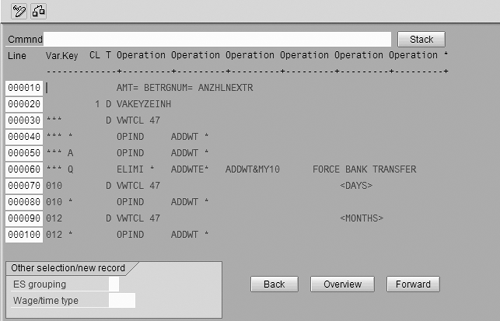
Figure 1
Processing infotype 15 wage types for Mexico payroll
Since this process of reading wage types into payroll is done via rules, you can modify it by using your own custom rules or making your own values for processing class 47. For example, for mileage reimbursements, you could have users enter a wage type with no amount, but only the number of miles, in the number field of infotype 15. Then create a custom processing class 47 value of Z and assign that to your mileage reimbursement wage type. You should also create a T511K constant to hold the reimbursement amount per mile, since this changes over time. In the rule used by P0015, look for processing class 47 value Z, and on that line multiply the number field by the mileage reimbursement constant before adding it to the IT. (To download an example document of this, click here: download.)
How to Salvage Poorly Written or Incorrect Custom Rules
Sometimes you have to make a date-effective change to a payroll calculation, but the custom rule that has that logic doesn’t use processing classes or other date-effective attributes. Here’s one approach to that problem. Suppose you need to change a calculation as of 7/1/2003. Create a T511K constant that has a value of 1.00 from 7/1/2003 to 12/31/9999, as shown in Figure 2. Then in your payroll rule, do a decision based on the value of that constant. In Figure 3, I’m using rule ZUAB as an example. Constants are read with the period end date, so if the end date of the period you are calculating is 7/1/2003 or greater, you do one set of logic (line 30); otherwise, you do the old logic (line 20).
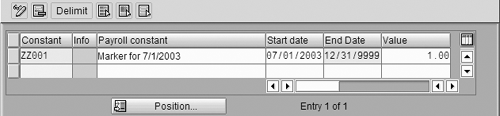
Figure 2
Create Payroll constant for 7/1/2003

Figure 3
Making a decision on the value of the constant
Use the IF Function for Date-Effective Changes
Suppose that several rules together perform a calculation, and you need to make a date-effective change to them. This is a perfect fit for using the IF function with a custom rule. You can use the existing constant ZZ001 for this example and create a new rule, ZUAC, that will be used by the IF function. In Figure 4, you can see I set the amount field equal to constant ZZ001. In line 20, the value of ZZ001 is not greater than zero, so you use operation SCOND to set the true/false condition of the IF function to false. In line 30, it is greater than zero, so you set the true/false condition to true.
In the schema, you call rule ZUAC with the IF function, as shown in Figure 5. The IF function processes rule ZUAC. If the rule returns a true condition, execute line 130; otherwise, execute the ELSE condition, line 150.

Figure 4
Rule ZUAC: setting a value for the IF function

Figure 5
Using the IF function
When to Create Custom Functions and Operations
While you can use schema and rule customization to do complex calculations, there are times when it is more appropriate — or even necessary — to use custom payroll functions or operations.
One appropriate use is when your payroll calculation has to access data in custom infotypes. Suppose you created a custom infotype 9001 to store data from an external compensation management system. Some of that data might be needed for bonus calculations. Infotype 9001 is not accessible via standard payroll functions and operations, so you create your own function or operation to access that data and do the bonus calculation.
Another good use of custom functions or operations is for very large calculations – ones that have many input variables or calculation steps. You might have to use 10 custom rules to get the calculation done, or you could write one custom function to do it all in one step.
Tips!
What you shouldn’t do in a rule:
- Don’t use the payroll area in a rule. Although it is available as a decision criteria for the OUTWP operation, use the personnel area instead, or test the value of the current period modifier to get the pay frequency (RTE=YCURPM, and then RTEV2O2L puts the value of the person’s period modifier in the rule’s variable key). The primary reason for not using the payroll area is that after payroll runs, you cannot change a person’s payroll area.
- Don’t change technical wage types directly unless you know for sure what the side effects might be. Sometimes it is tempting to add or subtract something from /102, but that can lead to problems since some SAP-standard functions and operations use those wage types in calculations.
You might also require a function or operation that doesn’t exist in R/3. Examples I have seen are an operation that calculates input criteria for the Puerto Rico Christmas bonus (a regulatory bonus payment), a benefits cost accrual function, and a function that performs a gross-down (essentially a gross-up with a negative net amount).
________________
Steve Bogner
Steve Bogner is a managing partner at Insight Consulting Partners and has been working with SAP HR since 1993. He has consulted for various public, private, domestic, and global companies on their SAP HR/Payroll implementations; presented at the SAP user's group ASUG; and been featured on the Sky Radio Network program regarding SAP HR.
Steve will be presenting at the upcoming HR Payroll Seminar November 7-8 in Chicago and November 27-28 in Orlando. For information on the event, click
here.
You may contact the author at sbogner@insightcp.com.
If you have comments about this article or publication, or would like to submit an article idea, please contact the editor.