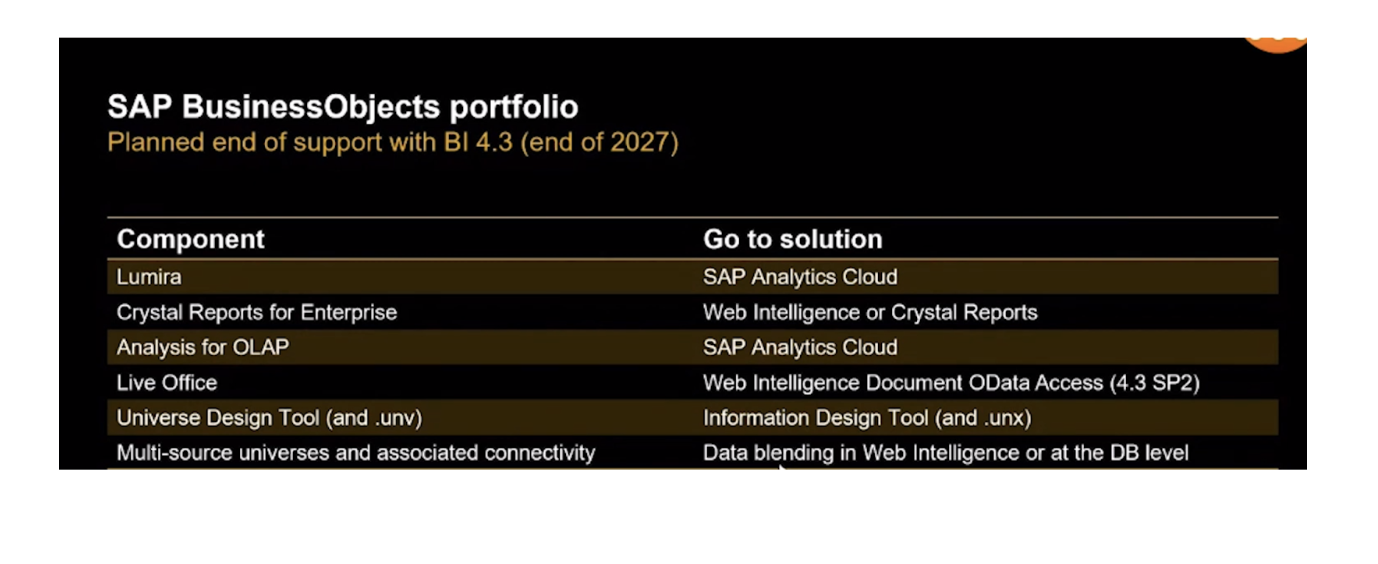
In a recent survey conducted by APOS, a prominent SAP partner, 80% of BusinessObjects (BOBJ) customers participating in a BOBJ regroup webinar indicated that they were in the process of migrating from their current BOBJ version or at least had migration plans within the next few months.
From trending YouTube videos discussing the future of SAP BOBJ developers to SAP’s latest Business Intelligence (BI) statement of direction released in April, it’s only natural to have concerns about the current state of SAP BOBJ.
But before we dive deeper into this topic, it’s important first to address a fundamental question…
What exactly is SAP BusinessObjects (BOBJ)?
Understanding SAP BusinessObjects
SAP BOBJ or SAP BO, as some like to call it, stands for SAP BusinessObjects. It is a suite of business intelligence (BI) and reporting tools designed to help organizations make informed decisions through data analysis and visualization.
Users can access, analyze, and share business data in a manner that is user-friendly with SAP BOBJ. SAP describes SAP BOBJ as an enterprise reporting solution.
What then makes up the SAP BOBJ? Let’s look at that next.
Key Components of SAP BOBJ
SAP BOBJ is very robust, with various component tools both on the front end and the back end. For a start, let’s look at the tools at the front end before going to the back end.
Frontend component of SAP BOBJ
Some of the frontend tools are;
1. SAP Web Intelligence (WebI):
Web Intelligence is a tool for creating ad-hoc reports and interactive dashboards.
BOBJ users use it to create data queries and access different sources of data and BI solutions. They can also use it to share reports across the organization.
2. SAP Crystal Reports:
Are you looking to create beautifully formatted reports from various data sources? SAP Crystal Report is the ideal solution for creating pixel-perfect, highly formatted reports. To top it up, it has a query wizard system integrated into it.
3. SAP Lumira:
Enables data visualization and exploration.
Another powerful tool of SAP BOBJ is SAP Lumira. It is a data visualization tool designed for data discovery. Users can easily identify trends and linkages across various data sets.
SAP Lumira is SAP’s data discovery and exploration tool. It connects various data sources, allowing us to derive valuable insights readily.
4. SAP BusinessObjects Explorer:
SAP BO Explorer offers a simplified way to search and explore data. It is used to generate reports in real-time using real-time data.
Explorer notifies users of any real-time changes made to reports and updates accordingly.
5. Dashboards:
Dashboards in SAP BOBJ are not just visual displays. They are interactive hubs for real-time data exploration.
Designing user-friendly dashboards ensures that your audience extracts valuable insights effortlessly.
6. SAP Design Studio:
The SAP Design Studio is SAP’s enterprise tool used for developing dashboards and visualizations using data retrieved from analytic and transactional systems spread out over hierarchies.
Additionally, data helps analyze and communicate between various departments and organizations.
7. Analysis Office:
All businesses have data coming from multiple data sources. Accessing these data from these diverse sources can be quite daunting. SAP Analysis Office is ideal for easily accessing these data.
It has advanced features for building and querying multiple data sources simultaneously.
Each of these components serves a unique purpose within the BI landscape.
Next, let’s open up the core components at the backend.
Core Components at the Back-End of SAP BusinessObjects
The backend component consists of what is primarily called the BI Launchpad, the central management console, and what was previously known as the universes.
The BI launchpad is an application running on a web browser. It is the main interface for working with objects on the BI platform.
We can use the BI Launchpad to access and organize your crystal report, WEBI documents, and other objects, view information in a web browser, create analytic documents, and use analytic tools to explore business data in detail.
1. The central management console: this is another tool in the SAP BOBJ toolset. It is important for user management and identification and is helpful in performing the day-to-day administrative tasks in the BI platform.
2. Universes: A very core part of SAP BOBJ is what was known as UNIVERSE. The universe is now known as the INFORMATION DESIGN TOOL (IDT). The universe is essentially a semantic layer between the data source and the target report that structures all the dimensions and measures. Right now, universes have been moved to the Information Design Tool (IDT).
The IDT is an SAP BOBJ metadata design environment that enables the designer to extract, define, and manipulate metadata from relational and OLAP sources to create and deploy SAP BusinessObjects universes
A universe is a collection of metadata objects that enables business users to analyze and report on corporate data using non-technical language. These metadata objects include dimensions, measures, hierarchies, attributes, pre-defined calculations, functions, and queries.
The metadata object layer called the business layer, is built on a relational database schema or an OLAP cube, so the objects map directly to the database structure via SQL or MDX expressions. A universe includes connections identifying the data sources so queries can be run on the data.
Universes created using the information design tool can be used by the following SAP data analysis and reporting applications starting with version Bi 4:
This diagram gives us an overview of both the frontend and the backend tools.