Manager
This guide to an enterprise-wide business process management (BPM) strategy focuses on the features in SAP Solution Manager that you can use for the four phases of BPM. It also highlights the use of solution maps and third-party products (such as ARIS, HP Quality Center, and HP QuickTest Professional) that have standard integration adapters for SAP Solution Manager.
Key Concept
An effective implementation of a business process management (BPM) strategy ensures the optimization, automation, and scalability of business processes. BPM has four distinct phases in its life cycle: business process discovery, mapping, monitoring, and governance and change management.
A business process management (BPM) initiative is not a one-time activity for an organization — it is an iterative and evolving process that follows a maturity path. SAP Solution Manager, along with certain third-party products, can help you manage the four phases of the BPM life cycle:
- Phase I: Business process discovery, standardization, and modeling
- Phase II: Business process mapping
- Phase III: Business process monitoring
- Phase IV: Business process governance and change management
The major motive behind a BPM initiative is optimizing a company’s business processes through standardization, which can lead to cost-effective consolidations and shared services operating units. Here are some of the other benefits you can achieve using BPM:
- Greater innovation in products or services based on the user’s primary business as a result of process optimization and availability
- Smooth process execution and continuity
- Process excellence with significant operating cost savings
- Identification of critical key performance indicators (KPIs) that you need to measure for reliable business decisions
- Improved quality of services and products, as well as process knowledge management
- Enhanced automation of business processes such as workflow and increased productivity
- Facilitation of process management as a milestone for service-oriented architecture (SOA) adoption
- Improved compliance alignment
- Facilitation of new roles and responsibilities with improved ownership
- Increased transparency in business teams
- Shift from a pure IT staff to a business-oriented IT staff
- Improved business and IT communications as a result of shared motivation toward a common goal
To ensure successful BPM throughout your organization, you should first establish guidelines in the following areas to avoid a costly failure of the initiative:
- Executive alignment — a critical success factor
- Organization culture and leadership — a strategic success factor
- People and ownership — a behavioral success factor
- Governance — a disciplined success factor
- Methods and information technology — the differentiating competitive success factor
Implementing BPM also requires new roles and responsibilities with motivated leadership. I recommend you set up a dedicated BPM office for the key people involved in the overall initiative governance before starting phase I. Dedicated roles with clearly identified responsibilities are the most important operational parameters of a successful BPM initiative. You should identify a combination of senior and junior individuals. This helps to align a number of different people easily with BPM goals. Common BPM roles include executive sponsors, enterprise architects, process architects, business analysts, subject matter experts, process analysts, process experts, operational managers, change managers, application consultants, and external contractors.
Phase I: Business Process Discovery, Standardization, and Modeling
Phase I acts as a base for the organizational process framework. The steps in this phase are independent of the underlying IT technology. In this phase, end-to-end business scenarios are discovered and documented along with multiple variations. You can carry out process modeling, which involves this documentation, in a third-party modeling tool such as Microsoft Visio, ARIS, or MEGA.
Note
Software selection for BPM should be based on an organization’s needs and available budget. A comparison of the tools’ options with your specific business priorities will help you select the most appropriate modeling tool.
Start this phase by identifying the enterprise-wide scenarios. This identification can happen in different directions (e.g., in end-to-end scenarios across value chains or departments or in scenarios supporting the final product or service of the organization). To cover everything holistically, you can use both of these directions.
Use industry-specific solution maps as a reference in this phase (Figure 1). These solution maps are available in Solution Composer, which is a desktop-based application that you can download from the SAP Service Marketplace. You can view and edit the maps per your requirements in Solution Composer.
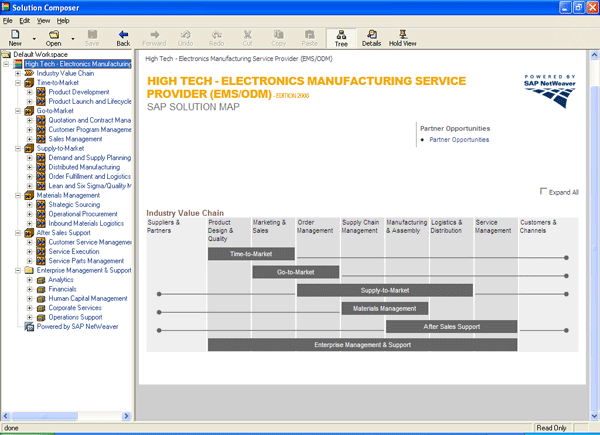
Figure 1
Solution map for the high tech provider with end-to-end scenarios on the right
I recommend that you document business scenarios in up to four levels of a hierarchy in the discovery phase. These four levels are business scenarios, business processes, subprocesses, and transaction level activities. For example, this could be: Supply Chain Management > Demand Planning > Create Forecasts > Define Forecast Profiles.
If you follow the four-level hierarchy documentation, then the IT mapping phase becomes simple. During this mapping phase (phase II) of BPM, end-to-end scenarios are correlated to underlying IT systems and then mapped in SAP Solution Manager using Business Blueprint transaction SOLAR01.
For best practices for a given business scenario, you can refer to the Business Process Repository (BPR). The BPR is a standard repository of industry-wide scenarios and processes. SAP updates it regularly based on best practices. It is available in transaction SOLAR01 (Figure 2). You can access the same BPR at https://implementationcontent.sap.com/bpr (Figure 3).
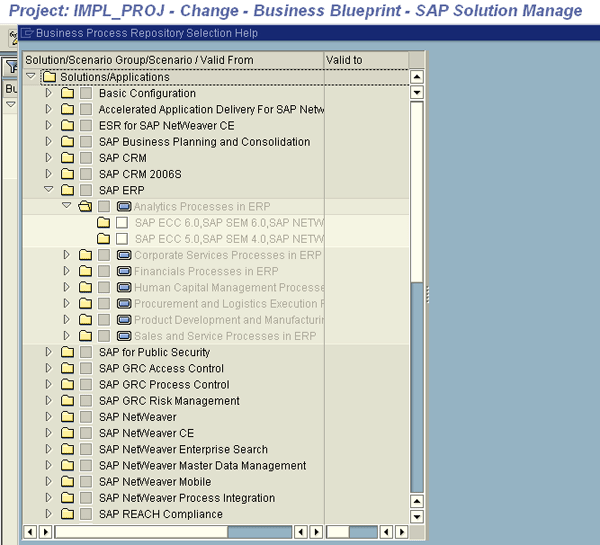
Figure 2
BPR in transaction SOLAR01

Figure 3
Online BPR
Determining business scenarios and processes is a tedious job that involves interaction with a variety of people. It involves reading existing business scenarios documentation, interviewing the actual process end users, and holding discussions with subject matter experts, process experts, and department heads. This might lead to a top-down (i.e., scenarios to activity level) or bottom-up (i.e., activity level to scenarios) approach based on the completeness of the available data.
You can expect uncertainty in this phase. For example, you may find that the process documentation was updated a couple of years back, or the processes may never have been documented because the same end user has executed them for a considerable time and knows how to execute them perfectly. In such cases, interviews can lead to the identification of key execution steps.
There may be multiple variations of executing the same process. Interviews and discussions with stakeholders should help identify mandatory variations. As this phase moves on, process gaps are identified. Process power users can address these gaps, leading to process improvements. This phase requires coordination between stakeholders and is highly iterative in nature. A change advisory board should have approval authority over any change in an existing process. Once a change is approved, an organizational change management body should be involved.]
Note
A change advisory board is a group of people with business knowledge that can judge whether a change is required or not. Once this board approves a change, an organization change management body should ensure that stakeholders adapt the changes via methods such as training, communication, or events.
At the end of phase I, enterprise-wide optimized business scenarios should be in a knowledge management repository. Companies usually set them up a centralized internal portal. After process maps are prepared and modeling is completed, the maps are posted on the knowledge management repository for everyone’s reference. These are documented scenarios with all variations that have been approved by the change advisory board and organizational change management body.
Phase II: Process Mapping
In this phase, steps from the process are mapped to underlying IT systems. This phase provides a transparent business-to-IT view of end-to-end processes. Once this mapping is complete, you can identify automation and IT improvement opportunities. Specifically, phase II helps you find and retire applications with functionality that can be replaced by SAP features. You assess the complete IT portfolio and simplify it by retaining only the relevant applications.
For scenarios that are partially or not at all automated in IT, you can investigate which SAP products are suitable for them. For SAP-relevant scenarios, BPM team members should identify process documentation, transactions, security roles, configuration objects, development objects, and test cases. When the IT process mapping identification is completed in a third-party modeling tool (such as Microsoft Visio, MEGA, or ARIS), you can store SAP-relevant scenarios and supporting information in SAP Solution Manager.
To map the end-to-end process hierarchy in SAP Solution Manager, you can use project management features. This mapping starts with the creation of a project in transaction SOLAR_PROJECT_ADMIN with minimal, basic details that are relevant to BPM. You do not include project management activities at this point. You should create a logical component for the existing SAP landscape, link this logical component in the newly created SAP Solution Manager project, and maintain project standards such as document templates and statuses (Figure 4). The details of this process are beyond the scope of this article.
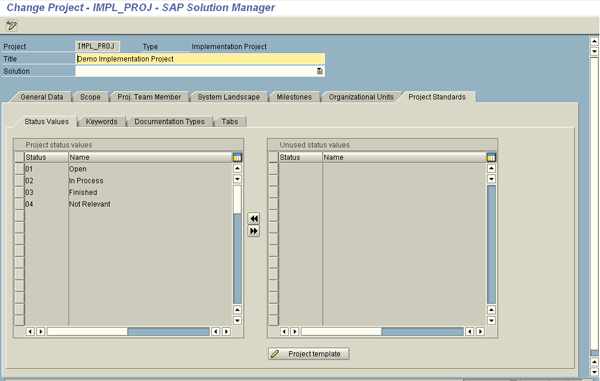
Figure 4
The project preparation phase in SAP Solution Manager
When the project creation in transaction SOLAR_PROJECT_ADMIN is complete, the Business Blueprint of the process hierarchy needs to be mapped in transaction SOLAR01. You can do this automatically if you integrate a modeling tool with SAP Solution Manager. Standard integration adapters are available that allow two-way communication between SAP Solution Manager and the modeling tool and vice versa. Once this integration is in place, the process hierarchy is passed from the modeling tool to SAP Solution Manager with the transfer option. Figure 5 shows one kind of data transfer (i.e., from ARIS to SAP Solution Manager).
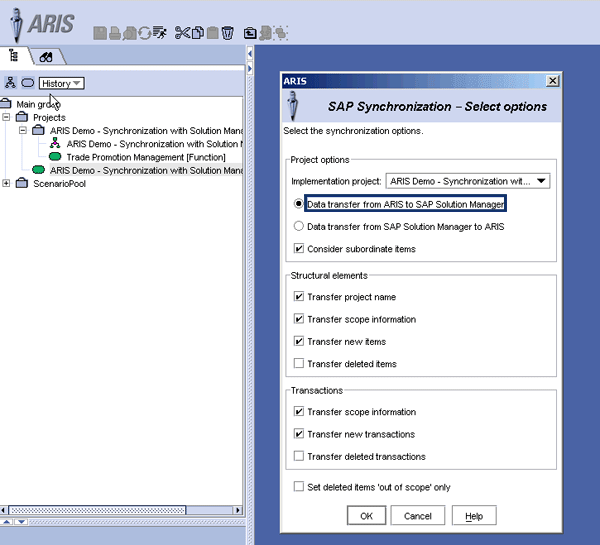
Figure 5
ARIS tool showing with data transfer options between ARIS and SAP Solution Manager
As the scenarios are passed to SAP Solution Manager in transaction SOLAR01, you can manually map the rest of the supported data (e.g., project documents) back into SAP Solution Manager using transaction SOLAR01. Figure 6 shows a sample SAP project document (i.e., a functional specification is uploaded in SAP Solution Manager) with a manual upload of process-relevant data in SAP Solution Manager once the process hierarchy is transferred from ARIS. After the data is transferred to the SAP Solution Manager project, BPM team members can manually enter the rest of the relevant data into SAP Solution Manager.
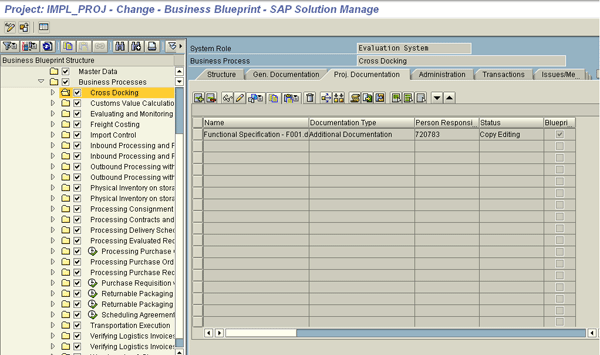
Figure 6
Transaction SOLAR01 project documentation mapping in SAP Solution Manager
At this part of the phase, the mapping of existing IT applications and business scenarios is complete. Now you can look for optimization opportunities. In this context, optimization leads to the simplification of your organization’s IT portfolio. For scenarios stored in SAP Solution Manager, there are two possibilities: either the scenario is completely or partially implemented by suitable SAP products (such as a supply chain in SAP Supply Chain Management [SAP SCM] or a procure-to-pay cycle in materials management). For partially automated scenarios, you can examine whether they could be completely automated in existing SAP products.
This requires studying existing legacy applications and the possibility of migrating these functionalities to your SAP system. This study might also recommend additional SAP products that address those legacy applications functionalities. Once the business case on complete automation in SAP is justified and approved, the BPM phase gets into IT implementation. The aim is to ensure a simplified portfolio by retiring non-SAP applications and migrating their functionality to SAP, facilitating business coverage and automation in SAP enterprise applications. Retiring applications whose functionalities can be moved to the SAP systems reduces maintenance costs.
For completely automated scenarios that are stored in SAP Solution Manager, maintenance activities can be carried out via SAP Solution Manager itself. Features such as the Service Desk and Change Request Management (ChaRM) can enable centralized maintenance operations of your processes. You can perform process configuration or development changes directly in SAP Solution Manager using transaction SOLAR02 (Figure 7). Note that it’s mandatory that you have these configuration objects and development objects already mapped in SAP Solution Manager.
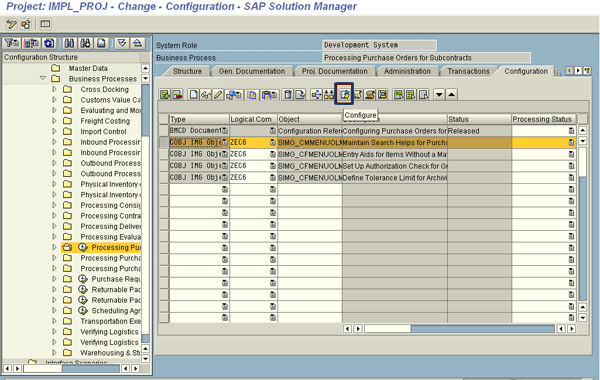
Figure 7
Process configuration change in transaction SOLAR02 as part of process maintenance
Once the business processes are configured, testing takes place either manually or by automating test cases. For effective business processes testing, you can use the SAP Quality Center by HP and HP QuickTest Professional. Although SAP Solution Manager has a strong test management feature, it handles the automation of SAP GUI-based transactions only. For Web-based transactions’ automated testing, use HP QuickTest Professional, which you can integrate with SAP Solution Manager through the SAP Quality Center by HP using a standard integration adapter. As a result of this integration, test case execution occurs via HP QuickTest Professional into the respective SAP servers and the results are stored in SAP Solution Manager. The flow of data transfer between the two systems is as shown in Figure 8. Again, SAP Solution Manager becomes the central repository of handling activities. After the business processes are successfully tested, they are transported to the production server for day-to-day operational use.
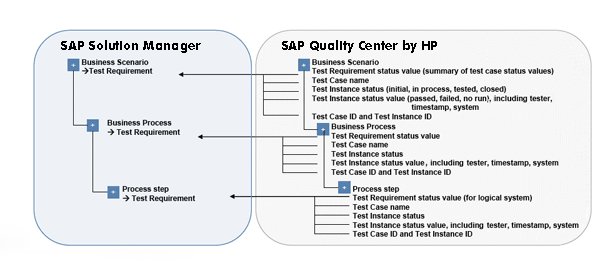
Figure 8
SAP Solution Manager and SAP Quality Center by HP data transfer example
Phase III: Process Monitoring
After the business processes execute in the production system, monitoring them to ensure smooth execution is essential. BPM requires the identification of KPIs and benchmark values. These are the parameters against which your process performance can be compared. Benchmarks are primarily two different types: internal and external. The internal benchmarks are interdepartmental values for the same process. They help you know which department is doing better for a given process so its practices can be imitated in other departments. External benchmarks are values recommended by business process best practices from external references such as SAP’s Value Lifecycle Manager framework (found at https://sapvalueengineering.com/VLM2 with the proper access credentials). External benchmarks help you find out the performance parameter values for the best in class of a given industry.
There can be intermediate benchmarks between existing benchmarks and your immediate competitors’ benchmarks. Best practices benchmarks are the ideal target values and intermediate benchmarks help you achieve best practices. For example, say that period end closing takes eight days in your existing scenario. Best practices take two days. A business competitor has a six-day period end closing. As a result, six days becomes the initial target to achieve and the final target is two days.
It is beyond the scope of this article to get into the details, but SAP Solution Manager has integrated monitoring features that facilitate system monitoring with landscape-related information, interface monitoring, and business process monitoring. It also has features that support the necessary monitoring requirements and provide easy dashboards for the maintenance team.
Phase IV: Process Governance and Change Management
Business process change management helps ensure that the efforts in your BPM initiative are concluded in a disciplined way. This approach handles future changes in processes in a systematic fashion.
You can use ChaRM, which requires Service Desk configuration, to automate the approval process. ChaRM handles support-related processes, including support ticket creation and the creation of a change request if the support ticket involves process changes. There is tight integration between ChaRM and Service Desk, and you can also use them to generate reports for the maintenance team.
For effective process change management, I recommend that you plan a governance process and use a change advisory board for any significant changes in your organization’s business processes flow. These group members should include senior employees with extensive business knowledge and IT leaders.
If the board approves a change, the relevant team carries it out. Before changes are moved to the production system, the change advisory board should be involved again — this time with the final results verification for the end users who asked for the change. Before the change moves to production, the process maps should be changed using steps in the process modeling phase (phase I). An organizational change management body should also be involved in the approval of changes because these changes might require additional training for end users. Finally, after all this, the changed processes can be transported to production.

Sapna N. Modi
Sapna N. Modi has 13+ years of experience in the software industry including SAP software in the areas of solution architecture, consulting, presales, and project management. Sapna has multiple SAP and non-SAP certifications. She is an integral part of the team in setting up the SAP Solution Manager practice at L&T Infotech (www.lntinfotech.com) and has participated in consulting and advisory roles for multiple projects. She has global exposure with experience in the US, Canada, Denmark, Sweden, Germany, the Netherlands, and Kuwait. She is instrumental in and is dedicated to an extreme automation initiative of SAP projects across verticals at L&T Infotech (LTI). Her goal is to accomplish automation-driven efficient operations and to formulate an automation platform for optimized TCO for customers as well as for her organization. Her focus is on innovation to leverage SAP products and non-SAP products involving Robotic Process Automation (RPA), Artificial Intelligence (AI), and Machine Learning (ML) to help customers standardize their portfolio so that it is simplified, automation ready, and able to easily migrate to the SAP S/4HANA platform.
You may contact the author at sapna.modi@lntinfotech.com.
If you have comments about this article or publication, or would like to submit an article idea, please contact the editor.