Internal recalculation can simplify the development of SAP Personnel Time Management (PT) business processes. It adds flexibility to such PT business functions as overtime, holidays, and regular hours processing. The author provides recommendations for implementing this functionality, discusses its limitations, and describes examples.
Key Concept
The internal recalculation functionality is based on the time-evaluation feature that internally initiates the retrocalculation process — time-evaluation results of previous dates based on the information available in future dates. SAP introduced this functionality with R/3 Release 4.6A as part of Personnel Time Management.
SAP’s internal recalculation functionality makes time evaluation more flexible, allowing you, for instance, to automate more business cases. It also simplifies audit and maintenance for HR/payroll support departments, which makes the lives of timekeepers easier. Eliminating their data-entry chores frees HR employees for more productive tasks such as data reconciliation or payroll results analysis.
Internal recalculation is useful in many business scenarios. Although it was developed for overtime analysis, you can use it in all cases where daily calculations are based on weekly (period) data. You can customize SAP-delivered schemas and personnel calculation rules for different business scenarios. Limitations include the ability to transfer only one time type to the past, performance in the case of multiple loops, and debugging using the time-evaluation log.
The time-evaluation process hinges on the assumption that all necessary data is available for the program prior to or on the day of processing. This means that all potential changes in HR master data are successfully stored in SAP; all absences, attendances, and substitutions are successfully posted to corresponding infotypes from the time-recording system (e.g., Cross-Application Time Sheet, or CATS); and the results from previous runs of time evaluation are consistent and available.
In some cases, however, time-evaluation results should be based on the data that may be available in the future only. These scenarios are not as rare as you might expect. Knowing more about internal recalculation will better allow you to deal with situations such as holidays that fall toward the end of the work week.
Business Scenario
Let’s look at the following weekly overtime situation: Employees are eligible for weekly overtime only after completion of 40 hours per week. If employees work 41 hours during the week, they are paid for 40 hours with one hour of overtime (Figure 1).

Figure 1
Classic case of weekly overtime calculation
Overtime calculations should be performed on a daily basis because an employee’s assignments, rates, premiums, etc., may vary from day to day. Every day, the system counts the entered hours and compares the running total with the weekly overtime limit (the number of regular hours that you must work until you start working overtime — 40 hours in Figure 1). When the running total exceeds the weekly overtime limit, the system converts all extra hours into overtime.
In this example, holiday hours count toward the weekly overtime limit. If a holiday falls during the week and employees work 33 hours, they are paid for 32 hours regular, eight hours holiday, and one hour of overtime. Every day the system counts hours worked and the holiday hours and compares the running total with the weekly overtime limit of 40 hours. When this running total is greater than the weekly overtime limit, the system tries to convert all extra hours into overtime.
Everything is fine if the holiday occurs in the beginning of the week (Figure 2). Holiday hours are successfully counted toward the weekly overtime limit, and extra regular hours on Friday are successfully converted into overtime.

Figure 2
Weekly overtime processing of a mid-week holiday
If the holiday is on Friday, however, the system cannot convert hours worked into overtime because no regular hurs are left on Friday (Figure 3). The system can convert holiday hours into weekly overtime, but employees may be confused when their pay stub shows seven (not eight) hours of holiday and their Friday hours may be labeled as “overtime premium on holiday” or another confusing distinction.

Figure 3
Holiday on Friday leads to a weekly overtime processing problem
The situation is even worse if some absences (e.g., floating holiday or jury duty) are counted toward the weekly overtime limit and are not processed in time evaluation from a pay perspective. In such cases, you must recalculate the whole week based on the information available to time evaluation at the end of the week.
Operation GOTC
Starting with Release 4.6A, SAP time evaluation provides a mechanism called internal recalculation. The most important element of this functionality is the time-evaluation operation GOTC (get overtime correction). The information is found in GOTC documentation (transaction PE04).
The syntax of the operation GOTC is GOTCxxYYYY.
- xx defines the period that is accounted again in the internal recalculation. This period could be a standard week (Monday to Sunday), a week defined by the feature LDAYW (last day of work week), a working week from infotype 0007 (planned working time), a payroll or time-evaluation period, etc.
- YYYY defines the time type. Operation GOTC transfers time type YYYY to the first day of the recalculation period where its value becomes available. The YYYY value from the end of the calculating period becomes available at the beginning of this period and could be used for different corrections and (re)recalculations.
Here is what happens when operation GOTC is processed at the end of a given period:
- Day processing ends for the day being evaluated. Because it is a real termination (interruption) of the current day, the time-evaluation cluster is not updated, no information is recorded in the system, etc.
- Processing of the subsequent days is also put on hold.
- An internal recalculation is started for the relevant period, defined in the xx parameter of operation GOTC.
- The correction is available in the time type on the first day of the recalculation period.
GOTC Tips
- Operation GOTC should be used only once in a personnel calculation rule but could be used in different rules in the schema. It is not recommended that you call the operation more than twice because it becomes difficult to trace the various recalculations. If operation GOTC is executed more than once in the schema, it calls the recalculation sequentially in the order requested.
- If the employee being evaluated is inactive at the start of the internal recalculation period, the operation sets the start of the recalculation to the first active day in the correction period. This is important because there is no need to programmatically check the active status of employees. On the other hand, this functionality does not work in the situation when different time-evaluation schemas are used for processing employees with different PT statuses (P0007-ZTERF) in infotype 0007 (e.g., different schemas are used for positive/exception reporters and for time evaluation without payroll integration).
- Each operation GOTC activates an internal loop counter. There is no real control of the number of loops or access to the loop counter. To avoid an endless loop problem, operation GOTC carries out a maximum of five successive recalculations. After five recalculations, operation GOTC is overlooked if it is called again at the same point in the schema.
- If you need two or more internal recalculations in one time-evaluation run, you should place the internal recalculation for the longer period after processing for the shorter period in the schema. If the condition that caused the recalculation isn’t met during the second run for any of operations GOTC, internal recalculation will be performed again up to five times, although this degrades system performance.
- Internal recalculation requires a complete recalculation of several days for one employee. Recalculating many employees could create a performance problem. The execution time could be up to seven times longer for recalculating the whole week if the system processes time evaluation for last day of the week.
- It is necessary to separate those employees for which the business scenario of internal calculation could happen. For example, you could create a special subschema for the employees who potentially could cause the recalculation and include only mandatory personnel calculation rules that are related to these employees in this subschema.
- Operation GOTC can transfer only one time type. If you have to transport several time types, you need to transfer them one by one, which degrades performance. SAP recommends using a rewriteable time type (a time type without cancellation from table T555A), but that is not a mandatory condition.
Note
One of the most effective ways to transfer several time types is for operation GOTC to transfer the first time type and assign its value to another rewriteable time type. Next, another GOTC transfers another time type that is also written to a rewriteable time type, and so on. When all necessary time types on day one of recalculation are present, the system recalculates the whole time period. Note that function CUMBT is necessary in the middle of the schema.
Note
Debugging is difficult. The only reliable source of information is a time-evaluation log, time-evaluation results cluster B2, which is overwritten after each recalculation. Transaction PT66 or reports RPCLSTB2 and RPTBAL00 show the detailed information for only the results after the last recalculation.
Time-Evaluation Schemas TPOW and TPOP
The SAP repository contains schemas TPOW and TPOP. These schemas are almost identical. Schema TPOW is developed for internal recalculation of weekly overtime and TPOP is developed for internal recalculation for pay period overtime. Use transaction PE01 to access these schemas.
In your main time-evaluation schemas, place subschemas TPOW and TPOP in the personnel calculation rule that checks the necessity of internal recalculation. For example, at the end of the week, the system checks whether it is necessary to recalculate the work week.
In the business scenario for schema TPOW, employees are eligible for daily overtime if they work more hours than assigned in their daily work schedule and they complete weekly planned working time. Employees’ overtime eligibility appears on infotype 2007.
The system calculates regular and overtime hours each day (Figure 4). In the time-evaluation log in Figure 5, the system “incorrectly” calculates daily overtime on Monday and Tuesday during the first run, because it does not yet realize that on Monday and Tuesday, the employee works only seven hours on Friday. In this case, the total number of regular hours is 39, so the system defines correction hours and puts the difference (40-39 equals one) into the correction time type and sends this time type back to Monday via operation GOTC.
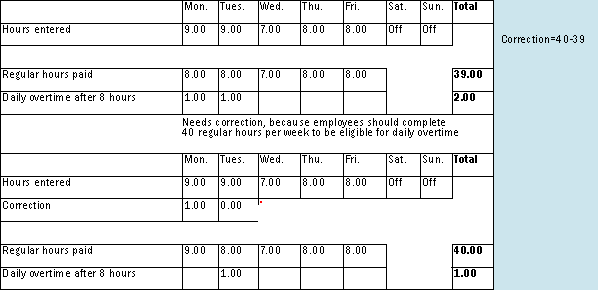
Figure 4
SAP R/3 calculates weekly overtime analysis

Figure 5
Time-evaluation log
Then the system converts all overtime hours into regular hours and recalculates the whole week. If an employee works nine hours on both Monday and Tuesday and then seven hours on Wednesday, R/3 recalculates the whole week while taking into consideration these correction hours.
During the second run, the system does not convert Monday’s nine regular hours into overtime because the correction time type balance is greater than zero (in this case it equals one). The system uses regular hours for daily overtime limit determination, so for Monday the employees are eligible for daily overtime only if they work more than nine hours (eight plus one correction hour), so the employees do not receive overtime for the nine hours worked. The employee reports nine entered hours on Monday, so the system changes the correction hours by subtracting the difference between entered hours (nine hours) and daily overtime limit (eight hours).
On Tuesday the correction time type is equal to zero and the system allows the generation of overtime after eight hours. In this way, the one fewer regular hour worked on Wednesday is compensated by one extra regular hour on Monday. While there is a positive balance in the correction time type (through Tuesday, 05/04/2004), the system does not generate daily overtime, so the total number of regular hours is 40. Note that the system reduces the correction time type after each day during the correction run.
Consider the limitations of schemas TPOW and TPOP before implementation:
- They were developed for the time-evaluation schema with clock times (TM00). When using the time-evaluation schema without clock times (TM04), change the settings of the schemas including base time types, in any customized solutions.
- Schema TPOW and TPOP processes attendance quotas (infotype 2007) and time identifiers (infotype 0050) that are not used broadly in the US and Canada.
- Schemas are complex and integrated; they require full understanding before modification.
- SAP-delivered schemas and personnel calculation rules require the complete redesign for many common overtime scenarios (double time processing, holidays and absences processing, etc.)
Internal Recalculation Without Clock Times
Predelivered daily and weekly overtime schemas and personnel calculation rules in time evaluation without clock times (the most common processing model in SAP PT) are available. They do not have internal recalculation functionality, but there is a method to apply this functionality with minor changes.
In Figure 3, the employee is eligible for weekly overtime after 40 hours (the weekly overtime limit). Holidays and some absences (such as floating holidays) count toward the weekly overtime limit. In such cases, R/3 incorrectly calculates weekly overtime when trying to generate a separate time wage type for holidays at the end of the week.
The overtime calculations are correct if the system counts holiday and special absence hours into a special variable and uses this variable to adjust the weekly overtime limit. Two time-evaluation runs are required in this case. During the first run, the system determines the need of a weekly overtime limit correction. During the second run, the system recalculates the weekly overtime.
In a holiday week with two days off, let’s configure weekly overtime for a group of employees with Sunday as the first day of the week (Figure 6).

Figure 6
Regular hours processing in holiday week
During the first run, R/3 calculates the weekly overtime running total, compares its value with the weekly overtime limit (40 hours), and puts all eligible absence hours (including floating holidays, jury duty, holidays, etc.) into the special correction time type. If this sum of the weekly overtime running total and correction time type is greater than 40 at the end of the week, the weekly overtime limit must be adjusted by a second run. Figure 7 shows a flowchart.

Figure 7
Flowchart of weekly overtime scemas and personnel calcualtion rules with internal recalculation
A special indicator that prevents endless loops guarantees that only one internal recalculation is executed, whether the correct results are achieved or not. In rare cases, such as when there is a change of the work week definition in infotype 0007, the R/3 weekly overtime schemas and personnel calculation rules do not work correctly. It is not related to the internal recalculation functionality and should be corrected manually. Figure 8 shows the time-evaluation log.
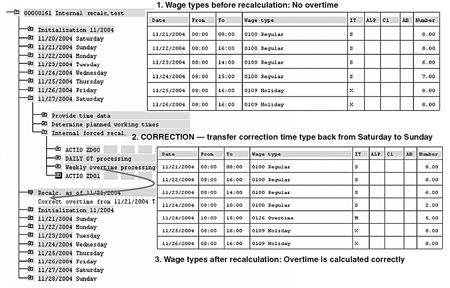
Figure 8
Time-evaluation log with internal recalculation
The SAP-delivered schemas and personnel calculation rules for internal recalculation without clock times uses standard SAP functionality, which means that all elements are compatible. Other standard R/3 solutions (daily overtime, overtime after x days in a row) could be included using the same configuration with no or minor modifications. This approach allows the inclusion (or exclusion) of different categories of time data (attendance, absences, and holidays) without changing the basic configuration. No more than one recalculation takes place even in the worst scenario of potential endless loop (due to errors or inconsistency of business process).
Practical Applications of Internal Calculations
Although internal recalculation functionality was developed for overtime, you can use it in other business scenarios. Here are some examples:
In some cases, only 40 regular hours per week are counted toward specific time balances (e.g., eligibility for a 401(k) plan). But if employees take vacation time and work on days off, it is possible that they are paid for more than 40 regular hours during a week. In this instance, you would need to recalculate the whole week to classify regular hours as eligible or ineligible for 401(k).
According to some business rules, employees are eligible for so-called guaranteed hours in a week regardless of how many hours they complete during the day. At the end of the week, the system should make an adjustment of working hours.
For instance, if an employee is eligible for 40 hours per week and reports only 38 hours, the system adds two hours. If the pay week does not match the work week (infotype 0007, field P0007-WWEEK), it is possible that the employee is underpaid for this week because guaranteed hours will be generated for the employee at the end of the work week only. To prevent this, the system should generate guaranteed hours at the end of the pay week and then recalculate at the end of the work week (infotype 0007) if guaranteed hours are calculated incorrectly at the end of pay week.
If an employee is scheduled to work on the first working day after a holiday but takes “time off/no pay,” in some cases they’re not paid for the holiday. Sometimes a “working day” is not clearly defined — it could be the first day after vacation, or sick leave, a day of paid absence, or something else. The system should have the ability to recalculate and potentially remove the holiday pay if this is the company policy.
Daniil Serebrennikov
Daniil Serebrennikov is a managing partner of VTMSoft LLC (a consulting and development company founded in 2009 by several former SAP high-level professionals, consultants, and software developers). He has been working in SAP ERP HCM projects (Time, PA, OM, and Payroll) since 1998 focusing on complex global and customer-specific solutions, primarily in SAP Time Management. Daniil’s previous experience was with SAP AG, several large consulting companies, and clients in different industries: oil, entertainment, utilities, mining, and the public sector. He also frequently speaks at SAP HR conferences.
If you have comments about this article or publication, or would like to submit an article idea, please contact the editor.