Learn how to strengthen your organization’s management of SAP development and object key controls to ensure that your system security and application security are not compromised.
Key Concept
The SAP Software Change Registration (SSCR) requires all SAP standard repository objects to be registered centrally via the SAP Service Marketplace portal before they can be modified. The SSCR also restricts developers from doing any work before being registered in the SAP Service Marketplace. A 20-digit key is generated after objects or developers have been registered.
As companies implement various SAP applications and modules, sooner or later they reach a point when standard functionality cannot meet some of their specific business requirements. In a vast majority of these circumstances, SAP enables users to customize applications in IMG menus or to create custom code (and other objects). However, sometimes companies cannot realize their specific business needs by using these customization techniques and have to adopt a last resort—changing standard SAP code (or for that matter, any object that is part of standard SAP-delivered software).
I will introduce you to the key mechanisms that SAP uses to impose controls over changes to standard SAP software. I will then share with you recommendations and best practices on how you can augment these controls. Companies do an unsatisfactory job of managing the ability to make changes to standard SAP functionality, and as a result, system and application security is compromised, and audit concerns arise.
There are two important concepts here:
- Object key: Regardless of whether you are using an older release of SAP (such as Enterprise 4.7 or R/3 4.6C or earlier) or SAP ERP 5.0 or 6.0, SAP has a framework called the SAP Software Change via the SAP Service Marketplace portal before being modified. The registration process generates a 20-digit key.
- Developer key: The SSCR also requires all developers who carry out any development (including both custom code and custom objects as well as modifying standard SAP objects) in an SAP system to be registered in the SAP Service Marketplace before they can do any work. This is regardless of whether the SAP system is a development, quality assurance, or production system. The registration process generates a 20-digit key.
Note
Another category of changes to standard SAP software is handled in a special way. SAP introduces these changes in the form of SAP Notes to fix bugs or issues or for some other purpose (such as performance enhancements or additional functionality). In such scenarios, a developer or Basis/NetWeaver administrator does not need to register the objects in question; SAP supplies the key.
To modify a standard SAP repository object, you need both an object key and a developer key. The combination of these two keys “unlocks” the standard repository object and enables you to modify it. To create or modify custom objects that have been created in the customer namespace, it is sufficient to be registered as a developer and therefore possess a developer key. In order words, custom objects are your assets or liabilities and do not require central registration with SAP.
How Does SAP Respond to Attempts to Modify Its Software?
So how does SAP enforce object and developer registration? As an example, imagine that you want to create your own program. You first run transaction SE38, which takes you to the ABAP Workbench. Then you enter the name of your program and click the create icon. A pop-up window is displayed requesting a developer key (Figure 1).

Figure 1
The system prompts you for a developer key
If you do not have a developer key for this installation, the system does not even let you create a custom object. From a controls standpoint, the good news is that the system won’t let you modify existing custom objects. If you do not have a developer key, you cannot do any development work in that instance. This is why you must consider granting a developer key to anybody as handing over the keys to the kingdom.
Now assume that you do have a developer key and want to modify a standard SAP object. Purely for the sake of illustration, assume that you have had to settle on the last resort and need to change a standard SAP function module. You run transaction SE37 and type in or search for this function module and then click the Change icon. Figure 2 displays the pop-up that results.
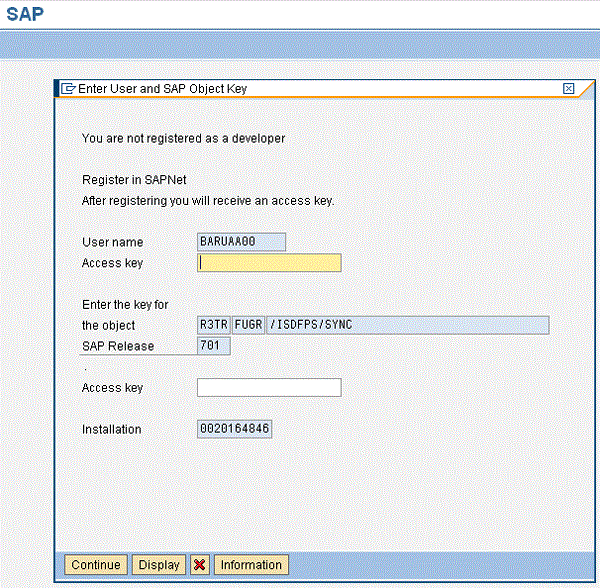
Figure 2
The system’s response to an attempt to change a standard SAP object
In Figure 2, you can see that the system not only is requesting an object key for this particular object (the second Access key field) but also is asking for the developer key (the top Access key field). You need to provide both to proceed. If you had only the developer key, you would not be able to proceed.
Recommendations for Risk Mitigation on Key Management
Unfortunately, despite the considerable risk associated with providing technical personnel with developer keys, some organizations have inadequate controls in this area. A contributing factor to the inadequate level of control is the general level of ignorance of the concept of a developer key, not to mention its capabilities. You can implement the following steps and measures in your organization to help mitigate this risk:
- No individual developer should have the authorization to directly register as a developer in the SAP Service Marketplace.
- There should be a standard request form for requesting a developer key that needs to be approved by an appropriate authority.
- An inventory of personnel with developer keys should be compiled, regularly maintained, and frequently reviewed.
- Upon termination of service of personnel with a developer key, the key should be removed from the SAP Service Marketplace.
Testing Controls for Registering Users in the SAP Service Marketplace
All requests by developers for registration in the SAP Service Marketplace should be executed by the Basis/NetWeaver administrator. If you are doing an IT audit, you should ensure that only the Basis/SAP NetWeaver administrator has the ability to register individual developers. You can test this control by trying to register yourself as a developer and seeing if you succeed. First, point your browser to the SAP Service Marketplace Portal by entering the URL service.sap.com on your browser’s address bar. Because you have a valid Marketplace user ID, the system either validates you or asks you for your user ID and password. After validation is passed successfully, click the link SAP Support Portal* and on the next screen click the Keys & Requests tab (Figure 3).
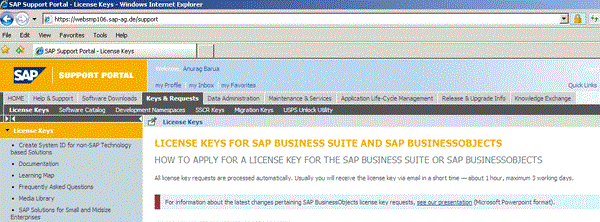
Figure 3
Requesting a developer key in the SAP Service Marketplace
Now, you click the SSCR Keys hyperlink to be taken to the next screen (Figure 4).
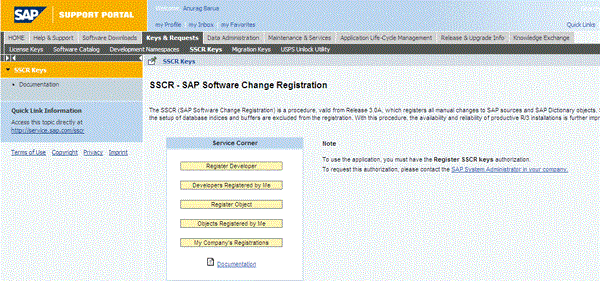
Figure 4
Registering a developer
You notice the cautionary note that SAP has included on this screen. You are unable to register yourself as a developer and get a developer key unless you have the necessary authorization. Furthermore, this authorization should be limited to only your Basis/SAP NetWeaver and/or security administrator. To test this control, click the Register Developer button. A screen appears that lists an authorization error (Figure 5).

Figure 5
Authorization error in trying to self-register as developer
If you receive this message along with the names of the persons who are authorized to register, and if these authorized personnel are either Basis/SAP NetWeaver or security administrators, your company is following the correct process for providing developers with keys.
Requesting and Approving Developer Keys
When developers want to register in the SAP Service Marketplace, they often send an email to a Basis/SAP Netweaver or security administrator requesting a developer key. Worse yet, developers sometimes go directly to the SAP Service Marketplace and register. None of these approaches are acceptable. A feasible approach is to publish a standard request template on an enterprise’s intranet portal. The template or form needs to include accompanying documentation on the nature of information to be provided by the requestor and the approving authority. Another one of the fields in this approval form should be a brief description of the need for a developer key. Anyone who wants a developer key should fill in this form and then route it to the approving authority. The approving authority (often a supervisor or sometimes a governance committee) decides whether this request is to be approved. If the request is approved, the approving authority routes the request form to the SAP security team for subsequent action, or the form is routed automatically if workflow has been set up. Although you can still be somewhat liberal in handing out keys in your development environment, you need to be very stringent about this in your production support system.
Creating an Inventory of Personnel with Developer Keys
If personnel changes in the development or support team occur frequently, your inventory of personnel with developer keys should be reviewed weekly. If you have not maintained such an inventory in your organization, start immediately. In its simplest form, this inventory is a spreadsheet with the following fields at a minimum: name of personnel, personnel ID, personnel employed? (“yes” or “no” question), name of SAP system, grant date of developer key, and date of deletion of developer key (if applicable). During these periodic reviews, review all developer key requests and ensure that any key deletion requests are processed quickly.
Removing Developer Keys upon Termination of Service
Upon termination of service of personnel with a developer key, the key should be removed from the SAP Service Marketplace. Termination of service generally triggers a set of HR actions, one of which is either a manual or automated request to the SAP security team to lock specific users from the SAP systems to which they have access. Note that the termination of service of a consultant generally tends to trigger fewer governance processes primarily because a consultant has fewer privileges in an organization anyway. However, it is very important that when it pertains to revoking SAP access, both employee and consultant termination be treated in the same manner.
Once HR sends this request to the SAP security team, the corresponding developer key should be deleted in the SAP Service Marketplace. This process needs to be the only method of handling developer keys of personnel no longer in the organization. Any attempt to delete a key directly in the corresponding SAP system is considered an audit violation. Because these keys are saved in the SAP table DEVACCESS, support staff may attempt to use an ABAP program to physically delete it from this table. This process is not recommended, and it does not actually delete this key.
In conclusion, developer keys unlock the doors to modifying SAP’s source code and repository objects. Because of its highly technical nature, management of these items often flies under the radar of the security and controls framework in many organizations. Because of the critical capabilities the keys provides, every organization should strive to maintain stringent controls in the management of these keys.
Anurag Barua
Anurag Barua is an independent SAP advisor. He has 23 years of experience in conceiving, designing, managing, and implementing complex software solutions, including more than 17 years of experience with SAP applications. He has been associated with several SAP implementations in various capacities. His core SAP competencies include FI and Controlling FI/CO, logistics, SAP BW, SAP BusinessObjects, Enterprise Performance Management, SAP Solution Manager, Governance, Risk, and Compliance (GRC), and project management. He is a frequent speaker at SAPinsider conferences and contributes to several publications. He holds a BS in computer science and an MBA in finance. He is a PMI-certified PMP, a Certified Scrum Master (CSM), and is ITIL V3F certified.
You may contact the author at Anurag.barua@gmail.com.
If you have comments about this article or publication, or would like to submit an article idea, please contact the editor.