articles
SAP Fiori Authorizations

SAP Fiori 3.0 is the latest user interface (UI), or user experience (UX), from SAP. It replaces traditional UIs, like the SAP GUI. With SAP Fiori 3.0, SAP provides applications by using cards (formerly called tiles) to encapsulate standard business tasks, such as approving purchase requisitions and displaying sales orders, through role-based SAP Fiori apps.
SAP Fiori is available for most SAP software products, such as SAP ERP (ECC), SAP S/4HANA, SAP Ariba Mobile, SAP Hybris Cloud for Customer and SAP SuccessFactors, and it utilizes the latest in-memory computing technology with the SAP HANA database.
To use SAP Fiori, the end-user must have proper authorizations for the applications and underlying business data. In addition to app-specific authorizations, the end-users also need certain general authorizations for the frontend server and backend server. These authorizations are required to run the SAP Fiori launchpad, to trigger the OData services required for the SAP UI5 applications, and to run (for example) analytical SAP Fiori apps launched by using a KPI tile.
Role administrators must maintain SAP Fiori authorizations in transaction code PFCG, which remains the same approach as with all other ABAP authorizations.
SAP Fiori Architecture and Deployment Scenarios
The architecture in every SAP Fiori installation includes the SAP Fiori Launchpad (FLP) and the SAP Web Dispatcher, as well as the SAP Frontend Server (FES) and the SAP Backend Server (BES). The SAP Fiori Launchpad and the SAP Web Dispatcher run on the SAP Frontend Server.
SAP Fiori can be deployed in two different scenarios: an embedded deployment or a central hub deployment.
In an embedded deployment scenario, the frontend and backend servers run on the same instance, whereas in the central hub scenario the frontend and backend server are physically separated and connected through a remote function call (RFC). The backend server (BES) can be any type of an SAP system, like an SAP NetWeaver ABAP installation (e.g., SAP S/4HANA or SAP ERP).

SAP Fiori Architecture
In the early stages of Fiori, SAP recommended the central hub scenario but revised the recommendation with later releases. Nowadays, SAP recommends the embedded scenario in which the frontend and backend server are located on the same system. The main drivers for using the embedded scenario are better upgradability with new releases and lower cost (by reducing the number of systems required).
Regardless of the deployment scenario, your end-users require authorizations for both the frontend (SAP Fiori Launchpad, cards, etc.) as well as the backend server (oData services). In an embedded scenario, you can build the frontend and backend authorizations into one role.
Conversely, in the central hub scenario, you have to build two roles: one for frontend authorizations on the frontend server, and one for backend authorizations on the backend system.
From an SAP security perspective, the end-user needs the proper authorizations to start an application (card) in the SAP Fiori Launchpad by having authorizations for the corresponding Fiori group and catalog on the frontend server. That ensures that the Fiori application can be executed in the SAP Fiori Launchpad and call the OData service on the backend server.
On the frontend server, you have to build a PFCG role that contains and authorizes the group, catalog, and frontend OData services (object IWSG). On the backend server, you have to authorize the catalog and the backend OData services (object IWSV), as well as transactions, web dynpros, and the authorization objects required in the back-end role.

SAP Fiori – Flow of Authorization Checks
SAP Fiori Authorizations
The end-user requires basic authorizations to start and use the SAP Fiori Launchpad. SAP delivers predefined role templates for end-users, as well as for administrators. The roles are SAP_UI2_USER_700 for end-users and SAP_UI2_ADMIN_700 for administrators.
However, we recommend building custom roles for your end-users with the below authorizations. SAP standard roles should not be assigned to productive users, and it’s therefore recommended to build a custom role.
| Server | Typ | Name |
| Frontend Server (FES) | Transaction | /UI2/FLP |
| Frontend Server (FES) | OData Service | /UI2/PAGE_BUILDER_PERS |
| Frontend Server (FES) | OData Service | /UI2/INTEROP |
| Frontend Server (FES) | OData Service | ZPAGE_BUILDER_PERS_0001 |
| Frontend Server (FES) | OData Service | ZINTEROP_0001 |
| Frontend Server (FES) | OData Service | /UI2/EASY_ACCESS_MENU |
| Frontend Server (FES) | OData Service | ZEASY_ACCESS_MENU |
| Frontend Server (FES) | OData Service | /UI2/USER_MENU |
| Frontend Server (FES) | OData Service | ZUSER_MENU |
| Backend Server (BES) | RFC function module | /IWBEP/FM_MGW_HANDLE_REQUEST |
Recommended Authorizations in SAP Fiori
In a central hub scenario, your back-end authorizations require authorization objects S_RFC and S_RFCACL to enable access to the backend server via a trusted RFC connection. Remember, when using trusted RFC connections, the user IDs need to be identical on the frontend and backend server. Also, for S_RFCACL, add the SIDs and clients from all the frontend-servers (DEV, QAS, PROD) specifically instead of an asterisk (*).
The graphic below shows the Fiori Launchpad when properly authorized. In addition to the basic authorizations needed to start the Fiori Launchpad, users require app-specific authorizations through so-called catalogs and groups. Catalogs carry the authorizations for an application, whereas the group displays the applications on the end-user’s home screen in tabs.
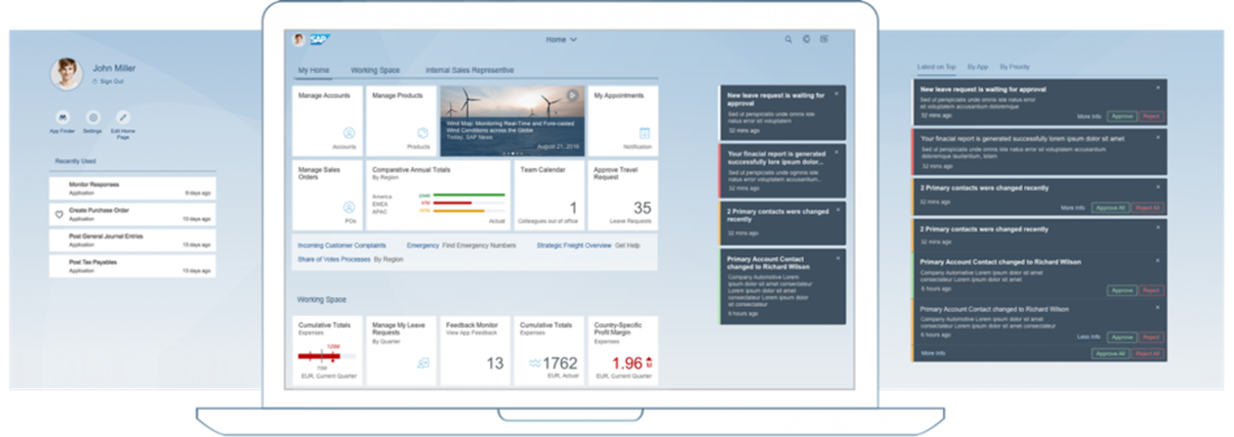
E_xample of the SAP Fiori Launchpad_
When building Fiori roles, it’s important to build them through the role menu to take advantage of the authorization proposals from transaction SU24.
SAP delivers SU24 authorization default values for the backend services, and we recommend applying the same security principles as you would for your ABAP tcodes to leverage the proposals from transaction SU24.
Vendors mentioned
Fill in the form on this page to read the full article.